DataNumen DWG Recovery: Rescue a Drawing AutoCAD Can't Open
DataNumen DWG Recovery is a $299.95 Windows tool that recovers corrupt AutoCAD DWG drawings and saves the entities, layers, blocks, text and dimensions it finds to a new DWG or DXF file. It's for CAD users and firms facing "Drawing file is not valid", "Non Autodesk DWG" or a crash on opening, after AutoCAD's own RECOVER command has failed.
The free demo runs the same recovery and shows a preview of the rebuilt drawing. You pay only to save it, which matters at this price.
Quick facts
- Version: 4.0, released January 19, 2024
- Developer: DataNumen, Inc.
- Platform: Windows (32-bit program). AutoCAD isn't among the requirements.
- Drawings: AutoCAD R14 to 2021 DWG files
- Output: DWG or DXF, in AutoCAD R14 up to the 2013-2017 format
- Price: $299.95 for one user, one-time, at checkout (the vendor's list price is $349.95)
- Trial: free demo that previews the recovered drawing but doesn't save it
- Guarantee: 30 days
- What we checked: installer file version 4.00 (67.18 MB, with a valid DataNumen, Inc. digital signature) downloaded from the vendor, with a January 19, 2024 file date; the $299.95 order page price, with no auto-renewal shown. We didn't recover a damaged drawing ourselves. Checked on November 8, 2026.
Before you buy
- Try AutoCAD's free options first. RECOVER, RECOVERALL (which also handles nested xrefs) and AUDIT are built in. After a crash, look for the
.sv$ autosave file, and after a bad save, the .bak backup beside the drawing: copy it and rename it to .dwg.
- Check the version on your own file. The source formats the program lists end at AutoCAD 2013-2017, and output goes no newer than that. AutoCAD 2018 and later save in a newer DWG format, so run the demo on your drawing before you pay.
- Preview first. If the demo can recover the drawing, it shows a preview. What you see there is what the full version saves.
- Upgrades run for one month. After that a new version needs the Annual Support and Maintenance Plan or a paid upgrade fee.
- A refund needs a reason. Refunds run for 30 days, but you must explain why in detail, and DataNumen may ask for the original damaged drawing. It offers to sign an NDA for confidential projects.
Download Free Trial Buy Now
Overview
DWG files get damaged the usual ways (a power cut or crash mid-save, an external drive unplugged while a drawing is open, a failing disk) and in a few CAD-specific ones: drawings that grow too large or complex. AutoCAD's RECOVER fixes many of them. DataNumen DWG Recovery reads the damaged file object by object and writes whatever it can rebuild into a new drawing, Damaged.dwg becoming Damaged_fixed.dwg.
AutoCAD isn't among its requirements, and the vendor says the recovered file opens in AutoCAD, an Autodesk viewer, Autodesk DWG TrueView or other DWG programs.
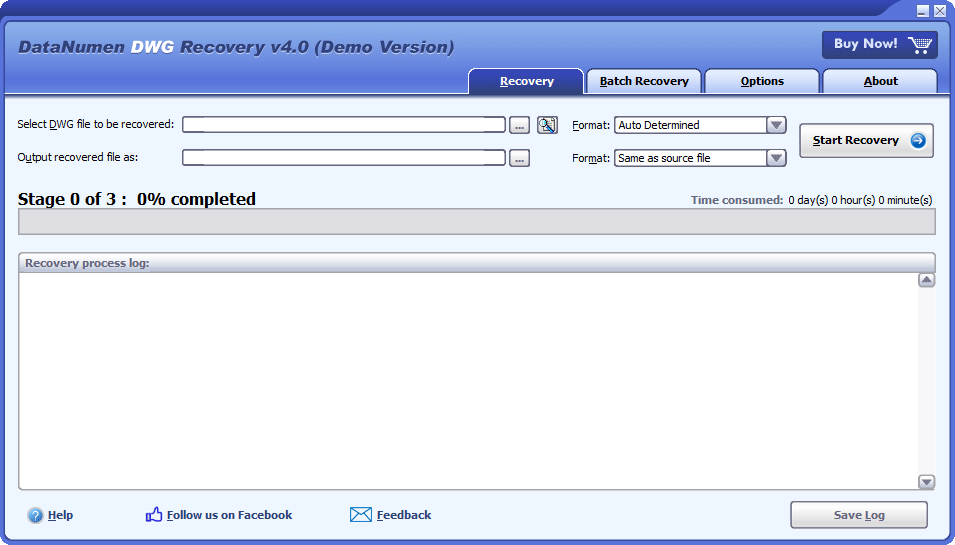
The Recovery tab of the version 4.0 demo: source drawing and format (Auto Determined), output file and format (Same as source file), and a three-stage progress bar.
Features
Recovers the objects a drawing is made of
DataNumen DWG Recovery rebuilds drawing entities (lines, arcs, circles, ellipses, splines, solids, 3D faces), polylines and their vertices including 3D, mesh and polyface types, text and multiline text, attributes, blocks and inserts, every dimension type, leaders and tolerances. It also restores the tables that organize them: layers, linetypes, text and dimension styles, views, UCSs and viewports.
Lost, deleted and temporary-file recovery
DataNumen DWG Recovery can pull in "lost and found" objects that are no longer linked into the drawing, recover deleted objects, and work from AutoCAD's temporary files when the main drawing is beyond repair. It can also recover a drawing from a disk image file.
Choose the format in and out
DataNumen DWG Recovery detects the source format by itself, but if you know it (R14, 2000-2003, 2004-2006, 2007-2009, 2010-2012 or 2013-2017), picking it saves a lot of time on big files. For the output, give the file a .dxf extension to get DXF, and pick the AutoCAD format version, which also lets you save down for an older CAD program.
Batch recovery and viewport options
DataNumen DWG Recovery's Batch Recovery tab processes a list of drawings in one run. Its options open the fixed file when it's done, recover lost and found objects, and can reset the active viewport to the extents of everything recovered, so a drawing doesn't open zoomed onto empty space.
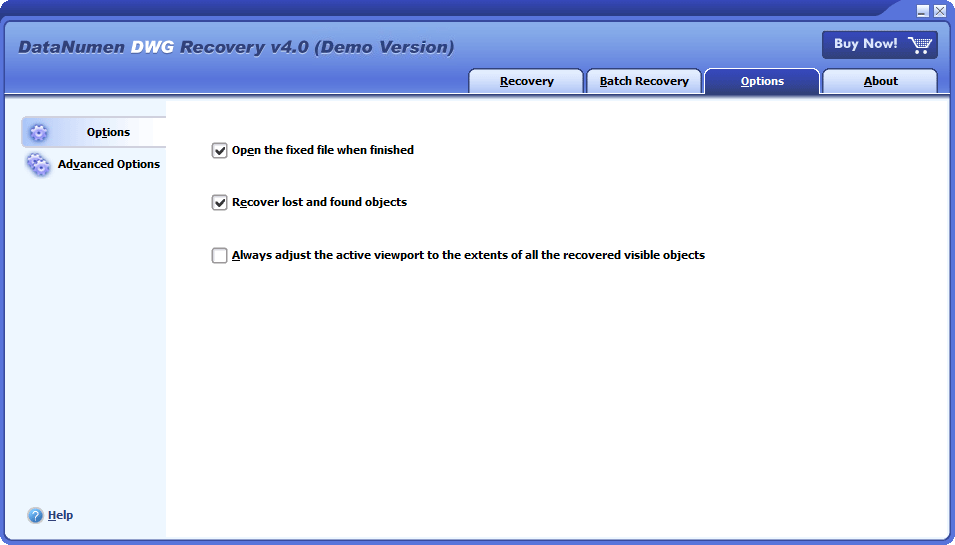
The Options tab: open the fixed file when finished, recover lost and found objects, and adjust the active viewport to the recovered objects.
Benefits
- Days of redrawing saved. Even a partial recovery gives you geometry and layers to work from instead of a blank sheet.
- A second chance after RECOVER fails. It reads the file differently from AutoCAD, so it can get further on badly damaged drawings.
- Batch work for archives. A folder of damaged drawings can go through in one run.
Real-World Uses
- "Drawing file is not valid" on a project due tomorrow. RECOVER gives up. Run the demo, check the preview, and save the drawing with the full version.
- A drawing on a USB drive pulled out mid-save. Recover what was written, then fill the gaps from the
.bak file.
- An archive of old R14 and 2000-era drawings. Recover the damaged ones in a batch and save them in a newer format.
- A drawing that crashes AutoCAD on open. Recover it into DXF and bring it back into AutoCAD from there.
Who It's For, and Who Should Skip It
It suits architecture, engineering and drafting firms and freelancers whose damaged drawing represents more work than the licence costs, and IT staff supporting CAD teams. At $299.95, it makes sense when one drawing is worth days of work.
Skip it if AutoCAD's RECOVER, the autosave file or the .bak backup already got your drawing back, or if a colleague or client has a recent copy. Users on AutoCAD 2018 or later should check the demo works on their file first. Mac users need a Windows PC. And for damaged PDF exports of drawings, DataNumen PDF Repair is the tool, not this one.
Usage Guide
- Download and install the demo, and close any program that might change the drawing.
- On the Recovery tab, type the drawing's path, browse to it, or use the find button.
- Set the source format if you know it, or leave it on Auto Determined.
- Check the output name (
_fixed.dwg by default), change the extension to .dxf if you want DXF, and pick an output format if you need an older version.
- Click Start Recovery and follow the three stages in the progress bar.
- Look at the preview. If your drawing is there, order the full version, recover again, and open the new file in AutoCAD or DWG TrueView.
Where it falls short
- Newer DWG formats. Supported drawings run to AutoCAD 2021 on the specification sheet, but the format lists stop at 2013-2017, and nothing newer can be written.
- Only the listed object types. The recoverable objects are the classic 2D and 3D entities, text, blocks and dimensions. Anything outside that list, such as images, OLE objects or third-party custom objects, may not come back.
- Slow on big drawings. Time grows with file size, object count and complexity, and leaving the format on Auto Determined adds more.
- Expensive for a one-off. $299.95 is the top of DataNumen's price range.
- Almost no independent reviews. The recovery-rate figures come from DataNumen's own tests.
- No online service. DataNumen doesn't offer to repair drawings for you, so it's the program or nothing.
What Users Say
There's very little independent feedback on DataNumen DWG Recovery. Its product page shows 4.90 out of 5 from 1,647 votes (the vendor's own count) but no customer testimonials for this product, and G2 lists a single review.
ColorMango user comments
The download site ColorMango has a page of short user comments, all positive and none with details of the drawing or the result. Two examples:
Charles: "Just get what shows in the demo version's preview."
Samuel: "Powerful DWG recovery tool. It is worth the 5 stars."
One-line praise with no detail tells you little, so don't weigh it heavily. For a tool at this price, the demo's preview of your own drawing is the review that counts.
Comparisons
DataNumen DWG Recovery vs. AutoCAD's RECOVER command
RECOVER and RECOVERALL are free, run inside AutoCAD, handle xrefs, and log what they fixed. They should always come first. DataNumen DWG Recovery is for the drawings they can't open.
DataNumen's own recovery test
DataNumen's chart gives its tool an average recovery rate of 81.10%, against 66.60% for Recovery Toolbox for DWG and 7.20% for AutoCAD's recovery command. That's the vendor's own test on its own sample files. Use the demo on your drawing to decide.
Editions and Pricing
There's one edition. The order page shows a weekly special price for every quantity, and $299.95 is what a single licence costs at checkout. Larger orders are priced per licence:
| User licenses | List price each (US$) | Special price each (US$) |
|---|
| 1 | 349.95 | 299.95 |
| 2 - 9 | 279.95 | 229.95 |
| 10 - 24 | 219.95 | 169.95 |
| 25 - 49 | 189.95 | 139.95 |
| 50 - 99 | 149.95 | 99.95 |
| 100 - 199 | 119.95 | 69.95 |
| 200 - 499 | 109.95 | 59.95 |
| 500+ | 89.95 | 39.95 |
FAQs
Does DataNumen DWG Recovery need AutoCAD installed?
DataNumen DWG Recovery doesn't list AutoCAD in its requirements, and it writes the new DWG or DXF file itself. You need AutoCAD, DWG TrueView or another DWG program to open the result.
Can DataNumen DWG Recovery fix a drawing from a Mac?
DataNumen DWG Recovery runs only on Windows. Copy the damaged drawing to a Windows PC, recover it there, and copy the new file back to the Mac.
Will the full version of DataNumen DWG Recovery recover more than the demo?
No. DataNumen DWG Recovery's demo and full version use the same recovery engine. The demo shows a preview, and the full version saves the same result.
Can DataNumen DWG Recovery save to DXF?
Yes. DataNumen DWG Recovery saves in DXF format when the output file name ends in .dxf, and in DWG otherwise.
Which Windows versions does DataNumen DWG Recovery run on?
DataNumen lists Windows 95 through Windows 10 and Windows Server 2003 to 2019, 32-bit and 64-bit. It needs 64 MB of memory at minimum, and 4 GB is recommended for large drawings.
Is DataNumen DWG Recovery a subscription?
No. DataNumen DWG Recovery is a one-time purchase with no auto-renewal at checkout. Free upgrades last one month, and later versions need the support plan or an upgrade fee.
System Requirements
- Windows
- Intel or equivalent processor, x86 or x64
- 64 MB of memory minimum, 4 GB recommended
- 205 MB of disk space
Conclusion
Worth $299.95 when a damaged drawing represents days of work and AutoCAD's RECOVER, the autosave and the backup have all failed. The reason to buy is the free preview: you see your own drawing rebuilt before you pay. The main reason not to is the price for occasional use, along with output limited to the AutoCAD 2013-2017 format and very little independent evidence. Run AutoCAD's tools first, then the demo.
Download Free Trial Buy Now