EaseUS Data Recovery Wizard Professional: Get Back Deleted, Formatted and Lost Files on Windows
EaseUS Data Recovery Wizard Professional is a Windows program that finds files you deleted, lost to a format or a vanished partition, or can't reach on a RAW drive, and copies them to a safe place. It's for home users and small offices with one PC to rescue, and it costs $99.95 for one year, $69.95 for one month or $149.95 for a lifetime license, all without automatic renewal.
You emptied the Recycle Bin a day too early, a camera card now says it needs formatting, or Windows reinstalled itself over a partition that held ten years of photos. Data Recovery Wizard scans the drive read-only, shows you what it can still see while the scan runs, and lets you preview a file before you pay for anything.
Quick facts
- Developer: EaseUS (CHENGDU YIWO Tech Development Co., Ltd.), founded in 2004, also makers of Partition Master and Todo Backup
- Version: 21.0.0, released October 2026
- Platform: Windows 11, 10, 8 and 7, and Windows Server 2003 to 2022 (a separate Mac edition is sold on its own)
- File systems: NTFS, exFAT, FAT12/16/32, ReFS, ext2/ext3, HFS+, and ZFS since version 20.1
- Price: $69.95 for one month, $99.95 for one year, $149.95 lifetime with free upgrades
- Trial: scans and previews files; saving them needs a license
- Refunds: within 30 days, on technical grounds only (see Before you buy)
- What we checked: the trial link on easeus.com serves a 2.8 MB web installer (drw_tr_installer.100000.exe) that downloads the program during setup; the version history lists 21.0.0 as the October 2026 release; the Windows order page showed $69.95, $99.95 and $149.95 (struck $159.95, marked as a limited-time offer) on November 19, 2026. We didn't run a recovery on a damaged drive.
Before you buy
- Use the trial's preview as your test. EaseUS refunds only on technical grounds: not after the program has recovered your files, not because you changed your mind, and only after you've let their support team try to fix the problem. Several one-star reviews come from buyers who were refused a refund after files came back damaged. If a photo or document won't preview in the trial, assume it won't open after recovery either.
- Stop using the drive. Every file you save to the drive that lost the data can overwrite what you want back. Install the program on a different drive and save recovered files somewhere else.
- Physical damage is out of reach. A clicking, dead or water-damaged drive needs a lab, not software. EaseUS says so itself.
Download Free TrialBuy Now
Overview
Data Recovery Wizard has been EaseUS's main product for about two decades, and it's one of the names you'll meet first when you search for a way to undelete files. The program works in three steps: pick a drive or location, scan it, then tick the files you want and recover them to another drive. When Windows deletes a file it only marks the space as free, so until something new is written there, the data is still on the disk and a scan can find it.
The home screen lists your internal and external drives with their used space, plus shortcuts for the Recycle Bin, the Desktop or a folder you choose. A sidebar leads to SD card recovery, file repair, Lost Partition Rescue and other tools. EaseUS ships updates every month or two: 20.0 (October 2025) added disk images and ReFS 3.14, 20.7 (August 2026) an SD card rescue mode, and 21.0 (October 2026) a Recovery Assistant that uses on-device AI to hide duplicate and nonessential results without uploading your files.
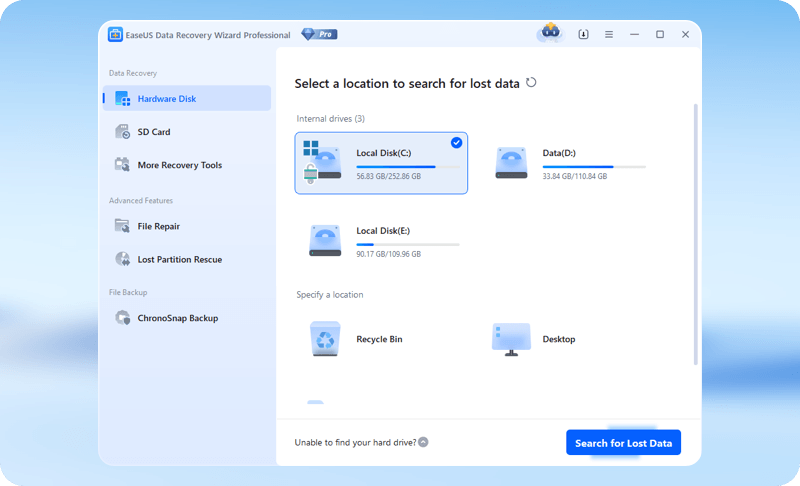
The Pro home screen: three internal drives, Recycle Bin and Desktop as scan locations, and the sidebar with SD Card, File Repair and Lost Partition Rescue.
Features
Recover from deletion, formatting, RAW drives and lost partitions
EaseUS Data Recovery Wizard Pro covers the everyday ways files disappear: Shift+Delete, an emptied Recycle Bin, a quick format, a drive that Windows suddenly shows as RAW or asks to format, a deleted or lost partition, and virus damage. It reads internal hard drives and SSDs, USB sticks, external drives, memory cards and camera storage, and lists more than 1,000 file formats, from JPG and RAW camera files (CR2, NEF, DNG) to Office documents, PDFs, MP4 and MOV video, Outlook PST mailboxes and ZIP archives.
Browse and recover while the scan is still running
EaseUS Data Recovery Wizard Pro shows results as it finds them, so on a big drive you don't have to wait hours for the scan to end. You can switch between a Path view (the original folders) and a Type view (all JPGs, all PDFs), filter by size, date, extension or status, search by name, and recover the first files while the scan carries on. You can also pause, stop and save a scan session to finish later.
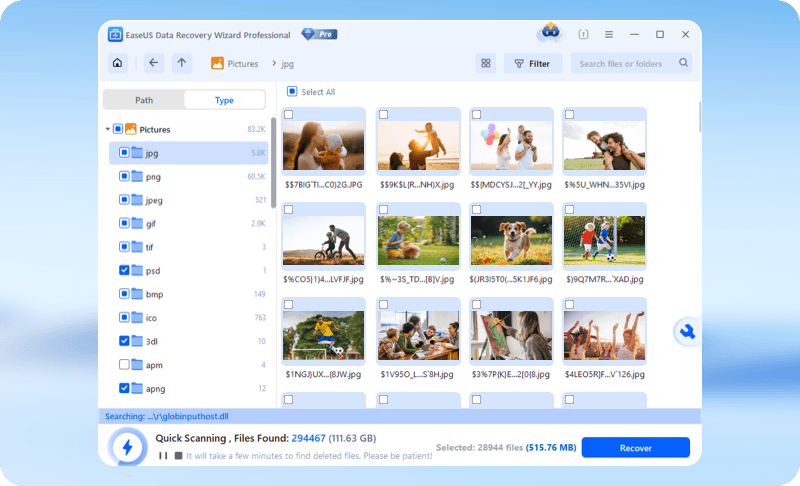
A quick scan in progress: Pictures sorted by type (jpg, png, psd and more) with thumbnails, 294,467 files found so far, and the Recover button already active.
Preview files before you pay
EaseUS Data Recovery Wizard Pro opens documents, images, RAW photos and videos in a preview pane, during or after the scan. Version 20.6 added a recoverability indicator for each file and a disk-health readout, so you can tell a healthy hit from a damaged one before you recover it. This is the most useful part of the trial: if the preview looks right, the file is very likely intact.
Repair damaged photos, videos and documents during recovery
EaseUS Data Recovery Wizard Pro tries to repair corrupt files as it recovers them, and when a preview fails it starts an automatic repair. Files rebuilt from raw data land in a Reconstructed folder. EaseUS has tuned its video reconstruction for camera footage: version 19.6 added MXF, MTS and AVI, and 20.3 improved GoPro recovery, which EaseUS says succeeds 27% more often.
Let big jobs run unattended, and get remote help
EaseUS Data Recovery Wizard Pro has an Auto-Recovery mode for large disks that saves the scan results when the scan finishes and emails you. Since version 20.0 it can also scan disk images (DMG, VHD, VHDX), which lets you image a failing drive once and work on the copy. Pro buyers get free remote help from an EaseUS technician, Monday to Friday, at no extra charge.
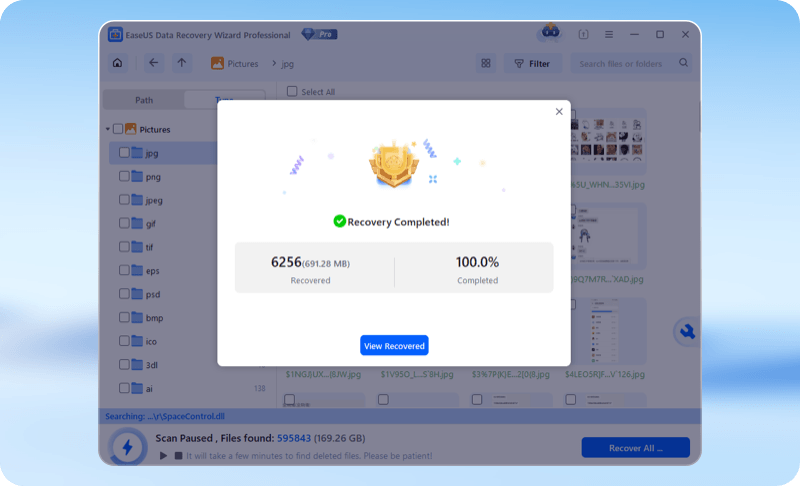
The Recovery Completed dialog: 6,256 files (691.28 MB) recovered, with a View Recovered button.
Benefits
- You know before you spend. The scan and preview are free, so you only pay when you can see the files you need.
- No skills needed. Pick a drive, wait, tick boxes. Reviewers and users keep coming back to how simple it is.
- Short licenses for one-off emergencies. The one-month and one-year licenses never renew on their own, so a single rescue doesn't turn into a subscription you forget to cancel.
Real-World Uses
- The emptied Recycle Bin. A folder of invoices went to the bin and the bin was emptied a week later. A scan of that drive finds the folder by its original path, and a preview confirms the PDFs open.
- The camera card that says "format". Windows wants to format your SD card. Scan it instead, sort by type to see the JPG and RAW files, recover them to your PC, then format the card.
- The partition that vanished. After a failed Windows update or a slip in Disk Management, drive D: is gone. Lost Partition Rescue looks for the old partition and its files.
Who It's For, and Who Should Skip It
Data Recovery Wizard Pro suits anyone with one Windows PC and a data emergency: families with lost photos, students with a vanished thesis, small offices with a formatted USB drive. It's also a good fit if you'd rather not learn file-system internals.
Skip it, or at least don't buy yet, if:
- Less than 2 GB is missing. EaseUS's separate Free edition recovers up to 2 GB (500 MB, plus 1.5 GB after sharing the program on social media).
- You recover data for other people or on many machines. A Pro license covers one computer (the lifetime one two). Technicians and companies need the Technician license.
- You use a Mac. This is the Windows edition; the Mac edition is priced separately.
- The drive is physically failing. No software helps there; a recovery lab does.
- You want hex-level control. Specialists who work sector by sector usually prefer tools with a hex editor and manual RAID parameters.
Usage Guide
- Install on another drive. Download the trial from EaseUS (a small web installer that fetches the program) and install it on a drive other than the one you're recovering from.
- Choose a location. On the home screen pick the drive, the Recycle Bin, the Desktop or a specific folder, or open Lost Partition Rescue if a partition is gone. Click Search for Lost Data.
- Watch the results. Use Path or Type view, the Filter button and the search box. Check the File Path Lost and Reconstructed folders too.
- Preview. Open the files you need. If they display correctly, they're recoverable.
- Activate and recover. Enter your license, select the files and click Recover, saving to a different drive or an external disk.
Where it falls short
- Not everything comes back whole. Files whose space has been partly overwritten can be found but come back corrupt. This is the most common complaint in negative reviews, especially for photos and video.
- Recovered files can lose their names. When the folder information is gone, files are recovered by content (RAW recovery) with generated names, so you sort through them by type and preview.
- Deep scans take time. EaseUS says about 10 to 12 hours for a healthy 1 TB hard drive, and longer on slow or damaged drives.
- Pricier than some rivals. TechRadar lists price as its first con, and Capterra reviewers say the same.
- Upsells. Some users complain about offers for other EaseUS products after purchase.
What Users Say
Ratings are high overall, but the negative reviews are worth reading because they all describe the same two problems: corrupted results and refused refunds. Trustpilot shows EaseUS at 4.9 out of 5 from 39,743 reviews on November 19, 2026, a score for the whole company, not just this program. Capterra shows Data Recovery Wizard at 4.6 out of 5 from 414 reviews. The Trustpilot quotes below are short excerpts, as shown.
TechRadar
TechRadar's review (by Krishi Chowdhary, last updated April 23, 2026) lists the pros "Recovers data from multiple loss scenarios", "Allows automatic recoveries", "Supports 1,000+ file formats and 2,000+ device types" and "Handy file preview feature", and the cons "On the expensive side" and "Free scanning capabilities are not the best". In its test, "within a matter of seconds, it found the deleted folder", and "all 22 files were recovered in our chosen destination within a few seconds."
Its verdict: "EaseUS is a value-for-money data recovery tool that lets you recover 1,000+ file formats, including photos, videos, audio, and applications." It adds: "Performance is solid with reasonable CPU usage, though pricing is slightly on the higher side."
Trustpilot: what happy users say
- "EaseUS Data Recovery Wizard is a very good, even the best program for data recovery." (Michał. Kloska., 5 stars, November 10, 2026)
- "Its the only software i use to find my files!!!No1 choice for data recovery." (Vasilis Giannoulis, 5 stars, "The greatest software for file recovery", October 30, 2026)
- "I was using EaseUS recovery software for windows to try to recover a formatted microSD card." (László Ambrus, 5 stars, October 10, 2026)
- "I deleted a 900 MB zip file from my USB drive by mistake, and I was very worried about losing it." (MAIDE MIRAY ALBAY, 5 stars, October 10, 2026)
- "EaseUS Data Recovery for one month is a one-time payment, and it does not automatically renew the next month." (Nam Nguyễn, 5 stars, November 4, 2026)
- "Had lost my license number for my lifetime subscription to Data Recovery Profession so I had a live chat" (Daniel F, 5 stars, "Had lost my license number for my Data Recover Professional software", October 6, 2026)
- "I got activated with my original license code from 11.8 version in the new version 21.0" (Vinyke, 5 stars, "I reinstalled Data recovery in my new PC", October 27, 2026)
Trustpilot: the complaints
- "The software did not recover any viewable images at all." (James Young, 2 stars, "The software did not work", September 5, 2026)
- "every single recovered file was corrupted and completely unusable." (Thiago Gaspar, 1 star, February 4, 2026)
- "all the stuff it did recover was corrupted so I couldn't even open a jpeg picture file." (Ed Holloway, 1 star, "Stay Away, Do Not Purchase anything from them.", January 29, 2026)
- "Recovery is extreme slow, when seeking help from the support team" (Kishan Trivedi, 2 stars, "Extreme slow Recovery", December 31, 2025)
- "it's consistently trying to further sell you other products after purchasing the one product you needed." (Neil, 2 stars, "Paid experience is just as bad as free.", July 26, 2026)
- "Recovery software does not work as promised" (Herb, 1 star, "30 days money-back offer is a lie...", December 31, 2025)
Stories EaseUS picked for its own pages
EaseUS's product page quotes a retired teacher: "I'm not a tech person. I accidentally deleted 10 years of family photos. This software found them in minutes - and let me preview before recovering. Worth every penny." An engineer writes: "Recovered a corrupted DWG file from SSD – checked the “Reconstructed” folder and successfully opened the DWG file. Problem solved."
On the order page, Aminul writes: "I have used this in the past to recover my dissertation which was due in a couple of days. Brilliant application and just a life save :D" These are chosen by the vendor, so read them as best cases.
The pattern is consistent. People like the simple three-step workflow, the preview and the live chat support, which many five-star reviews praise for sorting out license activations. The complaints are about recoveries that came back corrupted, deep scans that are slow, the price, and refund requests that were turned down. All of those point to the same advice: judge the results in the trial's preview before you buy.
Comparisons
Pro vs Free vs Technician
All three run the same Windows recovery program. Free recovers up to 2 GB in total. Pro removes the limit for one computer and adds free remote help. Technician ($299 a year for 10 PCs, or $399 for 99 computers on November 19, 2026) is licensed for many machines and for recovering data for clients, with WinPE bootable recovery listed among its features. If it's your own PC and your own files, Pro is the edition to buy.
Editions and Pricing
Prices on the Windows order page on November 19, 2026, in US dollars:
| Plan | Price | License period | Computers | Renewal |
|---|
| One-Month | $69.95 | One month after activation | 1 | None |
| One-Year | $99.95 | One year after activation | 1 | None |
| Lifetime Upgrade | $149.95 (was $159.95, limited-time) | Lifetime, free upgrades | 2 | One-time payment |
Verified students and teachers get 40% off each plan ($41.97, $59.97 and $89.97). The order page also sells bundles with Todo Backup, the Mac edition or MobiSaver for iPhone. The Mac edition itself costs more ($89.95, $119.95 and $169.95).
FAQs
What's the difference between the EaseUS Data Recovery Wizard trial and the Free edition?
The EaseUS Data Recovery Wizard trial scans and previews but can't save any files until you enter a license. The Free edition is a separate download that saves up to 2 GB: 500 MB by default and 1.5 GB more after you share the program on social media. Check which one you installed if recovery is blocked.
Does the one-year EaseUS Data Recovery Wizard Pro license renew automatically?
No. EaseUS sells the one-month and one-year Pro licenses as one-time payments with no renewal fees. Each is valid for its period after activation; after that you buy again only if you need it.
Can I move my EaseUS Data Recovery Wizard license to a new PC?
Yes. EaseUS resets the license code when you change computers; you ask by email or live chat, and you don't need to buy a new license. Several Trustpilot reviewers describe support moving their codes from an old PC.
Can EaseUS Data Recovery Wizard recover files deleted months or years ago?
EaseUS Data Recovery Wizard can find old deleted files as long as nothing has been written over their space. The age of the deletion matters less than how much the drive has been used since. On an SSD with TRIM enabled, deleted files are often cleared by the drive itself, so the chances are lower than on a hard drive or memory card.
Will EaseUS refund me if Data Recovery Wizard doesn't get my files back?
EaseUS refunds within 30 days only when the program has a technical problem that its support team can't solve, and only after you let support try. It doesn't refund after the program has done its job, on non-technical grounds, or when you bought from a reseller. If the price drops within 7 days of your purchase, EaseUS refunds the difference.
Does EaseUS Data Recovery Wizard upload my files?
No. EaseUS Data Recovery Wizard scans and recovers locally, and the 21.0 Recovery Assistant analyzes files on your PC without uploading their contents. Versions 20.4 and 20.5 added optional recovery from iCloud and saving recovered files back to iCloud, which do go online.
Can EaseUS Data Recovery Wizard Pro recover from a PC that won't boot?
Recovering from a PC that won't start needs EaseUS's bootable-media version, which runs from a USB stick in WinPE and is activated separately. The simpler route is to take the drive out, connect it to a working PC and scan it there with Pro.
System Requirements
- Windows 11, 10, 8 or 7, or Windows Server 2022, 2019, 2016, 2012, 2008 or 2003
- 32-bit or 64-bit processor
- At least 1 GB of RAM
- 200 MB of free disk space for the program
- A second drive or external disk to save recovered files
Conclusion
EaseUS Data Recovery Wizard Professional is worth buying for a one-PC data emergency, once the free scan has shown you the files you need in the preview. It's among the easiest recovery tools to use, it shows results while it scans, and TechRadar's tests back up its reputation. Pick the One-Month license for a single rescue; if you expect to need it again, the Lifetime license at $149.95 costs only $50 more than a year and covers two PCs.
The main reason not to buy is the refund policy: EaseUS won't refund a recovery that technically worked but gave you damaged files, so trust the preview, not the promise. If less than 2 GB is missing, try the Free edition first.
Download Free TrialBuy Now