DataNumen NTFS Undelete: A Simple Wizard for Getting Deleted Files Back from NTFS Drives
DataNumen NTFS Undelete is a $29.95 Windows tool that finds files and folders deleted from NTFS drives, including ones you emptied out of the Recycle Bin, and copies them to another drive. It's for home and office users who deleted something by mistake on an ordinary Windows hard disk or external drive and want a cheap, step-by-step way to get it back.
You emptied the Recycle Bin on Friday and on Monday someone asks for the spreadsheet that was in it. As long as Windows hasn't written new data over that space yet, the file's record is usually still on the disk, and that's exactly what this program looks for.
Quick facts
- Version: 2.0, released September 15, 2014
- Developer: DataNumen, Inc.
- Platform: Windows, 32-bit program, administrator rights needed
- File system: NTFS only (all NTFS versions)
- Recovers: deleted files, whole folders with their sub-folders, NTFS alternate data streams, Recycle Bin items
- Raw scan: more than 70 known file types
- Price: $29.95 for one user, a one-time payment with no auto-renewal on the order page
- Trial: free demo that scans and lists every recoverable file, but doesn't save them
- Guarantee: 30 days
- What we checked: installer file version 2.00 (4.93 MB, digitally signed by DataNumen, Inc.) downloaded from the vendor, with a September 9, 2020 file date; the $29.95 order page price, against a $49.95 list price. We didn't run a recovery on a drive. Checked on November 8, 2026.
Before you buy
- Stop using the drive. Every file you save to the drive can overwrite a deleted one. Install the program on a different drive if you can, and never recover files to the drive they were deleted from.
- NTFS only. USB sticks and memory cards formatted as FAT32 or exFAT show up as "Non NTFS System" and can't be scanned.
- Deleted, not formatted. It's built for files that were deleted. A formatted, repartitioned or damaged drive needs DataNumen Data Recovery ($49.95), which also covers FAT and other file systems.
- Run the demo first. It shows each file's "recoverable percent", so you know what you'll get before you pay.
- Upgrades and support run for one month. After that, DataNumen sells an Annual Support and Maintenance Plan. With no new version since 2014, that matters less here than for its other tools.
- A refund needs a reason. Refunds run for 30 days, including when another tool recovers more, but you have to explain why in detail.
Download Free Trial Buy Now
Overview
DataNumen NTFS Undelete is a wizard: each page asks one question and a Next button moves you on. You pick the drives, choose how deep to scan, wait for the scan, tick the files you want in a list, pick an output folder and let it copy them. There's nothing else to learn, which is the point of a $30 undelete tool.
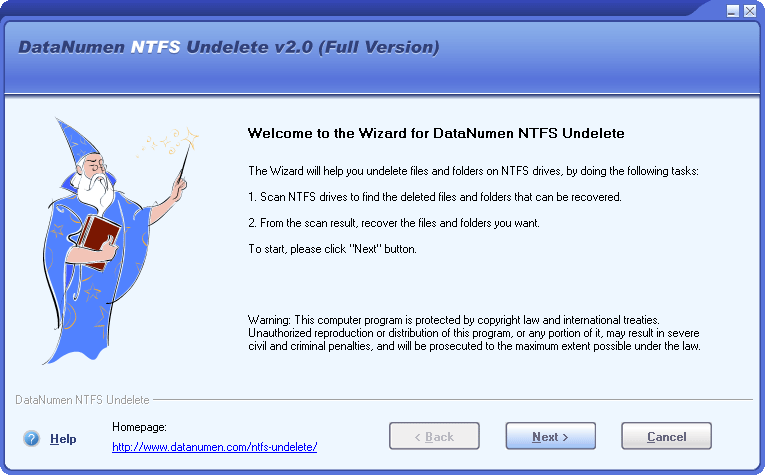
The start page of version 2.0 lists the two tasks: scan NTFS drives, then recover what you pick.
Features
Several NTFS drives in one scan
DataNumen NTFS Undelete lists every drive on the PC with its file system, and you can select several NTFS drives at once with Ctrl or Shift. Drives with another file system are marked "Non NTFS System".
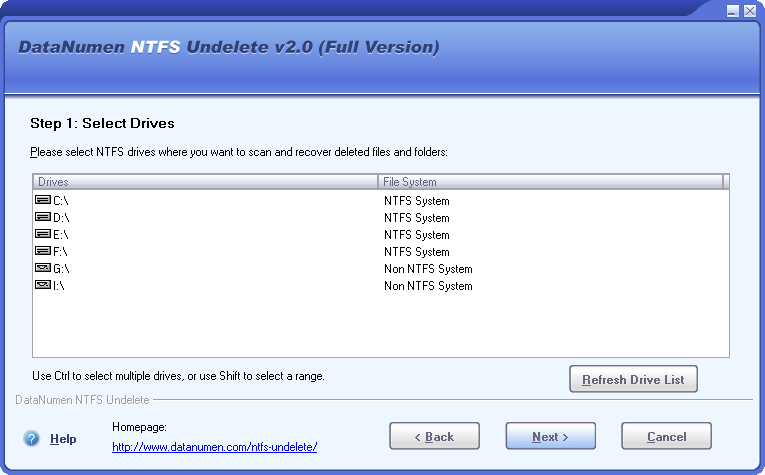
Step 1: drives C: to F: are NTFS and can be scanned; G: and I: are not.
Deleted folders and the Recycle Bin
DataNumen NTFS Undelete looks for deleted folders as well as files, and for items in the Recycle Bin. It covers the three usual cases: a file deleted by accident, one deleted from the Recycle Bin, and a Recycle Bin that was emptied. A recovered folder comes back with all its files and sub-folders in their original structure.
Exhaustive scan for more than 70 file types
DataNumen NTFS Undelete can also read the raw disk data and recognize deleted files by their content, for more than 70 types: Office documents old and new, PDF, OpenOffice files, JPEG, PNG, PSD and other images, MP3, Outlook PST and Outlook Express DBX files, among others. You can limit the scan to the types you need, which helps, because the exhaustive scan takes a very long time on a large disk.
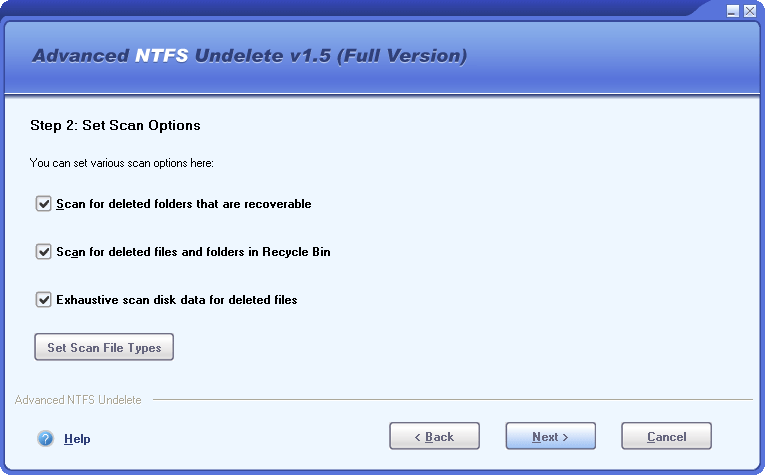
The scan options page, shown under the program's earlier name "Advanced NTFS Undelete v1.5". The options are the same in 2.0.
A result list that tells you how much is recoverable
DataNumen NTFS Undelete shows each found item with its name, size, drive, creation, access and modified times, and a recoverable percent: how much of a file's contents can still be read, or how many of a folder's items can be. You can filter the list with ready-made filters (Word, Excel, Access, PDF, images, ZIP and RAR) or your own wildcards, and sort it by name, type, size or drive.
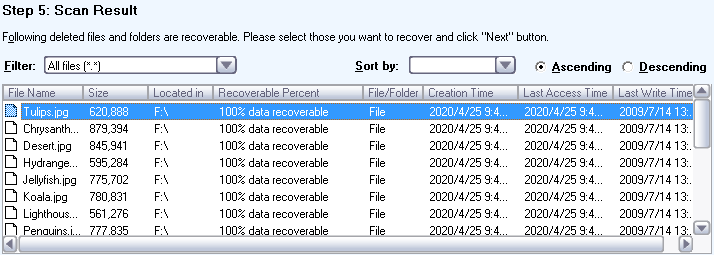
Step 5: deleted JPEG files on drive F:, each marked "100% data recoverable".
Safe output options
DataNumen NTFS Undelete writes the recovered items to a folder you choose and warns you not to pick the same drive. It can rename a file automatically when the name is already taken (MyFile(1).xls), skip duplicates already restored with their folder, keep NTFS alternate data streams and Unicode names, and open the output folder when it's done.
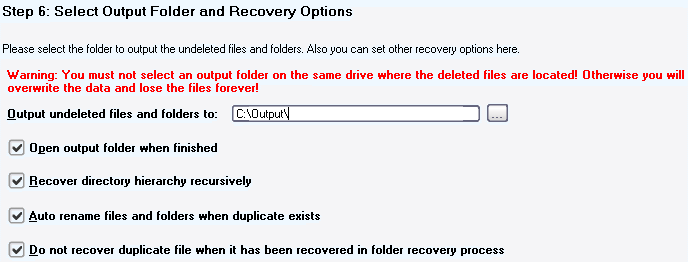
Step 6: the output folder, the red same-drive warning and the four recovery options.
Benefits
- You know before you pay. The demo runs the full scan, so the recoverable percent tells you whether the $29.95 is worth spending.
- Folders come back as folders. A deleted project folder returns with its sub-folders, not as a heap of loose files.
- Nothing to configure. The defaults (folders, Recycle Bin, exhaustive scan) are all switched on, so a first-time user only clicks Next.
- Cheap for an office. Volume licenses drop to $4.95 per user at 500 users, so IT can put it on every support PC.
Real-World Uses
- An emptied Recycle Bin. Scan C:, filter the list to Excel files, and recover the spreadsheet to a USB drive.
- A shared folder deleted on a work PC. Recover the folder with its whole tree to another drive and copy it back.
- Photos deleted from an external NTFS disk. Use the image filter, sort by date, and pick the ones marked 100 percent recoverable.
- An old Outlook PST deleted during a clean-up. The exhaustive scan recognizes PST files by their content even when the name record is gone.
Who It's For, and Who Should Skip It
It suits Windows users who deleted files from an NTFS hard disk or external drive and want the simplest paid option, and IT staff who need a cheap undelete tool on many PCs.
Skip it if the drive was formatted, repartitioned or is failing, or if it's a FAT32 or exFAT memory card or USB stick: it won't help there, and DataNumen Data Recovery or another full recovery tool is the right buy. Skip it for Mac and Linux drives. If your files were on an SSD, expect little: Windows usually tells the SSD to erase deleted blocks soon after deletion, and no undelete tool can bring those back.
Usage Guide
- Download the demo and install it, ideally on a different drive from the one with the deleted files. Close other programs.
- Start DataNumen NTFS Undelete with administrator rights and click Next on the start page.
- Select the NTFS drive or drives to scan.
- Keep the default scan options, or click Set Scan File Types to limit the exhaustive scan to the types you need.
- Confirm and start the scan, then wait. The exhaustive scan of a large disk can take hours.
- Filter and sort the result list, check the recoverable percent, and select what you want.
- Choose an output folder on another drive and start the recovery. In the demo, this is where you order the full version.
Where it falls short
- An old program. Version 2.0 dates from 2014 and the installer was last rebuilt in 2020. It's a 32-bit wizard with the look of the Windows XP era.
- Only about 70 file types in the raw scan. DataNumen Data Recovery recognizes more than 430, so camera RAW files, videos and other newer formats are more likely to be found there.
- No preview of file contents. The list shows names, dates and the recoverable percent, not a picture or document preview.
- English only.
- Hardly any independent reviews. See below.
What Users Say
We found no independent review of DataNumen NTFS Undelete on G2, Capterra or Trustpilot, or in any tech magazine. Here's what there is.
DataNumen's own figures
The product page shows 4.90 out of 5 from 1,651 votes. DataNumen collects these votes itself, and almost the same figure appears on its other product pages, so read it as marketing rather than evidence.
DataNumen's recovery tools on G2
G2 rates DataNumen's products 4.2 out of 5 overall. Reviewers of DataNumen Data Recovery, the closest product, praise how well its scan finds old deleted files, and complain that the free version only shows results and that later versions cost extra. We read G2 through a search summary, as G2 blocks direct access.
With so little to go on, the demo is the review that counts: if it lists your file at 100 percent recoverable, the full version should save it, and DataNumen refunds you if it doesn't.
Comparisons
DataNumen NTFS Undelete vs. DataNumen Data Recovery
NTFS Undelete ($29.95) only undeletes files on NTFS drives. DataNumen Data Recovery ($49.95) also handles formatted, repartitioned and damaged drives, FAT, Linux and Mac file systems and disk image files, recognizes more than 430 file types, and is still updated. For $20 more it covers far more cases; NTFS Undelete is only the better buy if you're sure the files were simply deleted from an NTFS drive.
DataNumen NTFS Undelete vs. Windows' own options
Check the Recycle Bin, File History, previous versions and any cloud service's own recycle bin first: they're free and keep the original names. DataNumen NTFS Undelete is for when those are empty.
Editions and Pricing
There's one edition. The order page shows a weekly special price for every quantity, and $29.95 is what one license cost at checkout:
| User licenses | List price each (US$) | Special price each (US$) |
|---|
| 1 | 49.95 | 29.95 |
| 2 - 9 | 39.95 | 22.95 |
| 10 - 24 | 29.95 | 17.95 |
| 25 - 49 | 24.95 | 14.95 |
| 50 - 99 | 16.95 | 10.95 |
| 100 - 199 | 11.95 | 7.95 |
| 200 - 499 | 9.95 | 6.95 |
| 500+ | 6.95 | 4.95 |
FAQs
Does DataNumen NTFS Undelete work on Windows 11?
DataNumen lists only "Windows" as the requirement and still sells and signs the 2.0 installer, but the program predates Windows 10 and 11. The free demo is the way to confirm it runs and sees your drives before you pay.
Can DataNumen NTFS Undelete recover files from a USB stick or SD card?
Only if the stick or card is formatted as NTFS. DataNumen NTFS Undelete marks FAT32 and exFAT drives, the usual format for cards and small sticks, as "Non NTFS System" and doesn't scan them.
Will the full version of DataNumen NTFS Undelete recover more than the demo shows?
No. DataNumen NTFS Undelete's demo runs the same scan and lists every recoverable file with its recoverable percent; the full version adds saving them. If the full version's result doesn't match the demo's, DataNumen's Try Before Buy guarantee gives you a refund.
Does DataNumen NTFS Undelete keep the original file names?
Yes, for files whose NTFS records survive: DataNumen NTFS Undelete restores the names, including Unicode names, and the folder tree. Files found only by the exhaustive content scan may come back without their original names.
Do I need administrator rights to run DataNumen NTFS Undelete?
Yes. DataNumen NTFS Undelete reads the drive directly, which Windows only allows with administrator privileges.
Is DataNumen NTFS Undelete a subscription?
No. DataNumen NTFS Undelete is a one-time purchase, and the full version download link arrives by email, usually within 15 minutes of the order.
Can one DataNumen NTFS Undelete license be used on several PCs?
No. A DataNumen NTFS Undelete single-user license covers one user. Multi-user licenses are much cheaper per user, as the pricing table shows.
System Requirements
- Windows
- Intel or equivalent processor, x86 or x64
- 32 MB of memory minimum, 2 GB recommended
- 3 MB of disk space
- Administrator privileges for scanning and recovery
Conclusion
Worth $29.95 if you simply deleted files from an NTFS hard disk and the demo lists them as recoverable. The reason to buy is that it's cheap, simple and shows exactly what it can save before you pay. The main reason not to is its age: version 2.0 is from 2014, it only knows about 70 file types and it does nothing for formatted drives or FAT and exFAT cards. For $20 more, DataNumen Data Recovery covers all of that, so choose this one only for the plain "I deleted it by mistake" case.
Download Free Trial Buy Now