Aiseesoft Total Video Converter: Convert Any Video, Then Fix It Up Before You Save
Aiseesoft Total Video Converter is a Windows program that converts video and audio between more than 1,000 formats and device profiles, and adds basic editing, 4K upscaling and 2D-to-3D conversion on top. The lifetime license for three PCs costs $69.96 at checkout, and there's a free trial download.
You've got a camcorder MTS file your phone won't play, an MKV your TV ignores, or a music video you only want the song from. Total Video Converter is built for exactly that: add the file, pick the device or format from a list, click Convert.
Quick facts
- Version: 9.2.68 (Windows)
- Developer: Aiseesoft Studio
- Platforms: Windows 11, 10, 8.1, 8 and 7. A Mac version is sold separately.
- Price: $69.96 for a lifetime license on 3 PCs. Aiseesoft's store also sells a 1-PC lifetime license and a monthly license (see Editions and Pricing).
- Formats: MP4, H.265/HEVC, MKV, AVI, MOV, WMV, MTS/M2TS, MXF, FLV, WebM, VOB and more in; video, audio (MP3, FLAC, WAV, AAC, OGG…) and animated GIF out
- Acceleration: NVIDIA, Intel and AMD GPU switches in the toolbar
- Guarantee: 30-day money back, for lifetime licenses with a quality problem
- Installer: 48.9 MB
What we checked: the installer from Aiseesoft's download server reports version 9.2.68 and is 48.9 MB (downloaded October 16, 2026). The Lifetime/3 PCs license cost $69.96 on the order page on October 16, 2026. We didn't run conversions ourselves, so we can't vouch for speed or output quality, and Aiseesoft doesn't publish the trial's limits.
Before you buy
- Refunds are for quality problems only. Aiseesoft's 30-day guarantee covers lifetime licenses "when there is a quality problem", not a change of mind. Several Trustpilot reviewers complain about refunds being refused, so use the free trial first.
- Watch for a Blu-ray Player add-on. Aiseesoft's purchase page offers a 7-day free trial of Aiseesoft Blu-ray Player with the converter, which renews at US$31.20 a month unless you cancel. Untick it on the order page if you don't want it.
- Windows only. This license is for the Windows program. Mac users need Aiseesoft's Mac version.
Download Free TrialBuy Now
Overview
Total Video Converter is a one-window converter. Files you add sit in a list on the left, each showing its source resolution and length next to the output it will become, with an audio-track and subtitle drop-down underneath. A preview player sits on the right. At the bottom you choose a Profile (the output format or device) and a destination folder, then click the big Convert button.
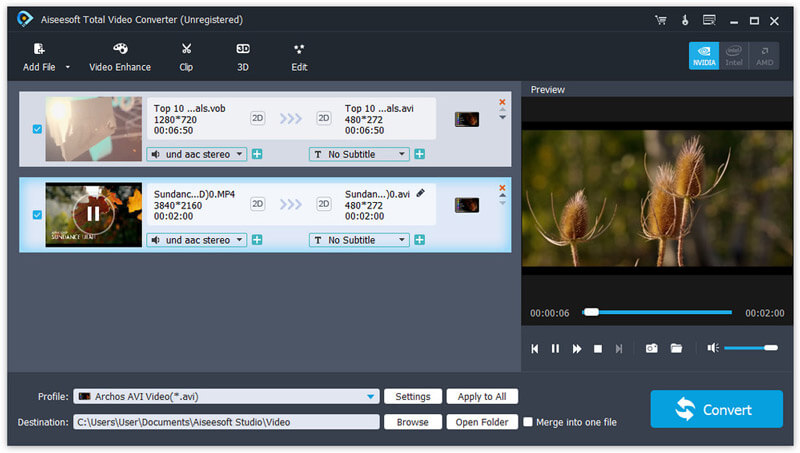
The main window: a VOB and a 4K MP4 queued for conversion to AVI, with the preview on the right and the NVIDIA, Intel and AMD acceleration buttons top right.
The toolbar along the top holds the extras: Video Enhance, Clip (trimming), 3D and Edit. That's what separates it from a bare converter. You can tidy a clip up on the way through instead of opening a second program.
Features
Convert between a very long list of formats
Aiseesoft Total Video Converter reads MP4, H.264, H.265/HEVC, MKV, AVI, MOV, WMV, ASF, FLV, F4V, WebM, VOB, MTS/M2TS, MXF, 3GP, RM/RMVB and more, and writes most of them back out. It also pulls the soundtrack out of a video as MP3, AAC, AC3, FLAC, WAV, WMA, OGG, AIFF or M4A, and can turn a clip into an animated GIF. Footage straight from camcorders (MTS, MXF) and phones is covered.
Pick a device instead of a codec
Aiseesoft Total Video Converter has preset profiles for iPhone, iPad, Apple TV, Android phones (Samsung, Huawei, LG, Sony, Xiaomi and others), PlayStation, Xbox, smart TVs, and editing programs such as Adobe Premiere, Avid Media Composer and Sony Vegas. If you don't know which codec your TV wants, you choose the TV and the program sets the rest.
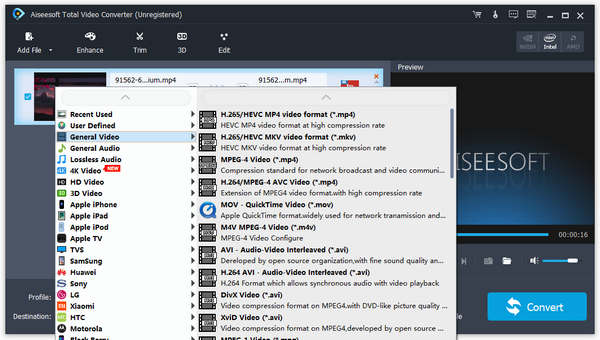
The Profile menu: categories such as 4K Video, 3D Video, Apple iPhone, Samsung and Huawei on the left, and the formats inside General Video on the right.
4K in and out, including upscaling
Aiseesoft Total Video Converter encodes and decodes 4K in H.265, H.264, MPEG, Xvid, VP8 and VP9. It can also scale HD or SD video up to 4K, or bring 4K down to HD so it plays on older screens and takes less space.
Turn 2D video into 3D, or 3D back into 2D
Aiseesoft Total Video Converter makes 3D versions of ordinary videos in 14 modes: 10 kinds of anaglyph (for red/cyan glasses), side by side (half width or full) and top and bottom (half height or full). A depth slider sets how strong the effect is. It also converts 3D files back to 2D.
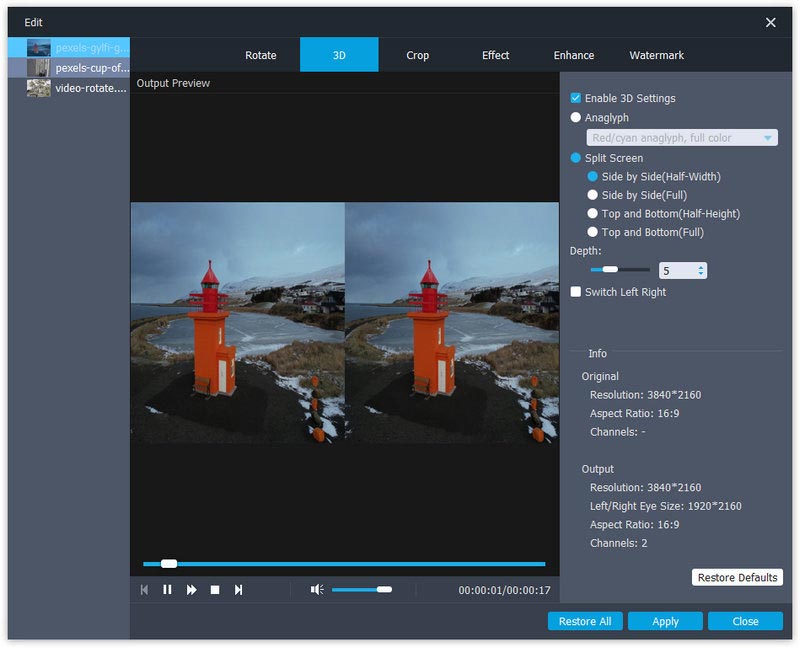
The Edit window from Aiseesoft's tutorial, on the 3D tab: side-by-side half-width output, depth 5, with Rotate, Crop, Effect, Enhance and Watermark tabs along the top.
One-click quality fixes
Aiseesoft Total Video Converter's Video Enhance button offers four fixes: upscale resolution and sharpen, optimize brightness and contrast on dark recordings, remove video noise, and reduce shaking in handheld footage. Each is a tick box, not a set of sliders.
Basic editing on the way through
Aiseesoft Total Video Converter trims a video into clips, crops away black bars, rotates sideways phone footage by 90 degrees, merges several files into one, adds a text or image watermark, and adjusts brightness, contrast, saturation and hue. You can add extra audio tracks (background music or a voiceover), change or remove existing ones, and choose the subtitle track. A real-time preview shows the result before you convert.
Batch conversion with GPU acceleration
Aiseesoft Total Video Converter converts a whole queue in one run, and uses NVIDIA, Intel or AMD graphics acceleration, which Aiseesoft says makes conversion up to 50 times faster. When the batch finishes, it can open the output folder for you.
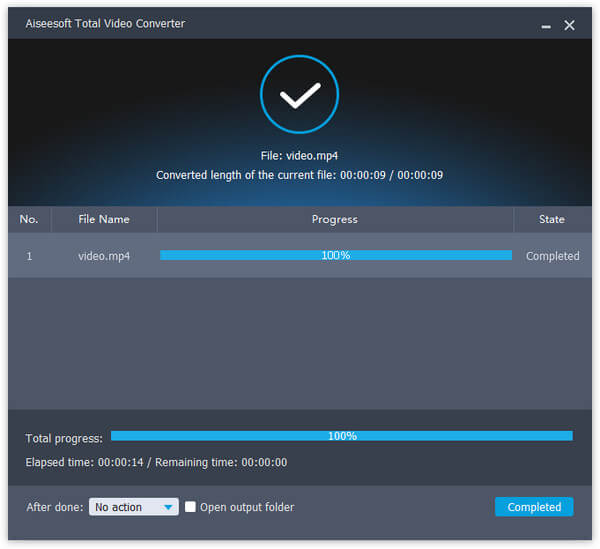
The progress window after a short MP4 finished converting, with an After done option and an Open output folder tick box.
Benefits
The main win is fewer tools. A free converter will change MKV to MP4, but you'll still need something else to cut the boring start off, crop the black bars, brighten a dark clip or steady a shaky one. Here that's all in the same queue, previewed before you commit.
The device profiles save guesswork. You don't need to know that your TV wants H.264 in an MP4 container at a certain bitrate. You pick the TV.
And the license is a one-time payment. Doug on Trustpilot put it simply: "I love that this app is simple to use and does not require a subscription."
Real-World Uses
- Old camcorder footage: convert MTS clips from a Sony or Panasonic camcorder to MP4, brighten the indoor ones and stabilize the handheld ones in the same pass.
- Movies for a phone or tablet: turn a folder of MKV and AVI files into iPhone or Android MP4s in one batch.
- Music from videos: pull the soundtrack out of a concert video or music clip as MP3 or FLAC.
- Clips for editing: convert phone footage into a format Premiere or Avid opens without complaint.
- A 3D night in: make a red/cyan anaglyph version of a home video for a pair of cheap 3D glasses.
Who It's For, and Who Should Skip It
It's a good fit if you convert video regularly for different devices, want light editing without learning a full editor, and prefer a one-time license to a subscription.
Skip it if:
- You only convert the odd file. Free converters handle a plain format change. dottech's review made the same point: apart from 2D to 3D, it found little you couldn't get in freeware.
- You need DVD burning or ripping. Total Video Converter converts files; it doesn't burn discs. Softonic flagged the missing DVD tools.
- You're on a Mac. This is the Windows program.
- You want real editing. Trimming, cropping and merging are here, but no timeline, transitions or titles. A video editor fits better.
Usage Guide
- Install: download the installer, run it, and launch Aiseesoft Total Video Converter. After buying, enter your registration code to register the full version.
- Add files: click Add File at the top left, or drag videos into the window. Each file shows its resolution and length.
- Edit if you want: select a file and use Video Enhance, Clip, 3D or Edit in the toolbar. The preview updates as you go.
- Choose the output: open Profile and pick a device or format, then set the destination folder with Browse. Tick Merge into one file to join everything in the queue.
- Convert: click Convert. Turn on the GPU button that matches your graphics card first for faster conversion.
Where it falls short
- Speed depends on the job. Softonic found the conversion takes "a bit of time", and other converters were quicker. A user on Aiseesoft's own site noted it's fast unless you convert SD up to 4K.
- Subtitle control is limited. dottech couldn't find a way to add an external subtitle file, and Aiseesoft's FAQ has a question from a user whose MKV subtitles didn't show.
- 3D is only as good as a conversion can be. dottech found converted movies "don't offer as much depth as movies that were designed to be in 3D from the start".
- Refunds are strict. The guarantee only covers quality problems, and several Trustpilot reviews are from buyers whose refund requests were refused.
What Users Say
Independent reviews
dottech (Ashraf, September 13, 2013, version 7.1.8) liked the engine and the batch tools but not the price. Its pros included "Supports batch processing and drag + drop", "Uses FFMPEG as the behind-the-scenes conversion engine, so conversion quality and speed is excellent" and "Can merge input files together into one output". Its cons: "No 'keep original resolution' option for output videos", "Doesn't appear to be a way to add custom subtitles (via an external subtitle file) to videos", and "Movies converted into 3D don't offer as much depth as movies that were designed to be in 3D from the start." The verdict: "Overall, Aiseesoft Total Video Converter is a good program… but it isn't worth the price tag." That review is of a much older version, so the missing options may have changed since.
Softonic rates it 3.5 from 104 user ratings. Its editors found installing quick ("The process took no time at all, and without much ado, the program was up and running") and liked the look ("The design of the program is incredibly stylish and modern"), but noted "The conversion process takes a bit of time" and that "other video converters can accomplish the task in less time." They also pointed out it has no DVD burning tools.
Trustpilot (all Aiseesoft products)
Aiseesoft Studio has a TrustScore of 3.8 from 603 reviews, covering all of its products, not just this one.
Henry (5 stars, January 4, 2026): "The software has done wonders in converting various formats to MP4 which I can easily play on my various devices."
Renee Lee-Starks (4 stars, August 2, 2026, "I'm Pleased With The App"): "I'm pleased with the format change process it provides."
Doug (5 stars, July 21, 2026, "I love that this app is simple to use"): "I love that this app is simple to use and does not require a subscription."
The negative reviews are mostly about refunds. Owend (1 star, September 5, 2026, "Refund Endless Cycle - Don't Trust"): "Asked for a Refund from Aiseesoft. That's where frustration began." Caitlin Hardwick (1 star, October 6, 2026, "Refusal to comply with consumer rights"): "They refuse any refund unless faulty."
Users on Aiseesoft's site
Aiseesoft's review page shows 232 reviews. Some of the more specific ones:
Bachelor ("Convert video to iPhone compatible format"): "I mainly use it to convert some unsupported video formats like avi, flv, mkv and more to my iPhone supported MP4. It provides an iPhone category for directly converting video to iPhone format. Very convenient."
Hal ("Fast speed!"): "The video converting speed is very fast if don't convert the video from common SD to 4K UHD. And the output quality if acceptable."
Michael Smith ("Good Quality"): "Was easy to install, easy to register, had a clip from an outside security camera, turned out well, clipped 15 sec from 11min, Good quality."
Cathy ("Adjust my video effect"): "Besides the basic converting feature, it also carries many basic editing functions. The effects adjusting feature is my favorite one."
The pattern: people who use it like the device presets, the ease of use and the one-time license. The criticism is about speed on heavy jobs, a few missing options (external subtitles, DVD burning), whether it's worth paying for over freeware, and Aiseesoft's strict refund policy.
Comparisons
Total Video Converter vs free converters
Free converters can change one format into another, and for an occasional MKV to MP4 that's enough. Aiseesoft Total Video Converter earns its price if you use the extras: the device profiles, the enhance tools (denoise, stabilize, brighten, upscale), 2D-to-3D, watermarking and merging in the same queue, and GPU acceleration.
Total Video Converter vs Aiseesoft Video Converter Ultimate
Aiseesoft also sells Video Converter Ultimate, its larger "convert, edit and enhance" package. Total Video Converter is the focused converter. If all you need is converting with light fixes, it's the cheaper choice.
Editions and Pricing
| License | Price | Term | PCs |
|---|
| Multi-user (our Buy Now button) | $69.96 | Lifetime | 3 |
| Lifetime (Aiseesoft store) | $39.96 | Lifetime | 1 |
| 1 Month (Aiseesoft store) | $12.50 | 1 month | 1 |
All licenses include free updates and support. Aiseesoft's store prices are shown as discounts from list prices of $49.95, $25.00 and $149.85, and can change.
FAQs
Does Aiseesoft Total Video Converter work on Windows 11?
Yes. Aiseesoft Total Video Converter supports Windows 11, 10, 8.1, 8 and 7, and needs a 2GHz CPU and 2 GB of RAM or more.
Is there a Mac version of Aiseesoft Total Video Converter?
Yes, but it's a separate product with its own license. The license sold here is for Windows.
Can Aiseesoft Total Video Converter rip DVDs or burn discs?
Aiseesoft Total Video Converter converts video files, including VOB files copied from a DVD, but it doesn't burn discs. Aiseesoft sells Burnova for DVD and Blu-ray burning.
Can I get a refund if I don't like Aiseesoft Total Video Converter?
Probably not. Aiseesoft's 30-day money-back guarantee covers lifetime licenses with a quality problem, not a change of mind. Try the free download first.
Is a lifetime license really a one-time payment?
Yes. The lifetime licenses are paid once and include free updates. The 1 Month license is the subscription option. Check the order page for any add-on trial (such as the Blu-ray Player offer) before you pay.
Does Aiseesoft Total Video Converter use my graphics card?
Yes. Aiseesoft Total Video Converter has NVIDIA, Intel and AMD acceleration buttons in the main window. Turn on the one that matches your graphics card.
Can Aiseesoft Total Video Converter convert video for Premiere or Avid?
Yes. It has output profiles for editing software, including Adobe Premiere, Avid Media Composer and Sony Vegas, so camcorder MTS or MXF files can be converted into something those programs open.
I lost my registration code. How do I get it back?
Aiseesoft has a Retrieve Registration Code page on its site and a support address (support@aiseesoft.com) that answers purchase questions within 24 hours.
System Requirements
- Windows 11, 10, 8.1, 8 or 7
- 2GHz Intel or AMD CPU or faster
- 2 GB RAM or more
- About 49 MB for the installer
Conclusion
Worth it if you convert video often and want the fixes in the same place. Aiseesoft Total Video Converter does the conversion job well, and its real value is everything around it: device presets, one-click denoise, stabilize and brighten, 2D-to-3D, trimming, cropping and merging, all in one queue with a preview and GPU acceleration, for a one-time $69.96 covering three PCs.
The main reason not to buy: if you only change a format now and then, a free converter does that, and Aiseesoft's refund policy won't help if you change your mind. Run the trial on your own files first, then buy if the extras earn their keep.
Download Free TrialBuy Now