You need a stack of business cards by Friday, and you don't want to hand a design job to a print shop or fight with a word processor to get the margins right. Home Business Card is a Mac application built for this job. It combines card layouts, ready-made designs and printing tools in one place.
Quick facts
- Version: 1.7.3
- Platform: Mac
- Developer: Cristallight Software
- Export formats: JPEG, TIFF, PDF, BMP, PNG and more
Key features
Start from a pre-made template instead of a blank page
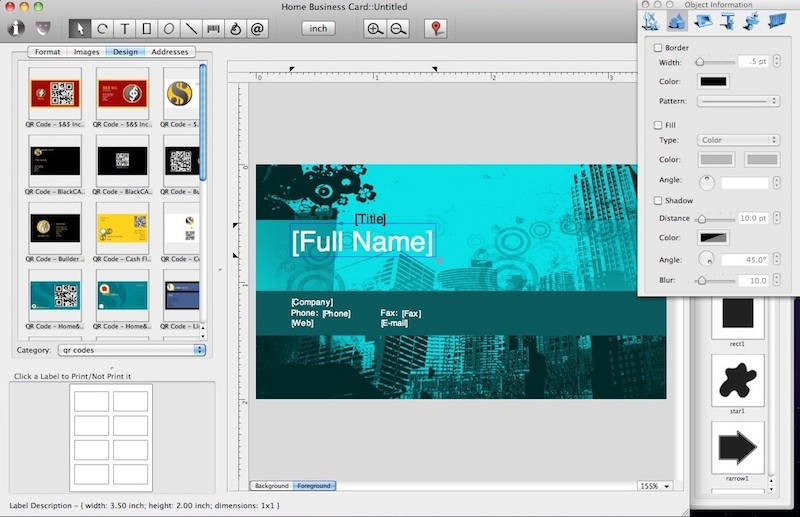
The program ships with hundreds of templates in horizontal and vertical layouts. You can start from one or build your own design.
Print on the card stock you already own
Built-in card formats cover paper from makers such as Avery, APLI, A-One, Herma and Sigel. Custom card formats are supported if your stock isn't listed.
Fill in your details from Address Book
The app integrates with the Mac Address Book and imports personal data into address field objects, so you don't retype your own contact information.
Put a QR code or barcode on the card
Barcode objects include Code 128, Datamatrix and QR Code, so a card can link people to your details.
Fine control over the design
You get background and foreground layers, color gradients, text along an ellipse, tables, and image effects such as opacity and image masks. Print options include bleeds, crop and trim marks and printer calibration.
Export for an outside printer
You can print on your own Mac printer, or export to PDF, JPEG, TIFF, PNG, BMP and other formats to send to a print shop.
Who it's for
It suits freelancers, small business owners and home users on a Mac who want to print their own cards. It also suits people who want more layout control than a basic template tool gives them. The interface is a simple tabbed layout.
Pros and cons
Pros
- Large library of templates and clipart or background images
- Wide range of supported paper formats
- QR code and barcode objects built in
- Address Book import
Cons
- Mac only
- Older Mac systems need an older release of the program
What users say
"The cards I printed using Home Business Card came out really nice!" (Cristallight Software product page)
FAQs
Can I print on Avery card stock?
Yes. Avery is one of the paper brands with built-in formats, and you can define a custom format for anything else.
Can I use my own images?
Yes. You can insert JPEG, TIFF, PDF, GIF, EPS and other image formats into a card.
Can I have someone else print the cards?
Yes. Export your design to PDF, JPEG, TIFF, PNG or BMP and take it to an outside printer.
Does it work on older Macs?
The vendor offers an older version, 1.4.0, for systems with MacOS 10.5 support.