Barcode labels on a Mac, without a design suite
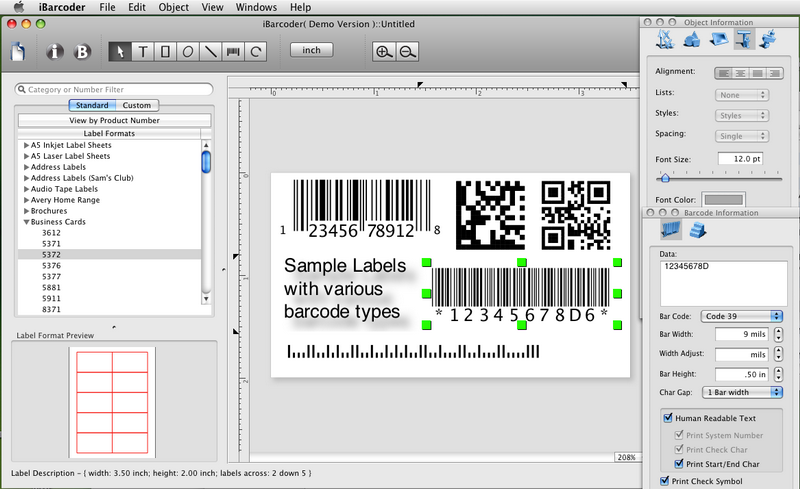
You need a few hundred sequential ISBN or UPC labels for a catalog, and you don't want to wrestle a page-layout app to get bars that scan. iBarcoder is a Mac barcode generator and label maker built for that job. You pick a symbology, type the data, lay out the label, then print it or export it.
Quick facts
- Version: 3.18.8
- Platform: Mac OS X 10.15 or later, with support for macOS 14, 15 and 26
- Price: $49.99, a lifetime license with free updates
- Trial: the unregistered version is a fully functional trial
- Disk space: 20 MB
Key features
More than 60 barcode types in one app
The list covers UPC-A and UPC-E, EAN-13 and EAN-8, ISBN, ISMN, ISSN, Code 128, Code 39, Codabar, ITF14, Datamatrix, QR Code, Micro QR, PDF417 and Aztec. It also includes the GS1 variants (GS1-128, GS1-Databar, GS1-Datamatrix, SSCC-18, GTIN-14) and postal codes such as Postnet and Intelligent Mail. You can add 2 or 5 digit supplements to UPC, EAN and ISBN.
Sequential barcodes from a counter or an Excel file
In Counter mode, you set a prefix, a starting number, a postfix and an increment, and iBarcoder builds each next code. In Text File mode, you point it at a .txt or .xlsx file and it makes one barcode per data string.
Print on standard Avery sheets or your own label format
Standard Avery label formats are built in, and you can create and save custom formats. A live barcode preview and a label layout preview show the result before you print. It prints to inkjet, laser, direct thermal and other barcode printers.
Export as vector or high-resolution images
Export to PDF and EPS (vector), or to BMP, TIFF, JPEG, PNG, PNTG and Photoshop, at up to 4800 dpi. You can choose RGB or CMYK color spaces. You can also copy a finished barcode and paste it into Illustrator, InDesign or Photoshop.
Labels with text, images and shapes
Add text boxes, image boxes, rectangles, ovals and lines around the barcode. You can set the barcode font and color, rotate the barcode, and put a logo inside a QR Code with adjustable opacity and scale.
Who it's for
It suits small retailers labeling products, publishers who need ISBN barcodes, and anyone producing inventory tags or shipping labels from a Mac. It also fits designers who need clean vector barcodes to drop into print layouts.
Pros and cons
- Pro: a very wide range of symbologies, including GS1 types.
- Pro: vector export and CMYK output for print work.
- Pro: a one-time price with free updates, and a fully working trial.
- Con: it runs only on Mac. Windows users need the separate PC edition.
- Con: current versions need Mac OS X 10.15 or later. Older systems need an older release.
- Con: it is a barcode and label tool, not a general design app.
FAQs
Can I try it before buying?
Yes. The unregistered version is a fully functional trial. You get a product activation key after purchase.
Do I pay again for updates?
No. The license is for life and includes free updates and free tech support.
Can it make ISBN barcodes with price add-ons?
Yes. ISBN-13 and ISBN-10 are supported, with 2 and 5 digit supplements.
Which file types can I export?
You can export PDF and EPS as vector graphics, plus BMP, TIFF, JPEG, PNG, PNTG and Photoshop files.
Does it work on older Macs?
The current version needs Mac OS X 10.15 or later. Older releases exist for macOS 10.6 and for 10.4 and 10.5.
System requirements
- Mac OS X 10.15 or later, ready for macOS 26 (Tahoe)
- 20 MB of hard disk drive space