Printing barcode labels from a Mac without hunting for Windows-only tools
You have a Mac, a pile of products or assets that need barcodes, and most barcode programs you find only run on Windows. This Mac barcode maker is built for Apple Mac OS X machines and creates barcode labels, stickers, tags, coupons and rolls from a single window.
Quick facts
- Platform: Apple Mac OS X
- Output: barcode labels, stickers, tags, coupons, rolls
- 2D symbologies: QR Code, PDF417, DataMatrix, plus linear fonts
- Trial: a demo version is offered for download
Key features
Pick a barcode font, type a value, add a header and footer
You choose the barcode font, enter the barcode value, and set header and footer text. Alignment, general and font settings are all available.
Colour your barcodes
The colour settings let you change the colour of the header, footer, value, barcode and background, so you can make colourful stickers.
Print many labels with batch processing
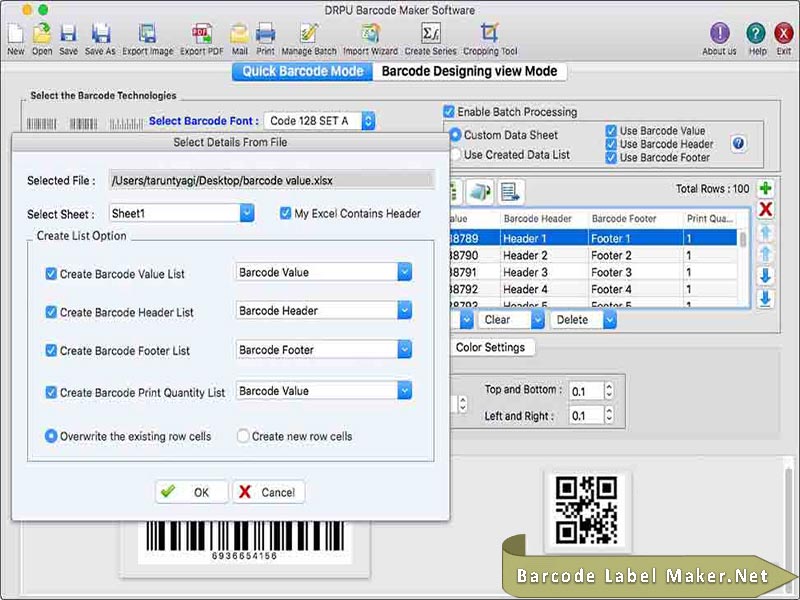
You can create a batch processing series to print multiple barcode labels in one go.
Draw and place barcodes on a label
The barcode designing view offers drawing tools. You can add shapes to a label and fill in barcode properties.
Save as an image or copy into other apps
Barcodes can be saved as JPEG, BMP, GIF, TIFF or PNG images. A copy barcode option pastes a finished label into TextEdit, MS Word or MS Excel.
Who it's for
It suits Mac users who need to produce price stickers, asset tags, coupons or library and retail labels. It is also useful if you want to try the demo before committing.
Pros and cons
- Pro: Runs natively on Mac OS X.
- Pro: Supports both linear and 2D barcode fonts.
- Pro: Batch series and print preview cut down on printing errors.
- Con: The download is a demo, so you should check what the trial limits before relying on it.
- Con: The vendor sells several editions (Standard, Corporate), and the more advanced design tools appear in the Corporate edition.
FAQs
Which operating system does it run on?
It is made for Apple Mac OS X computers.
Can it make QR codes?
Yes. The supported 2D symbologies include QR Code, PDF417 and DataMatrix.
Can I print lots of labels at once?
Yes, through the batch processing series feature.
Can I preview before printing?
Yes, a print preview shows the label before you print it.