dbForge Schema Compare for MySQL: See Exactly How Two Databases Differ, Then Sync Them
dbForge Schema Compare for MySQL is Devart's Windows tool for comparing the structure of two MySQL or MariaDB databases (tables, views, routines, triggers, events) and generating the ALTER script that brings the target in line with the source. It costs $84.95 a year or $169.95 for a perpetual license, and it's for developers and DBAs who deploy schema changes from development to staging and production.
The release goes out tonight, and you're not sure which of the last three weeks' table changes made it into staging. Schema Compare puts the two databases side by side, lists every object that's different, only in one of them or identical, and writes the script for just the changes you tick.
Quick facts
- Version: 2026.2.96, released November 9, 2026
- Developer: Devart
- Platform: Windows 7 to 11 and Windows Server 2008 to 2025, with .NET Framework 4.7.2; macOS and Linux through CodeWeavers CrossOver
- Databases: MySQL (support for 26.7 added in September 2026), MariaDB up to 13, Percona; Amazon RDS and Aurora, Google Cloud, Oracle MySQL Cloud and Alibaba Cloud
- Compares: live databases, scripts folders and backup files
- Download: 105.45 MB; the installer is Devart's Compare Bundle for MySQL, which also contains Data Compare
- Price: $84.95 for a 1-year subscription or $169.95 perpetual; one edition
- Trial: free for 30 days (the download asks you to sign in with a free Devart account)
- What we checked: version 2026.2.96 and its November 9, 2026 date on Devart's download page and revision history, the 105.45 MB download size listed there, and the order page prices of $84.95 for the default 1-year subscription and $169.95 perpetual on November 13, 2026. We didn't run a comparison on our own databases.
Before you buy
- It compares structure, not table data. If you also move data between environments, the dbForge Compare Bundle for MySQL adds Data Compare for $99.95 a year in total, only $15 more.
- No version control integration. Devart keeps that for dbForge Studio for MySQL.
- A subscription stops working when it ends; the $169.95 perpetual license keeps working, with a year of updates.
Download Free TrialBuy Now
Overview
Schema Compare for MySQL is released together with dbForge Studio for MySQL, with five builds between August and November 2026. You choose a source and a target (a database, a scripts folder or a backup), it maps the objects, and a results grid groups them by status or type. Select an object and the bottom pane shows its DDL from both sides with the differences highlighted. Then the Schema Synchronization Wizard produces the script, with warnings about potential problems.
The September 2026 release added MySQL 26.7 and MariaDB 13 support; October fixed an invalid CHARSET/COLLATE combination in the RETURNS clause of stored functions; and the November build fixed an out-of-memory error on large XLS reports.
Features
Object-by-object differences you can filter and report
dbForge Schema Compare for MySQL compares tables, views, procedures, functions, triggers and events, plus MariaDB packages and sequences. The results grid can group objects by status, object type or operation, filter and sort them, and color-code DDL differences. You can exclude objects, save comparison settings for reuse, and export a report as HTML, Excel (XLS) or XML, with the deployment script and warnings included if you want.
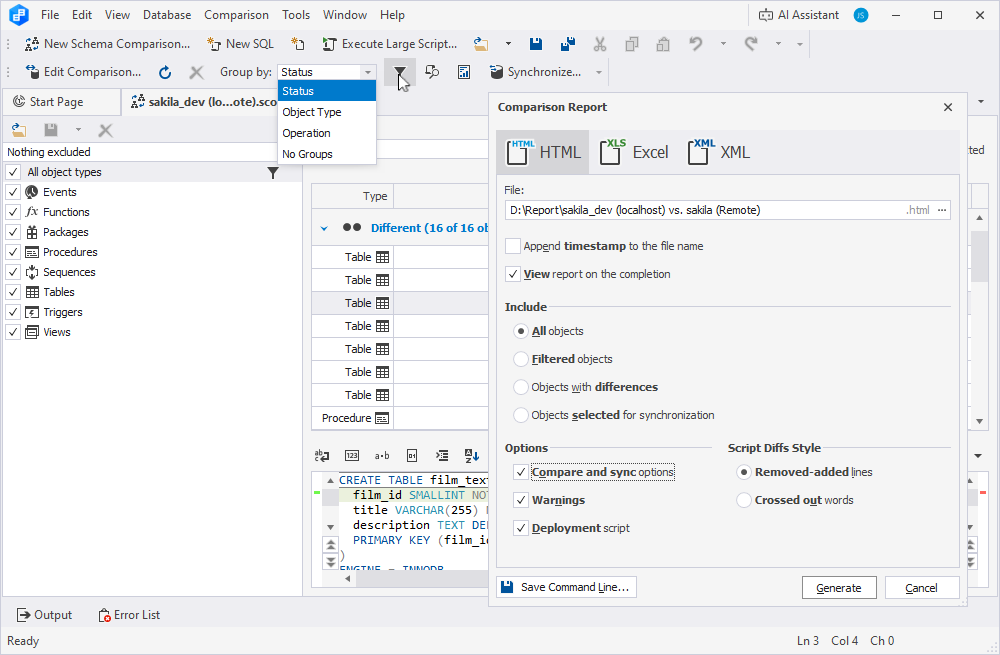
Comparing sakila_dev on localhost with a remote sakila: 16 different objects, the Group by menu open, and the Comparison Report dialog set to HTML.
A synchronization script you review before it runs
dbForge Schema Compare for MySQL's Schema Synchronization Wizard lets you open the script in the built-in SQL editor, save it to a file with an optional timestamp, or execute it directly against the target and refresh the comparison. You can add your own scripts before and after, get warnings about potential problems, and synchronize asynchronously so the window stays usable.
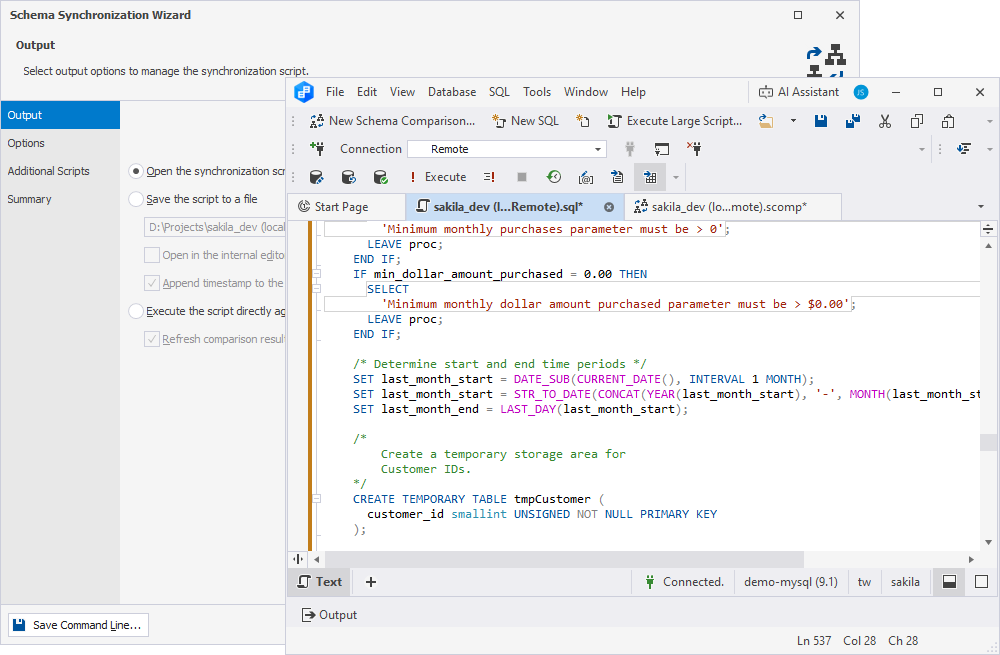
The wizard's Output page (open, save or execute the script) and the generated script for a stored procedure, opened in the editor against the remote server.
Backup and restore built in
dbForge Schema Compare for MySQL includes backup and restore wizards, so you can take a backup of the target right before you sync. Back up the schema only or schema with data, handle databases over 2 GB, compress to ZIP with optional encryption, delete old backup files automatically, and save the settings as a project. A backup file can also be a comparison source.
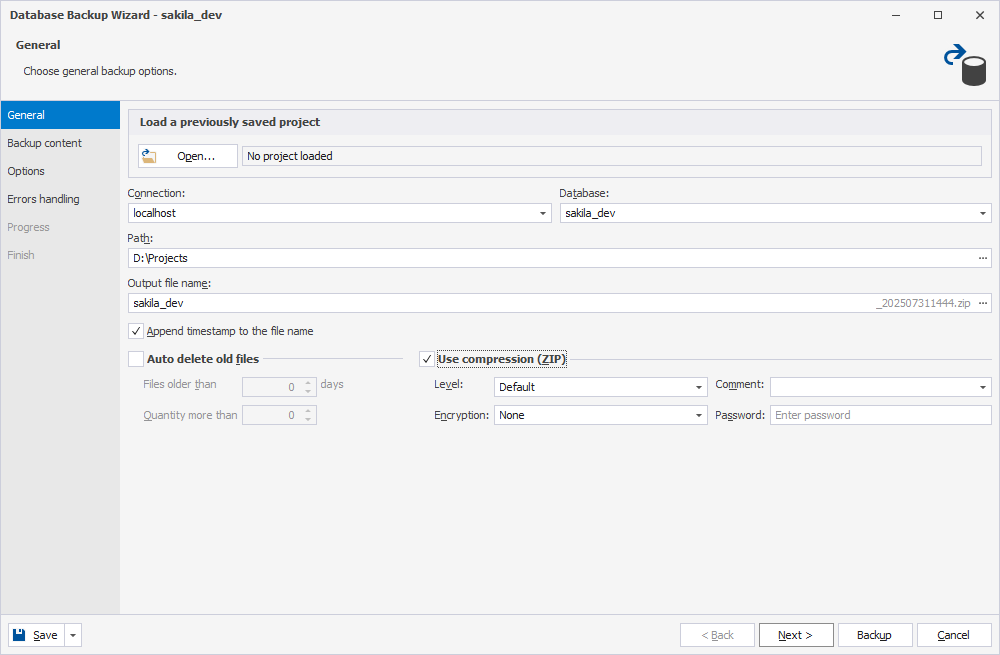
The Database Backup Wizard for sakila_dev, with a timestamped file name, ZIP compression and encryption settings.
Comparisons and syncs from the command line
dbForge Schema Compare for MySQL builds a .bat file from a dialog where you set the source, target, report, object filter, log file and whether to synchronize, and validates the command before you save it. Run it from Windows Task Scheduler, PowerShell or a deployment pipeline; the console prints a summary of identical, different, source-only and target-only objects.
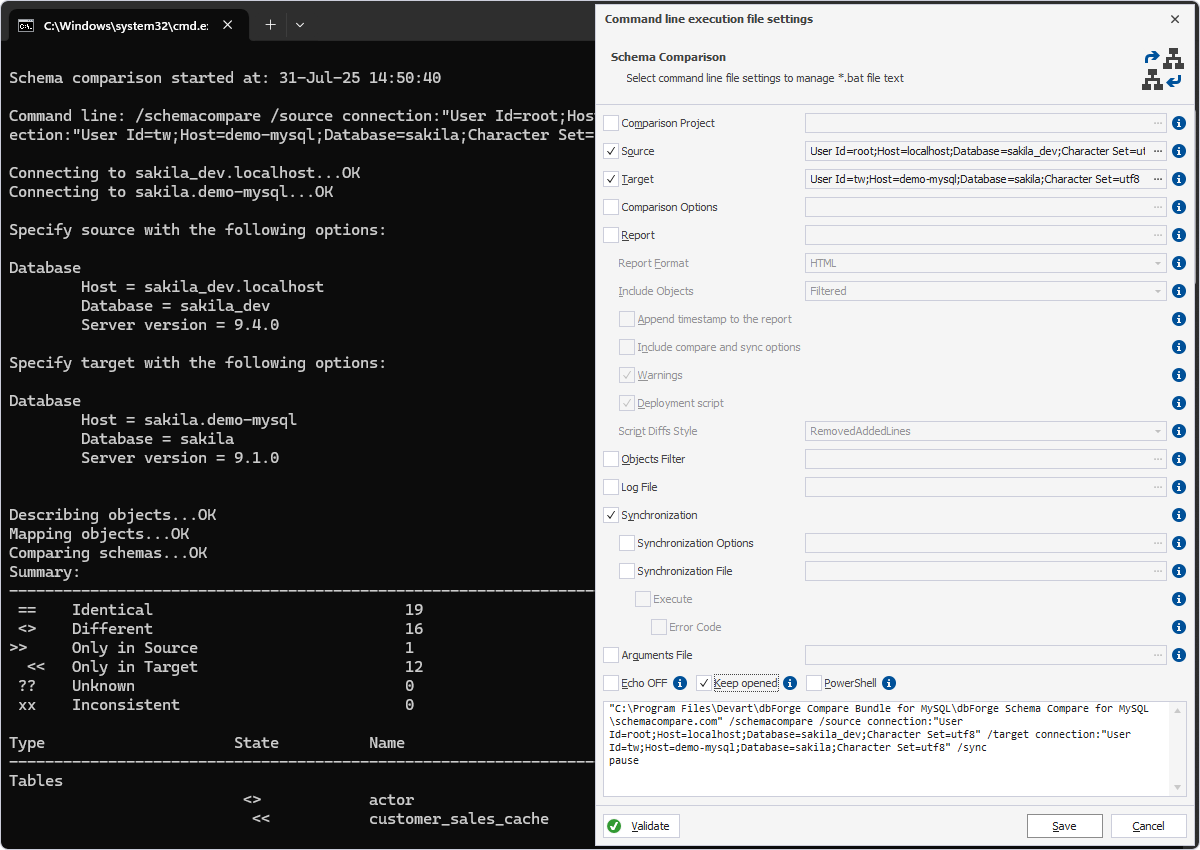
A command-line comparison of sakila_dev (MySQL 9.4.0) with sakila (9.1.0): 19 identical, 16 different, 1 only in source and 12 only in target, beside the .bat settings dialog.
Connections to cloud servers
dbForge Schema Compare for MySQL deploys to Percona, Oracle MySQL Cloud, Amazon RDS and Aurora, Google Cloud and Alibaba Cloud, and connects over SSL, SSH, HTTP tunneling and Percona PAM. The AI Assistant is built in for writing, explaining and troubleshooting SQL.
Benefits
- Safer deployments. You see every change and the exact script before anything touches production.
- Drift caught early. A scheduled comparison tells you when someone changed a production table by hand.
- Schema changes alongside code. Saved comparison files and command-line runs fit into a release pipeline.
- Proof for reviewers. An HTML or Excel report documents what a release changed.
Real-World Uses
- Release deployment: compare development with staging, then staging with production, and run the reviewed script.
- Drift detection: schedule a nightly comparison between production and the reference schema and email the report.
- Migration checks: after moving to a new MySQL version or Amazon RDS, confirm the structure matches the old server.
- Restoring a dropped object: compare production with last night's backup and recreate just the procedure someone deleted.
Who It's For, and Who Should Skip It
Buy it if you deploy MySQL or MariaDB schema changes between environments and want a readable, reviewed script each time, from the GUI or a pipeline.
Skip it if you also sync table data (the Compare Bundle costs only $15 more and adds Data Compare); if you want schema changes in Git with a full IDE (dbForge Studio for MySQL Enterprise has source control); or if you only compare schemas once a year, where the free trial or a mysqldump diff may do.
Usage Guide
- Download and install the Compare Bundle for MySQL from Devart's download page (sign in with a free Devart account) and choose Schema Compare.
- Click New Schema Comparison and pick the source and target: a database, scripts folder or backup, with their connections.
- Review the results grid. Group by status or type, and select an object to see its DDL differences.
- Exclude what you don't want to deploy, then click Synchronize.
- In the wizard, read the warnings, add any extra scripts, and open, save or execute the script.
- Save Command Line to repeat the comparison on a schedule or in your pipeline.
Where It Falls Short
- Data is a separate product. Schema and data changes often travel together, and covering both means the bundle or the Studio.
- Few independent reviews. Most published feedback comes through Devart, so the trial is your real test.
- No native Mac or Linux build. CrossOver is a separate license.
What Users Say
Independent reviews of the stand-alone MySQL Schema Compare are few. Devart quotes two reviewers on its product page, and dbForge Studio for MySQL users comment on the same compare engine.
Quoted on Devart's product page
Anthony A., Senior Software Engineer: "[dbForge] Schema Compare's two best features are the ability to customize and share comparison files and run comparisons via command line, so they can be integrated into your pipeline. We use it to make our schema changes part of our source code and deploy alongside code changes."
Robert O., Senior Database Developer: "I am happy with the dbForge comparison tool. Visual Studio Schema Comparison does not allow you to filter by object. Redgate has an awkward user interface. Adept SQL Diff is no longer supported (used to be my favorite comparison tool). The winner is dbForge :-)"
dbForge Studio for MySQL users on the same compare tools (SoftwareSuggest)
Tailib N., Developer (December 2022): "dbForge Studio for MySQL allows me to quickly and efficiently compare and synchronize schemas and data."
Imad M., Software Architect (November 2022): "We searched extensively for software or tools that perform schema and data comparison and synchronization, and dbForge Studio was the only software that met our needs."
The common thread: people who compared several diff tools chose Devart's for its filtering, readable results and command-line automation. With so few reviews, run the trial against your own staging and production schemas.
Comparisons
Schema Compare vs dbForge Compare Bundle for MySQL
The Compare Bundle ($99.95 a year, $199.95 perpetual) contains Schema Compare and Data Compare for MySQL. Bought separately they cost $169.90 a year, so the bundle saves about 41%. If there's any chance you'll sync data, buy the bundle.
Schema Compare vs dbForge Studio for MySQL Professional
dbForge Studio for MySQL Professional ($179.95 a year at checkout) includes schema and data compare plus a full IDE, debugger, database projects and reporting. Schema Compare alone is the choice when the person deploying changes doesn't need an IDE.
Editions and Pricing
dbForge Schema Compare for MySQL has a single Standard edition. The order page opens on the 1-year subscription; the perpetual license, 2- or 3-year terms and priority support are options you choose there.
| License | Price | What you get |
|---|
| Standard, 1-year subscription | $84.95 | Use and updates for a year, renews yearly |
| Standard, perpetual | $169.95 | Use forever, 1 year of updates included |
Devart takes 5% off for 5 to 9 licenses, 10% for 10 to 19 and 15% for 20 or more.
FAQs
Can dbForge Schema Compare for MySQL compare a MySQL database with a MariaDB one?
Yes. dbForge Schema Compare for MySQL supports both MySQL and MariaDB and can compare a schema on one with a schema on the other, including MariaDB-only objects such as packages and sequences.
Can I compare against a backup instead of a live server?
Yes. dbForge Schema Compare for MySQL accepts backup files and scripts folders as well as live databases on either side of a comparison.
Does it integrate with Git?
No. The stand-alone dbForge Schema Compare for MySQL has no version control integration; that's in dbForge Studio for MySQL. You can still keep scripts folders and comparison files in Git and run comparisons from the command line in a pipeline.
Does it work with Amazon RDS?
Yes. dbForge Schema Compare for MySQL connects to Amazon RDS and Aurora, Google Cloud, Oracle MySQL Cloud and Alibaba Cloud, among other MySQL services.
What happens when my subscription ends?
A dbForge Schema Compare for MySQL subscription becomes inaccessible when it ends, until you renew. The perpetual license keeps working; renewing it only brings updates and support.
Does it run on a Mac?
Only through a compatibility layer. dbForge Schema Compare for MySQL is a Windows program; Devart supports running it on macOS and Linux with CodeWeavers CrossOver.
System Requirements
- Windows 7, 8, 8.1, 10 or 11, or Windows Server 2008, 2012, 2016, 2019, 2022 or 2025
- .NET Framework 4.7.2 or later
- macOS or Linux (Ubuntu, Debian, Fedora, RHEL): CodeWeavers CrossOver
- MySQL 5.5 and later, MariaDB 5.5 to 13, Percona 5.5 to 8.4
- About 105 MB for the installer download
Conclusion
dbForge Schema Compare for MySQL does its job thoroughly: clear object-by-object differences, a sync script you can read before it runs, a backup wizard for safety, and command-line runs for pipelines. At $84.95 a year it's fair value, but the honest advice is to look at the Compare Bundle first: for $15 more you also get Data Compare, and most teams need both sooner or later. Buy Schema Compare alone if you only ever deploy structure. Try it free for 30 days on your own environments.
Download Free TrialBuy Now