Copernic Business Server Search: One Shared Search Index for Your File Server and Team Mailboxes
Copernic Business Server Search is a Windows search server for small and mid-sized teams: it builds one central index of your shared folders, shared Outlook mailboxes and PST archives, and employees search it from a Copernic client on their own PCs, seeing only the files their Windows permissions allow. The entry package covers one server and 1 to 3 users for $999 a year at checkout, with larger user tiers priced up to $9,999 a year.
If your team keeps asking "where's the latest version of that contract?" and the answer lives somewhere in a decade of nested folders on a file server, this is the problem Copernic sells against. Windows' own search on a network share is slow and shallow; Copernic reads the contents of Office files, PDFs, emails and attachments, and answers as you type.
Quick facts
- Current version: Server 3.3.7.18993 and Client 8.3.7.18993, released October 21, 2026
- Developer: Copernic, a division of N. Harris Computer Corporation
- Server runs on: Windows Server 2008 R2 SP1 through 2025, or a Windows 7 SP1 to 11 PC acting as the server
- Clients run on: Windows 10 and 11 (64-bit recommended)
- Indexes: over 170 file types, shared Outlook mailboxes and PST archives, text in images (OCR)
- Security: results follow Windows Active Directory access rights
- Languages: 11, including English, French, German, Spanish, Japanese and Korean
- Price: $999 per year for one server and 1 to 3 users; renews every 12 months
- Trial: 30 days, all features enabled, no credit card
- What we checked: the x64 server installer (269 MB, dated October 21, 2026) and the client package (415 MB) on the vendor's download server, the setup steps in Copernic's Quick Start Guide, and the price on the order page: $999.00 for a 12-month subscription on November 12, 2026. We didn't install it on a server or test it against Active Directory.
Download Free TrialBuy Now (1 to 3 users, 1 year)
Overview
Copernic Business Server Search comes in two parts. The server application installs on a Windows server, or any PC you dedicate to the job, and does the heavy lifting: it crawls the folders and mailboxes you point it at, extracts their text and keeps the index up to date on a schedule. The Copernic Server Search Client installs on each employee's Windows 10 or 11 PC. It's the same search interface as Copernic Desktop & Cloud Search, with one addition: a green drop-down next to the Search button that switches between the server's index and the user's own local index.
The point of the split is that the server is indexed once. Without it, every PC that wants to search a share has to crawl it on its own. With it, the server's index answers everyone, and each user's PC only has to index what's on that PC.
Copernic has shipped steady updates to it. In 2026 alone the release history lists versions in March, July, August and October, with new extractors for audio formats, a new OCR engine, a new PDF viewer and fixes throughout.
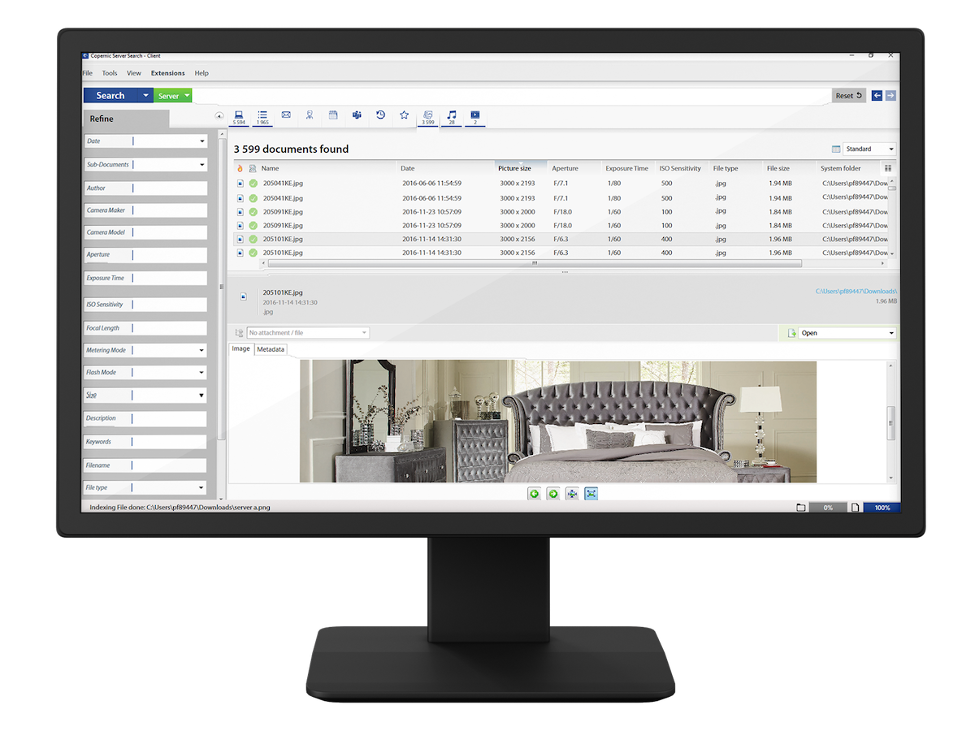
The Copernic Server Search Client with "Server" selected next to the Search button: 3,599 JPG files found, columns for picture size, aperture, exposure and ISO, the Refine pane on the left and an image preview below.
Features
One index of your file shares and shared mailboxes
Copernic Business Server Search indexes the folders you add on the server's Options screen, by UNC path or network name, plus shared Outlook mailboxes and PST archives under "Emails & Organizer". The paths have to be reachable by your users too, because the client opens and previews files from where they live. You choose which file types are indexed and which Outlook plugin extracts the mail.
Search results that respect Windows permissions
Copernic Business Server Search uses your Windows Active Directory access rights, so a user only sees results for files they could open anyway. HR's folder stays out of the sales team's search results without you building separate indexes. The security option sits under Indexing & Performance; switching it off turns permission filtering off for everyone, so leave it on unless every indexed file is meant for every user.
Over 170 file types, including CAD, Visio and Photoshop
Copernic Business Server Search reads the contents of Microsoft Office and LibreOffice files, PDFs, Outlook and Thunderbird mail, IBM Notes, Corel WordPerfect, Visio, Photoshop and AutoCAD drawings, among others. The Business Server package includes Image Text Recognition, so text inside scanned documents and images becomes searchable. Audio and video files are indexed by their tags and metadata; the October 2026 release improved the tagging library, and August 2026 added AIFF, FLAC, Monkey's Audio, MP2 and M4V.
Search-as-you-type with refine filters and Boolean operators
The Copernic client starts showing results while you're still typing, with a preview pane so you can read a document or email before opening it. Double-click opens the file in its own application, and right-click gives you the file's usual Windows context menu. The Refine pane narrows results by date, size, author, file type, folder and, for photos, camera details. AND, OR, NOT and NEAR work in the search bar, and a prefix match finds words that start with what you typed.
Scheduled indexing you control
Copernic Business Server Search lets you set how often each category of content (files, emails, contacts and so on) is refreshed and at what time the daily full scan runs, so indexing load lands outside office hours. You can also set the number of parallel extraction threads; Copernic recommends no more than two.
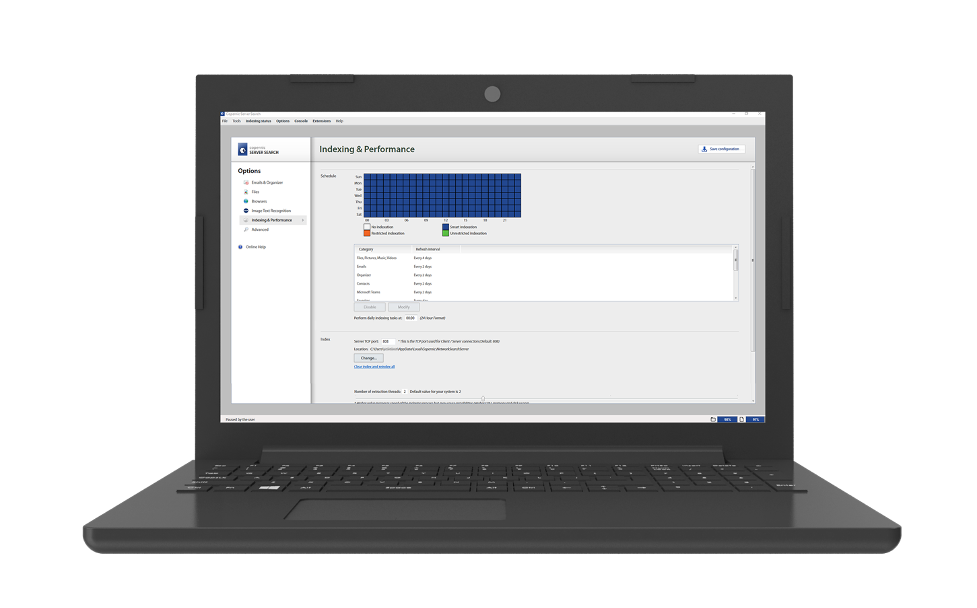
The server application's Options, on the Indexing & Performance page: a weekly indexing schedule grid, the refresh interval for each category, and the index settings below.
Local search on each PC, online or off
The Copernic Server Search Client also indexes the user's own computer, so someone on a laptop away from the office can still search their local files and email with the same interface. The client's AI extension (added August 2026) can connect to Google Gemini or OpenAI, with your own API key, for semantic search, summaries, translation and reply drafts; it's a client feature and is off until you set up a provider.
Benefits
- Less duplicate crawling. The server indexes the shares once, instead of every PC grinding through the same folders.
- Your data stays in-house. The index lives on your own server, and Copernic states that it doesn't collect your data. That matters for firms that can't put client files into a cloud search service.
- No permission project. Because it reads existing Active Directory rights, you don't have to rebuild your access model inside the search tool.
- Fast to deploy. It's a Windows installer and an Options screen, not a search platform you have to engineer. The client also comes as an MSI, so IT can push it with Group Policy.
Real-World Uses
- An engineering office searching years of AutoCAD drawings, Visio diagrams and project PDFs on a file server by client name or part number.
- A law or accounting firm finding every document and archived email that mentions a client across shared folders and old PST files, without exposing files from other partners' matters.
- A small office with a shared support mailbox letting three people search its history and attachments from their own desks.
- A design studio finding images by camera, date or embedded text across a shared photo archive.
Who It's For, and Who Should Skip It
Copernic Business Server Search fits Windows-based teams of a few people up to a few hundred who keep their working files on an on-premises file server and want fast full-text search without a SharePoint or enterprise-search project.
Skip it if:
- You're one person. Copernic Desktop & Cloud Search Elite indexes your own PC, including OCR, for about a tenth of the price.
- Your team uses Macs or Linux. The client is Windows 10 and 11 only.
- Your files live in Microsoft 365 or Google Drive rather than on a server. The cloud extractors (OneDrive, Google Drive, Gmail) are client-only, so each user would index their own cloud data; the shared server index doesn't cover it.
- You need search inside a web portal or across thousands of users. This is a Windows desktop client talking to a Windows server; above 999 users Copernic quotes on request.
Usage Guide
- Install the server. Download the server installer (x64, or x86 for older machines) and run it on your server or a PC acting as one. The destination folder must be on a local hard drive.
- Register it. On first launch, enter your serial number. A server without internet access can be activated offline by sending Copernic the server license file.
- Choose what to index. Open Options. Under Files, add the shared folders by UNC path; under Emails & Organizer, add shared mailboxes or PST archives. Under Indexing & Performance, set the schedule and daily scan time, and check that Security is on. Under Advanced, add or remove file types.
- Watch the console. The main Console screen lists the search requests coming in from clients, which is a quick way to confirm they're connected.
- Install the clients. Run the client installer on each PC, or deploy the MSI through Group Policy. Enter a client serial number.
- Point each client at the server. In the client, go to Tools, Options, Indexing & Performance, and enter the index server's machine name or IP address under Index. Click "Back to main view" to save.
- Search. Pick Server or the local index from the green drop-down next to Search, type, and refine with the pane on the left.
Before you buy
- The price is per server, by number of users. The $999 package covers 1 to 3 users for one year. Count everyone who will search before you pick a tier: 4 users already moves you to $1,699.
- It's a subscription that renews every 12 months; updates are included while it runs.
- Budget hardware for the index: Copernic asks for 8 GB of RAM minimum (16 GB recommended) and at least 2 GB of disk for the index, which grows with the amount you index.
- Run the 30-day trial against a real share with real permissions. That's where indexing time and server load show up.
Download Free TrialBuy Now (1 to 3 users, 1 year)
Where it falls short
- Cloud and AI features are client-side. Copernic's release notes mark the OneDrive, Google Drive and Gmail extractors, the AI extension and the new PDF viewer as "Client only".
- Older Windows clients are out. Client 8.3 no longer supports Windows 7, 8 or 8.1, even though the server itself still installs on Windows 7 SP1 and Server 2008 R2.
- Indexing needs a capable server. Copernic asks for 8 GB of RAM at minimum and recommends no more than two parallel extraction threads, so a large share takes time to index the first time.
- Few public reviews. There's little independent feedback on the server edition, so the trial is your real test.
- Activation needs the internet, or a manual offline activation through Copernic.
What Users Say
Reviews are thin, and mostly about the desktop product
The server edition has no user ratings yet on SourceForge or Slashdot, the software directories that list it. Copernic says it has customers in over 142 countries, but doesn't publish customer reviews of Business Server Search.
The client is built on Copernic Desktop Search, which does have reviews: Capterra shows 3.4 out of 5 from 14 reviews and G2 3.5 out of 5 from 16, and those ratings are for the single-PC product, not for the shared server setup. With so little feedback on the server edition itself, the 30-day trial on your own server tells you more than any rating will.
Comparisons
Business Server Search vs Copernic Desktop & Cloud Search Elite
Copernic Desktop & Cloud Search Elite ($95.99 a year per computer at checkout) is the same search interface, but each PC builds and keeps its own index. Business Server Search adds the shared server index, the console and Active Directory permission filtering. For three users, Elite on three PCs costs about $288 a year against $999 for the server, so the server only pays off when the point is searching shared data once, with permissions, rather than each person's own files.
Business Server Search vs Windows Search on a file share
Windows Search is free, but a PC doesn't index the contents of a network share by default, so searching one from a desk is slow. Copernic reads file contents across over 170 formats, includes OCR, searches shared mailboxes and PSTs, and gives you refine filters and Boolean operators. You pay for that depth.
Editions and Pricing
Business Server Search is priced per server by the number of users, as a 1-year or 3-year subscription. The order page here sells the 1 to 3 users, 1-year package ($999.00 on November 12, 2026). The other tiers below are Copernic's own list prices and are ordered through Copernic's store.
| Users per server | 1 year | 3 years | Buy |
|---|
| 1 to 3 | $999 | $2,299 | Buy 1 year |
| 4 to 9 | $1,699 | $3,849 | Copernic store |
| 10 to 29 | $2,599 | $5,849 | Copernic store |
| 30 to 59 | $3,299 | $7,599 | Copernic store |
| 60 to 99 | $4,499 | $9,999 | Copernic store |
| 100 to 249 | $5,499 | $12,299 | Copernic store |
| 250 to 499 | $7,199 | $15,999 | Copernic store |
| 500 to 999 | $9,999 | $21,999 | Copernic store |
| 1,000 or more | Quote | Quote | Copernic sales |
FAQs
Do I need Windows Server to run Copernic Business Server Search?
No. Copernic Business Server Search runs on Windows Server 2008 R2 SP1 through 2025, but also on Windows 7 SP1, 8.1, 10 or 11, on a PC that acts as the server. It needs .NET Framework 4.8 and its install folder on a local drive.
Does the $999 package include the client licenses?
Copernic Business Server Search is priced per server by how many people will search it: the $999 tier is for 1 to 3 users for one year. Each client PC is activated with a serial number the first time it launches, and the server with its own.
Will people see files they don't have permission to open?
Not with the default setting. Copernic Business Server Search filters results by Windows Active Directory access rights. The filtering only switches off if an administrator unchecks the Security option on the server.
Can the server run without an internet connection?
Yes. Copernic Business Server Search needs the internet only to activate the license, and a server that isn't connected can be activated offline by sending Copernic its license file. Searching works entirely on your network.
Can IT deploy the client to many PCs at once?
Yes. The Copernic Server Search Client comes as an MSI package for x64 and x86 that can be deployed through Group Policy, and Copernic ships Group Policy template files for its settings.
Does Copernic Business Server Search work on Mac?
No. Both the Copernic server and the client are Windows-only, and the current client needs Windows 10 or 11.
What happens when the subscription ends?
Copernic Business Server Search is sold as a yearly (or 3-year) subscription that includes updates while it's active; the order here renews every 12 months. Plan to renew if you want to keep using it with current updates.
Where do I get support?
Copernic takes support requests through its contact page and a customer portal where you can open and follow tickets.
System Requirements
- Server OS: Windows Server 2008 R2 SP1, 2012, 2012 R2, 2016, 2019, 2022 or 2025, or Windows 7 SP1, 8.1, 10 or 11 (64-bit recommended)
- Client OS: Windows 10 or 11 (64-bit recommended)
- .NET Framework: 4.8 or newer
- Memory: 8 GB minimum, 16 GB or more recommended
- Disk: 500 MB for installation, at least 2 GB for the index (grows with what you index)
- Licensing: one license per server; one per client computer
- Internet: needed to activate (offline activation possible)
Conclusion
Copernic Business Server Search is worth it for a Windows office whose knowledge lives on a file server: one index, deep content search across 170+ formats and shared mailboxes, and results that follow the permissions you already have, all kept on your own hardware. It's actively maintained, with several releases in 2026. The reason to buy it is that it makes a messy shared drive searchable in an afternoon rather than a project. The reason not to is price for very small teams: at $999 a year for three users, it only beats three copies of Copernic Desktop Elite if you really need the shared index and the permission filtering. Try it for 30 days on your real server first.
Download Free TrialBuy Now (1 to 3 users, 1 year)