Short answer: for a team that keeps its files on a Windows file server, Copernic Business Server Search is the pick: one shared index of the shares and team mailboxes, with results filtered by each person's Windows permissions, from $999 a year for 1 to 3 users. For your own PC, Copernic Desktop & Cloud Search Basic ($28.99 a year) searches the contents of documents, PDFs and Outlook mail as you type, with Advanced and Elite adding more sources. If Outlook is where you search most, Lookeen Desktop Search is the stronger Outlook tool. For an occasional "which file contains this phrase?" with no index running, Search Text In Files costs $19 once.
At a glance
| Fact |
Copernic Business Server Search |
Copernic Desktop & Cloud Search |
Lookeen Desktop Search |
Search Text In Files |
| Price | $999 a year, 1 to 3 users | $28.99 / $44.99 / $95.99 a year per PC | $9, $12 or $25 per user a month, billed yearly | $19 once |
| Shared index for a team | ✓ | ✗ | Premium and Server editions | ✗ (no index) |
| Outlook mail and PST files | ✓ shared mailboxes and PSTs | ✓ | ✓ plus an add-in inside Outlook | ✓ PST, OST, MSG files |
| Text in scans (OCR) | ✓ | Elite only | Business and Premium | ✗ |
| Windows | Server 2008 R2 SP1 to 2025; clients Windows 10/11 | Windows 10/11 | Windows 10/11, 64-bit | Windows Vista to 11 |
| Trial | 30 days, no card | 30 days, no card | 14 days | No time limit, nag screen, personal use |
| Installer | 269 MB server | 399 MB | 182 MB | 6.1 MB |
How we picked and what we checked
- We looked at the file search programs listed on this site that are still sold and updated, and dropped ones whose last release is years old.
- We split them by job: a shared index for a team, a personal index on one PC, and a no-index search you run when you need it.
- We read each vendor's product, pricing, requirements and FAQ pages, and opened every order page.
- What we checked: the installers on the vendors' download servers on November 24, 2026: Copernic Business Server Search (269 MB) and Copernic Desktop & Cloud Search (399 MB), both dated October 21, 2026, Lookeen 14.1.172.0 (182 MB, dated November 19, 2026) and Search Text In Files 5.4 (6.1 MB). Prices at checkout on November 24, 2026: $999.00 for Copernic Business Server Search, $28.99, $44.99 and $95.99 for Copernic Basic, Advanced and Elite, and $19.00 for Search Text In Files, which dropped to $9.50 with the BLACKFRIDAY2026 code. Lookeen's prices are from its pricing page on the same day.
We compared features, sources, prices and trials. We didn't index a real file server or time searches, so indexing speed and memory use come from the vendors and from users' reviews.
First: what Windows Search already does
Windows' built-in search is free and finds file names and the contents of common documents quickly, in the folders it indexes on your own PC. Where it falls down is the rest: the contents of a network share, old PST archives, text inside scanned PDFs, refine filters by author or date, and Boolean searches. Try it first with "Enhanced" indexing switched on in Settings. The tools below earn their price when you need one of those things, or when a team needs to search the same server.
Copernic Business Server Search
Copernic Business Server Search by Copernic (N. Harris Computer Corporation)
- Price: $999 a year at checkout for one server and 1 to 3 users; Copernic lists 4 to 9 users at $1,699 and larger tiers up to $9,999 a year for 500 to 999 users
- Platform: server on Windows Server 2008 R2 SP1 to 2025 (or a Windows 7 SP1 to 11 PC); clients on Windows 10 and 11. Server 3.3.7, client 8.3.7
- Trial: 30 days, all features, no credit card
- Best for: Windows offices of a few people to a few hundred whose documents live on an on-premises file server
Copernic Business Server Search indexes your file server once and lets everyone search it. The server application crawls the shared folders you add by UNC path, plus shared Outlook mailboxes and PST archives, reads over 170 file types (Office, PDF, Visio, Photoshop, AutoCAD and more) and keeps the index current on a schedule you set, so the heavy indexing runs outside office hours. Each employee searches from a Copernic client with a green Server / local switch next to the Search button.
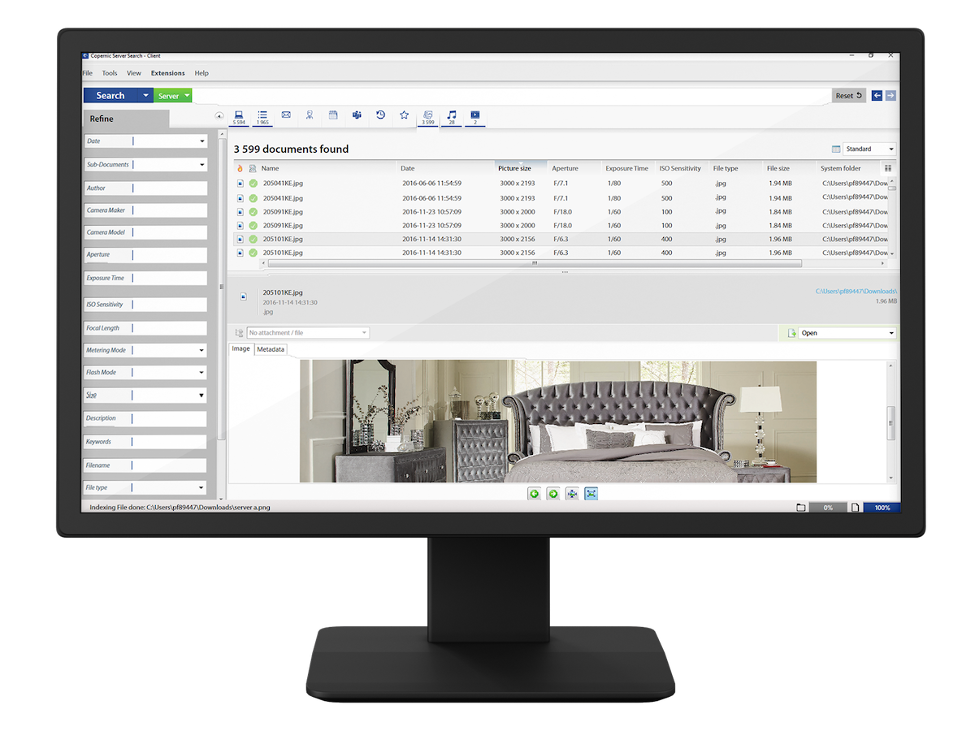
The Copernic Server Search Client with "Server" selected: 3,599 JPG files found, columns for picture size, aperture and ISO, the Refine pane on the left and an image preview below (vendor image, shown on a monitor).
The part that matters for a business is permissions: results follow Windows Active Directory access rights, so a user only sees files they could open anyway, and HR's folder stays out of the sales team's results without separate indexes. The index stays on your own hardware. On the other side, Copernic's cloud sources (OneDrive, Google Drive, Gmail) and its AI extension are client-only, so the shared index covers your server, not your cloud storage.
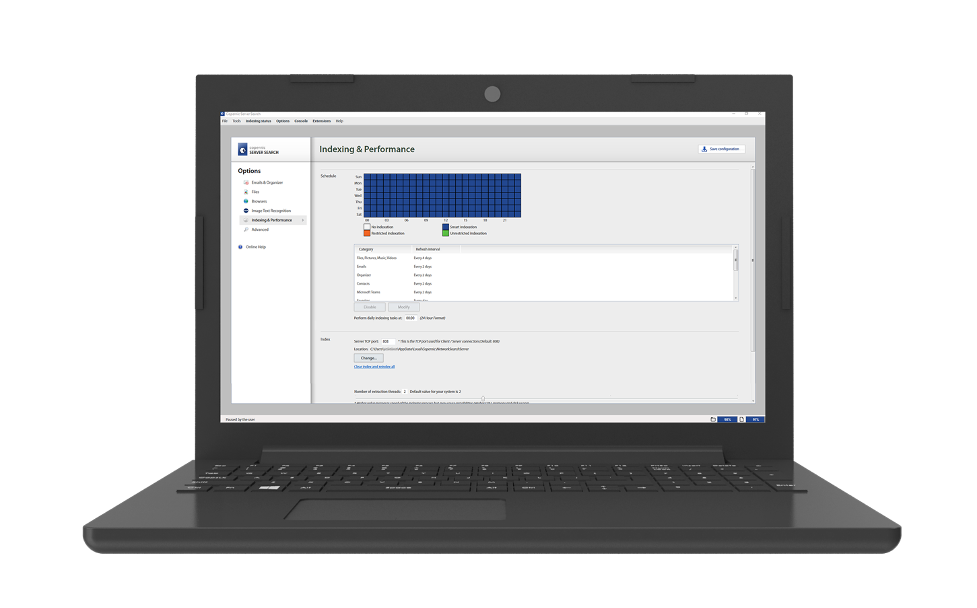
The server's Options, on the Indexing & Performance page: a weekly indexing schedule grid, refresh intervals per category and the index settings (vendor image, shown on a laptop).
What we like
- One index for the whole team instead of every PC crawling the same shares
- Results respect Active Directory permissions
- OCR, shared mailboxes and PST archives included
- Several releases in 2026; client MSI for Group Policy deployment
Watch out for
- A yearly subscription, priced by number of users
- Needs 8 GB of RAM at minimum (16 GB recommended)
- Windows clients only; Windows 7 and 8 clients are no longer supported
- Almost no public reviews of the server edition
The server edition has no user ratings yet on the directories that list it. Its client is built on Copernic Desktop Search, which has 3.4 out of 5 from 14 reviews on Capterra and 3.5 from 16 on G2, and those are for the single-PC product. With so little feedback, the 30-day trial on your own server tells you more than any rating.
Download Copernic Business Server Search TrialBuy Copernic Business Server Search (1 to 3 users)
Copernic Desktop & Cloud Search (Basic, Advanced, Elite)
Copernic Desktop & Cloud Search Basic, Advanced and Elite
- Price: $28.99, $44.99 or $95.99 a year per computer at checkout, renewing every 12 months
- Platform: Windows 11 and 10 (64-bit recommended); version 8.3.7, released October 21, 2026
- Trial: 30 days, all features, no credit card
- Best for: one person who wants deep, as-you-type search of their own files, mail and cloud folders
Copernic Desktop & Cloud Search is the same search engine as the server client, indexing one PC. It builds a keyword index of the folders, mailboxes and online accounts you add and answers as you type, with a preview pane and a Refine pane that narrows results by date, file type, size, author and folder. AND, OR, NOT and NEAR work in the search bar. The three packages differ by what they can index:
| Package |
Price a year |
What it indexes |
| Basic | $28.99 | Office files, PDFs, media, local Outlook mail and PST files, cloud folders |
| Advanced | $44.99 | Adds Outlook 365 online, Thunderbird, Eudora, e-books, WordPerfect, PDF Archive and an AI connector (your own Gemini or OpenAI key) |
| Elite | $95.99 | Adds Gmail, Teams, SharePoint, IBM Notes, OCR of images and scans, Visio, Photoshop, Illustrator and AutoCAD |
Most people whose files are Office documents, PDFs and Outlook only need Basic. Advanced is worth it for Thunderbird mail or the AI tools; Elite only when you search Gmail, Teams, SharePoint or scanned documents every day. Each license covers one computer. The interface is the one shown in the server client screenshot above, minus the Server switch.
What we like
- Results as you type, with previews and refine filters
- Basic is cheap for what it reads, including PST files
- Elite reaches Gmail, Teams, SharePoint and scans in one list
Watch out for
- Every package is a yearly subscription
- 399 MB installer, and 8 GB of RAM at minimum
- Users have long complained about slow first indexing and memory use
- Support scores are low (2.0 for customer service on Capterra from 10 reviews)
"this software is really good. The ocr is pretty straigthforward and its search works very well." (angelmartinezn, AlternativeTo, June 7, 2021)
"This program takes forever to index and it uses a lot of memory of the system." (omaffud, AlternativeTo, July 11, 2014)
Capterra shows 3.4 out of 5 from 14 reviews and G2 3.5 from 16. Praise is about search depth and speed once indexed; complaints are about indexing load, support and the move to paid subscriptions.
Download Copernic Desktop TrialBuy Copernic BasicBuy Copernic AdvancedBuy Copernic Elite
Lookeen Desktop Search
Lookeen Desktop Search (Lookeen 2026, version 14)
- Price: Basic $9, Business $12 and Premium $25 per user a month, billed yearly ($108, $144 and $300 a year); Lookeen Server priced on request
- Platform: Windows 10 and 11, 64-bit; Outlook add-in for classic Outlook 2016 to 2024 and Microsoft 365; version 14.1.172.0
- Trial: 14 days, full functionality
- Best for: people and firms whose searching is mostly in Outlook, Exchange public folders and PST archives
Lookeen Desktop Search is the Outlook-first alternative. It indexes emails, attachments, calendar items, tasks, contacts, PST and OST files and on-premises Exchange public folders alongside files on local, external and network drives, in more than 60 formats, and it opens from the taskbar or by pressing CTRL twice. Its Outlook add-in puts the search inside classic Outlook. Lookeen 2026 added a new interface, indexing that Lookeen says is up to 10 times faster than version 12, tags and labels, a Discovery Panel and an AI assistant that summarizes and compares documents. Business adds Group Policy management and OCR; Premium adds a shared index.

The setup wizard of an earlier build, Lookeen 2025 version 14.1.19.0.
Lookeen is the better choice than Copernic if Outlook is the center of your day, and it can be rolled out company-wide with Group Policy. Note that owners of Lookeen 12 or older need a new license for version 14 (Lookeen offers 30% off the upgrade).
What we like
- Deepest Outlook and Exchange coverage here, with an in-Outlook add-in
- No limit on index size; data stays on your PC
- Tags and AI summaries in the current version
Watch out for
- Per-user monthly pricing; $108 a year is the cheapest plan
- Only a 14-day trial
- OCR and Group Policy need Business or higher
"This product is worth EVERY PENNY you spend on it and more! I can find ANY indexed item in about 2 seconds, preview it, and manage it (delete, move, copy, etc.). It is MUCH better than the Outlook built-in search." (Henry Dana, quoted on Lookeen's site)
"This new 2025 version is a dream! My computer runs noticeably faster with and without Outlook open." (Jeremy Ross, Trustpilot, November 19, 2024)
"I could literally find NO difference at all from the v10 I had been using." (Walker, Trustpilot, November 22, 2024, who also reported getting no reply from support). Trustpilot shows 4.2 out of 5 from 32 reviews and G2 4.0 from 32.
Download Lookeen Trial
Search Text In Files
Search Text In Files by Vovsoft
- Price: $19 once, lifetime license. Black Friday: the BLACKFRIDAY2026 code took it to $9.50 at checkout on November 24, 2026; Vovsoft's sale runs through December 1, 2026
- Platform: Windows 11 back to Vista, installer or portable; version 5.4
- Trial: no time limit, all search features, nag screen, personal use only
- Best for: finding which files in a folder contain a phrase, without an index running in the background
Search Text In Files is the no-index option. You pick a folder, a filename filter such as *.docx and the text, press Start, and it reads every file and lists the matches, including text inside PDF, Word, Excel, PowerPoint, Outlook MSG, PST and OST files and MBOX mailboxes. It can show the matching lines with line numbers, export results to CSV or Excel, and list files that don't contain a phrase ("which contracts lack the new clause?"). Nothing runs in the background, and it fits on a USB stick.

A search for "dragon" in *.srt files: the Found Lines window lists 337 matching lines with file name and line number, and an Export to File button.
What we like
- One-time $19, and the trial has every search feature
- Reads Outlook PST/OST and MBOX files, not just text
- Found lines and CSV/Excel export
Watch out for
- No index: big folders take as long as reading them takes
- Can't read scanned PDFs or images
- No regular expressions or AND/OR queries
"Invaluable for finding old files with arcane labels containing wanted information." (RobLVT, on Vovsoft's site)
Vovsoft's page shows 4.5 out of 5 from 8 reviews. Enter BLACKFRIDAY2026 in the coupon box at checkout for the sale price.
Download Search Text In FilesBuy Search Text In Files
Cost and size compared
First-year cost for one user (USD)
Lookeen Basic (yearly billing)$108.00
Copernic Desktop Elite (yearly)$95.99
Copernic Desktop Advanced (yearly)$44.99
Copernic Desktop Basic (yearly)$28.99
Search Text In Files (one-time)$19.00
Copernic Business Server Search ($999 a year for 1 to 3 users) is left out of this chart because it's priced per server, not per person. Prices before coupons, checked on November 24, 2026.
Installer size (MB)
Copernic Desktop & Cloud Search399
Copernic Business Server Search (server)269
Lookeen Desktop Search182
Sizes of the installers on the vendors' download servers on November 24, 2026. The index itself needs more: Copernic asks for at least 2 GB of disk for it.
Which should you choose?
| Your situation |
Pick |
Why |
| A team searching a Windows file server | Copernic Business Server Search | One index, Active Directory permissions, shared mailboxes and OCR |
| Your own documents, PDFs and Outlook mail | Copernic Desktop & Cloud Search Basic | Deep content search for $28.99 a year |
| Gmail, Teams, SharePoint or scans in the same search | Copernic Desktop & Cloud Search Elite | The only package here that reaches those sources |
| You search Outlook and Exchange public folders all day | Lookeen Desktop Search | Built around Outlook, with an add-in inside it |
| Now and then, one folder, no background indexing | Search Text In Files | $19 once, portable, found lines and export |
| File names only, on your own PC | Windows Search | Free and already there |
Who should skip what: skip Copernic Business Server Search if you're one person (Copernic Elite indexes one PC for about a tenth of the price) or if your files live in Microsoft 365 rather than on a server. Skip the Copernic desktop packages on a PC with less than 8 GB of RAM, or if you refuse subscriptions. Skip Lookeen if you rarely use Outlook. Skip Search Text In Files if you want instant results across a whole drive; that's what an index is for.
What commonly goes wrong
- Judging the tool before the first index finishes. Indexing tools are slow and busy the first time through a big share or mailbox. Let it finish, ideally overnight, before deciding.
- Scanned PDFs don't show up. A scan has no text layer; you need OCR (Copernic Elite and Business Server, Lookeen Business and Premium).
- Counting users wrong. Copernic's server price jumps from $999 to $1,699 a year at the fourth user; count everyone who will search.
- Switching off permissions. Copernic's server only filters results by Windows rights while its Security option is on.
- Forgetting the renewal. Copernic and Lookeen are yearly plans; only Search Text In Files is a one-time purchase.
FAQs
What is the best desktop search software for Windows 11?
Copernic Desktop & Cloud Search is the best all-round pick for searching file contents on Windows 11, starting at $28.99 a year. Lookeen Desktop Search is better if your searching is mostly in Outlook, and Search Text In Files is the cheap no-index choice.
How do I search the contents of files on a network share?
Copernic Business Server Search indexes the share on the server so everyone can search it quickly. For a one-off search of a share from your own PC, Search Text In Files reads the files directly without an index, which works but takes as long as reading them.
Will people see files they don't have permission to open?
No, not with Copernic Business Server Search's default settings: it filters results by each user's Windows Active Directory rights. An administrator can switch that off, so leave the Security option on.
Can these tools search inside Outlook PST files?
Yes. Copernic (desktop and server), Lookeen and Search Text In Files all read PST files. Copernic and Lookeen index them for instant searches; Search Text In Files reads them each time you search.
Is there a free desktop search tool?
Windows Search is built in and free. Search Text In Files has a trial with no time limit for personal use, with a nag screen. Copernic and Lookeen offer 30-day and 14-day trials.
Do these programs upload my files to the cloud?
No. Copernic and Lookeen keep the index on your own PC or server; Lookeen says only license data is sent to its licensing server. Copernic's AI features in Advanced and Elite send text to the AI provider you connect, with your own key, only when you use them.
Do any of them run on a Mac?
No. Copernic, Lookeen and Search Text In Files are all Windows programs.
Is Copernic Desktop Search still free?
No. Copernic Desktop & Cloud Search is sold as yearly packages ($28.99, $44.99 and $95.99 at checkout) with a 30-day trial; the old free Lite version is gone.
Conclusion
If a team keeps asking where a document is, and the answer is somewhere on a Windows file server, Copernic Business Server Search is the one to buy: it indexes the shares and shared mailboxes once, keeps permissions intact and stays on your own hardware. The reason not to is price for very small teams, where three copies of Copernic Desktop Elite cost less. For one person, Copernic Desktop & Cloud Search Basic is the best value, Lookeen suits Outlook-heavy work, and Search Text In Files answers the occasional question for $19. Run the 30-day trial against your real server before you pay.
Download Copernic Business Server Search TrialBuy Copernic Business Server Search