losLab PDF Library: A Full-Source PDF Engine for Delphi and C++Builder
losLab PDF Library is a $750 developer SDK for creating, editing, rendering, signing and validating PDF files inside your own software, with full Object Pascal source for Delphi, C++Builder and Lazarus. It's for teams shipping applications that generate invoices, signed contracts or archive-ready documents.
Many Delphi shops end up gluing a generator, a viewer and a signing tool together, then fighting the gaps between them. This library puts those jobs into one engine you can compile yourself.
Quick facts
- Version: 3.730.66, released October 28, 2026
- Developer: losLab (also sold as PDF Library for Delphi)
- IDEs: Delphi and C++Builder XE5 to 13, Free Pascal 3.2.2 and Lazarus
- Other languages: DLL and ActiveX for C#, VB.NET, VBA, PHP, Visual C++ and others, plus a macOS Dylib
- Platforms: Windows x86, x64 and ARM64, headless Linux and macOS on x64 and ARM64
- Price: $750 for the Single (one developer) license on the order page
- Evaluation: free demo package
- Refunds: all sales are final
What we checked: the demo package at 133 MB, dated November 4, 2026 on the vendor's server, and the order page, which showed $750 for losLab PDF Library, Single License, on November 10, 2026. We didn't compile the library or run its demos.
Download Free TrialBuy Now
Overview
losLab PDF Library centers on one class, TPDFlib, in the PDFlibrary unit. You create the object, call methods such as DrawText and SaveToFile, and free it. There is no external PDF service and no document leaves your application.
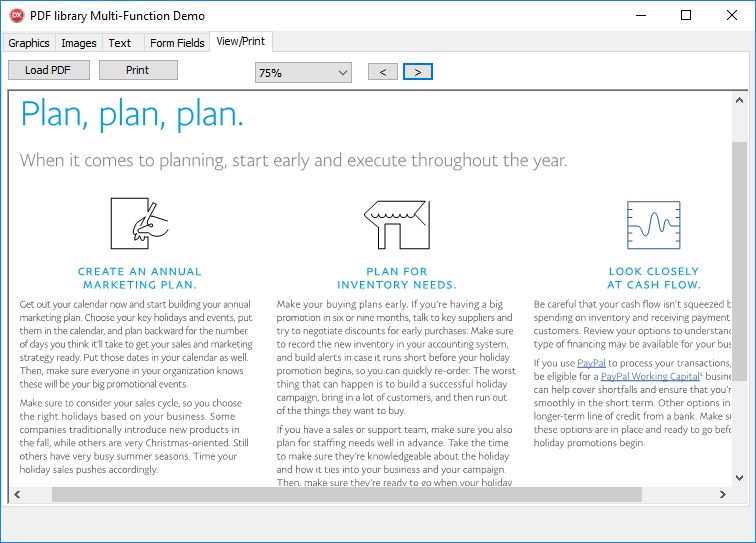
The Multi-Function Demo showing a PDF in its View/Print tab.
The release notes show steady work: the current version adds FIPS 204 identifiers for post-quantum ML-DSA signatures, following recent releases that added a Delphi Linux64 target and one-call PDF/X conversion.
Features
Create, edit and assemble
losLab PDF Library draws text, vector graphics, images, QR codes and barcodes, and splits, merges, copies, rotates and rebuilds pages from existing documents.
Three rendering engines
losLab PDF Library switches between GDI+, PDFium and Cairo for screen preview, bitmap export and printing, so you can pick the renderer that suits a given platform.
Signatures and security
losLab PDF Library creates PAdES signatures with selectable SHA-256, 384 or 512 digests, supports RSA, ECDSA, Ed25519 and ML-DSA keys, and encrypts files with AES-256 using hardware AES-NI on Windows.
Standards conversion
losLab PDF Library converts existing files with ConvertToPDFA, ConvertToPDFX and ConvertToPDFE, and AutoTagPages adds structure tags to untagged pages, each with a report of what changed.
Very large files
losLab PDF Library opens PDFs beyond 2 GB through on-demand loading and 64-bit offsets, and merges lists of files in one pass while keeping bookmarks, form fields and tags.
Content extraction
losLab PDF Library exports text in reading order to DOCX, JSON, CSV or Markdown, detects tables, and replaces Unicode text exactly.
Benefits
- You own the code path. Full source means no black box in your build.
- One engine across languages. The same API reaches C# and VB.NET through DLL or ActiveX.
- Royalty-free deployment in unlimited applications within your developer scope.
Real-World Uses
- An ERP producing ZUGFeRD or Factur-X invoices and archiving them as PDF/A.
- A contract system applying long-term signatures.
- A CI pipeline that fails a build when a generated PDF breaks PDF/UA rules (preflight reports need Enterprise).
- A legacy Delphi desktop app gaining PDF print and preview.
Who It's For, and Who Should Skip It
Buy it if you build Delphi or C++Builder software that has to create and sign PDFs and you want source-level control. Skip it if you only need to display PDFs, where the vendor's cheaper PDFium component fits, or if you're a .NET-only shop, because the DLL route is less natural than a native .NET library. If you aren't a developer, this isn't an end-user PDF editor.
Usage Guide
- Download the demo package and unzip it.
- Open the HelloWorld or Showcase project in your IDE.
- Run the domain labs, such as ComplianceLab or SecurityLab, against your own files.
- Add the library unit to your project and create a
TPDFlib object. - Buy the tier that matches your developer count.
Before you buy
All sales are final because the package contains source code, so run the demo projects against your own PDFs first. One year of updates and email support is included. After that, renewal costs 50% of the list price, and the right to use the purchased version stays with you.
Where it falls short
- Automated PDF/A, PDF/UA and Arlington checks, timestamping and long-term signatures need the $7,500 Enterprise tier, and e-invoice validation needs Small Business.
- On Linux and macOS it runs headless, and rendering, cryptography and XML validation depend on platform-specific providers.
- There's a learning curve: this is an API, not a visual designer.
Comparisons
losLab PDF Library or HotPDF
Both losLab products create, edit, render, sign and validate PDFs. losLab PDF Library adds switchable GDI+, PDFium and Cairo rendering, structured DOCX export, EU trust-list tools and packaged DLL, ActiveX and Dylib APIs. HotPDF has a built-in renderer, dynamic XFA and HTML/CSS layout.
Editions and Pricing
| Tier | Price | Developers | Adds |
|---|
| Single | $750 | 1 | Core feature set, full source |
| Small Business | $2,250 | Up to 5 in one company | Document comparison, e-invoice rules, Bates numbering, PDF/VCR merge |
| Enterprise | $7,500 | All in one company | Long-term signatures, HSM signing, validation, preflight, redaction, priority support |
The vendor also sells DCU editions with precompiled units instead of source at half those prices, directly from its own store.
FAQs
Can I use losLab PDF Library from C# or VB.NET?
losLab PDF Library ships DLL and ActiveX builds that C#, VB.NET, VBA, PHP and Visual C++ can call, and the same API sits behind them.
Which Delphi versions does losLab PDF Library support?
losLab PDF Library supports Delphi and C++Builder XE5 through 13, plus Free Pascal and Lazarus on Windows.
Does losLab PDF Library require runtime royalties?
losLab PDF Library is royalty-free for unlimited applications within the developer scope of your license.
What happens when losLab PDF Library updates expire?
losLab PDF Library keeps working at the version you bought. Renewal within six months of lapsing costs 50% of list, six to twelve months is 70% by arrangement, and after a year a new license is needed.
Can I get a refund on losLab PDF Library?
losLab treats all sales as final because the packages contain source code or precompiled binaries with no copy protection.
System Requirements
- Delphi or C++Builder XE5 to 13, or Free Pascal 3.2.2 / Lazarus
- Windows x86, x64 or ARM64 for full features
- Linux or macOS on x64 or ARM64 for headless builds
Conclusion
At $750 for one developer, losLab PDF Library is good value if your Delphi or C++Builder product has to produce, sign and archive PDFs and you want source you can step through. The pace of releases is its strongest point. The main reasons not to buy are that the compliance tools sit in much higher tiers and that sales are final, so test the demo before you commit.
Download Free TrialBuy Now