HotXLS Delphi Component: Read, Write and Calculate Excel Workbooks Without Excel
HotXLS Delphi Component is a $650 Object Pascal library that lets Delphi, C++Builder and Lazarus programs create, edit, calculate and export XLS, XLSX, XLSB and ODS workbooks with no copy of Microsoft Excel on the machine. It is for developers who generate reports on servers or in unattended jobs.
Driving Excel through automation works on a developer's desk and falls over in a Windows service. A library that reads and writes the workbook format itself removes that dependency.
Quick facts
- Version: 2.384.433, released October 27, 2026
- Developer: losLab Software
- IDEs: Delphi and C++Builder XE5 to 13 Florence, Free Pascal 3.2.2 with Lazarus
- Targets: Windows including ARM64 via Free Pascal, with a portable core for Linux and macOS on x64 and ARM64
- Formats: XLS, XLSX, XLSB, ODS, plus HTML, RTF, CSV and TSV export
- Price: $650.00 for the Single license (one developer)
- Includes: full Object Pascal source, one year of updates and one year of email support
- Demo: free download
- Refunds: none, because the product ships with source code
- What we checked: demo package (164 MB) available from the vendor and checkout price $650.00, both on November 9, 2026. We did not compile the library or generate a workbook with it.
Before you buy
- Every sale is final. losLab's refund policy treats source-code libraries as non-refundable once sold, so test the demo package with your own workbooks first.
- Check the formula reference. The built-in engine covers a long list, including LAMBDA and dynamic arrays, but not necessarily every function your templates use.
- Encrypted input varies. Reading password-protected files depends on the format and platform, so confirm yours in the documentation.
- Small Business and Enterprise add features. The report engine and workbook compare start at Small Business, and XLSX digital signing is Enterprise.
Download Free TrialBuy Now
Overview
HotXLS has two workbook APIs. lxHandle deals with classic BIFF8 .xls files, and lxHandleX deals with .xlsx, with XLSB detected automatically and ODS available for import and export. Workbooks are read, calculated and written inside your process.
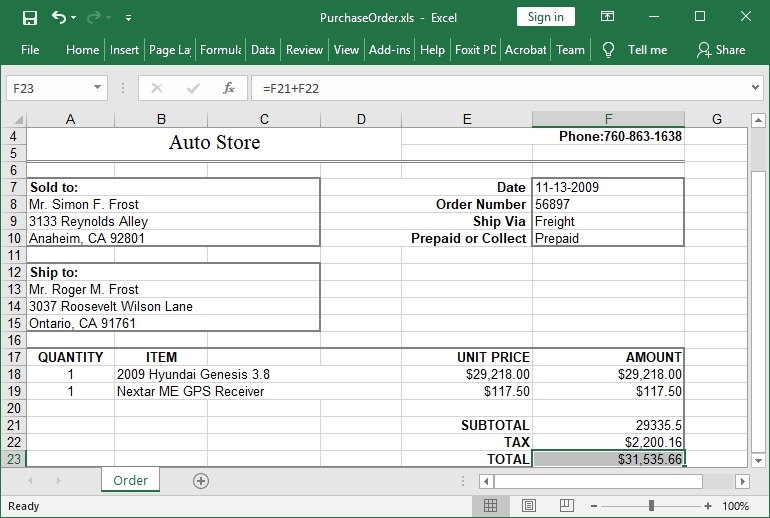
A purchase order created through the HotXLS API and opened in Excel, with a formula in the total cell. The picture is the vendor's own and shows an older workbook.
Features
A formula engine that does not need Excel
HotXLS calculates cross-sheet references, defined names, dynamic-array spills and LAMBDA expressions with closures, along with GROUPBY and PIVOTBY. You can add your own functions through the OnUserFunction callback.
Native Pivot reports
HotXLS produces Pivot output with compact, tabular and outline layouts, grouping, all eleven subtotal functions, calculated fields, Top and Bottom filters, slicers and timelines.
Edits that keep what Excel wrote
HotXLS preserves Excel-authored notes, threaded comments, VBA, tables, form controls and drawings during targeted edits, and a conversion-loss report or strict save can stop silent data loss.
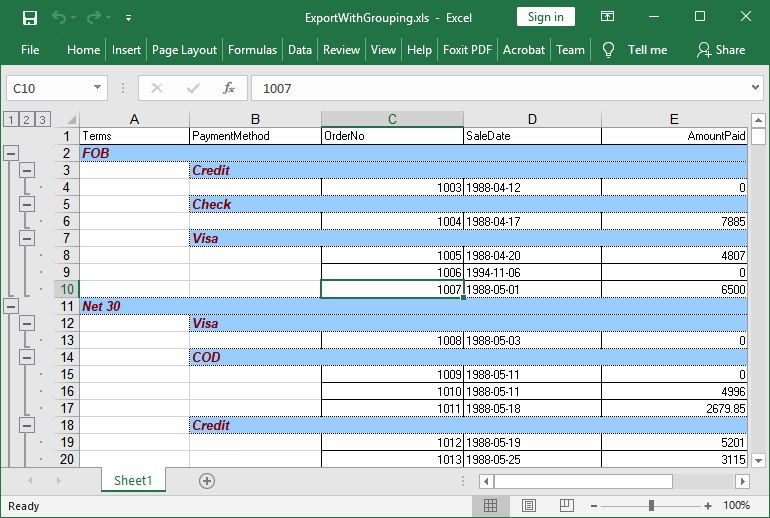
Grouped rows with outline levels, exported through the HotXLS component and opened in Excel.
PDF, SVG and PNG output
HotXLS renders worksheets, charts and images to PDF, SVG or PNG using print plans that honor print areas, titles, page breaks and scaling.
One codebase across platforms
HotXLS covers Delphi and C++Builder, Lazarus on Windows including ARM64, and an opt-in portable core that compiles on Linux and macOS for x64 and ARM64, with encrypted XLSX output on all three.
Export helpers for existing data
HotXLS exports workbooks, ranges, database tables and DBGrid content to Excel, HTML, RTF, CSV and TSV, so an existing grid can become a report with little code.
Benefits
Your reporting stops depending on Office licenses and interactive desktop sessions, which is often what breaks in production. Full source means you can fix or trace behavior yourself, and royalty-free deployment under the developer-count license keeps costs fixed as your user base grows.
Real-World Uses
- A Windows service that emails a styled sales workbook every night.
- Filling a finance team's XLSX template without disturbing their comments and VBA.
- Converting a Linux server's data exports to XLSX and PDF.
- Turning a Delphi DBGrid into a grouped Excel report with one call.
Who It's For, and Who Should Skip It
Good fit: Delphi, C++Builder and Lazarus developers who need dependable Excel file handling on servers or across platforms, and who value having the source.
Skip it if you only need to dump simple tables, because CSV export or a free library can do that. If you are not writing in Pascal, look for a library built for your language.
Usage Guide
- Download the demo package and run the QuickStart project for your IDE.
- Choose lxHandle for .xls or lxHandleX for .xlsx.
- Create a TXLSWorkbook, add a sheet and set cell values and formulas.
- Call SaveAs with your file name.
- Test against your real templates before you buy.
Where it falls short
- No independent reviews or developer comparisons are available, so the feature claims are the vendor's own.
- The cost is high for a single developer who only needs basic reading and writing.
- Support for encrypted input is uneven across formats and platforms.
- Updates and email support stop after the included year unless you renew.
Editions and Pricing
| Edition | Price | Developers | Source |
|---|
| Single | $650 | 1 | Yes |
| Small Business | $1,950 | Up to 5 | Yes |
| Enterprise | $6,500 | All in one company | Yes |
| DCU Single | $325 | 1 | Precompiled only |
| DCU Small Business | $975 | Up to 5 | Precompiled only |
| DCU Enterprise | $3,250 | All in one company | Precompiled only |
Small Business adds the compiled report engine and workbook compare with import validation. Enterprise is the full edition, which adds XLSX digital signing among other features.
FAQs
Does HotXLS need Microsoft Excel installed?
HotXLS does not need Excel or Office at runtime, which makes it suitable for servers and unattended jobs.
Can HotXLS run on Linux?
HotXLS has an opt-in portable core that compiles with Free Pascal on Linux and macOS for x64 and ARM64.
Which Delphi versions does HotXLS support?
HotXLS supports Delphi and C++Builder XE5 through 13 Florence.
Is HotXLS royalty-free?
HotXLS allows royalty-free use in unlimited applications under the license's developer count.
Can I get a refund on HotXLS?
HotXLS is delivered with source code, so losLab treats every sale as final. Try the demo package before you pay.
Does HotXLS still support the old .xls format?
HotXLS keeps a dedicated API for Excel 97-2003 BIFF8 .xls files alongside its XLSX support.
System Requirements
- Delphi or C++Builder XE5 to 13 Florence, or Free Pascal 3.2.2 with Lazarus
- Windows, or Linux and macOS through the portable core
- Microsoft Excel is not required
Conclusion
Worth $650 for a Delphi shop that ships Excel files from servers. HotXLS replaces Office automation with a library you can read and step through, and that independence is the reason to buy. The main reason to hesitate is that sales are final and no outside reviews exist, so the demo has to prove itself against your own templates.
Download Free TrialBuy Now