Software Setup Package Creator (DRPU Setup Creator): A Form-Based EXE Installer Builder for Windows Programs
Software Setup Package Creator, sold by DRPU Software as DRPU Setup Creator, is a $69 Windows tool that turns your program's files into a single self-extracting EXE installer, with a matching uninstaller, by filling in forms instead of writing a setup script. It's aimed at small developers and in-house IT staff who ship a simple Windows application and want a standard install wizard without learning Inno Setup or NSIS.
If you've ever shipped a program as a ZIP file, this is the step up: your users get a normal setup wizard, a Start menu entry, a desktop icon and an entry in Add/Remove Programs, and you get one EXE file to put on your website.
Quick facts
- What it is: an installer builder that produces self-extracting EXE setups and uninstallers for Windows software
- Developer: DRPU Software Pvt. Ltd. (India), which sells it as DRPU Setup Creator
- Version: 5.3.1.2
- Runs on: Windows only. There's no Mac or Linux version, and it builds Windows installers only
- Output: one EXE setup file, optionally compressed, with a 64-bit setup option
- Scripting: none. Every setting is a field, checkbox or file picker
- Price: $69.00 for a license, one edition
- Trial: a free demo download. Setups built with it carry a "Demo Limitation" notice
- Refunds: none. DRPU's terms say downloadable products are not refundable
- What we checked: we downloaded the demo installer from DRPU on November 2, 2026: a 3.6 MB (3,779,872-byte) EXE, digitally signed by DRPU Software Private Limited, whose own about dialogs read "Version 5.3.1.2" and "Copyright 2007-2023". Its setup engine contains the "Demo Limitation!" message quoted below. The order page charged $69.00 for "Software Setup Package Creator" with no discount and no renewal term shown, also on November 2, 2026. We didn't install the program or build a setup with it.
Before you buy
- Test the demo first, because you can't get your money back. DRPU's terms state that downloadable products are not refundable and that online orders can't be cancelled. They ask you to evaluate the demo before ordering, and that's the only safety net you get.
- The demo marks what it builds. The setup engine in the demo contains a "Demo Limitation!" message that reads "This Setup has been created using: DRPU Setup Creator ... Full version will not show this message." Use the demo to check that your files, shortcuts and registry keys install correctly, not to ship a release.
- The order page says "Software Setup Package Creator", while DRPU's website, the program and its windows say "DRPU Setup Creator". They're the same product.
- It's a simple tool. If your program needs the .NET runtime, a Visual C++ redistributable or a database engine installed first, this isn't built for that (see "Where it falls short").
Download Free TrialBuy Now
Overview
DRPU Setup Creator works like a settings dialog for your installer. The main window has an Install column with six pages (General, Files, Dialogs, Shortcuts, Registry and Interface) and an Uninstall column with three (General, Files and Registry). You work down the buttons, filling in each page, then press the big Create Setup button. Two more buttons, Run Created Setup and Open Output Folder, let you test the result straight away.
Project settings can be saved and reopened with New, Open, Save and Save As, so the next release of your program is a matter of changing the version number and the files, then building again. Placeholders such as %ProductName%, %ProductVersion%, %CompanyName%, %ProgramFiles% and %InstallPath% fill in the wizard's titles and paths for you, so a version change carries through the whole setup.
The demo's own installer is a good sample of the output: DRPU builds it with DRPU Setup Creator, and it's a plain, signed 3.6 MB EXE with a classic Windows install wizard, a license agreement page, an install location page and side banner images.
Features
Product details, icon and compression on one page
DRPU Setup Creator's General page holds everything that identifies your setup: product name, version, company name, the wizard's title text, the copyright line, where to save the finished setup EXE, and the icon the EXE file shows in Explorer. A checkbox applies file compression to shrink the compiled setup, and a progress bar shows the build. A separate Create 64 Bit Setup checkbox sits under every page.

The General Information page: product name, version, company, title and copyright text, the output file name and EXE icon, with file compression running during a build.
Any number of files and folders, each with its own destination
DRPU Setup Creator's Files page lists every file the setup installs in two columns: the source file on your PC and the destination path on the user's PC, usually under %InstallPath%. Add Files picks single files and Add Directory adds a whole folder. Edit, Clear Selected and Clear All fix mistakes. Any file type goes in: the vendor's own example mixes an MSI, an Illustrator file, a font, an HTML page and an XPS document.
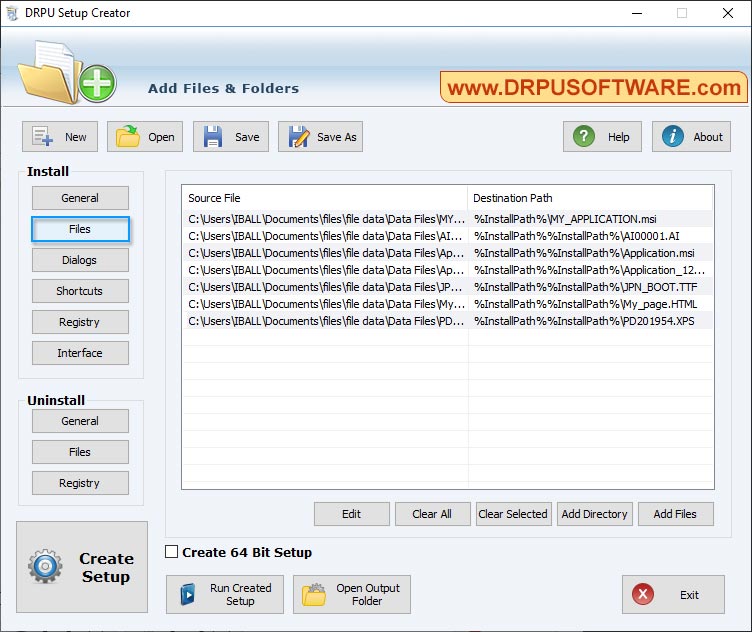
The Add Files & Folders page with seven files queued, each mapped to a path under %InstallPath%.
Install folder, Start menu group, license page and "Launch" checkbox
DRPU Setup Creator's Dialogs page decides what the user sees and where things go. The default product folder (for example %ProgramFiles%\%CompanyName%\%ProductName%) and the Start menu group can each be locked with Enforce Path so the user can't change them. You can add a "Launch Application" checkbox at the end of the wizard, pointing at the file to run, and an End User License Agreement page that shows a text file of your choice.
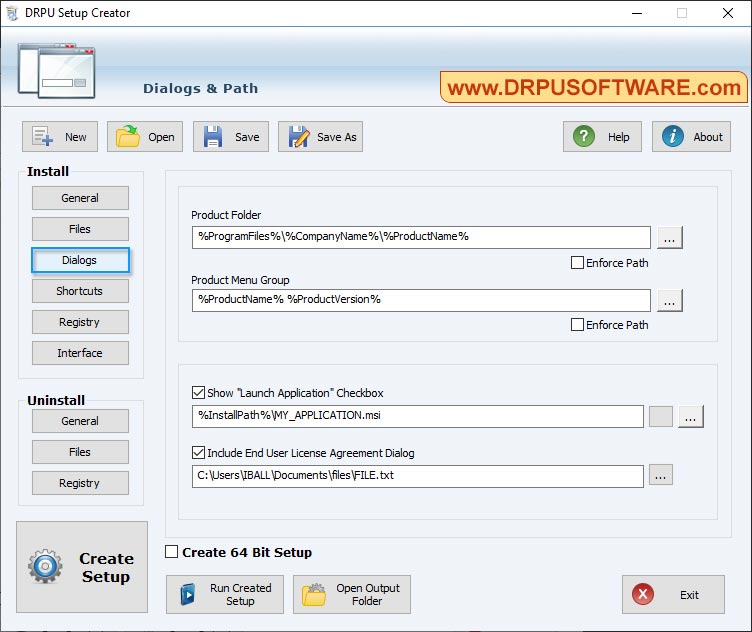
The Dialogs & Path page: product folder and menu group with Enforce Path, the Launch Application checkbox and the license agreement file.
Shortcuts, registry entries and a branded wizard
DRPU Setup Creator creates desktop icons and Start menu shortcuts for the files you choose, and writes registry entries during installation: you give the root key, sub key name, value and registry type. The Interface page sets the look of the wizard, including the banner images (the demo's own setup installs four "Side Banner" images). Windows Report's review also lists a log file of the setup's activity for later checking.
A matching uninstaller with an Add/Remove Programs entry
DRPU Setup Creator builds the uninstaller alongside the setup and registers it in Control Panel's Add/Remove Programs. Its own three pages set the uninstall window's title, a product web page, and which files, folders and registry entries are removed when the user uninstalls, so your program doesn't leave settings behind.
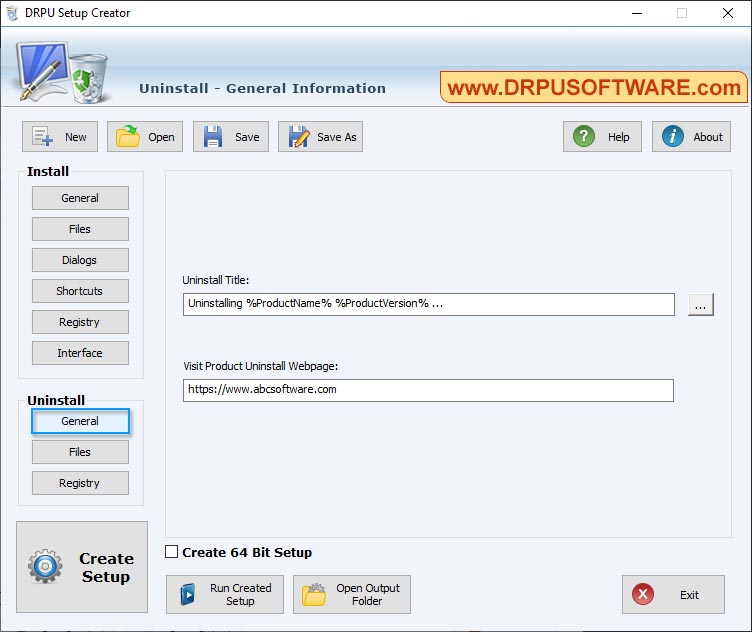
Uninstall - General Information: the uninstall window title and the product web page.
Benefits
- A professional first impression for little effort. A customer who downloads one setup EXE, clicks Next a few times and finds your icon on the desktop trusts the program more than one who gets a ZIP file.
- No setup language to learn. Inno Setup and NSIS are free and far more capable, but both are built around a script. Here every option is visible on screen, which suits someone who builds an installer twice a year and forgets the syntax in between.
- Clean removal. Because the uninstaller is defined in the same project, users can remove your program properly from Windows' own list of installed apps.
Real-World Uses
- A shareware author's first installer. You've written a small utility in Visual Basic or Delphi and want a download link on your site. One project file holds the EXE, its help file and a license text, and every new release is a version change and a rebuild.
- An office's in-house tool. The IT person who wrote a database front end for the accounts team packages it so each colleague runs one EXE and gets the same folder, the same Start menu entry and the same registry settings.
- Wrapping an MSI in an EXE. The vendor's own example includes an MSI file and a "Launch Application" checkbox pointing at it. If converting MSI packages is your main job, though, DRPU sells a separate MSI to EXE Creator for that.
Who It's For, and Who Should Skip It
It fits independent developers, small software shops and in-house IT staff who ship simple Windows desktop programs, want a standard install wizard with shortcuts, registry keys and an uninstaller, and would rather pay $69 once than learn a setup scripting language.
Skip it if:
- your program needs prerequisites installed first (.NET, Visual C++ runtimes, SQL Server Express), services registered, or conditions checked during setup. A scriptable builder such as Inno Setup, NSIS or a commercial tool like Setup Factory or Advanced Installer handles those
- you need an MSI package for Group Policy or Intune deployment. This tool builds EXE setups
- you develop on a Mac or ship for macOS or Linux
- you're comfortable editing a script. Inno Setup is free and does everything this does and much more
Usage Guide
- Install and launch. Download the demo, run the setup, accept the license agreement and choose a folder. It places a desktop shortcut, and you can start it as soon as the setup finishes.
- Start a project. Click New, then on Install - General enter the product name, version, company, title and copyright text, choose where to save the setup EXE and pick an icon. Leave file compression ticked.
- Add your files. On Install - Files, use Add Files or Add Directory. Each file gets a source path and a destination such as
%InstallPath%\MyApp.exe.
- Set the dialogs. On Install - Dialogs choose the default product folder and Start menu group, tick Enforce Path if users mustn't change them, and add the license text and the "Launch Application" checkbox.
- Add shortcuts and registry keys on the Shortcuts and Registry pages, and set the banners on Interface.
- Define the uninstaller on the three Uninstall pages: its title, your product web page, and the files, folders and registry keys it should remove.
- Build and test. Tick Create 64 Bit Setup if you want a 64-bit setup, press Create Setup, then Run Created Setup to try it. Test on a clean PC or a virtual machine, not on the machine that already has your program.
- Save the project with Save As so the next release only needs a new version number and files.
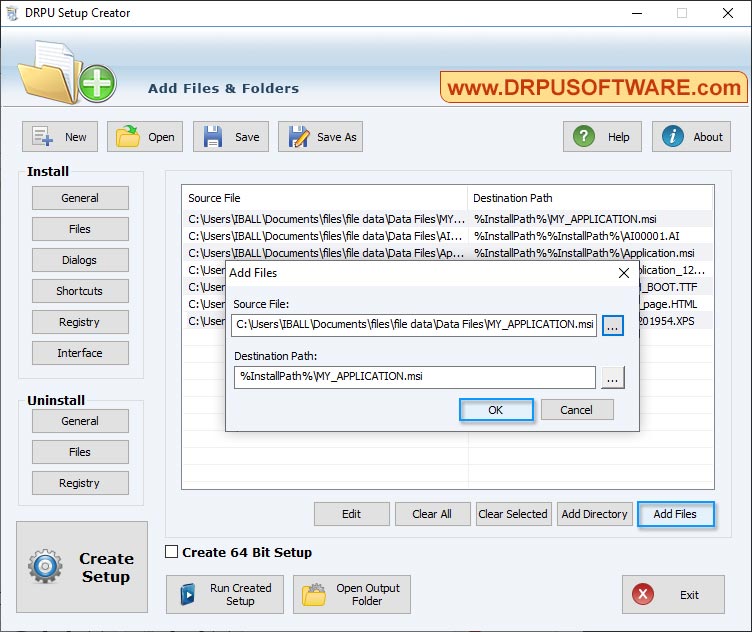
Step 3: the Add Files dialog, where you pick a source file and its destination path under %InstallPath%.
Where it falls short
- No prerequisites or dependencies. Windows Report's review says plainly that you "can't include dependencies in your setup packages", and there are no advanced settings: no custom actions, conditions or scripted steps.
- Few signs of active development. The current build's dialogs carry a 2007-2023 copyright, and Windows Report lists "No recent updates" as a con. DRPU lists no specific Windows versions, Windows 11 included.
- Thin documentation and support. Documentation is the built-in Help, and support is by email. You won't find a user forum or community answers the way you will for Inno Setup or NSIS.
- Code signing is up to you. The product page doesn't mention signing. Unsigned setups trigger Windows SmartScreen warnings for new publishers, so budget for a code signing certificate and sign the finished EXE with Microsoft's signtool.
What Users Say
Very few people have written about this product, and there's one substantial independent review of it.
Windows Report (Elena Constantinescu, updated October 4, 2023)
Windows Report's review is positive about ease of use and clear about the limits. Its pros are "Easy interface and options", "Most settings are free" and "Create install and uninstall wizards". Its cons are "No advanced options" and "No recent updates".
On the limits: "DRPU Setup Creator comes bundled with simple and straightforward options to compile installer and uninstaller files for your Windows programs. Before proceeding, though, you should know that it doesn't contain advanced settings. For instance, you can't include dependencies in your setup packages."
On the interface: "It's quite clear that it focuses on functionality instead of style, showcasing the software install and uninstall options in a neatly organized layout."
The verdict: "We've noticed that it creates setup packages quickly and doesn't hog system resources, so you don't need to worry about possible computer performance issues." And: "DRPU Setup Creator gets the job done and can be easily operated by any users, even those who have never created setup packages."
The review also says the demo can't add a custom file version to the setup and that the paid version is a fixed price for a lifetime license with no subscription.
Download sites
Free Download Manager's listing calls it "User-friendly interface suitable for non-technical persons" and, as cons, notes "As a shareware program, it requires a purchase for unrestricted use" and "Limited to Windows, not available for other operating systems like macOS or Linux." Its listing still shows version 3.0.2.4 and a $79 price, both out of date, so download the demo from DRPU's own site rather than a mirror. It shows no user ratings.
The pattern: people who write about it like that it's easy to learn and quick, and the same people point out that it's basic and hasn't changed much in years. Nobody reports it breaking, but nobody describes using it for anything complex either.
Comparisons
DRPU Setup Creator vs Inno Setup and NSIS
Inno Setup and NSIS are free and are what most small Windows developers use. Both are driven by a script file (Inno Setup has a wizard that writes the first script for you), and both can install prerequisites, run code during setup and handle cases this tool can't. DRPU Setup Creator's only advantage is that you never see a script. If you'd spend an afternoon learning Inno Setup anyway, it's the better and cheaper choice. If you want forms and nothing else, DRPU's approach is simpler.
DRPU Setup Creator vs DRPU MSI to EXE Creator
DRPU sells two developer tools. Setup Creator builds an installer from your program's files. MSI to EXE Creator takes an MSI package that already exists and wraps it as an EXE setup. Pick by what you start with: loose files or an MSI.
Editions and Pricing
| Version | Price | Setups it builds | Refund |
|---|
| Demo | Free | Show a "Demo Limitation" notice | Not applicable |
| Full license | $69.00 | No notice | None, downloads are non-refundable |
There's only one paid edition. At checkout you'll also be offered an optional "Download Insurance Service" ($2.80 when we checked) that lets you download the files again for 24 months. You don't need it if you keep a copy of the installer and your license details.
FAQs
Is DRPU Setup Creator free?
No. DRPU Setup Creator has a free demo, but the setups it builds show a "Demo Limitation" notice saying they were made with DRPU Setup Creator. Removing it takes the $69 license.
Is Software Setup Package Creator the same as DRPU Setup Creator?
Yes. Software Setup Package Creator is the name on the order page, and DRPU Setup Creator is the name on DRPU's website and in the program. DRPU's other websites also sell it as Setup Maker Software or Setup Builder Software.
Can DRPU Setup Creator make an MSI file?
No. DRPU Setup Creator builds self-extracting EXE setups. If your company deploys software through Group Policy or Intune and needs MSI packages, you need an MSI authoring tool instead.
Can DRPU Setup Creator install the .NET Framework or other runtimes with my program?
Not as a prerequisite step. DRPU Setup Creator copies files, creates shortcuts and writes registry keys, and Windows Report confirms you can't include dependencies. Tell users to install the runtime first, or use Inno Setup or NSIS, which can run a redistributable during setup.
Can I sell or give away setups made with DRPU Setup Creator?
Distributing setups is what DRPU Setup Creator is for: the vendor describes it as a way to deploy your applications "over internet or other media". Build them with the licensed version, though, or every user sees the demo notice.
Will Windows warn users about a setup made with DRPU Setup Creator?
Possibly. Windows SmartScreen judges a setup by its digital signature and reputation, not by the tool that built it. A setup from a new, unsigned publisher often gets an "unrecognized app" warning, so sign your finished EXE with a code signing certificate.
Is DRPU Setup Creator a subscription?
No renewal term appeared on the order page when we checked: it was a single $69.00 charge. Windows Report also describes a fixed price for a lifetime license.
Does DRPU Setup Creator run on a Mac?
No. DRPU Setup Creator is a Windows program and builds Windows installers only.
System Requirements
- Windows 10, 8.1, 8, 7, Vista or XP, 32-bit or 64-bit (as listed by Windows Report)
- Pentium-class processor
- 256 MB of RAM
- About 10 MB of free disk space
- Administrator rights to install
Conclusion
Worth it for a narrow group: developers of simple Windows programs who want a standard install wizard and uninstaller from a few forms and never want to touch a setup script. For them, $69 once is fair, and the result looks like any ordinary Windows installer.
The one reason to buy it is that it's genuinely simple: fill in the pages, press Create Setup, done. The main reason not to is that Inno Setup is free and does far more, and this tool can't install prerequisites and shows few signs of recent development. Since DRPU doesn't refund downloads, build and test a real setup of your own program with the demo before you order.
Download Free TrialBuy Now