PDFium Delphi Component: A PDF Viewer, Signing and Validation Toolkit for Delphi and Lazarus
PDFium Delphi Component is a $550 source-code SDK that lets Delphi, C++Builder and Lazarus developers put a PDF viewer inside their own applications, then sign, encrypt and validate those PDFs. It runs on Windows, and through Lazarus on Linux and macOS.
Google's PDFium engine draws PDF pages very well, and that is about all it does. A plain binding of its C API leaves you to write signatures, encryption and standards checks yourself. This product is losLab's attempt to fill that gap in Object Pascal.
Quick facts
- Version: 3.240.1, released October 28, 2026
- Developer: losLab Software
- IDEs: Delphi and C++Builder XE5 to 13.1 Florence, Lazarus / Free Pascal
- Targets: Win32 and Win64, Linux with Qt6, macOS with Cocoa
- Price: $550.00 for the Single license (one developer)
- Includes: full Object Pascal source, one year of updates and one year of email support
- Deployment: royalty-free
- Demo: free download
- Refunds: none, because the product ships with source code
- What we checked: demo package (82 MB) available from the vendor and checkout price $550.00, both on November 9, 2026. We did not compile the component or build a viewer with it.
Before you buy
- Every sale is final. losLab's refund policy treats source-code libraries as non-refundable once sold, so run the demo against your own PDFs and IDE version first.
- Some signing and validation features need Enterprise. B-LT and B-LTA signatures, HSM signing, trust validation, and the PDF/X, PDF/E, PDF/VT and PDF/R validators are Enterprise-only.
- You still ship PDFium. Your application must include a matching PDFium runtime for each platform, and XFA, OCR, color management and signing can add further providers.
Download Free TrialBuy Now
Overview
The package contains visual components for viewing and non-visual ones for document work. Drop TPdfView and TPdfThumbnailView on a form and you have zoom, selection, forms, links and thumbnails. Behind them sit units the vendor counts at about 154,000 lines of Object Pascal, more than 65,000 of which never call PDFium.
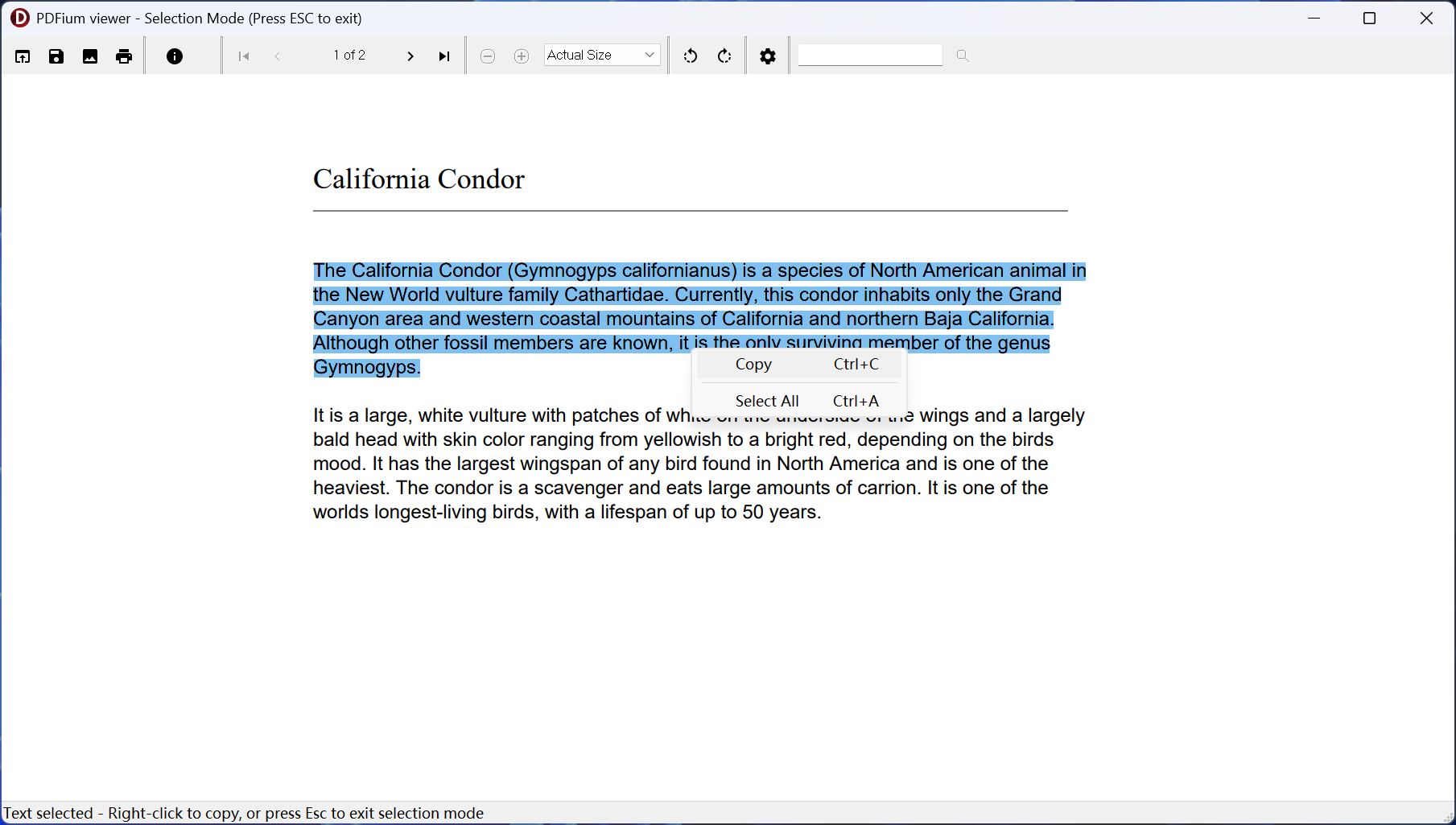
The VCL demo viewer in selection mode, with text highlighted and the Copy menu open.
Features
A ready-made viewer for your forms
PDFium Delphi Component provides TPdfView and TPdfThumbnailView with zoom, rotation, fit modes, continuous layout, text selection and form focus. Progressive rendering and on-demand reads aim to show a first page of very large PDFs before the whole file loads.
PAdES signing with remote and HSM keys
PDFium Delphi Component signs PDFs to the B-B through B-LTA profiles with RFC 3161 time-stamps, using Windows CNG, macOS Keychain or OpenSSL keys. A two-step remote flow keeps private keys inside a signing service.
Encryption written in Pascal
PDFium Delphi Component writes PDF 2.0 AES-256, ISO/TS 32003 AES-GCM and ISO/TS 32004 PDF MAC using its own Pascal AES, SHA and HMAC code, so there is no C crypto library to deploy for this.
Six families of standards validators
PDFium Delphi Component checks PDF/A, PDF/X, PDF/UA, PDF/E, PDF/VT and PDF/R documents and provides helpers to save and mark conforming files.
Text extraction, redaction and comparison
PDFium Delphi Component extracts structured text and tables to CSV or JSON, reflows content to HTML, performs verified redaction and compares revisions down to annotations and form widgets.
Read-aloud accessibility
PDFium Delphi Component includes read-aloud page following with word cursors, CJK-aware word breaks and table-aware reading order, so a reader you build can speak a document aloud.
Benefits
The main saving is the work you skip. Viewer state, asynchronous rendering, signature containers and revision writers are months of careful engineering, and with full source you can step through them when something misbehaves. No per-document or per-user runtime fees also keep the cost fixed however widely you ship.
Real-World Uses
- A document management system that needs an embedded reader with search and thumbnails.
- An approval tool that applies PAdES signatures through a company's HSM.
- A government-facing app that must validate PDF/A before accepting uploads.
- A desktop reader with read-aloud support for visually impaired users.
Who It's For, and Who Should Skip It
Good fit: Delphi, C++Builder and Lazarus teams building PDF readers or review tools into native applications, especially those who want source code.
Skip it if your main job is generating PDFs from code, since the vendor itself points that work to HotPDF or its PDF Library. A simple read-only preview may also be cheaper with a free PDFium wrapper, and teams outside the Pascal world should look at a library for their own language.
Usage Guide
- Download the demo package and open a demo for your IDE.
- Run it against your hardest PDFs, including large and signed ones.
- After buying, install the package into Delphi, C++Builder or Lazarus.
- Drop TPdfView on a form and load a document.
- Add the matching PDFium runtime DLLs to your installer.
Where it falls short
- No independent reviews or developer comparisons are available, so the performance figures are the vendor's own internal tests.
- Heavy programmatic PDF authoring is not its strength, and the vendor says so.
- It depends on external PDFium DLLs, unlike a fully native library.
- Updates stop after the included year unless you renew at 50 percent of the list price, though the license you bought keeps working.
Editions and Pricing
| Edition | Price | Developers | Source |
|---|
| Single | $550 | 1 | Yes |
| Small Business | $1,650 | Up to 5 | Yes |
| Enterprise | $5,500 | All in one company | Yes |
| DCU Single | $275 | 1 | Precompiled only |
| DCU Small Business | $825 | Up to 5 | Precompiled only |
| DCU Enterprise | $2,750 | All in one company | Precompiled only |
Small Business adds static XFA to AcroForm flattening and a searchable OCR layer. Enterprise adds the long-term signature, trust validation and HSM features along with the extra validators. Renewals cost half the list price.
FAQs
Is PDFium Delphi Component just a wrapper around the PDFium DLL?
PDFium Delphi Component uses PDFium for rendering and reading, and adds its own Pascal units for signing, encryption, validation and PDF writing that the engine does not offer.
Can PDFium Delphi Component be used on Linux or macOS?
PDFium Delphi Component runs on Linux with Qt6 and on macOS with Cocoa when built with Lazarus / Free Pascal. Delphi and C++Builder builds target Windows.
Are there royalties for applications built with PDFium Delphi Component?
PDFium Delphi Component is royalty-free, with no per-document or per-end-user fees.
Does PDFium Delphi Component handle PDF forms?
PDFium Delphi Component works with AcroForm fields, including undo, generated appearances and flattening, and can run XFA with optional runtime DLLs.
Can I get a refund on PDFium Delphi Component?
PDFium Delphi Component is a source-code library, so losLab treats every sale as final. Test the demo before you pay.
What happens to PDFium Delphi Component after the first year?
PDFium Delphi Component keeps working on the version you bought. New versions and email support need a renewal at 50 percent of the list price.
System Requirements
- Delphi or C++Builder XE5 to 13.1 Florence, or Lazarus / Free Pascal
- Win32 or Win64, Linux with Qt6, or macOS with Cocoa
- A matching PDFium runtime on the target machine
Conclusion
Worth $550 for a Delphi team that needs a viewer and real signing in one source-code package. PDFium Delphi Component gives you PAdES signing, validation and a working viewer that a plain PDFium binding lacks, and that is the reason to buy. The main reason not to is the no-refund policy combined with no outside reviews, so the demo has to do all the persuading.
Download Free TrialBuy Now