VisioForge Media Player SDK .Net: Add Real Video Playback to Your C# App
The built-in media controls in .NET get you about halfway. They play an MP4 just fine, then fall over on an RTSP camera feed, an MKV with HEVC video, or a request like "can we step through this frame by frame and grab a still?" Before long you're wiring up native libraries and codec packs and testing on every machine your app ships to.
Media Player SDK .Net from VisioForge is a playback component you drop into a WPF, WinForms, MAUI, Avalonia or Unity project. It plays files and network streams, decodes on the GPU where it can, and gives you the hooks a serious player needs: overlays, effects, frame capture, seeking in both directions and multiple output screens. This listing is the Professional edition for one developer.
Quick facts
- Version: 2026.10.20, released October 20, 2026
- Developer: VisioForge
- UI frameworks: WPF, WinForms, WinUI, .NET MAUI, Avalonia, Uno Platform and Unity
- Runs on: Windows 7 SP1 to Windows 11 and recent Windows Server versions, macOS 10.14+, Linux (Ubuntu, Debian and others), Android 8+ and iOS 12+
- .NET: .NET Framework 4.6.1+, .NET Core 3.1, .NET 5 to 10
- Price: $392.53 USD for one developer with 12 months of updates. It renews yearly at $274.77 unless you turn auto-renewal off
- Trial: fully functional for 30 days, though it may show a watermark or an "unregistered" notice
- Deployment: royalty-free, with no runtime licenses for your users
- Download: a 200 MB installer covering VisioForge's .NET SDKs, or the VisioForge.DotNet.MediaPlayer NuGet package
- What we checked: the order page for this edition showed $392.53 USD for one developer, renewing at $274.77 a year, on October 21, 2026. The newest VisioForge.DotNet.MediaPlayer package on NuGet was 2026.10.20, and the trial installer on VisioForge's site was 200 MB, both on October 21, 2026. We didn't build a test app with the SDK.
Before you buy: Professional vs. Premium
The product page puts a lot of weight on its AI features: object detection, face recognition, OCR and license plates, Whisper transcription, privacy redaction and CLIP video search. Those are Premium only. So are DVD and Blu-ray playback, chroma-key and VR 360° video. If you need any of them, Professional won't do.
Also note that this is an annual license for one named developer. VisioForge also sells lifetime team licenses on its own store, priced in euros.
Download Free TrialBuy Now
Overview
The SDK ships with two playback engines. MediaPlayerCoreX is the cross-platform one: it uses GStreamer under the hood and runs on Windows, macOS, Linux, Android and iOS. MediaPlayerCore is the classic Windows-only engine built on DirectShow, with optional FFMPEG or VLC playback. Each UI framework gets its own VideoView control, so the player sits in your window like any other control.
Internally, each source is split into separate audio and video streams, decoded, then passed through your effects before rendering. A sample grabber can tap the decoded frames along the way, which is what makes real-time analysis or custom processing possible.
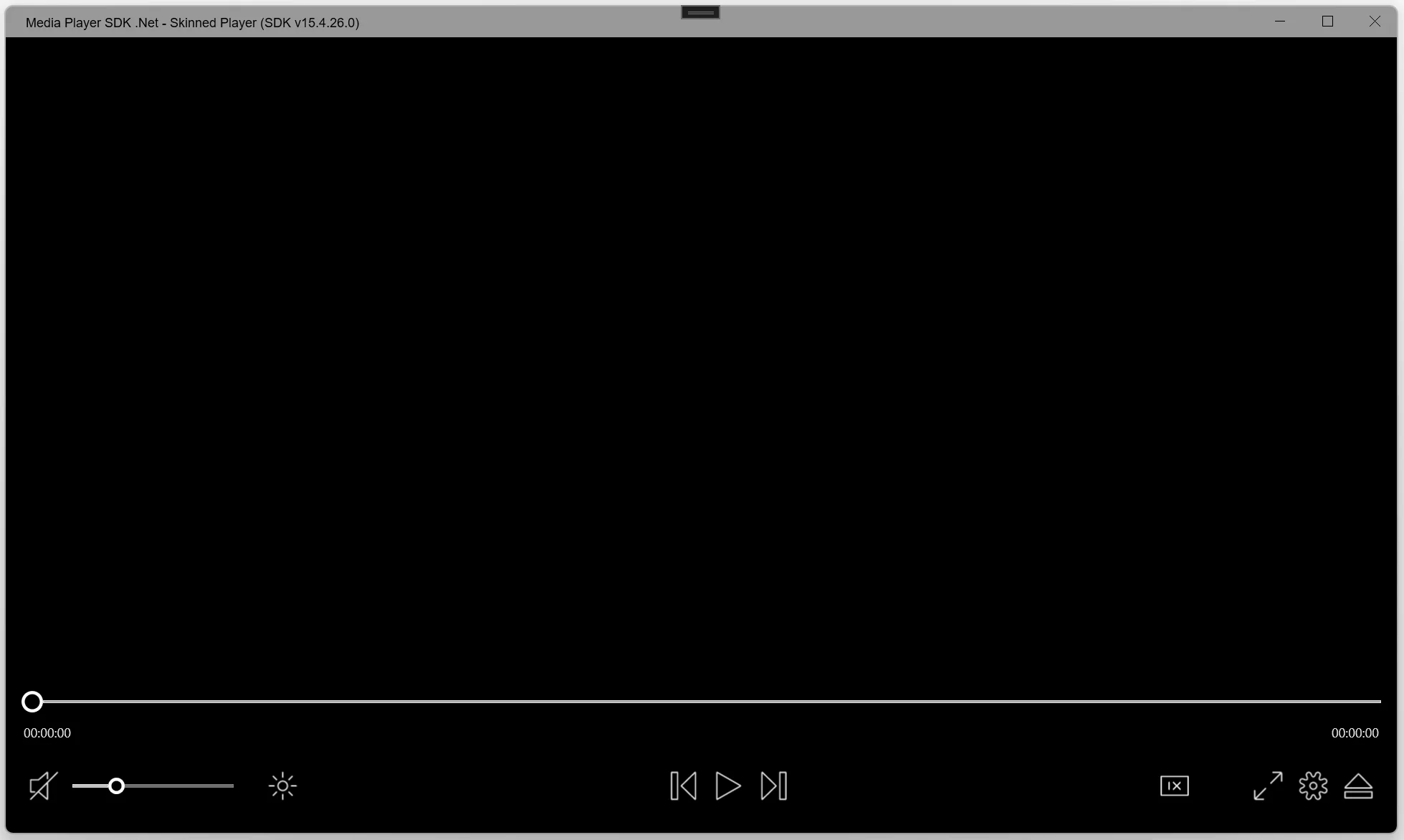
The SDK's Skinned Player demo before a file is opened: a seek bar with time counters, mute and volume, brightness, previous, play and next buttons, a playback speed control, full screen, settings and eject. The title bar shows an older SDK build (v15.4.26.0).
Features
Files and codecs without a codec pack
Play MP4, MKV, MOV, AVI, MPEG-TS, WMV, MXF, VOB, OGG and more, with MPEG-1/2, MPEG-4, H.264, HEVC, AV1 and VP9 video and AAC, MP3, Vorbis, WMA, Opus or FLAC audio. VisioForge says the player handles more than 500 formats without your users installing codecs. It also plays MIDI, karaoke KAR and CDG files, and 4K and 8K video.
Network streams and memory playback (Professional)
The Professional edition adds what Standard leaves out: HTTP/HTTPS, RTSP, RTMP, HLS, MPEG-DASH, UDP, SRT and NDI streams with configurable buffering, plus playback straight from a memory stream and audio tracks from external files. That covers IP cameras, live streaming servers and encrypted content you decrypt yourself (Video Encryption SDK support is included on Windows).
GPU decoding
Hardware decoding uses DXVA2, D3D11, Intel QuickSync, NVIDIA NVDEC and AMD AMF on Windows, VideoToolbox on macOS and iOS, MediaCodec on Android and VAAPI on Linux. Video effects can run on the GPU too.
Player controls you'd otherwise build yourself
Frame-by-frame stepping, variable speed, reverse playback, backward and forward seeking, playlists, gapless playback between files, audio track selection, rotation and aspect ratio control, subtitles, an on-screen display, picture-in-picture and output to multiple screens at once. The skinned UI accepts PNG or SVG icons and custom styles.
Overlays, effects and frame capture
Draw text, images, animated GIFs and SVG over the video, adjust brightness, contrast, saturation and hue, deinterlace, denoise, crop, resize, pan and zoom, and fade in or out. On the audio side there's an equalizer, a volume booster, 3D bass, normalization and gain control. Grab any frame to a .NET Bitmap or an image file, run motion detection, or read barcodes from the picture.
Unity support
A single .unitypackage brings playback into Unity 6 for Windows, Android, macOS and iOS. Frames go into a Texture2D, so video can play on a RawImage in your UI or on any 3D surface in the scene. A ready MediaPlayerX sample scene gives you play, pause, seek and volume.
Benefits
The obvious win is time. Format support, stream protocols, hardware decoding and seeking are the parts of a video player that eat weeks, and here they come working. You spend your effort on the app around the player instead.
The less obvious win is reach. With the X engine, one player codebase can serve a WPF desktop app today and a MAUI or Avalonia app on Mac, Linux or mobile later. And because distribution is royalty-free, your costs don't grow with your number of users.
Real-World Uses
- Security and camera software: a monitoring app that shows several RTSP camera feeds and flags motion, on the Professional edition.
- Training and e-learning: a desktop course viewer with subtitles, variable speed and chapter-style playlists.
- Video review tools: a QA or sports-analysis app that steps frame by frame, plays in reverse and exports stills.
- Digital signage and kiosks: a looping player that drives multiple screens with text and image overlays.
- Games and VR scenes: cutscenes or in-world video screens in a Unity 6 project.
Who It's For
This is for .NET developers who need playback that goes beyond the platform's basic media element: streams, unusual formats, frame-level control or multi-platform targets. It's a developer component, not a player for end users. The Professional edition suits teams that need network streams or memory playback but not DVD, VR or AI analysis.
Usage Guide
- Get the SDK. Run the trial installer, or simply add the
VisioForge.DotNet.MediaPlayer NuGet package in Visual Studio, VS Code or Rider.
- Add the platform packages. For the X engine, add the redistributable package for each target, such as
VisioForge.CrossPlatform.Core.Windows.x64, plus the optional Libav package for extended format support. MAUI and Avalonia apps also need their UI package.
- Initialize once. Call
await VisioForgeX.InitSDKAsync() at startup.
- Create the player. Drop a
VideoView into your window and create a MediaPlayerCoreX with it, then pick an audio output device.
- Open and play. Create a source from a file path or URL, call
OpenAsync(), then PlayAsync(). Seeking, pausing, volume and speed are single calls from there.
- License it. The trial needs no certificate. In a licensed build, register your license before calling
PlayAsync().
Tips
- On Linux, install GStreamer 1.22 or later (base, good and bad plugins) before running the X engine.
- Android builds need VisioForge's Java bindings library from its GitHub samples.
- Start from the sample projects on VisioForge's GitHub. They cover WPF, WinForms, WinUI, MAUI, Avalonia, Uno, Android and iOS players.
- VisioForge publishes an MCP server and per-platform agent skills, so AI coding assistants can look up the right packages and API calls for you.
Comparisons
Standard vs. Professional vs. Premium
- Standard covers file playback with subtitles, 4K, effects, GPU acceleration, OSD, frame grabbing, multiple screens, barcodes and picture-in-picture.
- Professional adds memory streams, network streams (HTTP, RTSP, RTMP, HLS, WMV, NDI), reverse playback, motion detection, DirectShow filter processing, Video Encryption SDK support and external audio tracks.
- Premium adds chroma-key, DVD and Blu-ray, VR 360° video and the full set of AI analysis features.
Media Player SDK vs. VisioForge's other SDKs
If you also need to record from cameras or screens, look at Video Capture SDK .NET. For editing and conversion, there's Video Edit SDK. Building custom pipelines from blocks is the job of Media Blocks SDK. VisioForge's .NET bundles combine these, and they cost less than buying each SDK separately.
Editions and Pricing
- Professional, one developer, annual: $392.53 USD at checkout through this listing, renewing at $274.77 a year
- VisioForge's own store (in euros): Standard €250 a year or €750 lifetime, Professional €350 a year or €1,000 lifetime, Premium €500 a year or €1,500 lifetime
- Source code license: available on request from VisioForge's sales team
Annual licenses cover one named developer and include 12 months of updates. Lifetime team licenses cover your organization's developers at one location and include all minor and major updates for the product's lifetime. Both include email support.
FAQs
Is there a free option?
Yes, for non-commercial use. VisioForge says the SDK is free for non-commercial projects and asks you to contact them for a free license.
Do my users need a license or pay royalties?
No. Distribution is royalty-free and your users don't need runtime licenses.
What happens when the year runs out?
The checkout subscription renews automatically each year at $274.77 unless you switch auto-renewal off. If you'd rather pay once, VisioForge's own lifetime licenses include updates for the product's lifetime.
Does Professional play DVDs or Blu-ray discs?
No. Disc playback is Premium only, and works on Windows only.
Can I use it from VB.NET?
Yes. VisioForge's documentation includes a VB.NET player guide as well as C# guides.
Does it work in Microsoft Office apps?
VisioForge lists compatibility with Microsoft Access, Word and Excel.
What hardware do I need?
VisioForge recommends 4 GB of RAM (2 GB minimum), a Core i5 or equivalent, and a DirectX 11 GPU for hardware acceleration. NVDEC needs an NVIDIA GPU, and QuickSync needs an Intel GPU.
System Requirements
- Development: Windows 10 or 11, Ubuntu 22.04 or later, or macOS 12 or later, with a recent Visual Studio, Visual Studio Code or JetBrains Rider
- Target platforms: Windows 7 SP1, 8/8.1, 10 and 11, recent Windows Server versions, macOS 10.14+, Linux (Ubuntu, Debian and others), Android 8+, iOS 12+
- .NET: .NET Framework 4.6.1 and later, .NET Core 3.1, .NET 5 to 10
- Unity: Unity 6 with the .NET Standard 2.1 API compatibility level
- Hardware: 2 GB RAM (4 GB recommended), Intel Core i5 or AMD equivalent, DirectX 11 GPU for acceleration
Conclusion
Media Player SDK .Net is a capable, actively updated playback engine for .NET developers who need more than a basic media element, especially streams, frame-level control and cross-platform targets. The Professional edition hits the middle ground: everything streaming and camera apps need, without the AI and disc features that push you to Premium. Check the edition table against your feature list, then run the 30-day trial on your real files and streams before you commit.
Download Free TrialBuy Now