Clone Fighter: Find Exact Duplicate Files and Folders on Your Mac
Clone Fighter is a $14.95 duplicate file finder for macOS that scans folders or whole drives, compares files byte by byte, and lets you send the extra copies to the Trash. It's a one-time purchase for Mac owners whose disks have filled up with repeated photos, downloads and backup folders.
Quick facts
- Developer: Naarak Studio
- Version: 2.6.3 on the vendor's site, from August 2026 (the App Store build is 2.6.4)
- Platform: macOS 10.13 or later, Intel and Apple silicon. Mac only.
- Price: $14.95 one-time for a single user, with use on all the Macs in your household and free updates
- Free trial: 14 days, fully functional
- Refund: generally none once the license key has been emailed (see below)
- What we checked: the installer (CloneFighter.dmg, 1.70 MB) on the vendor's site, the user manual, the App Store's version history, and the order page prices of $14.95, $49.95 and $99.95, all on November 10, 2026. We didn't run a scan ourselves.
Before you buy
Run the trial on your real files first, because Naarak Studio doesn't normally refund a purchase once the activation key has been sent. Its policy makes exceptions only if the product wasn't delivered within 24 hours, doesn't work the way the trial did, or for another technical reason.
Download Free TrialBuy Now
Overview
Clone Fighter works in three moves: pick a location, press Start, and choose what goes. Results sit in one table, with each set of identical files grouped and collapsible, and a row of totals along the top shows how much space Music, Pictures, Movies, Documents and everything else are wasting.

The results table: 1.19 GB of duplicates sorted by type, with copies marked for deletion in red, a red parent checkbox where every copy of a file is selected, and the file's path along the bottom.
Features
Byte-by-byte comparison
Clone Fighter compares file contents rather than names, byte by byte, so a listed pair is a true copy even if the two files are called different things. It won't, by the same token, flag photos that merely look alike or the same song in two formats.
Duplicate folders, not just files
Clone Fighter's Find duplicate folders option treats two folders as identical when they hold the same number of files with matching names and contents, which is handy for backups copied around years ago. Other options set a size range, include empty files, and add hidden items or system folders to the scan.
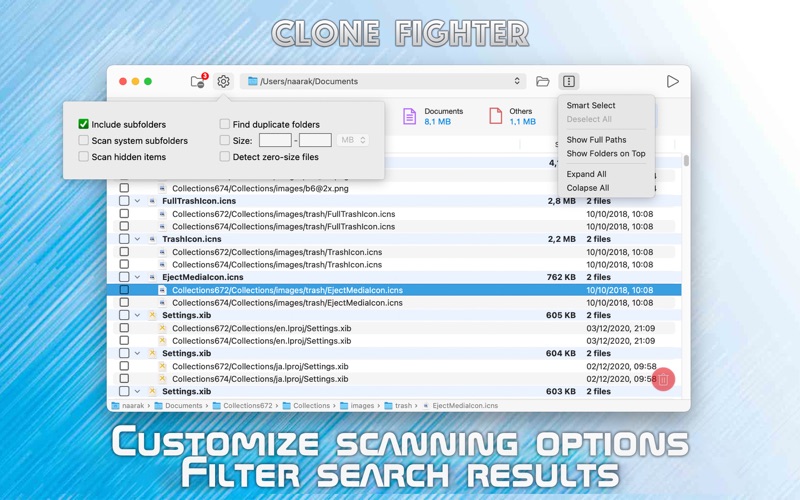
The vendor's App Store picture: scan options on the left (subfolders, system subfolders, hidden items, duplicate folders, size, zero-size files) and the Actions menu with Smart Select on the right.
Multi-folder and cross-folder search
Clone Fighter's Multi-Folder List scans several locations at once, external drives included. With Cross-Folder comparison only turned on it reports a file only if it exists in at least two of those folders, which is what you want when checking a backup against the original. You can also exclude folders.
Read-only folders protect your originals
Clone Fighter lets you mark any folder in the list as Read-Only, and files inside it can't be deleted even when they're found as duplicates. Mark your master photo library this way and the copies elsewhere are the only ones at risk.
Deletion you can take back
Clone Fighter moves what you remove to the Trash rather than erasing it, and until the next scan or restart it can put those files back. A parent checkbox turns red if you've selected every copy, a clear warning that no original would remain. Version 2.6 also added copy and move actions.
Real-World Uses
- A MacBook that's out of space. Scan your home folder and start with the Movies total, where a few repeats free the most room.
- Years of photo exports. Find the identical JPEGs scattered through dated folders.
- Checking an external backup. Compare the drive against your Documents folder with cross-folder mode, and mark Documents read-only.
Who It's For, and Who Should Skip It
It's a good fit if you want a small, low-cost tool for removing exact copies on a Mac and you like checking the results yourself.
Skip it if:
- You mainly want to clear out similar photos such as burst shots. Clone Fighter finds exact copies only, so use a tool with similar-image matching.
- You're on Windows. There's no version for it.
- You want a general Mac cleaner for caches and leftovers. This does duplicates only.
Usage Guide
- Install CloneFighter.dmg and open the app.
- Choose a location, which can be a folder or a whole disk.
- Set the options: subfolders, duplicate folders, a size range. Leave system folders and hidden items off unless you know what you're removing.
- Press Start and read the totals across the top.
- Tick the copies to remove, or use Smart Select in the Actions menu, then watch for red parent checkboxes.
- Press Delete, then check nothing's missing before you empty the Trash.
Where it falls short
- Exact matches only. Near-identical photos and re-encoded files stay on your disk.
- System and hidden files need care. The manual itself warns that duplicates in system folders are usually important and shouldn't be removed without deep knowledge of macOS.
- A little learning at the start. One App Store reviewer found it confusing to operate.
- Thin documentation. The manual is a single page.
- Strict refunds, as noted above.
What Users Say
Apple App Store
The one review we found, titled "Good, but could be better" and posted by "--D." in December 2021, says: "This is a good tool but could be better. First, it's a bit confusing to operate." The reviewer also asks for a way "to allow it to remove duplicates in bulk to a separate folder that's not the trash file." The App Store shows too few ratings for an average, and that's all the user feedback we could find, so treat the trial as your real test.
Editions and Pricing
| License |
Price (one-time) |
Covers |
| Single User |
$14.95 |
One user, all home Macs; one Mac for commercial use |
| Small Business |
$49.95 |
5 Macs in a company |
| Site |
$99.95 |
All Macs in a company |
Licenses have no expiry and include future versions. Prices are before any VAT or sales tax, which the order page adds for your country. The App Store sells the same app as a free download with in-app purchases: a $19.99 lifetime license, $7.99 a year or $3.99 a month.
Buy Single User ($14.95)Buy Small Business ($49.95)Buy Site License ($99.95)
FAQs
Can Clone Fighter scan external and network drives?
Yes. Clone Fighter scans internal, external and network drives, and external volumes can be added to the Multi-Folder List like any folder.
Does Clone Fighter delete files permanently?
No. Clone Fighter moves removed files to the Trash, and you can restore them from its Edit menu until the next scan or program restart. They're only gone once you empty the Trash.
Is a Clone Fighter license a subscription from the website?
No. A Clone Fighter license from the vendor's site is a one-time purchase, valid for unlimited time and for all future versions. Only the App Store offers monthly and yearly plans.
Does Clone Fighter run on Apple silicon Macs?
Yes. Clone Fighter is built for both Intel and Apple silicon, and its maker states compatibility with macOS 27.
System Requirements
- Operating system: macOS 10.13 or later
- Processor: 64-bit Intel or Apple silicon
- Disk space: a download of under 2 MB
Conclusion
Clone Fighter is worth $14.95 if you want exact duplicates off your Mac and you'd rather pay once. The one reason to buy it is the combination of byte-by-byte matching and read-only folders, which makes accidental loss of your originals hard to do.
The main reason not to is its narrow scope: it won't catch similar photos, and there's very little independent feedback on it. The website license is cheaper than the App Store's lifetime option, and a full 14-day trial shows you how much space it'll actually free.
Download Free TrialBuy Now