DirEqual: Check That Two Mac Folders Really Match
DirEqual is a $39 one-time Mac app that compares two folders side by side, shows every difference, and syncs them after you approve the changes. It's for anyone verifying a backup, a drive migration or a project copy, and it runs on macOS 10.13 or later with a 14-day free trial.
Finder said the copy finished, but did all 40,000 photos make it? Checking by hand isn't realistic. DirEqual gives you a yes or no for every file, and a list of what to fix.
Quick facts
- Version: 7.7.2 (website edition)
- Developer: Naarak Studio
- Platform: macOS 10.13 or later, compatible with macOS 27, Intel and Apple silicon. A separate Windows version also exists
- Price: $39 one-time, single user
- Trial: 14 days
- What we checked: the app inside the 13.6 MB installer dated October 20, 2026 reports version 7.7.2, and the App Store build is 7.7.3; 41 App Store reviews read; price $39.00 on the order page on November 6, 2026. We didn't run a comparison on a Mac
Download Free TrialBuy Now
Before you buy
Don't confuse the two editions. The App Store download is free, but several reviewers were caught out when a scan finished and they had to pay to continue. The website trial lasts 14 days. Either way, plan on paying if you use it for a real job.
Refunds are limited. Naarak Studio gives no refunds once your activation key has been emailed, except when the product wasn't delivered within 24 hours, didn't work the same way as the trial, or for another technical reason.
License. One user, on 3 Macs in your household, or one computer at work. VAT is added at checkout.
Overview
You pick a left and a right folder, and DirEqual lays them out as expandable trees with size and date on each side. Colors and icons mark what differs, and a Compare file content option checks files byte by byte, stopping at the first difference. Without it, DirEqual compares date and size, which is much faster but less certain.
Set an action on an item with its dot button, then click Execute, or use Synchronize for the whole comparison. Nothing changes until you confirm. Recent versions added an improved merge module and AppleScript support in 7.7, redesigned include and exclude rules in 7.6, and macOS 27 compatibility in 7.7.2.

Two project folders side by side, with differences in color and a summary at the top.
Features
DirEqual compares whole folder trees
The side-by-side view shows every subfolder, with a count of differences and orphans that you can sort. Filters and excluded folders drop what you don't care about, using begins with, ends with, contains, wildcard, regular expression and full path rules. You can also ignore file name extensions.
DirEqual syncs with full control
Choose what gets copied, replaced or deleted, item by item, then run everything at once. Recent versions can also create aliases, rename, and delete both compared items together. That makes it useful for cleanup as well as for sync.
DirEqual compares text down to the character
Open two text files and DirEqual highlights changed lines, words and characters, with a minimap showing all differences across both files. An improved merge module lets you move changes between them.

A text comparison of two versions of a source file, with changed lines highlighted.
DirEqual compares binary files too
Files that aren't text can be compared in a hex-style view, which is useful for checking a damaged or altered file.

A binary comparison of two files in hex view. The title and caption text are the vendor's.
DirEqual snapshots record a folder for later
Save a snapshot of any folder as a small file, then compare against it later to see what changed. In the vendor's example, a snapshot of 2,646 files and 428 folders took 101 KB.
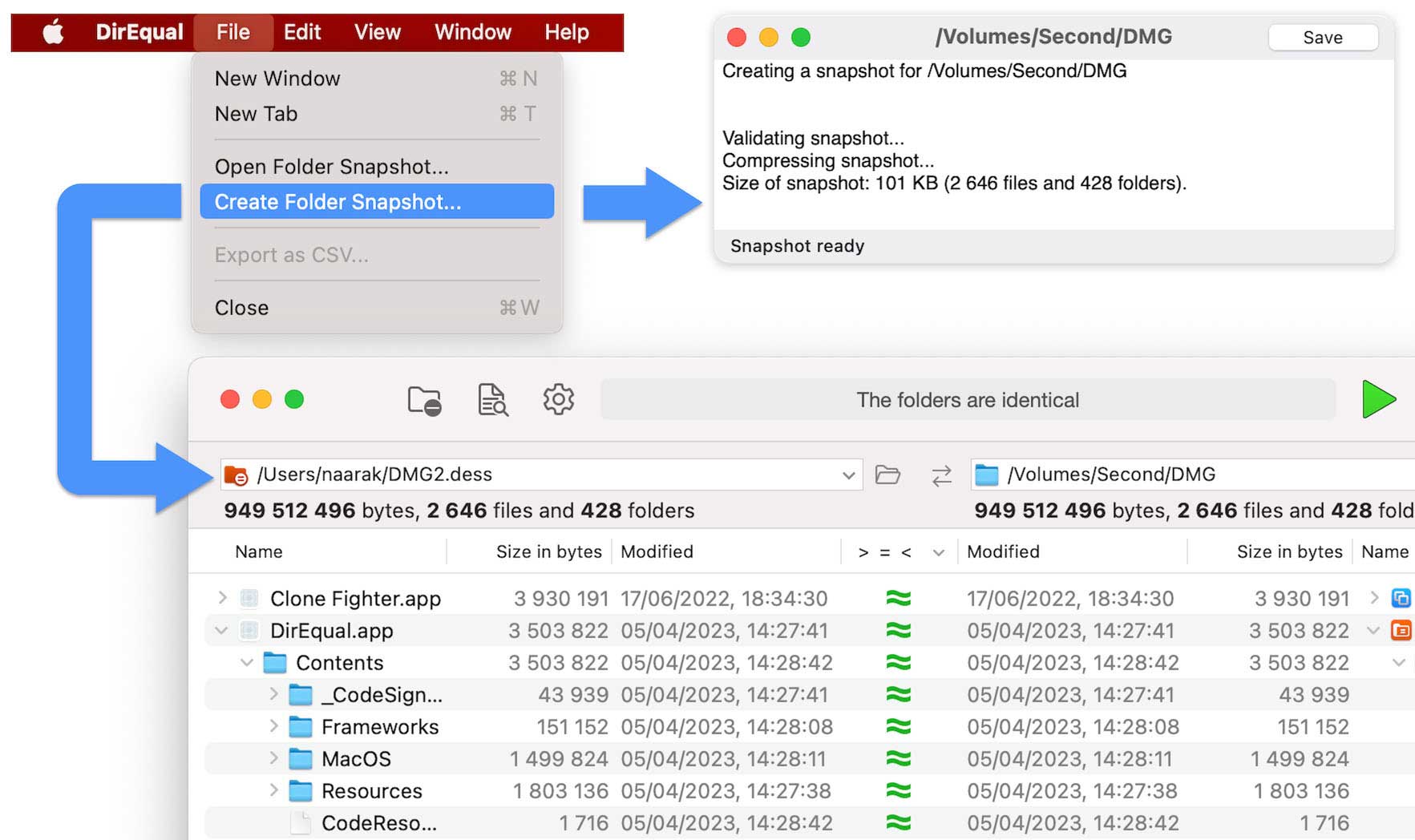
Creating a folder snapshot from the File menu, then comparing it with the folder.
DirEqual exports and automates
Export results to CSV as a record of the check, or drive comparisons from AppleScript. Finder integration works through macOS Services.
Benefits
- You can trust a copy. Byte-by-byte comparison gives a firm answer on whether two files match.
- You save days of manual checks. One reviewer says exactly that about a 32 TB RAID transfer.
- You don't need the Terminal. Non-coders get what diff gives developers, with a visual layout.
Real-World Uses
- Verify a move between RAID arrays before you wipe the old one.
- Confirm that a mirrored iCloud Drive copy on an external disk is complete.
- Rescue a failing drive, then check that the copied files match the originals.
- Compare two versions of a project before deploying.
- Compare tagged duplicate photo folders, since DirEqual also shows macOS tag differences.
Who It's For, and Who Should Skip It
DirEqual suits photographers, video editors, developers and anyone who moves a lot of data. If you only need a yearly check, the trial may cover it. If you mainly want hands-off scheduled backups, a dedicated sync tool suits you better, because DirEqual is built around a review before action. Developers who diff code all day may prefer a code-focused tool, since one reviewer found its file comparison disappointing.
Usage Guide
- Download the DMG, install DirEqual and launch it.
- Pick the left and right folders in the path panel.
- Turn on Compare file content if you need a byte-by-byte check, and leave it off for a quick pass.
- Start the comparison and read the legend, since the icons aren't all obvious at first.
- Set actions on items, or use Synchronize, then click Execute.
- Export a CSV if you need a record.
Where it falls short
- The interface takes learning. Reviewers from 2021 to 2023 call the icons and arrows confusing, and even happy users advise reading the Help and legend first.
- Cloud streaming folders can be a problem. One reviewer in 2023 saw it hang on a Google Drive File Provider folder.
- Unavailable network folders. A 2022 reviewer found that restoring recent folders at startup could stop the app opening when a network location was gone.
- Not a pure diff tool. One blogger found file comparison much weaker than folder comparison.
What Users Say
DirEqual has more public feedback than most small Mac utilities. The US App Store has dozens of written reviews, though the store doesn't display an overall average.
Praise from App Store reviews
"I have been transferring between 32TB Raids and this was perfect to make sure all was good. It caught many issues and saved so much time not having to compare one by one. Saved me days of review." LaDolceVideo, version 7.2, 5 stars
"I move thousands of files, and this is the simple sanity checker I needed. Simple to setup, use, and works fast." Fair reviewer 00001, version 6.7.3, 5 stars
"I really don't want to have to be writing code in Terminal at this point in my life. DirEqual was effortless to install, intuitive to begin using right away." AlanBleiweiss, version 6.6.5, 5 stars
"I use a sync tool (SyncTime) to mirror my iCloud Drive with a local external drive and this tool works well to confirm that the sync was correct." J. W. M., version 6.6, 5 stars
"This app was exactly what I needed to quickly ensure tens of thousands of photos under multiple layers of folders within folders all copied over to a new hard drive." TeamDeez23, version 5.7.2, 5 stars
Complaints from App Store reviews
"There is no mention anywhere on this app that it requires a subscription. But after it scanned my folders for over 30 minutes, when I went to look at the results it asked for me to sign up for a subscription in order to view the results." MrMcKnowItAll, version 5.5, 1 star
"Used to be good until the "view in finder" feature became paywalled" shrekballs45382, version 6.0, 1 star
"I need to compare two directories, one on my local drive and the other streamed from Google Drive using Apple's File Provider functionality. DirEqual hung on startup" Arabear94, version 5.2.1, 1 star
"I think the UI is a bit confusing, but I have learned how to read it. It just takes more than a glance." dysamoria, version 4.3, 4 stars
Elsewhere
"I found file analysis very disappointing." Konstantin Dokuchaev, blog review, February 26, 2024. He still concludes: "DirEqual is a good option for diff analysis and folder synchronization."
"Very fast to scan and show differences." Norton, AlternativeTo, September 9, 2021
"Lightweight and battery-saving. Still strong in features." manosm, MacUpdate, June 14, 2023, who says it replaced a paid sync subscription. MacUpdate shows 5.0 from 2 ratings.
The recurring themes: people love it for checking large copies, and they call it fast and easy once learned. The complaints are mainly about paying in the App Store edition and a legend-heavy interface. A real bug report is rare, and those we found are from 2023 or earlier.
Comparisons
DirEqual vs Beyond Compare
Beyond Compare is a long-running cross-platform comparison tool, and AlternativeTo lists it as a DirEqual alternative. Choose it if you work across Windows and Mac. DirEqual is Mac-focused and built for the check-then-sync job.
DirEqual vs Meld and WinMerge
Meld and WinMerge are free, open-source options, also named on AlternativeTo. WinMerge is for Windows. If you're happy with a developer-style tool and don't mind free-software rough edges, try Meld first.
DirEqual vs Terminal diff
The diff command is free and compares folders too, but its output is text. DirEqual adds the visual tree, actions and snapshots.
Editions and Pricing
| License | Price at checkout | Where it installs | Payment |
|---|
| Single User | $39 | 3 home Macs, or 1 computer at work | One-time |
| Small Business | $129 | 5 Macs in a company | One-time |
| Site | $499 | All Macs in a company | One-time |
Prices were read on the order page on November 6, 2026. Naarak Studio also sells a $5 monthly and $15 annual subscription in its own store. Non-profits, schools and universities can ask for a 40% discount.
Buy Single User ($39)Buy Small Business ($129)Buy Site ($499)
FAQs
Does DirEqual change my files during a comparison?
No, DirEqual only changes files when you execute actions or run Synchronize, and you can review them first.
Is DirEqual compatible with macOS 27?
Yes, DirEqual added compatibility with macOS 27 in version 7.7.2.
Can DirEqual compare a folder with a network drive?
Yes, DirEqual has been used for network comparisons, and reviewers describe comparing folders across a network.
Does DirEqual compare macOS tags?
Yes, an App Store reviewer confirms that DirEqual shows tag differences on duplicate files, and tags are carried over during copy operations.
Is there a Windows version of DirEqual?
Yes, Naarak Studio offers DirEqual for Windows on a separate page. This listing covers the Mac version.
System Requirements
- macOS 10.13 or later, compatible with macOS 27
- 64-bit Intel or Apple silicon (M chips)
- About 14 MB download
Conclusion
DirEqual is worth $39 if you regularly move or back up data you can't afford to lose. The reason to buy it is certainty: a byte-by-byte check with clear results and a sync you control. The reason not to is its learning curve, and if you need a code-diff tool first and a folder tool second, look elsewhere. Run it on a real backup during the 14-day trial.
Download Free TrialBuy Now