Picture Echo: Find Duplicate and Look-Alike Photos on Windows and Mac
Picture Echo (now spelled PictureEcho) is a $39.97-a-year duplicate photo finder from Sorcim for Windows and Mac that spots exact copies and visually similar images, lets you review them, and removes the extras. It suits anyone with years of phone dumps, backups and exported edits scattered across drives, and photographers working in Lightroom.
Ordinary duplicate finders only catch files that match byte for byte. They miss the resized copy, the re-saved JPEG and the WhatsApp version of the same picture. Those near-matches are what eat the space in a real photo collection, and they're what Picture Echo's Similar mode goes after.
Quick facts
- Version: 5.0
- Developer: Sorcim Technologies
- Platforms: Windows 11, 10, 8.1, 8 and 7; macOS 10.15 or later on Intel and Apple Silicon
- Formats: JPEG, PNG, WebP, GIF, BMP, TIFF, HEIC and major RAW formats
- Price: $39.97 for 1 year, 1 license, renewing yearly
- Trial: free download; deletes duplicates from 10 image groups
- Guarantee: 60-day money-back
What we checked: the 5.6 MB Windows installer on the vendor's server, dated February 26, 2026, version 5.0 on the vendor's download page, and the price of $39.97 with a 12-month renewal on the order page, on November 6, 2026. We didn't run a scan.
Before you buy
- This plan renews every year. The $39.97 order renews every 12 months, so note the date if you only need one big cleanup.
- The trial shows real results. You can scan everything and clear 10 groups for free, which tells you how well it matches your own photos.
- Check Similar mode's picks. A loose threshold can group photos that merely look alike, such as burst shots you meant to keep. Review before deleting, and start at the recommended setting.
Download Free TrialBuy Now
Overview
Picture Echo has a short sidebar: System Scan, Library Scan, Results, and two tools called Empty Folders and Cloud Scan. You add folders, pick Exact or Similar mode, and start. Results arrive as groups of matching photos with thumbnails, and a counter at the bottom totals the redundant photos and wasted space.
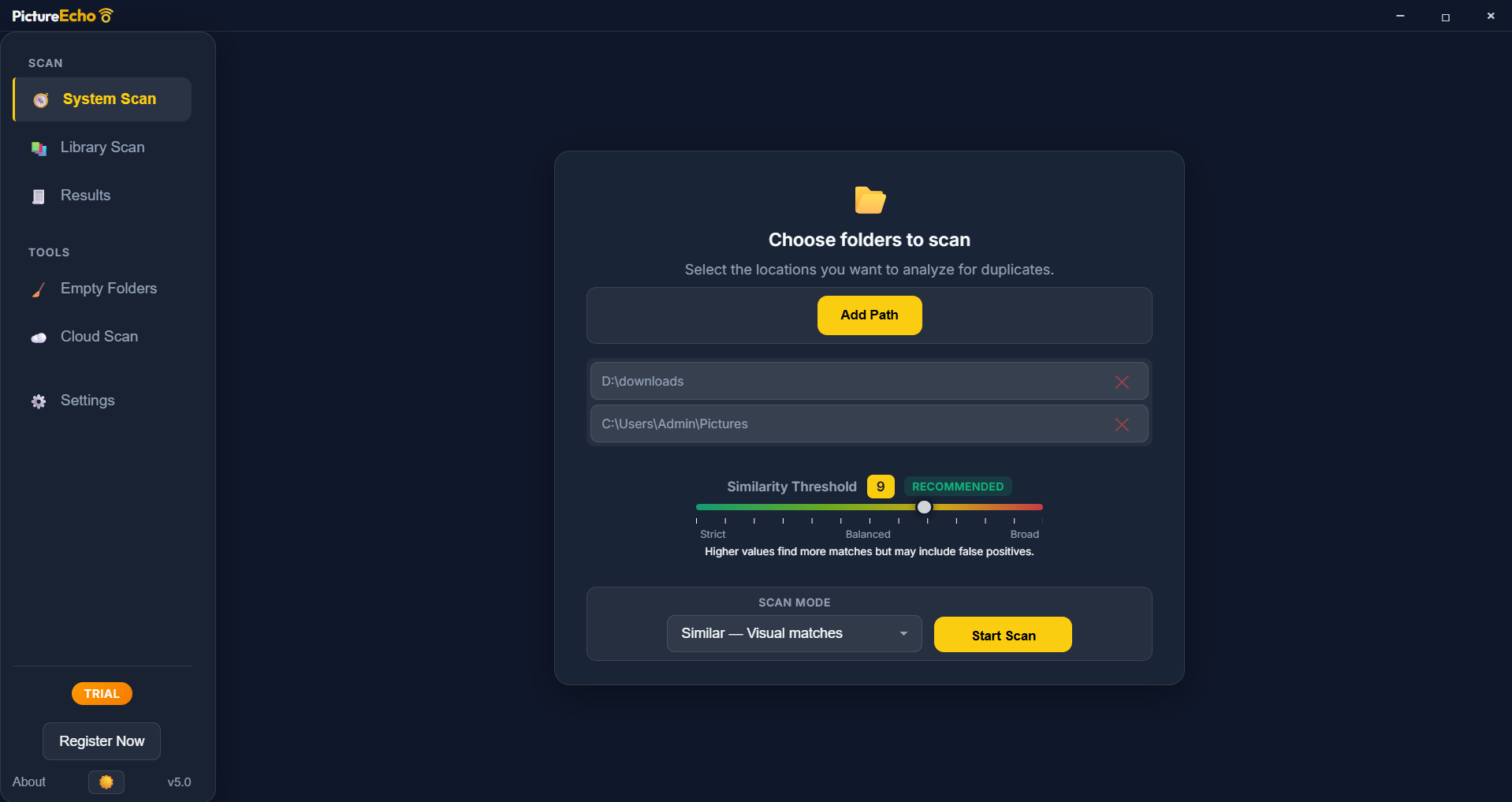
System Scan with two folders added, the similarity threshold at its recommended value and Similar mode selected.
Features
Exact and Similar scan modes
Picture Echo's Exact mode finds byte-for-byte identical files by their hash. Similar mode uses perceptual hashing and image comparison to find photos that were resized, edited or re-saved. A threshold from 1 to 13 sets how strict the match is, so lower values catch only close copies and higher values cast a wider net.
Scan Lightroom and Apple Photos libraries
Picture Echo detects Lightroom Classic catalogs, Lightroom CC and Apple Photos libraries, and Windows Photos on a PC. You can also set a custom catalog path. It reads the library's file list, then looks for duplicates among those files.
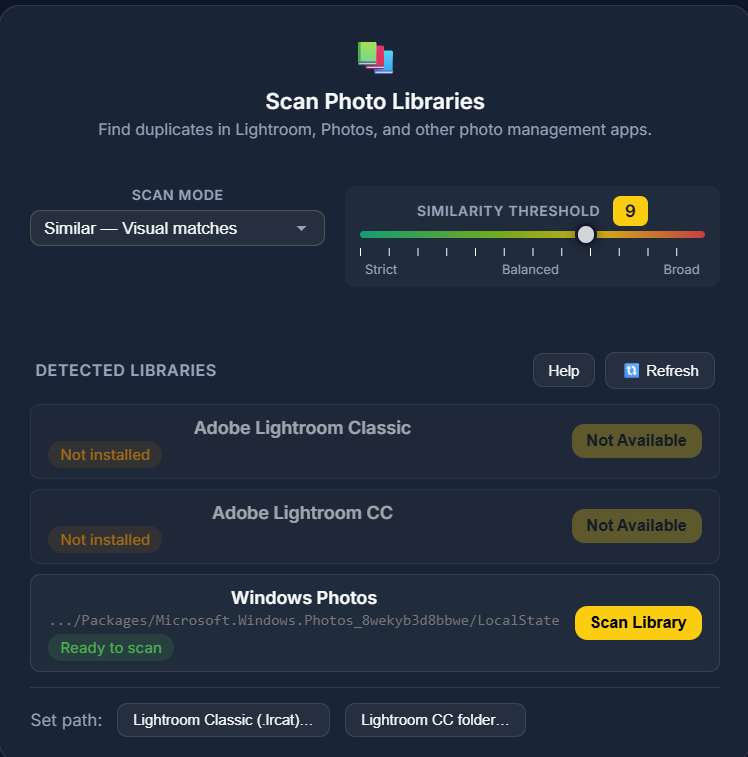
Scan Photo Libraries, listing Lightroom Classic, Lightroom CC and Windows Photos with the threshold slider above.
Review groups side by side
Picture Echo shows each match as a group, with file size and date under every thumbnail. A Select All But One button clears a group quickly, and the footer shows how much space your selection will recover.
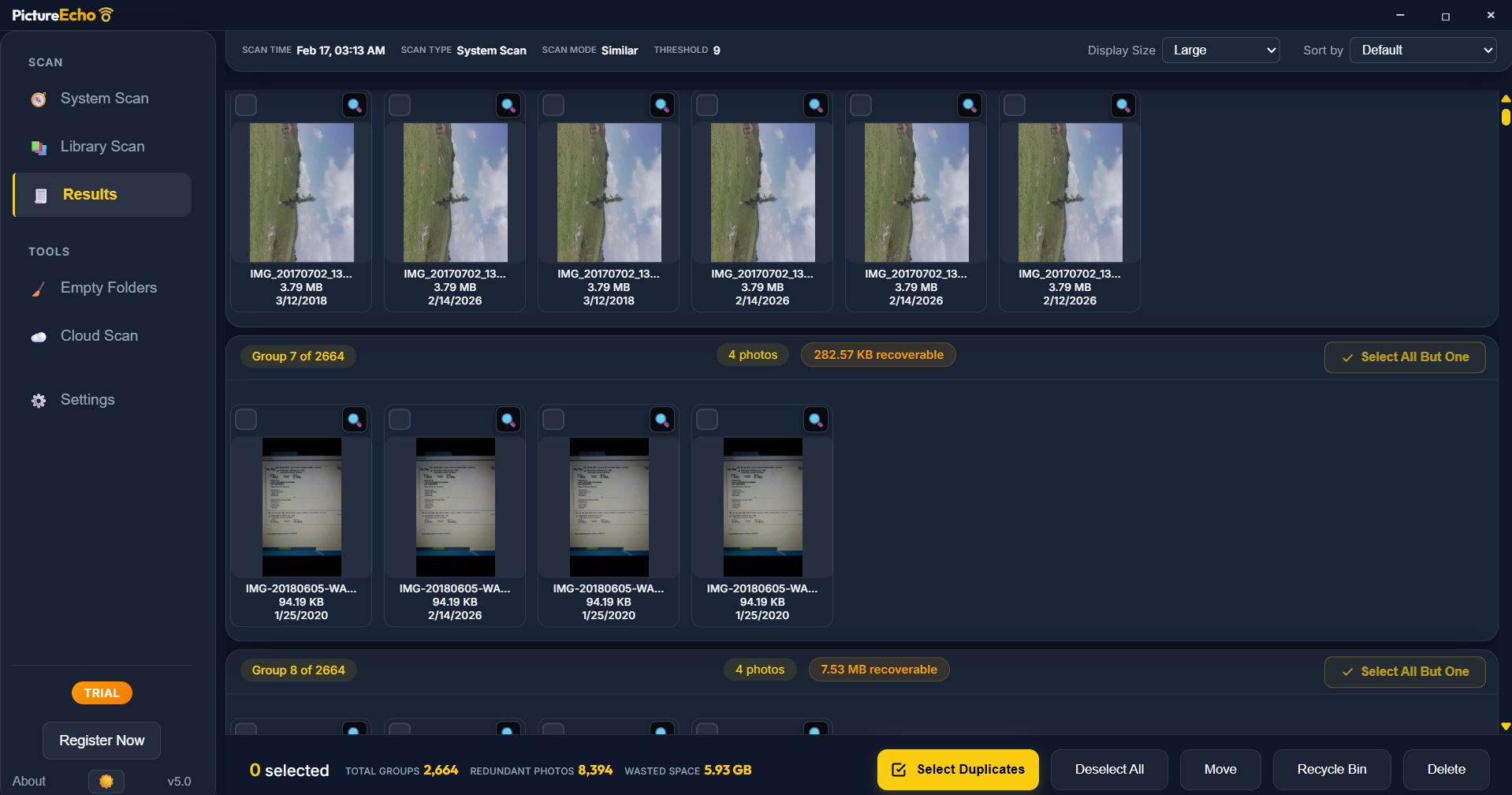
Results from a large scan: 2,664 groups, 8,394 redundant photos and 5.93 GB of wasted space.
Bulk selection rules
Picture Echo's Bulk Selection applies one rule across every group: keep the oldest, newest, largest, highest-resolution or lowest-resolution copy. With thousands of groups, that's the difference between a ten-minute job and a lost weekend.
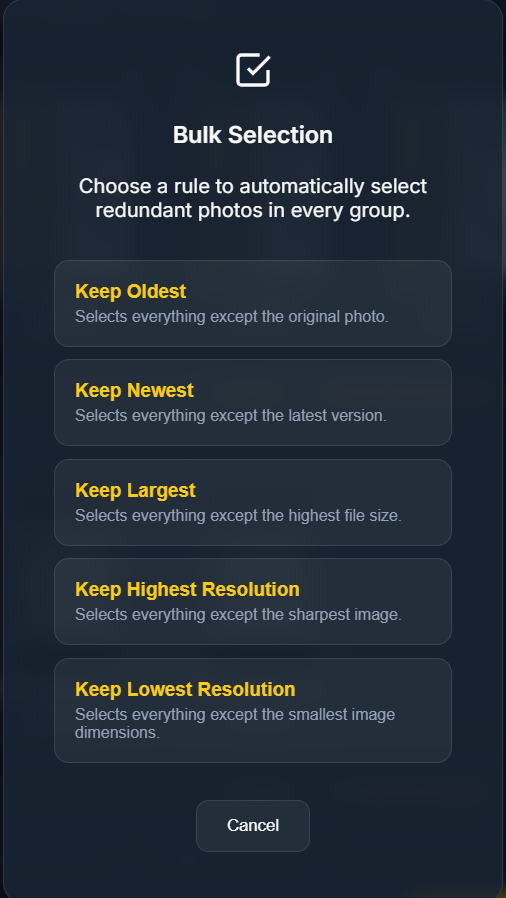
The Bulk Selection dialog with its five keep rules.
Safe deletion and an action history
Picture Echo sends deleted files to the Recycle Bin or Trash unless you choose permanent delete, or it can move them to a folder instead. An Action History lists recent moves and deletions. It also cleans up empty folders left behind, and lets you exclude folders from scans.
Benefits
- Your photos stay on your computer. Sorcim says scans run locally and nothing is uploaded to its servers.
- Space comes back without manual sorting. Comparing thousands of near-identical shots by eye simply isn't realistic.
- You stay in charge. Picture Echo only suggests groups, and nothing goes until you choose it.
Real-World Uses
- A family archivist merges three old drives and removes the copies each backup left behind.
- A photographer scans a Lightroom catalog for re-imported RAW files.
- A phone user clears the resized copies that messaging apps saved beside the originals.
- Someone paying for extra cloud storage shrinks a local library before the next sync.
Who It's For, and Who Should Skip It
Picture Echo fits people with large, messy photo collections on local or external drives, particularly when copies were re-saved or resized along the way.
Skip it if your photos live only in the cloud: it skips cloud-only placeholders that aren't downloaded, so OneDrive or iCloud files must be stored locally first. If you want one purchase and no renewal, the yearly plan sold here isn't the right fit. And if you only have exact copies, a free duplicate finder will do the job.
Usage Guide
- Download the installer and run it. On Windows it may also install the WebView2 runtime.
- Open System Scan and add your folders, or use Library Scan for Lightroom or Photos.
- Choose Exact or Similar, and leave the threshold at the recommended value for your first run.
- Start the scan and open Results.
- Check a few groups by eye, then use Select Duplicates or a Bulk Selection rule.
- Choose Move, Recycle Bin or Delete, and empty the Bin only once you're happy.
Where it falls short
- Large scans can take a while. One Trustpilot user of an earlier release needed over two hours for about 2 TB, though another says an upgrade got that down to about an hour.
- Network drives are slower. Sorcim says so itself.
- Cloud-only files are skipped. Download them first or they won't be compared.
- License keys sometimes need support. Several happy reviewers mention a key problem that support had to fix.
- Few independent tests exist. We found general write-ups, but no detailed accuracy test.
What Users Say
Trustpilot: Sorcim 4.6 out of 5 from 311 reviews
This score covers all Sorcim products. PictureEcho's own site quotes 4.8 from 282 reviews.
- "you can verify the result and then remove thousands of duplicates in a few minutes!!" Neda n, July 24, 2026
- "Picture Echo is great for helping to organize and weed out duplicates in my photo collection." Greg Sisk, July 6, 2026
- "Speed has been increased." Vince Conway, May 21, 2026, who says he scanned over 2 TB in about an hour
- "They accidentally sent me the same license key for both of them." Michael Vervier, September 4, 2026, who adds that support "quickly and painlessly resolved the problem."
Trustpilot reviews shown on PictureEcho's site
The vendor picks these, so they lean positive, but they're specific.
- "I've used several duplicate image finders over the years. Picture Echo is up with the best of them, but what stood out for me was the facility to find copies of one specific image." Mike Kean
- "I had a glitch with the license code but the support team reacted speedily and sorted it out." Trustpilot customer
- "I can now stop paying for extra storage every month because I had something like 5000 duplicate pictures between what I deleted and what they did." Carole Dankers
TechPout
Tanmay Sharma's older review calls it "a decent duplicate photo cleaner" and notes among its cons: "The software does not offer any advanced features". Its heading dates it to 2021, well before version 5.0.
The pattern: buyers praise the similarity control and very responsive support. The recurring snag is a license key hiccup, and speed on huge libraries comes up too. Apple's App Store listing doesn't have enough ratings to show a score yet.
Comparisons
Picture Echo vs Clone Files Checker
Clone Files Checker, also from Sorcim, finds duplicates of every file type by matching contents. Picture Echo works only on images, but it recognizes photos that merely look alike. Pick it for a photo collection, not a general disk cleanup.
Editions and Pricing
Prices are from the vendor's order page on November 6, 2026. The Single Solution 1 Year plan at $39.97 is the one sold through the buttons on this page.
| Plan | Licenses | 1 Year | 2 Years | Lifelong |
|---|
| Single Solution | 1 | $39.97 | +$20 | +$50 |
| Family Pack | 3 | $49.97 | +$20 | +$75 |
| Small Business | 10 | $99.99 | +$30 | +$100 |
FAQs
Does Picture Echo delete photos automatically?
No. Picture Echo only suggests groups of duplicates or similar photos, and you choose which to remove. Deleted files go to the Recycle Bin or Trash unless you pick permanent delete.
Does Picture Echo upload my photos?
No. Sorcim says Picture Echo stores scan results locally and that photos are never uploaded to its servers.
Can Picture Echo scan an external drive or NAS?
Yes. Picture Echo scans any mounted drive or network share you add as a source, though network locations can be slower.
Does Picture Echo work with RAW files?
Yes. Picture Echo supports major RAW formats including CR2, CR3, NEF, ARW, DNG, ORF, RW2, PEF, SRW and RAF.
What happens to Picture Echo if I cancel the renewal?
Picture Echo's $39.97 plan is a yearly subscription. Check the terms for your license before cancelling, and turn off the renewal before the date if you don't want another year.
Is there a Picture Echo app for phones?
Yes. Sorcim also lists PictureEcho on Google Play and Apple's App Store, sold separately from the desktop plan here.
System Requirements
- Windows 11, 10, 8.1, 8 or 7, with the WebView2 runtime (the installer adds it if needed)
- Or macOS 10.15 Catalina or later, Intel or Apple Silicon
- Enough free space to move files if you use the move option
Conclusion
Picture Echo is worth $39.97 if you have a large, disorganized photo collection, and one year is usually enough to clean it up. The one reason to buy it is finding the resized and re-saved copies that ordinary duplicate finders miss. The main reason not to is the yearly renewal, which is poor value once the big cleanup is done, so cancel if you don't need it again. Run the trial first and see what it finds.
Download Free TrialBuy Now