dbForge Compare Bundle for Oracle: Schema Compare and Data Compare for Less Than Both
dbForge Compare Bundle for Oracle is Devart's two-tool pack for Oracle deployments: dbForge Schema Compare for Oracle finds structural differences and scripts the DDL, and dbForge Data Compare for Oracle finds differing rows and scripts the data fix. The Professional bundle costs $199.95 a year and Standard $169.95 (perpetual: $399.95 and $329.95), 28% to 33% less than buying the two tools separately. It's for DBAs and developers who move both structure and data between Oracle environments.
Most releases change both: a new column and the lookup rows that go with it, a new table and its seed data. With the bundle you compare and sync both from one installer, with the same interface, the same connection list and the same kind of synchronization wizard.
Quick facts
- Version: 2026.2.96, released November 9, 2026
- Developer: Devart
- Contains: Schema Compare for Oracle (Standard or Professional, depending on the bundle edition) and Data Compare for Oracle (its only edition)
- Platform: Windows 7 to 11 and Windows Server 2008 to 2025, with .NET Framework 4.7.2
- Databases: Oracle 9i through 26ai (Data Compare also 8i), Oracle Cloud, Real Application Clusters and Oracle on Amazon RDS, with or without an Oracle client
- Download: 121.87 MB, one installer for both tools
- Price: Professional $199.95 a year or $399.95 perpetual; Standard $169.95 a year or $329.95 perpetual
- Trial: 30 days, full functionality (the download asks you to sign in with a free Devart account)
- What we checked: version 2026.2.96 and its November 9, 2026 date on Devart's download page and revision history, the 121.87 MB download size listed there, which tools and editions each bundle edition contains, and the order page prices of $199.95 for the default Professional 1-year subscription, $169.95 for Standard, $399.95 and $329.95 perpetual, plus the separate prices of both tools, on November 13, 2026. We didn't run a comparison against our own Oracle databases.
Before you buy
- The edition only changes Schema Compare. Both bundle editions include the same Data Compare; Professional upgrades Schema Compare to its Professional edition (wrapped PL/SQL, permissions, version control, command line).
- Standard still has some automation. Data Compare runs from the command line in both bundles; only Schema Compare's command line needs Professional.
- If you write PL/SQL every day, dbForge Studio for Oracle Professional ($329.95 a year) includes both compare tools plus the IDE.
- A subscription stops working when it ends; a perpetual license keeps working.
- Check the refund terms. Devart's order page promises a refund within 30 days if you're not satisfied (on annual subscriptions and perpetual licenses), but its ordering FAQ ties refunds to technical problems its support can't fix, so make up your mind during the trial.
Download Free TrialBuy Now
Overview
Both tools work the same way. You pick a source and a target, map the schemas, and get a comparison document that lists every object (schema) or every table (data) with its status: different, only in source, only in target or identical. You review the differences side by side, exclude what isn't ready, and the synchronization wizard writes the script, shows the action plan and warnings, and lets you open, save or run it.
The bundle is one download and one installation, and it's updated together with the tools. The November 2026 release fixed an out-of-memory error with large Excel data reports, September 2026 added a "Last modified" column to schema comparison documents and reports and fixed an ORA-02421 error in data comparison, and August fixed NOT NULL constraint mapping.
What's in the Bundle
dbForge Schema Compare for Oracle: structure
dbForge Schema Compare for Oracle compares tables, views, materialized views and their logs, procedures, functions, DML triggers, packages, sequences, array, object and table types, clusters, database links, Java sources, synonyms and XML schemas, in databases, snapshots or (Professional) versioned snapshots in source control, and generates a dependency-ordered synchronization script.

Schema Compare: 8 differing tables between HR and HR_DEV, with JOB_ID as VARCHAR2(20 BYTE) in the source and VARCHAR2(10 BYTE) in the target.
dbForge Data Compare for Oracle: rows
dbForge Data Compare for Oracle compares tables, views, materialized views and custom queries, with custom comparison keys and column mapping, and generates a SQL*Plus script to make the target's rows match. You can migrate single records, groups of records or all differences, toggle the sync direction and synchronize LOBs via files.

Data Compare: JOBS has 3 and JOB_HISTORY 2 differing rows; the grid shows the two JOB_HISTORY records whose DEPARTMENT_ID differs.
Features
Comparison options for both tools
dbForge Compare Bundle for Oracle lets you compare multiple schemas, include or exclude tables and views by mask, ignore columns by mask (such as a ModifiedDate column in every table), round float types, ignore case and trailing spaces in strings, ignore identifier and keyword case, and (Professional) compare wrapped and unwrapped PL/SQL.
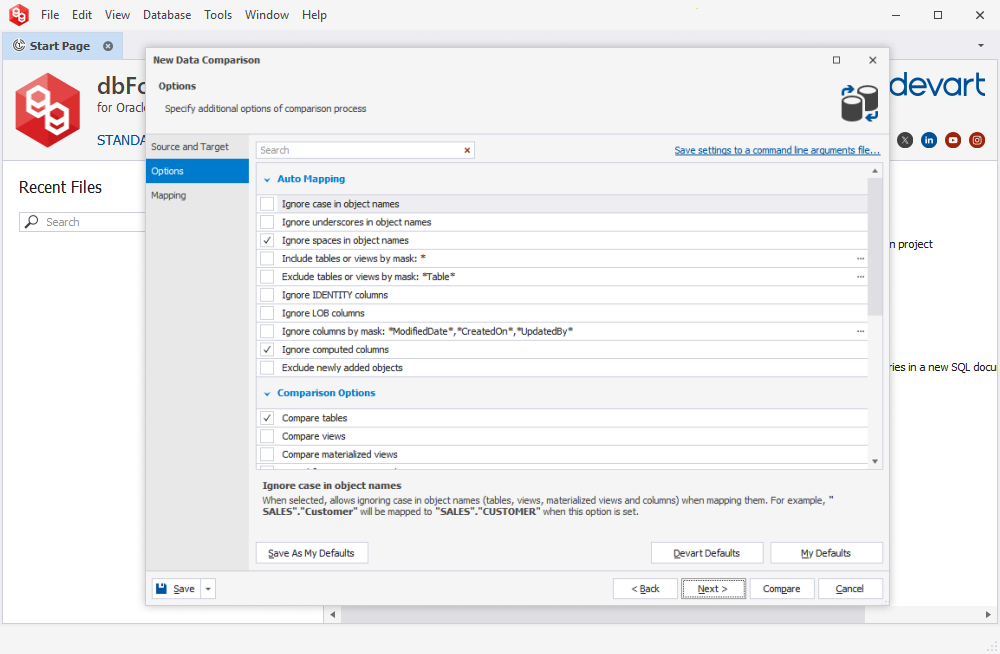
Data comparison options: ignore case, underscores or spaces in object names, exclude tables by mask, ignore LOB or computed columns, and choose tables, views and materialized views.
Reports in HTML, Excel and XML
dbForge Compare Bundle for Oracle generates comparison reports for sharing or audits, with options to include only filtered objects, objects with differences or those selected for synchronization, the comparison options used, warnings and the deployment script.
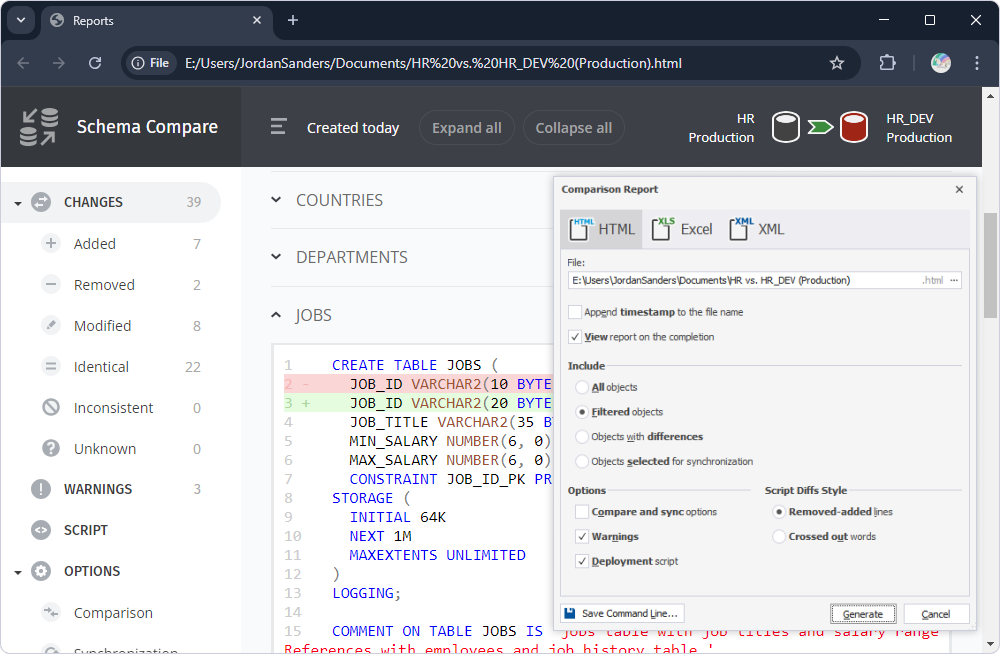
An HTML schema comparison report in a browser (39 changes: 7 added, 2 removed, 8 modified) beside the Comparison Report dialog with HTML, Excel and XML formats.
Safe synchronization and command-line automation
dbForge Compare Bundle for Oracle checks dependencies, rolls back on error, warns before risky steps and lets you add scripts to run before and after synchronization. Saved comparisons become .bat files or PowerShell scripts for scheduled runs (Schema Compare's command line needs the Professional bundle).
Benefits
- One release, one toolkit. Structure and data changes are compared and deployed the same way, from the same installation.
- Cheaper than the parts. You pay 28% to 33% less than for the two tools bought separately.
- Reviewed deployments. Both wizards show an action plan and warnings before anything runs against production.
Real-World Uses
- Shipping a release: sync the new tables and columns with Schema Compare, then the reference data that goes with them with Data Compare.
- Rebuilding a test environment: align TEST with PRODUCTION's structure and copy its lookup tables.
- A nightly drift report: a .bat file compares production with a snapshot and with the expected reference data, and saves HTML reports.
- Checking a vendor patch: see every object and every configuration row the patch changed.
Who It's For, and Who Should Skip It
Buy it if you deploy Oracle changes that involve both structure and data, which covers most release work. Choose Professional if you want Schema Compare's command line, source control and wrapped PL/SQL comparison.
Skip it if you only ever compare structure (Schema Compare alone is cheaper) or only data (Data Compare alone), or if you'd use an Oracle IDE anyway, since dbForge Studio for Oracle Professional includes both. It's Windows-only; a reviewer on G2 specifically missed a Linux version.
Usage Guide
- Download and install the Compare Bundle for Oracle from Devart's download page (sign in with a free Devart account).
- Compare schemas first. Start Schema Compare, pick source and target, map the schemas and review the differing objects.
- Synchronize structure. Check the action plan and warnings, then run or save the script.
- Compare data next. Start Data Compare on the same connections, check the comparison keys and review the differing rows.
- Synchronize data with the Data Synchronization Wizard.
- Automate: save both comparisons and generate .bat files for scheduled runs.
Where It Falls Short
- Two programs, not one. Schema and data are compared in separate tools and separate documents; there's no single combined comparison.
- Standard is half-automated. Without Professional, schema comparisons can't run from the command line or against source control.
- Windows only.
What Users Say
On G2 (as shown on SaaSworthy), the Compare Bundle for Oracle has three reviews, all five stars, and each of its two tools has one more. The reviews are short and from 2020 to 2023, so read them as a sign of what people use it for rather than a large sample.
Compare Bundle for Oracle on G2 (5/5 from 3 ratings)
Katya O. (June 16, 2020): "We are using both of them to compare schemas and data between our production and test environments. Most often it helps to identify missing columns and tables, columns with incorrect data types and character length."
Oleksandr L. (June 17, 2020): "I'm most impressed by the smart customizable synchronization this solution provides, and also its nice and clear comparison wizards which make tuning of data and schema comparisons quite easy."
A verified user in real estate (September 28, 2020): "The product saves time and resources! It is able to handle extreme amounts of data."
The individual tools on G2
moujab z. on Schema Compare for Oracle (November 17, 2022): "We mainly used it to compare the databases between live and development environment, which made us concentrate more on the our code upgrade." His wish: "What I needed was to be able to install it on a Linux machines."
Harshvardhan S. on Data Compare for Oracle (April 21, 2023): "I appreciate its ability to automate data synchronization tasks." His complaint: "dbForge Data Compare for Oracle is designed explicitly for Oracle databases and may not be suitable for users with other database management systems, which limits its efficiency."
The recurring praise is for the comparison wizards, the synchronization scripts and the time saved between test and production; the only complaints are platform ones (no Linux version, Oracle only).
Comparisons
The bundle vs buying both tools separately
Schema Compare for Oracle plus Data Compare for Oracle cost $239.90 a year at Standard level against $169.95 for the bundle, and $299.90 with Schema Compare Professional against $199.95. Perpetual licenses cost $459.90 and $579.90 separately against $329.95 and $399.95 bundled. If you need both tools, the bundle is always the cheaper way.
The bundle vs dbForge Studio for Oracle Professional
dbForge Studio for Oracle Professional ($329.95 a year) includes schema and data comparison with their command lines, plus the PL/SQL editor, debugger and other IDE tools. The Professional bundle at $199.95 is the better buy for a DBA who only deploys changes.
Editions and Pricing
Both editions are sold under one product. The order page opens on Professional with a 1-year subscription at $199.95; you choose the edition, subscription or perpetual license, 1 to 3 years of support and optional priority support there.
| Bundle edition | Contains | 1-year subscription | Perpetual | Separately (year / perpetual) |
|---|
| Standard | Schema Compare Standard + Data Compare | $169.95 | $329.95 | $239.90 / $459.90 |
| Professional | Schema Compare Professional + Data Compare | $199.95 | $399.95 | $299.90 / $579.90 |
Devart takes 5% off for 5 to 9 licenses, 10% for 10 to 19 and 15% for 20 or more.
FAQs
Are the two tools in dbForge Compare Bundle for Oracle installed separately?
No. dbForge Compare Bundle for Oracle is one 121.87 MB installer that installs both Schema Compare and Data Compare, which then run as separate applications.
Can I run data comparisons from the command line with the Standard bundle?
Yes. dbForge Compare Bundle for Oracle Standard includes Data Compare for Oracle, whose only edition has the command line. What Standard lacks is the command line for schema comparisons.
Does dbForge Compare Bundle for Oracle need an Oracle client?
No. Both tools in dbForge Compare Bundle for Oracle can connect directly to the server, and both also work with Instant Client or several Oracle Homes.
Can it compare against a schema stored in Git?
Yes, with Professional. dbForge Compare Bundle for Oracle Professional includes Schema Compare Professional, which compares databases with versioned snapshots in Git, TFVC, Subversion, Mercurial, Perforce or SourceGear Vault.
Does it work with Oracle on Amazon RDS?
Yes. Both tools in dbForge Compare Bundle for Oracle support Oracle on Amazon RDS, Oracle Cloud and Real Application Clusters.
What happens if I let the subscription lapse?
A dbForge Compare Bundle for Oracle subscription stops working at the end of its term until you renew. Devart charges 20% more to renew 3 or more months after the end, and 60% more after 12 months.
System Requirements
- Windows 7, 8, 8.1, 10 or 11, or Windows Server 2008, 2012, 2016, 2019, 2022 or 2025
- .NET Framework 4.7.2 or later
- Oracle 9i to 26ai (Data Compare also 8i), Oracle Cloud, RAC or Oracle on Amazon RDS
- About 122 MB for the installer download
Conclusion
dbForge Compare Bundle for Oracle is the right buy for anyone who deploys Oracle changes and needs to sync both structure and data: you get both tools for 28% to 33% less than buying them separately, and Professional, at $199.95 a year, adds the schema command line and source control that make it a real release tool. The main reason not to buy it is dbForge Studio for Oracle Professional, which includes both compare tools and an IDE for $329.95, so developers should compare the two. Try the bundle free for 30 days.
Download Free TrialBuy Now