ODBC Driver for NexusDB: Get NexusDB Data Into Excel, Power BI and Access on Windows
Devart ODBC Driver for NexusDB is a commercial ODBC driver that lets Excel, Power BI, Tableau, Access and other ODBC tools read and write NexusDB databases on 32-bit or 64-bit Windows, with no NexusDB client to install. A single-desktop license costs $139.95 a year, or $279.95 as a perpetual license.
NexusDB is a database that lives mostly inside Delphi applications, so the data tends to be locked in the program that created it. This driver is how you get at it from outside: point a DSN at the server or the embedded database folder, and any ODBC tool can see the tables. NexusDB's vendor licenses this driver too, which tells you it isn't a side project.
Quick facts
- Version: 1.11.0, released October 16, 2026
- Developer: Devart
- Platforms: Windows only, 32-bit and 64-bit
- Servers: NexusDB Server 3.10 and higher, with support added through 4.75.20
- Connection types: Remote over TCP/IP (port 16000 by default) or Embedded (a database path)
- Client needed: none
- Price: $139.95 per year for the Desktop edition (subscription), $279.95 perpetual
- Trial: 30 days, free, activated with a trial key from a Devart account
What we checked: version 1.11.0 (released October 16, 2026) on Devart's download page and revision history, installer sizes of 31.02 MB (EXE) and 32.99 MB (MSI), and prices on the order page of $139.95 a year for Desktop for Windows, $279.95 perpetual and $899.95 a year for Server Standard, all on November 5, 2026. We didn't install the trial (the download needs a Devart account) or connect it to a NexusDB database.
Before you buy
This driver is Windows only: there are no macOS or Linux packages, unlike most of Devart's other ODBC drivers. Its configuration dialog also has no security tab for SSL, SSH or HTTP tunneling, so plan on a VPN or similar for a remote connection across an untrusted network.
The default price is a subscription: the driver works only during the paid term, and it needs an internet connection to activate and to check the license. A perpetual license costs about twice as much, activates offline and keeps the version you bought working.
Download Free TrialBuy Now
Overview
Devart ODBC Driver for NexusDB implements the ODBC API on top of a direct connection to NexusDB. Applications send SQL, the driver maps NexusDB data types to ODBC types in both directions, and rows come back as with any other ODBC source. Both NexusDB deployment styles are covered: Remote for a NexusDB server on the network and Embedded for a database opened from a path on disk.
Devart updates it twice a year, in step with its other drivers. Version 1.9.0 in November 2025 added NexusDB 4.75.17, and 1.11.0 in October 2026 added NexusDB 4.75.20 and a read-only connection mode, along with better compatibility with Node.js, Visual FoxPro and DBeaver.
Features
Remote and Embedded NexusDB connections with nothing else to install
Devart ODBC Driver for NexusDB connects to a remote NexusDB server over TCP/IP, port 16000 by default, or opens an embedded database from its path. No NexusDB client software is needed on the machine. The DSN dialog is short: pick Embedded or Remote, fill in the server, port, database alias, user and password, and test it.
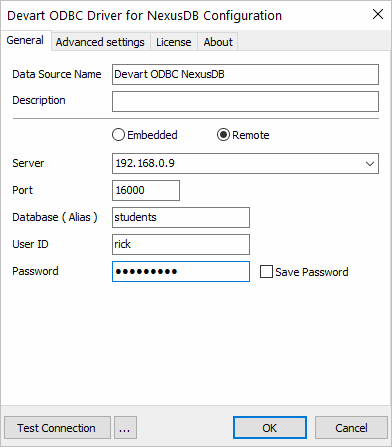
The driver's Windows configuration dialog with Remote selected: server address, port 16000, database alias, user and password. The tabs are General, Advanced settings, License and About.
Live NexusDB tables in Excel, Power BI and Access
Devart ODBC Driver for NexusDB puts NexusDB tables in Excel through the standard From ODBC command, so a report refreshes from the database instead of an export. Devart documents the setup for Excel, Access, Power BI, Tableau, QlikView, DBeaver, SQL Server Management Studio, Python and PHP, among others.

Excel's Navigator listing tables through the driver, with a preview of an EMPLOYEES table.

The same table loaded into a worksheet.
32-bit and 64-bit Windows builds
Devart ODBC Driver for NexusDB works with both 32-bit and 64-bit applications, which matters for the older Windows and Office setups that NexusDB applications often run alongside. The MSI package also suits rollouts through Group Policy.
Read-only connections and bulk updates
Devart ODBC Driver for NexusDB supports inserts, updates and deletes, and can combine statements into batches for bulk updates. Since version 1.11.0 it can also open a connection read-only, a sensible setting for a report that shouldn't be able to touch a production application's data. Local caching and connection pooling help with repeated queries.
Compatibility options for ODBC tools
Devart ODBC Driver for NexusDB can force ODBC 2.x or 3.x behavior, return strings as ANSI or Unicode, use regional number and date formats, and treat empty strings as NULL. NexusDB-specific settings include heartbeat and watchdog intervals, a lost-connection timeout and passwords for individual tables. The change log shows steady fixes for Access, including linked tables with joins and nullable columns.
Benefits
- Data gets out of the application. Reports no longer depend on what a Delphi program's own screens can show.
- No client to deploy. The installer is all a report user needs.
- One DSN for every tool. Excel, Access and Power BI share the same setup.
- Vendor backing. NexusDB licenses this driver itself, and Devart adds new server versions as they appear.
Real-World Uses
- An office manager pulls customer lists out of a NexusDB-based line-of-business program into Excel.
- A Delphi developer gives a customer a read-only DSN so they can build their own reports without a new feature in the application.
- A BI analyst brings NexusDB tables into Power BI next to other data sources.
- An IT team moving off NexusDB uses a SQL Server Linked Server or an ETL tool to copy data out to a new database.
Who It's For, and Who Should Skip It
It's for Delphi and C++Builder developers who use NexusDB, the businesses running their applications, and anyone who needs NexusDB data in a Windows reporting tool.
Skip it if you need access from Mac or Linux, since there's no build for them. Skip it if your code is in Delphi and can use NexusDB's native components directly. If NexusDB is one of several sources you need, price Devart's ODBC Universal Bundle (from $499.95 a year for all its ODBC drivers).
Usage Guide
- Get the installer. Sign in to or create a Devart account on the download page, then download the EXE or MSI. Only one version of the driver can be installed at a time.
- Install and activate. Run the wizard and enter your trial or purchased activation key, or activate later. The driver must be activated even for the trial.
- Create a DSN. Open ODBC Data Sources in the bitness of your application, choose User DSN or System DSN, click Add and pick Devart ODBC Driver for NexusDB.
- Enter the connection. Choose Remote and give the server, port and database alias, or choose Embedded and give the database path. Add the user and password if the database has them, then click Test Connection.
- Connect your tool. In Excel use Data, Get Data, From Other Sources, From ODBC, and pick your DSN.

The Excel route to the driver: Data, Get Data, From Other Sources, From ODBC.
Where It Falls Short
- Few independent reviews. We could find almost no reviews of this particular driver, which suits a niche database but means your own trial counts for a lot.
- The trial takes paperwork. The installer sits behind a Devart sign-in, and the driver won't work until you enter a trial key.
- Access needs testing. The change log has a run of Access fixes, including date and time updates and the "-7735" error on nullable columns, so try your own forms and linked tables.
- A shared server costs more. Desktop allows one user at a time on one computer, and a shared server needs Server Standard at $899.95 a year.
What Users Say
From NexusDB itself
The most useful voice here is NexusDB's own. In a case study on Devart's site, the company explains that it partnered with Devart rather than rebuild its ODBC driver in-house, and reports that the driver copes well with tools that don't fully follow the ODBC standard. It's a vendor-published story, so read it as an endorsement rather than a test:
"Our testing has shown speed to be no concern compared to other connection methods." Eivind Bakkestuen, Senior Developer, NexusDB
Ratings for the Devart ODBC line
We found no user reviews of the NexusDB driver on its own. These November 2026 ratings cover Devart's ODBC drivers as one product, so they describe the vendor rather than this driver:
- Capterra: 4.7 out of 5 from 26 reviews of Devart ODBC Drivers
- Software Advice: 4.7 out of 5 from 26 users, with 4.5 for ease of use and 4.4 for customer support
- TrustRadius: a much lower 5.2 out of 10 from 58 ratings
Reviewers of the line praise quick setup and reliable connections. The complaints are mostly about price, one TrustRadius reviewer noting that "for each user, it is necessary to purchase a license."
Comparisons
Desktop vs. Server editions
Desktop covers one computer used by one person at a time, directly or remotely. Server Standard covers one server with up to 6 cores used by many people in one company, such as a web or report server. Server Enterprise removes the core limit. Site and OEM licenses are quoted on request, and OEM is the route for a Delphi developer who wants to ship the driver inside an application.
Editions and Pricing
| Edition | Subscription | Perpetual | Who can use it |
|---|
| Desktop (Windows) | $139.95 per year | $279.95 | One user at a time on one computer |
| Server Standard | $899.95 per year | $1,799.95 | Many users on one server with up to 6 cores |
| Server Enterprise, Site, OEM | On request | On request | Any core count, whole company, or redistribution |
Licenses include a year of support and upgrades. Priority support is an optional extra, and Devart takes 5, 10 or 15 percent off for 5, 10 or 20 copies.
FAQs
Does Devart ODBC Driver for NexusDB work with embedded databases?
Yes. Devart ODBC Driver for NexusDB can open an embedded database from its path as well as connect to a remote NexusDB server.
Which NexusDB versions does the driver support?
Devart ODBC Driver for NexusDB supports NexusDB Server 3.10 and higher, and version 1.11.0 added support for 4.75.20.
Is there a NexusDB ODBC driver for Linux or Mac?
No. Devart ODBC Driver for NexusDB runs only on 32-bit and 64-bit Windows.
Can a 32-bit Access or Excel use the NexusDB driver?
Yes. Devart ODBC Driver for NexusDB works with 32-bit and 64-bit applications. Create the DSN in the ODBC Data Sources tool that matches your application.
What happens when the subscription ends?
Devart ODBC Driver for NexusDB on a subscription works only for the term you've paid for, and it checks the license online. A perpetual license keeps the version you bought working.
Can I ship the driver with my own Delphi application?
Yes, with an OEM license. Devart sells OEM licensing for ODBC Driver for NexusDB, quoted by the number of devices.
System Requirements
- Windows: 32-bit or 64-bit
- Database: NexusDB Server 3.10 and higher, or an embedded NexusDB database. No client software required
- Installed versions: one version of the driver at a time
Conclusion
Devart ODBC Driver for NexusDB is worth $139.95 a year if you have NexusDB data and need it in Excel, Power BI or any other Windows ODBC tool, because there aren't many other ways to reach it, and NexusDB's vendor backs this one. It keeps up with new NexusDB releases, the latest in October 2026. The main reason not to buy is platform: it's Windows only, with no tunneling settings in its dialog. Reviews are scarce too, so run the 30-day trial on your own database and tools before you pay.
Download Free TrialBuy Now