Excel Add-in for Zendesk: Ticket, User and Help Center Data in a Live Excel Table
Excel Add-in for Zendesk is a $179.95 Devart add-in for Excel on Windows that pulls Zendesk tickets, users, organizations and Help Center content into worksheets through the Zendesk API, refreshes them in one click, and lets you edit records and commit the changes back. It is for support managers and Zendesk admins who report on tickets in Excel or need to fix many user and organization records at once.
Zendesk's built-in exports are either limited to a view's CSV or delivered as a full-account JSON or XML file that someone then has to parse. The add-in turns the same data into a query: the tickets updated this week, the users without an organization, the articles in one section, ready for a pivot table.
Quick facts
- Version: 3.1.70, released September 7, 2026
- Developer: Devart
- Excel versions: 2007 to 2024, Windows
- Login: Zendesk subdomain, agent email and API token; OAuth access token or basic login in the advanced options
- Zendesk data: tickets, requests, views, users, organizations, ticket metric events, Help Center articles and sections, dynamic content
- Archived tickets: readable through the Incremental Export option
- Price: $179.95 including a year of updates; $89.95 per renewal year
- Trial: 30 days, free, after creating a Devart account
What we checked: the Zendesk connection and API options in Devart's documentation, every Zendesk change in the revision history back to the first release that supported it in January 2017, version 3.1.70 (76.60 MB) on the download page, and the price at checkout: $179.95 with one year of updates and $89.95 for a renewal, on November 14, 2026. We didn't connect it to a Zendesk account.
Before you buy
Old tickets need one setting changed. Zendesk archives a ticket 120 days after it's closed, and the standard API no longer returns it. For year-on-year reports, turn on Incremental Export in the advanced connection options; it reads archived tickets too, but then only the Updated date is filtered on Zendesk's side.
An API token acts as the agent who owns the email. Whatever you commit is done with that person's Zendesk permissions, so use an account with the right role, or switch the connection to Readonly for reporting workbooks.
Download Free TrialBuy Now
Overview
Zendesk support arrived in the add-in family in January 2017, and Devart has added objects as Zendesk grew: ticket metric events in 2022, custom lookup fields in 2024, and the Section and Article link fields for Help Center in June 2026. The Devart ribbon tab drives everything: Get Data to connect and query, Refresh to reload, Edit Mode, Commit and Rollback for changes.
Behind the scenes the add-in uses Zendesk's Search API for filtered queries, and Devart has adapted it to Zendesk's limits on search results. A Use Search API option turns that off, but then only tickets from the past 120 days come back.
Features
Sign in with your subdomain, email and API token
Excel Add-in for Zendesk needs three things on its connection page: the Zendesk host (yourcompany.zendesk.com), the email of the agent whose token you use, and the API token itself. The Advanced editor switches to OAuth with a client id, client secret and refresh token, which avoids sharing a long-lived API token in a workbook.
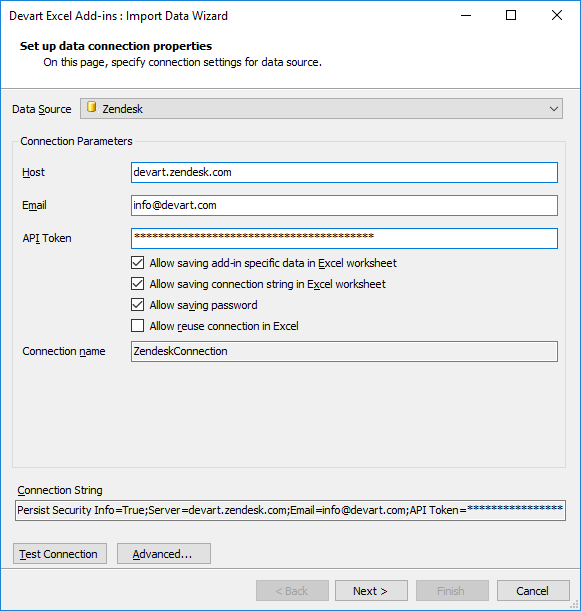
The Zendesk connection page of the wizard with the host devart.zendesk.com, an email, a masked API token and the connection string.
Query tickets and users with filters Zendesk understands
Excel Add-in for Zendesk shows each object's fields in a Query Builder, such as a user's role flags, time zone, last login, phone and notes. Conditions on fields like Status, Priority, Type, requester or organization are passed to Zendesk's API, so only matching records come back. A SQL tab handles joins, for example tickets with their organization's name.
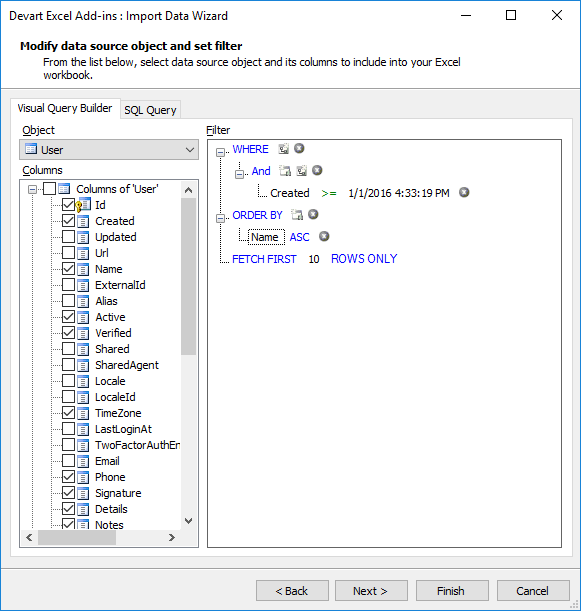
The User object in the Query Builder: selected fields include Name, Active, Verified, TimeZone and Phone, filtered on Created and sorted by name, ten rows.
Update users and organizations in bulk
Excel Add-in for Zendesk lets you correct names, phone numbers, notes or details for dozens of users at once in Edit Mode, or add a new end user as a new row. Zendesk-managed fields such as Id, Created and Active stay read-only, and the add-in rejects an empty name or a malformed true/false value before you commit.
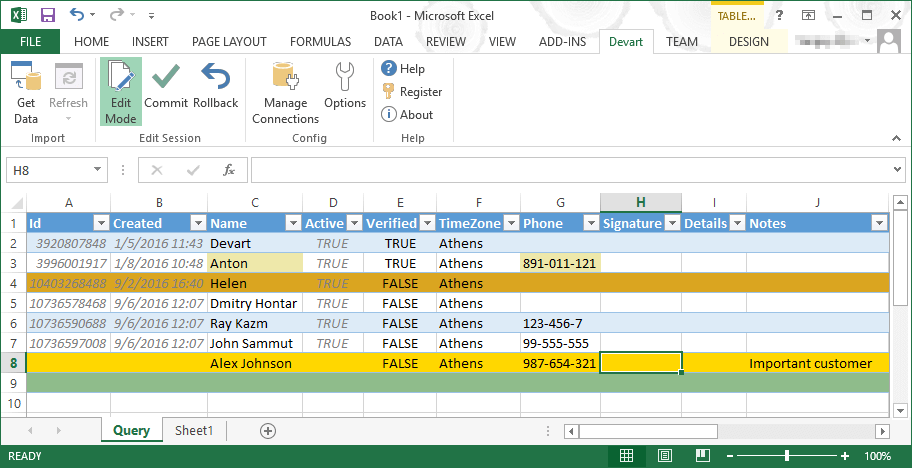
Zendesk users in Edit Mode: changed name and phone cells are shaded, one edited row is highlighted, and a new user, Alex Johnson, is being added with a note.
Custom ticket fields and custom objects
Excel Add-in for Zendesk reads custom fields on tickets, requests, views, users and organizations when Use Custom Fields is on, including custom lookup fields. A separate Describe Custom Objects option exposes Zendesk custom objects with their fields as columns, so the data you've modelled in Zendesk is reportable too.
Service metrics and Help Center content
Excel Add-in for Zendesk includes TicketMetricEvents, the event stream behind reply-time and resolution-time SLAs, so you can calculate your own response statistics in Excel. On the knowledge base side, Articles carry their SectionId and AuthorId and Sections their CategoryId, enough to audit which articles sit where and who wrote them. DynamicContentItem and its variants cover the translated text used in macros and triggers.
Benefits
- Reports beyond Zendesk Explore's layout. Once tickets and metric events are in Excel, any formula or chart is fair game.
- Mass fixes without the API. Updating 300 user records doesn't need a script or a third-party bulk app.
- History included. Archived tickets are reachable, which Zendesk's view exports don't give you.
Real-World Uses
- Monthly support report: refresh a workbook of tickets updated last month with their priority, type and organization, and let the pivot tables rebuild.
- SLA analysis: load TicketMetricEvents to measure first reply and resolution times by group or customer tier.
- User directory cleanup: find end users with missing phone numbers or wrong time zones and fix them in one commit.
- Knowledge base audit: list every article with its section and author to spot orphaned or outdated content.
Who It's For, and Who Should Skip It
A good buy for support operations leads and Zendesk admins on Windows who build their own reports in Excel and periodically clean up users, organizations or tickets in bulk.
Not for teams that want dashboards to update on a schedule with nobody at the keyboard, because Devart's add-ins have no automation, nor for Mac users. If Zendesk Explore already answers your questions, the add-in adds little.
Usage Guide
- Create an API token in Zendesk's admin settings for the Zendesk API, and note the agent email it will be used with.
- Install the add-in (76.60 MB, Devart login needed) from an administrator account on Windows.
- Connect: on the Devart tab click Get Data, choose Zendesk, enter the host, email and token, and Test Connection.
- Set the options you need under Advanced: Use Custom Fields for custom ticket fields, Incremental Export for archived tickets, Readonly for a reporting workbook.
- Load and edit: pick an object, filter it, load it, then use Edit Mode and Commit for any changes.
Where it falls short
- A trade-off on big ticket histories. Incremental Export brings in archived tickets but can only filter by Updated on Zendesk's side; filtering by status or priority then happens after download.
- Search API caps. Zendesk limits how many results a search returns, and Devart's add-in follows those limits, so very broad ticket queries are better split by date.
- Query bugs do appear. The August 2026 release fixed an error on SELECTs with an OR in the WHERE clause, and a 2022 release fixed another WHERE-clause bug.
- Manual only. No macro or scheduler can run Refresh or Commit.
What Users Say
On review sites
Capterra's page for Devart Excel Add-In for Zendesk shows a rating based on zero user reviews, and GetApp's review section is empty, as of November 14, 2026. The family-wide "Devart Excel Add-ins" profile on TrustRadius scores around 9.3 out of 10 from about 33 ratings, but that profile also gathers reviews of Devart's database tools, so it says little about this add-in. Reviewers of the line generally like live, editable data in Excel and point to price and first-time setup as the drawbacks.
Comparisons
Excel Add-in vs Zendesk Explore and view exports
Zendesk Explore and CSV exports from views come with Zendesk. Explore is the better tool for standard dashboards shared with the team. The add-in wins when you want raw records in Excel, need archived tickets or metric events in your own calculations, or want to edit users and organizations in bulk, which Explore can't do.
Zendesk add-in vs Cloud Pack
Support teams often run Zendesk next to a CRM. The $499.95 Cloud Pack adds Salesforce, HubSpot, Freshdesk, Zoho Desk and 15 other cloud add-ins to Zendesk; on its own, Zendesk plus any two of them would cost $539.85.
Editions and Pricing
Excel Add-in for Zendesk is sold as a single edition. Clicking Buy Now opens the order page set to one license with a year of updates, where two- or three-year update periods and priority support can be added.
| Item | Price | Includes |
|---|
| Excel Add-in for Zendesk | $179.95 | Lifetime use, one year of new versions and support |
| Another year of updates | $89.95 | Price rises 20% after 3 months and 60% after 12 months of lapse |
| Cloud Pack | $499.95 | Zendesk and 19 more cloud add-ins |
| Universal Pack | $599.95 | All 26 add-ins, databases included |
From five licenses Devart deducts 5%, from ten 10%, and from twenty 15%.
FAQs
Can Excel Add-in for Zendesk export tickets older than 120 days?
Yes. Excel Add-in for Zendesk reads archived tickets, which Zendesk moves out of its standard API 120 days after closing, when the Incremental Export option is turned on. Leave the Search API option on as well; with it off, results are limited to the last 120 days.
Does Excel Add-in for Zendesk need a Zendesk admin?
Excel Add-in for Zendesk needs an API token, which a Zendesk admin enables and creates, or an OAuth app registered by an admin. After that, each connection runs with the permissions of the agent whose email is used.
What are Devart's refund terms?
Devart refunds Excel Add-in for Zendesk within 30 days of purchase if a technical problem prevents it from working and Devart's support can't solve it. It isn't a no-questions guarantee, so test it on your account in the free trial.
Can I use one license on two computers?
Excel Add-in for Zendesk is licensed per person: one main computer plus a second laptop or home PC used only by the same person.
Will it run in Excel for Mac?
No. Excel Add-in for Zendesk runs only in Excel 2007 to 2024 for Windows.
System Requirements
- Windows PC with Microsoft Excel 2007, 2010, 2013, 2016, 2019, 2021 or 2024
- .NET Framework 4.0+, Visual Studio 2010 Tools for Office Runtime
- Installation under an administrator account
- A Zendesk account with API token access, or an OAuth client
Conclusion
Excel Add-in for Zendesk is worth $179.95 if you report on Zendesk in Excel or clean up users and organizations in bulk. Archived tickets, metric events and Help Center data in a refreshable sheet go well beyond what Zendesk's view exports give you.
If Zendesk Explore's dashboards already cover your reporting and you rarely edit in bulk, it's an extra cost you don't need. Otherwise, the 30-day trial on your own account will show quickly whether it fits.
Download Free TrialBuy Now