dbForge Data Compare for PostgreSQL: Find the Row Differences Between Two Databases and Script the Fix
dbForge Data Compare for PostgreSQL is a Windows tool that compares the rows in two PostgreSQL databases, shows what differs, and generates a script or applies the changes. It costs $74.95 at checkout for a one-year subscription license, or about $149.95 as a perpetual license.
You need it when lookup tables on staging have drifted from production, when a bad update damaged some rows and you have a backup to compare against, or when you want proof that two copies of a database match. You could write that SQL by hand, table by table. This tool turns it into a few clicks and a reviewable script.
Quick facts
- Version: 2026.2.82, released October 16, 2026
- Developer: Devart
- Runs on: Windows
- Databases: PostgreSQL 8.4 and later, including PostgreSQL 19 support added in September 2026, Amazon Redshift, and hosted PostgreSQL on Supabase, Heroku, AWS, Google Cloud, Azure and others
- Price: $74.95 for a one-year subscription, renewing at $74.95; about $149.95 perpetual
- Trial: 30 days, free, with a Devart account
- Guarantee: refund within 30 days on an annual subscription or a perpetual license
What we checked: version 2026.2.82 and the 51.97 MB installer size on Devart's download page, the revision history, and $74.95 on the order page on November 6, 2026. We did not install the tool or run a comparison.
Before you buy
The $74.95 price is a subscription. Under Devart's terms, a subscription-based license lets you use the product only during the paid period, and the cart renews it by default. The perpetual license, at twice the price, keeps working after your updates end. If you expect to use it past two years, perpetual is the better deal.
It compares data, not structure. Differences in tables, columns or indexes are the job of dbForge Schema Compare for PostgreSQL.
Download Free TrialBuy Now
Overview
You pick a source and a target connection, the tool maps tables to each other, and it reports each table as different or equal, with counts of records found only in the source, only in the target, different, or identical. You then select the rows you want, and it writes the synchronization script.
Devart ships updates often. Version 2026.2.54 in September 2026 added PostgreSQL 19 and more AI Assistant options, and 2026.2.82 in October fixed error reporting and improved copying data to the clipboard.
Features
Side-by-side row comparison
dbForge Data Compare for PostgreSQL shows every mapped table with its counts, then lets you open the exact rows that differ. You can compare whole databases or part of one, compare a table with a query result, and filter rows with a WHERE expression.
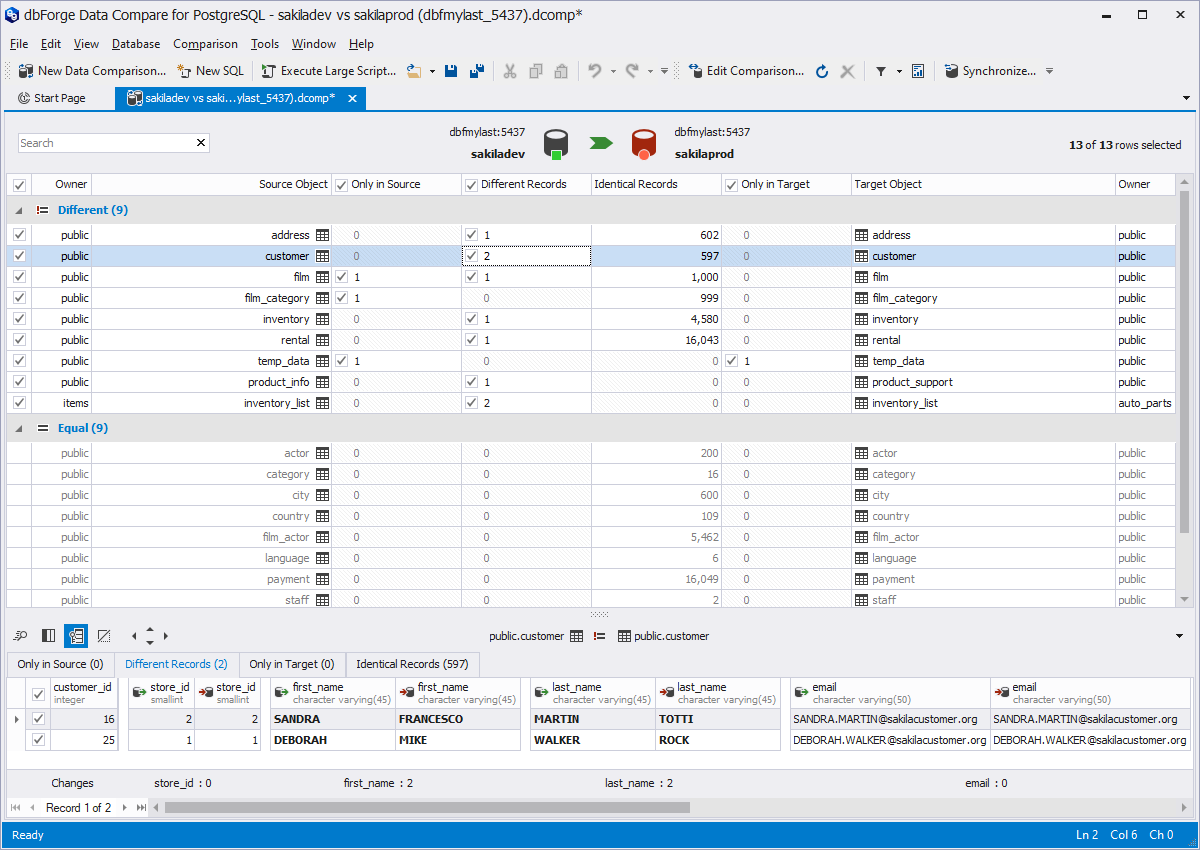
Results for sakiladev against sakilaprod: nine tables differ and nine are equal, with the two changed rows of the customer table shown below.
Mapping for tables that do not match
dbForge Data Compare for PostgreSQL maps tables, views, columns and schemas automatically, and you can map by hand when names or structures differ. Above, for example, product_info is compared with product_support.
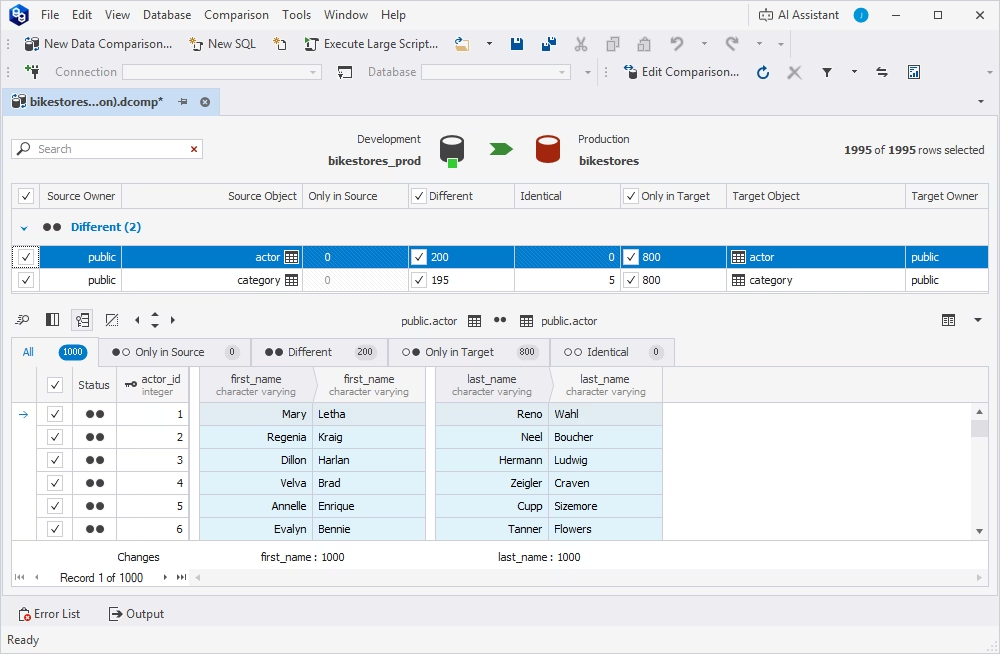
A comparison of the actor and category tables, with the actor rows open. Devart labels this and the next screens as the comparison module in dbForge Studio for PostgreSQL. The screenshot above is the standalone tool.
A synchronization script you can read first
dbForge Data Compare for PostgreSQL generates the SQL to bring the target in line, and you can run it at once, open it in the editor or save it to a file. Options cover single-transaction runs, disabling triggers and foreign keys, and resetting identity columns, and pre- and post-sync scripts can run around it.

The Data Synchronization Wizard's options: use a single transaction, disable DML triggers and foreign keys, and more.
Reports in CSV, Excel and HTML
dbForge Data Compare for PostgreSQL exports comparison reports in those three formats, which gives you something to attach to a change ticket or show an auditor. You choose whether the report covers all objects, only those with differences, or those selected for sync.

The Comparison Report dialog, with a choice of objects and options to include the actual data records.
Command-line automation
dbForge Data Compare for PostgreSQL saves comparison settings to a project and exports them as command-line arguments. You can put that in a .bat file and schedule it with Windows Task Scheduler. Passwords are not stored in the generated file, so you add them yourself.

The wizard's Output page, where Save Command Line exports the settings for scripting.
AI Assistant
dbForge Data Compare for PostgreSQL includes the dbForge AI Assistant, which turns plain requests into SQL, explains queries and helps with errors. It is handy for a one-off script, but always read what it writes before you run it against production.

The AI Assistant chat answering a request for a sync script between two bikestores databases.
Benefits
- Hours saved on manual SQL. A comparison across dozens of tables takes one setup, not dozens of queries.
- Safer changes. You review the script before anything touches the target.
- Row-level repairs. You can restore a few damaged rows from a backup copy, not the whole table.
Real-World Uses
- Copying updated lookup data from development to staging and production.
- Restoring rows damaged by a bad UPDATE after loading last night's backup into a second database.
- Checking that a migration to Supabase, or another hosted PostgreSQL service, copied every row.
- Giving auditors an HTML report of what differs between two environments.
Who It's For, and Who Should Skip It
It fits PostgreSQL DBAs and developers on Windows who compare environments from time to time and want a cheap, focused tool.
Skip it if you work on Mac or Linux, need ongoing replication, or already own dbForge Studio for PostgreSQL, which includes data comparison. It is also the wrong tool for near-real-time syncing of huge tables: use PostgreSQL logical replication for that.
Usage Guide
- Create a free Devart account, download the installer and run it on Windows.
- Click New Data Comparison and choose the source and target connections.
- Set the options and check the table mapping, adding custom mapping if names differ.
- Run the comparison and open a table to see its rows.
- Select the rows you want, click Synchronize, and choose whether to view, save or run the script.
- Save the project if this is a repeat job, then use Save Command Line to schedule it.
Where it falls short
It is not built for very large tables on a tight schedule. It fetches rows to the PC running the tool and sorts them by the comparison key, so big tables take time and traffic. Devart itself said so in the forum (see below).
Sync needs a usable key. Rows are matched on a comparison key, so check tables with no primary key before you trust the results. Activation also now happens through sign-in, so plan for it on locked-down servers.
What Users Say
There are only a few public reviews. Treat the ratings as thin, and read Devart's own frank answer on large tables.
Review sites
G2 shows 5.0 out of 5 from 3 reviews, and G2 itself says that is too few for buying insight. One reviewer called it a good tool for Postgres data comparison, and another wished the loader were faster on large data sets.
ComponentSource shows 4 out of 5 from a single review. Capterra had no user reviews on its listing, and PeerSpot and SourceForge show none either.
Devart on large, busy tables
User royb asked in April 2021 about comparing a table of over 30 million records every few minutes, with 300 rows added each minute. Devart's dzhanhira replied on April 23, 2021:
"If the table has about 30 million records and every minute the table grows by 300 records and the synchronization occurs every few minutes, then our tool will hardly work." The reason: "I don't think this is a suitable query for regularly fetching data from a large table."
A new user on the command line
User minicortex wanted to skip the GUI: "My company has many databases, so we can not save all db credentials inside the tool, nor can we manually recreate the connexion credientials every time." The same user later found the command-line documentation and wrote "All good!"
The recurring themes: the few reviewers are happy with the comparison itself, and the complaints are about speed on large data. That matches Devart's own advice, so size your tables before you commit.
Comparisons
Data Compare vs dbForge Schema Compare and dbForge Studio
Data Compare handles rows, and Schema Compare handles structure such as tables, columns and functions. Many teams need both, one after the other.
dbForge Studio for PostgreSQL is Devart's full IDE and includes data comparison along with a query editor and other tools. Buy Studio if you want one tool for daily work, and Data Compare if comparison is all you need.
Editions and Pricing
| License | Price | After the term |
|---|
| One-year subscription | $74.95, renews at $74.95 | Stops working unless extended |
| Perpetual | About $149.95, with a year of updates | Keeps working; updates need renewal |
Standard is the only edition. Two- and three-year terms cost less per year, and premium support is an optional add-on.
FAQs
Does dbForge Data Compare for PostgreSQL run on Mac or Linux?
dbForge Data Compare for PostgreSQL is a Windows application. Your PostgreSQL servers can run on Windows, Linux or macOS, as long as the Windows PC can reach them.
Can dbForge Data Compare for PostgreSQL compare a hosted database such as Supabase?
dbForge Data Compare for PostgreSQL lists Supabase, Heroku, AWS, Google Cloud, Azure, IBM, Alibaba and Aiven among its supported hosted services.
Will dbForge Data Compare for PostgreSQL change my data without asking?
dbForge Data Compare for PostgreSQL changes nothing until you run a synchronization. You can save or read the script first, and a rollback runs on errors if you use a single transaction.
Does dbForge Data Compare for PostgreSQL work with Amazon Redshift?
dbForge Data Compare for PostgreSQL lists Amazon Redshift support among its Standard edition features.
Should I choose subscription or perpetual?
dbForge Data Compare for PostgreSQL pays back the perpetual license after about two years of subscription. For a short project, take the subscription and switch off automatic renewal.
Can I get a refund on dbForge Data Compare for PostgreSQL?
dbForge Data Compare for PostgreSQL can be refunded within 30 days on an annual subscription or a perpetual license, according to the order page.
System Requirements
- Windows PC with network access to both databases
- PostgreSQL 8.4 or later, Amazon Redshift, or a compatible hosted service
Conclusion
dbForge Data Compare for PostgreSQL is good value at $74.95 a year for anyone on Windows who compares PostgreSQL environments now and then. The one reason to buy is the reviewable sync script: you see what will change before it changes.
The main reason not to buy is a very large, busy table that you want to keep in sync every few minutes. Devart says itself that the tool will hardly work there, and logical replication is the better fit.
Download Free TrialBuy Now