Aiseesoft Video Converter for Mac: Turn Any Video Into a File Your Mac, Phone or TV Will Play
Aiseesoft Video Converter for Mac is a $49.95 Mac app (lifetime license for one Mac) that converts video and audio between formats such as MP4, MOV, MKV, AVI, WMV, MXF and AVCHD, with ready-made profiles for iPhone, iPad, Apple TV, Android phones and editors like Final Cut Pro. It's for Mac users who want a simple, menu-driven converter with basic editing, 2D-to-3D and one-click video enhancement, and it runs natively on both Intel and Apple silicon Macs.
You've got an MKV that QuickTime won't open, camcorder clips in MTS that iMovie fumbles, or a folder of old AVI and WMV files that your iPad refuses. This app's job is to pick the right format for you from a device list, tidy the video up a little on the way, and convert the whole batch in one go.
Quick facts
- Version: 9.2.62 (app packages dated September 9, 2026)
- Developer: Aiseesoft Studio
- Runs on: macOS 10.10 or later, including macOS Tahoe. Separate native builds for Intel and Apple silicon Macs
- Converts: MP4, MOV, MKV, AVI, WMV, FLV, WebM, MPEG, VOB, MXF, AVCHD MTS/M2TS, TS and more, plus audio formats like MP3, AAC, FLAC, WAV and M4A
- Extras: 4K and HD profiles, 14 kinds of 3D output, trim, crop, rotate, watermark, and four one-click enhancements
- Price: $49.95 lifetime for one Mac, $25.00 for one month, $69.96 lifetime for three Macs
- Trial: free download that converts only a limited number of minutes of each file
- Guarantee: 30-day money-back guarantee for quality problems
What we checked: on October 18, 2026 we confirmed all three prices on the order page ($49.95, $25.00 and $69.96), downloaded the 4.3 MB installer from Aiseesoft, and read the full app packages it installs (153 MB for Intel, 160 MB for Apple silicon): version 9.2.62 (build 30191), a minimum of macOS 10.10, and true arm64 code in the Apple silicon build. We read the trial limits from the app's own text but didn't install it or run conversions on a Mac ourselves.
Before you buy
- The three-Mac license is the better deal. Lifetime for three Macs is $69.96 at checkout, only $20 more than the single-Mac license.
- The trial won't finish a full file. It converts only a limited number of minutes of each video, enough to judge quality and speed, not to do real work.
- The refund promise is narrow. Aiseesoft's guarantee covers "a quality problem within 30 days after purchasing," not a change of mind.
- It's a Mac-only license. The Windows counterpart is a separate product, Aiseesoft Total Video Converter, with its own license.
Download Free TrialBuy Now
Overview
Aiseesoft Video Converter for Mac is a classic one-window converter. A toolbar across the top holds Add File, Enhance, Trim, 3D and Edit. Your files sit in a list, each showing the source and output name, resolution and length, with drop-downs to pick the audio track and subtitle. A preview player fills the right side. The bottom bar holds the Profile menu, the destination folder, a Merge into one file checkbox and a big orange Convert button.
It's the converter from Aiseesoft's lineup without the extra tools of its bigger sibling, Mac Video Converter Ultimate. That keeps it simple: add files, pick a device or format, click Convert.
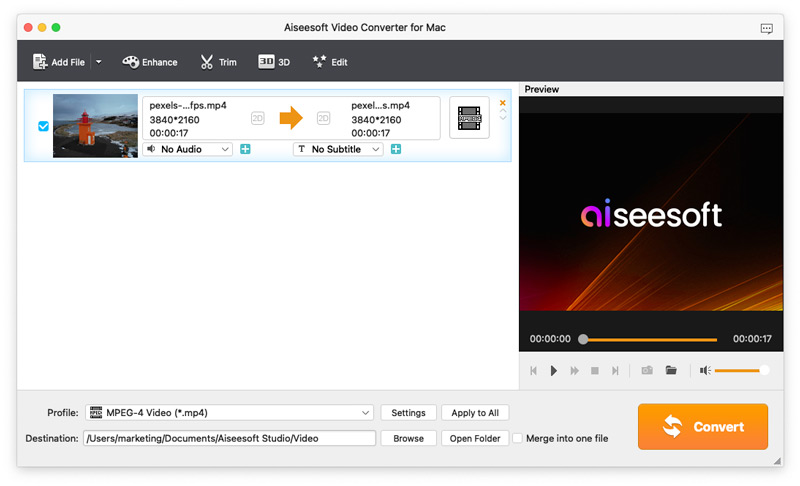
The main window with a 3840x2160 MP4 clip queued, the Profile set to MPEG-4 Video, the audio and subtitle drop-downs under the file, and the preview player on the right.
Features
Converts between the common video formats, including 4K and camcorder files
Aiseesoft Video Converter for Mac reads MP4, MOV, MKV, AVI, WMV, ASF, FLV, F4V, SWF, 3GP, MPEG, VOB, DV, MJPEG, RM/RMVB, MXF and transport streams (TS, MTS, M2TS, TRP), and writes most of them back out, plus WebM, DivX, XviD, DVD-style VOB and VCD/SVCD MPEG. It also writes ProRes Proxy, LT, Standard and HQ MOV files, which Final Cut Pro edits smoothly. 4K UHD and 1080p HD profiles sit in their own categories, so you can keep full resolution or scale down for a smaller screen.
Pick a device instead of a codec
Aiseesoft Video Converter for Mac groups its output profiles by device and app: Apple iPhone, iPad, iPod and Apple TV, Samsung, Huawei, Sony, LG, Xiaomi, Motorola and other phone makers, PSP, PS3/PS4, Xbox and Wii, and editors such as Final Cut Pro, Avid Media Composer and Adobe Premiere. Choose "iPad" and it lists the H.264, MPEG-4 and MOV variants that suit it. A search box finds a profile by name, and Settings lets you change the encoder, resolution, frame rate and bitrate and save the result as your own profile.
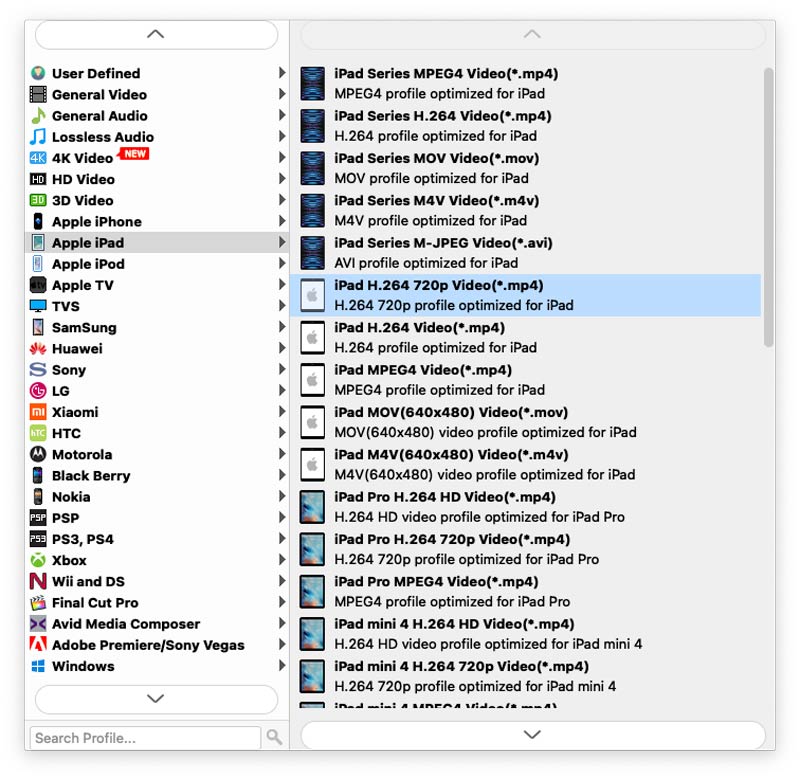
The Profile menu open on Apple iPad, with device categories on the left (iPhone, Apple TV, Samsung, Huawei, PS3/PS4, Final Cut Pro, Avid Media Composer and more) and the matching iPad formats on the right.
An Edit window for cropping, effects and watermarks
Aiseesoft Video Converter for Mac has a tabbed Edit window: Rotate, 3D, Crop, Effect, Enhance and Watermark. Crop shows the original and output previews one above the other, with the crop area size, its position, and a zoom mode (letterbox and others) to get rid of black bars or change the aspect ratio. Effect sets brightness, contrast, saturation, hue and volume, There's also a Deinterlacing option for old TV recordings. Watermark adds your own text or image. Trim, on the toolbar, keeps only the part between a start and end time, and the Merge checkbox joins several clips into one file.
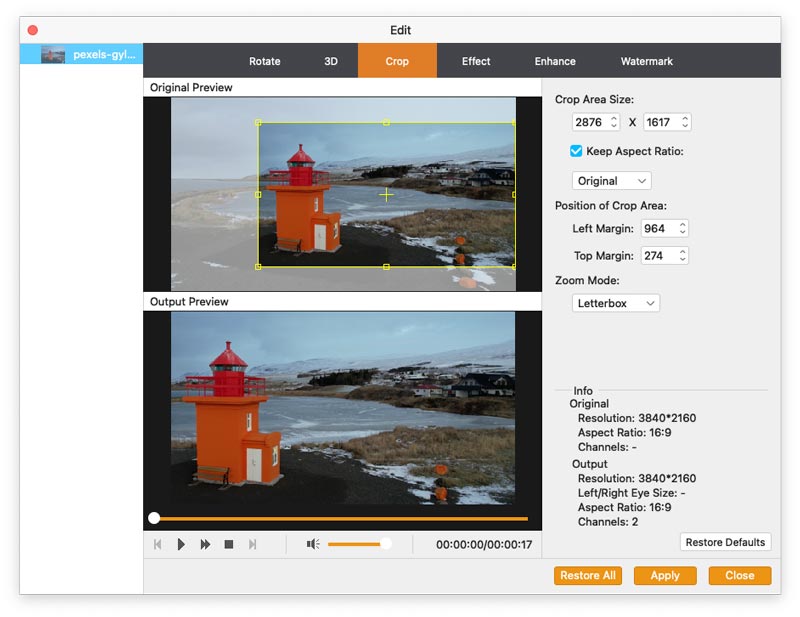
The Crop tab: a yellow crop box on the original 3840x2160 clip at the top, the output preview below, and the crop size, margins and Letterbox zoom mode on the right.
One-click video enhancement
Aiseesoft Video Converter for Mac can improve a video while it converts it, with four tick boxes: upscale resolution, optimize brightness and contrast, remove video noise, and reduce video shaking. The shake reduction only works on footage where the whole frame moves, as Aiseesoft notes in the window itself. These are quick fixes for a dark phone clip or grainy old footage, not a replacement for a proper video editor.
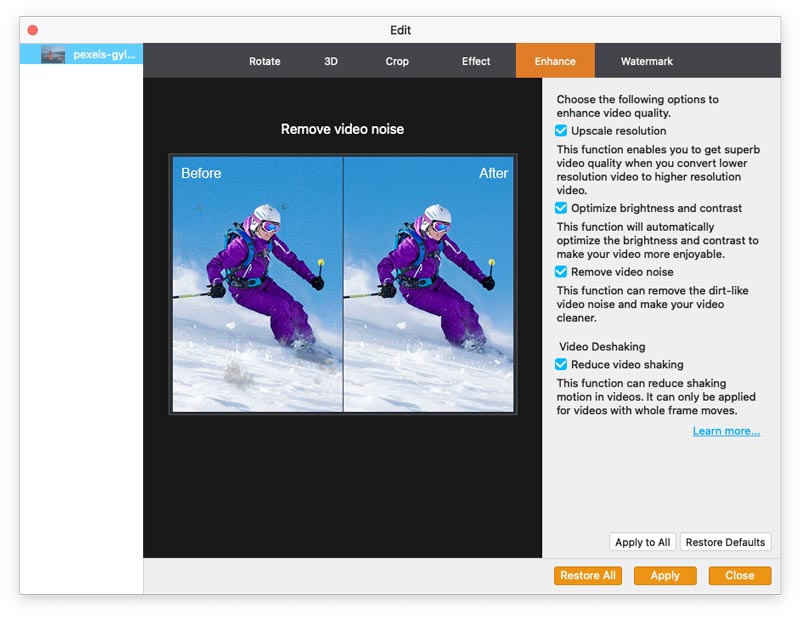
The Enhance tab with a before-and-after view of noise removal on a skiing shot, and the four options (upscale, brightness and contrast, noise, shaking) ticked on the right.
2D-to-3D conversion
Aiseesoft Video Converter for Mac turns ordinary 2D video into 3D in 14 modes: 10 kinds of anaglyph (for red-cyan and similar glasses), Side by Side (half-width or full), and Top and Bottom (half-height or full) for 3D TVs and VR headsets. Pick the mode your screen and glasses use. It's a niche feature, but it's here at no extra cost.
Audio extraction, batch work and a preview
Aiseesoft Video Converter for Mac also saves just the soundtrack as MP3, AAC, AC3, AIFF, FLAC, M4A, OGG, WAV, WMA and other audio formats. You can queue many files, set one profile with Apply to All, and convert them in one run. The preview player plays the source or the edited result before you commit, and a snapshot button saves a still frame as JPG, PNG or BMP.
Benefits
- You don't need to know codecs. Choosing "Apple TV" or "Samsung" is easier than deciding between H.264 and HEVC at a given bitrate.
- One tool covers the small jobs around conversion. Cropping off black bars, brightening a dark clip or trimming the start would otherwise mean opening an editor first.
- It's native on M-series Macs. Unlike some of Aiseesoft's older Mac apps, this one has a real Apple silicon build, so it doesn't rely on Rosetta 2.
- You pay once. The lifetime license includes free upgrades, and there's no subscription unless you choose the one-month plan.
Real-World Uses
- Old home videos for a new iPad. A box of AVI, WMV and MPEG files from an old Windows PC goes in as a batch and comes out as iPad-ready MP4s.
- Camcorder footage into Final Cut Pro. AVCHD MTS clips become ProRes MOV files that scrub smoothly on the timeline.
- A dark party video fixed up. Optimize brightness and contrast plus noise removal make a phone clip shot in a dim room watchable before you share it.
- Movie night on a 3D TV. A regular film becomes a side-by-side 3D file your TV can show with its glasses.
- A talk turned into a podcast file. Pull the audio from a recorded lecture or webinar as an MP3 for your phone.
Who It's For, and Who Should Skip It
It's a good fit if you convert videos now and then for different devices, want menus rather than settings, and like having crop, trim and quick enhancements in the same window. People with mixed archives of old formats get the most out of it.
Skip it if:
- You only need MP4 output. HandBrake is free and makes good MP4 and MKV files, and macOS can re-encode many files to H.264 or HEVC from Finder's Encode Selected Video Files command.
- You want DVD ripping, screen recording or a video downloader. This app converts files only.
- You need real editing. There's no timeline, titles or transitions. iMovie (free) or a proper editor fits better.
- You're on Windows. This license only covers the Mac app.
Usage Guide
- Install it. Download the small installer DMG from Aiseesoft and run it. It fetches the right build for your Mac (Intel or Apple silicon), about 153 to 160 MB. If you've bought a license, register with your email address and the registration code Aiseesoft sends you.
- Add your files. Click Add File or drag videos into the window.
- Choose an output. Open Profile and pick a device or format, or type a name such as "iPad" into the search box. Click Apply to All to use it for every file.
- Edit if you need to. Select a file and use Trim to cut it, or Edit to crop, rotate, change effects, add a watermark, enhance or make it 3D.
- Preview and convert. Play the result in the preview window, set the destination with Browse, and click Convert.
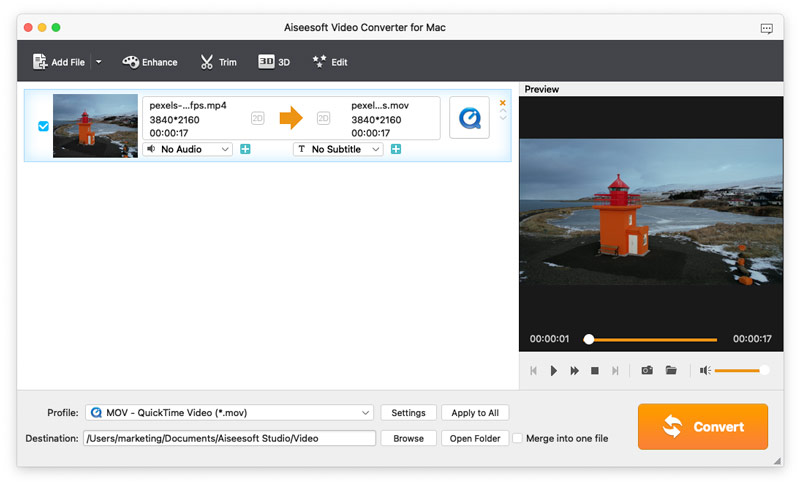
Ready to convert: the MP4 clip set to MOV - QuickTime Video, with its first frame showing in the preview player.
Tips
- Try the trial on your hardest file. Since it only converts part of each file, test the format and device you actually care about.
- Use the device profile, then tweak. Start from your device's profile and change only the bitrate or resolution in Settings. You'll avoid files your device can't play.
- Turn on enhancement only where it helps. Upscaling and noise removal add processing time. Leave them off for clean source video.
Where it falls short
- The device list is dated. Aiseesoft's spec sheet names devices up to the iPhone 11 and PS4. Newer phones play the generic MP4 and HEVC profiles fine, but don't expect a profile with your exact model.
- No change log. Aiseesoft doesn't publish what changes between versions, so you can't tell what an update fixed.
- Refunds can be a fight. Many of the 1-star reviews of Aiseesoft on Trustpilot are about refused or slow refunds, across its products. The guarantee only covers quality problems.
- The editing is basic. Trim, crop and effects work on one clip at a time, with no timeline.
What Users Say
There are no independent reviews of this exact app from tech magazines or app stores. MacUpdate lists it with no ratings yet. What exists is Aiseesoft's own review page and Trustpilot's reviews of Aiseesoft as a company.
On Aiseesoft's review page
Aiseesoft shows 196 reviews for this converter, nearly all five stars. Treat them as picked by the vendor. The older ones say more about real use than the recent ones:
- "I download this software for converting AVI to MOV on my Mac. Total 10 minutes for converting 7 video files over 90 minutes for everyone. The converting speed is much faster than online converters." (Coca)
- "The editing features are very amazing. Rotate, flip, crop, clip, merge, watermark, even 3D… I think it deserves my money." (Jude)
- "I've been using Video Converter for Mac for years. Its stability and reliability is without parallel. I don't do a lot of file conversions, but when I do, it takes care of it with no problem." (Devin)
- "It works just as advertised. I use it to convert MKV to MOV for QuickTime Player on Mac. The output video quality is satisfying and the conversion speed is fast." (Jay)
- "Very helpful tool to help me to extract mp3 background music from video and save for loop playback on my new iPhone X." (Alicia)
On Trustpilot (Aiseesoft as a company)
Aiseesoft scores 3.8 out of 5 from 604 reviews, but the spread is split: 59% five-star and 34% one-star, with almost nothing in between. These reviews cover all of Aiseesoft's products, not this converter alone.
- "The software has done wonders in converting various formats to MP4 which I can easily play on my various devices." (Henry, 5 stars, January 2026, about Aiseesoft's Video Converter Ultimate)
- "I've been buying Aiseesoft products for many years and always get quick support from them." (Hayden, 5 stars, December 2025)
- "when reaching out to support it was quick and relevant responses" (David Molinaro, 5 stars, October 2025)
- "Whole point was to save time, and the return process was turning into an endless trap." (Owend, 1 star, "Refund Endless Cycle - Don't Trust", September 2026)
- "i cant login for some weird reason and if you email this company they will make circles with you" (Rb, 1 star, September 2026)
The pattern is clear: people who keep the software tend to like the speed, the output quality and the support, while the angry reviews are mostly about refunds and accounts, not about conversions failing.
Comparisons
Aiseesoft Video Converter for Mac vs HandBrake
HandBrake is free and open source, but it only writes MP4, MKV and WebM, and its settings assume you know what a codec is. Aiseesoft Video Converter for Mac writes far more formats (MOV, ProRes, AVI, WMV, MPEG and audio-only files), picks settings from a device list, and adds 3D and one-click enhancement. If MP4 is all you need, HandBrake saves you $50.
Aiseesoft Video Converter for Mac vs Aiseesoft Mac Video Converter Ultimate
Mac Video Converter Ultimate is Aiseesoft's bigger, pricier converter, with a toolbox of extra tools on top of conversion. Video Converter for Mac is the plain converter. Choose this one if converting files is all you need.
Editions and Pricing
| License |
Price at checkout |
Term |
Macs |
| Lifetime License |
$49.95 |
Lifetime, free upgrades |
1 |
| 1 Month License |
$25.00 |
1 month |
1 |
| Multi-user License |
$69.96 |
Lifetime, free upgrades |
3 |
The one-month license costs half the lifetime price, so it only makes sense for a single job. All three come with the 30-day money-back guarantee for quality problems.
FAQs
Does Aiseesoft Video Converter for Mac run natively on Apple silicon (M1 to M5)?
Yes. Aiseesoft Video Converter for Mac 9.2.62 comes in two builds, and the installer downloads the arm64 one on an M-series Mac, so it runs without Rosetta 2.
Which versions of macOS does Aiseesoft Video Converter for Mac support?
Aiseesoft Video Converter for Mac 9.2.62 needs macOS 10.10 Yosemite or later, and Aiseesoft lists macOS Tahoe as supported. Its sales pages still say Mac OS X 10.7, but the current app itself requires 10.10.
Can I use my Aiseesoft Video Converter for Mac license on a Windows PC?
No. Aiseesoft Video Converter for Mac is licensed for Macs only. On Windows the matching converter is sold as Aiseesoft Total Video Converter, with its own license.
Can Aiseesoft Video Converter for Mac rip DVDs or download online videos?
No. Aiseesoft Video Converter for Mac converts video and audio files that are already on your Mac. For discs or online videos you need a separate ripper or downloader.
Can Aiseesoft Video Converter for Mac make ProRes files for Final Cut Pro?
Yes. Aiseesoft Video Converter for Mac writes ProRes Proxy, LT, Standard and HQ MOV files, and has a Final Cut Pro profile category, so camcorder or phone footage edits smoothly in Final Cut.
Why is the Aiseesoft Video Converter for Mac download so small?
The 4.3 MB DMG is an installer, not the app. When you run it, it downloads Aiseesoft Video Converter for Mac itself, about 153 MB for Intel Macs or 160 MB for Apple silicon, so you need an internet connection to install it.
Do I get updates after buying Aiseesoft Video Converter for Mac?
Yes. Aiseesoft Video Converter for Mac's lifetime licenses include free upgrades, according to Aiseesoft's order page. The one-month license works only while it's active.
Can I get a refund for Aiseesoft Video Converter for Mac?
Only for a quality problem within 30 days of purchase. Aiseesoft's guarantee doesn't promise a refund if you simply change your mind, so use the free trial before buying.
System Requirements
- macOS: 10.10 or later, including macOS Tahoe
- Processor: 1 GHz Intel processor or Apple M-series chip (native build for each)
- RAM: 1 GB or more
- Disk: about 160 MB for the app, plus space for your converted videos
- Internet: needed to install, since the installer downloads the app
Conclusion
Aiseesoft Video Converter for Mac is worth it if you regularly convert mixed video files for different devices and want to do it from a menu, not a settings panel. The device profiles, ProRes output, crop and enhancement tools and native Apple silicon build make it a capable everyday converter, and the $69.96 three-Mac license is the best value.
The main reason to pass: if MP4 is all you need, HandBrake does it for free. And because Aiseesoft only refunds for quality problems, take the trial seriously before you pay.
Download Free TrialBuy Now