Entity Developer: Visual ORM Design for EF Core, Entity Framework and NHibernate
Entity Developer is Devart's visual ORM designer for .NET developers. It turns a database into an Entity Framework Core, Entity Framework, NHibernate or LINQ to SQL model, lets you edit that model on a diagram, and generates the C# or Visual Basic code from templates you can change. The Professional edition behind this page's Buy Now button costs $319.95 for one developer, including a perpetual license and a year of updates, and runs on Windows on its own or inside Visual Studio.
Scaffolding a 200-table database into EF Core from the command line works, until you need to rename half the classes, split a table, map a stored procedure and then pull in next month's schema changes without losing your edits. That's the job Entity Developer was built for: a model you can see, refactor and keep in sync with the database in both directions.
Quick facts
- Version: 8.2.223, released October 8, 2026
- Developer: Devart
- Runs on: Windows with .NET Framework 3.5 SP1 or later, standalone, from the console, or integrated with Visual Studio 2015, 2017, 2019, 2022 and 2026
- ORMs: Entity Framework Core 1.1 to 10, Entity Framework v1 to v6, NHibernate 3 and later, LINQ to SQL, LinqConnect, Telerik Data Access and EntityDAC
- Databases: SQL Server, MySQL, Oracle, PostgreSQL, SQLite, Firebird and DB2, plus cloud sources through Devart's dotConnect providers
- Price: $319.95 at checkout for the Professional edition, single developer, with 1 year of updates and support
- License: perpetual for the version you have when the subscription ends. Renewing keeps updates coming.
- Free trial: 30 days, full features, download needs a free Devart account
- Guarantee: 30-day money-back guarantee
What we checked: the price on the order page ($319.95 for Entity Developer Professional, single license, 1 year of support and upgrades included) and the current version on Devart's download page (8.2.223, 84.85 MB), both on October 27, 2026. The trial download requires signing in to a Devart account, so we didn't install it or build a model.
Download Free TrialBuy Now
Overview
Entity Developer works the way most data-heavy .NET teams already think. You connect to a database, pick tables, views, procedures and functions in the Create Model wizard, and get a diagram of classes and associations. From there you rename, refactor and add mapping, and every save regenerates the code. When the database changes, the Update From Database wizard shows exactly which tables and columns were added, changed or dropped and lets you choose which changes to apply. You can also go the other way, designing the model first and pushing it to the database with Update To Database.
What sets it apart from the designers built into Visual Studio is breadth. One tool covers EF Core and classic Entity Framework, NHibernate (with XML, Fluent or Loquacious mapping), LINQ to SQL and Telerik Data Access, and it reads from every major database. Devart keeps it current: 8.0.35 (March 2026) added SQL Server 2025 and Oracle 26ai support, and 8.2.192 (September 2026) added Microsoft.Data.SqlClient, Microsoft Entra authentication and the ability to run without administrator rights.

Entity Developer integrated into Visual Studio: the model diagram in the center, Model Explorer and Database Explorer on the left, the generated DataModel files in Solution Explorer and the Diagram Overview on the right.
Features
Database-first and model-first, kept in sync
Entity Developer generates a model from an existing database in a few clicks, with options for how classes, members and methods are named, then keeps it in step with the schema. The update wizards list each change (a dropped table, a column whose nullability changed, a new function) so you apply only what you want, and your hand edits to the model survive. Model-first works too: design classes and generate the database script or update the database directly.

The Create Model Wizard (selecting tables, views, procedures and functions) and the Update From Database Wizard listing dropped, changed and added tables and columns, with the selected change explained at the bottom.
Visual mapping for almost everything
Entity Developer has visual editors for classes, properties, complex types and enums, all the common kinds of inheritance and association, mapping of insert, update and delete operations to stored procedures, methods created from stored routines, and table splitting, entity splitting and query views. For Entity Framework v1 to v6 it also edits the storage part of the model visually.
Model Refactoring wizard
Entity Developer's Model Refactoring wizard handles the mapping a database can't tell it about. Select a group of properties, such as the address fields on a Contact class, and turn them into a new complex type, move them into a new base or derived class, or split them out with table splitting, in a couple of clicks.
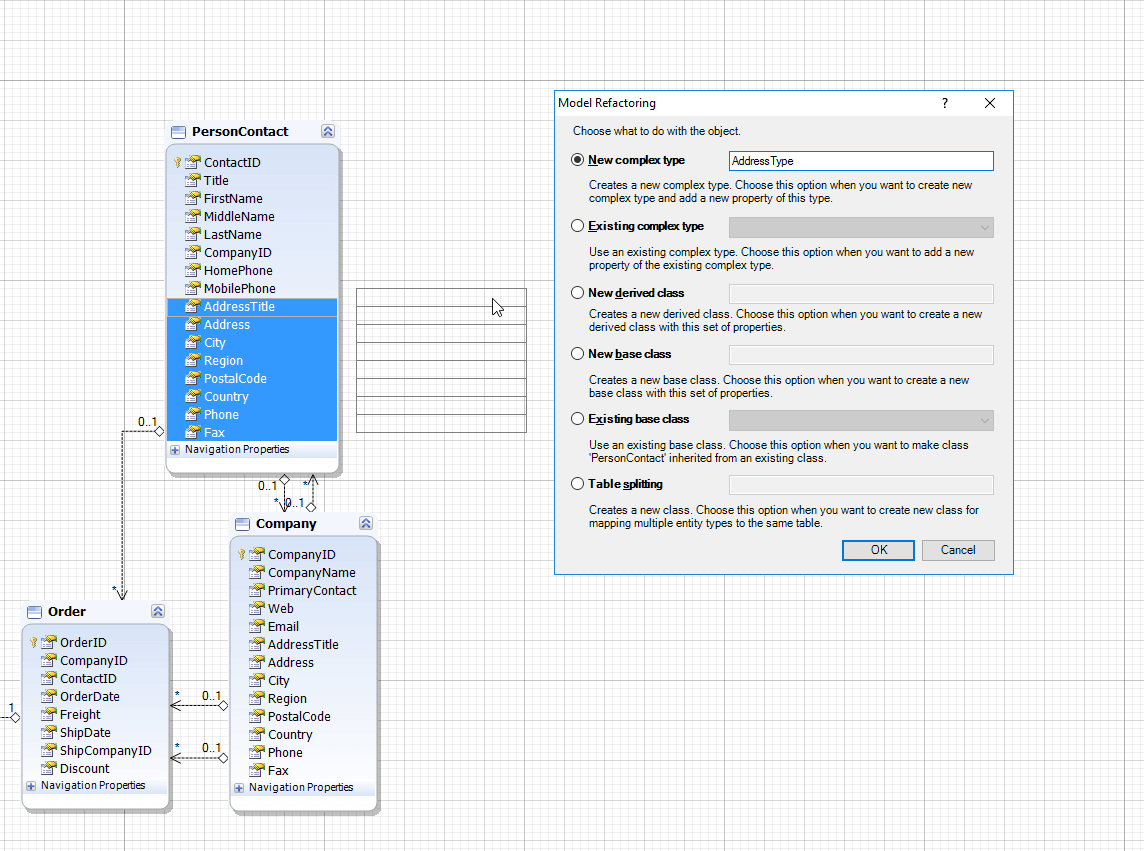
The Model Refactoring dialog: the address and phone properties of PersonContact are selected on the diagram and are about to become a new complex type called AddressType. The other options create a derived or base class or split the table.
Code generation from editable T4 templates
Entity Developer generates C# or Visual Basic code from T4 templates, edited in a built-in editor with syntax highlighting. You can store templates with the model, add your own properties to model objects that drive the generation, and produce extras such as repository classes or a separate interface layer. This is where Entity Developer most clearly beats plain scaffolding: the generated code follows your conventions, every time.
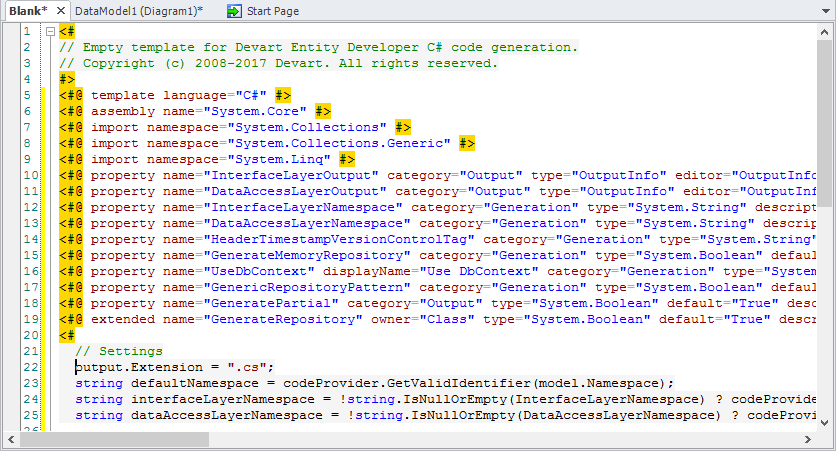
The template editor with a blank C# generation template: T4 directives and template properties such as output folders, namespaces, Use DbContext, the repository pattern and partial classes. This screenshot is from an older version.
Built for large models, with design-time queries
Entity Developer is designed for models with thousands of entities: you can split a model into several thematic diagrams, and metadata retrieval and code generation are optimized for size. You can also run LINQ, Entity SQL or HQL queries against the model at design time, preview the returned data and browse related entities, so you check a mapping before writing any application code.
Benefits
The main benefit is control over a big data layer. Database-first scaffolding is quick the first time and painful the tenth, when the schema has drifted and the generated code needs the same manual fixes again. Entity Developer keeps the model as the single place where those decisions live, so a schema update is a wizard, not a morning of merge conflicts.
The second is one tool across projects. A team that maintains an old LINQ to SQL app, an Entity Framework 6 system and new EF Core services can use the same designer and templates for all three, instead of a different workflow for each.
Real-World Uses
- Reverse-engineering a legacy database with hundreds of tables into EF Core, then fixing names and associations on the diagram.
- Migrating from EF6 to EF Core while keeping both models designed in the same tool.
- Generating NHibernate Fluent mapping for an Oracle or PostgreSQL database instead of writing it by hand.
- Enforcing team conventions through shared T4 templates that every developer's generated code follows.
- Mapping a CRM's data (Salesforce, Dynamics 365, Zoho) as entities through Devart's dotConnect providers.
Who It's For, and Who Should Skip It
Entity Developer fits .NET developers and teams working database-first with large or frequently changing schemas, anyone maintaining several ORMs at once, NHibernate users who want a visual designer, and teams that want generated code to follow their own templates.
Skip it if you work code-first with EF Core migrations and a small model: the built-in tooling and free EF Core Power Tools may be all you need. Skip the Professional edition if you only use EF Core and Entity Framework, because Standard ($219.95) covers those. If your model has 10 entities or fewer and default templates are fine, the free Express edition does the job. And it's Windows-only, so Mac and Linux developers using Rider or VS Code are out.
Usage Guide
- Download and install. Sign in to a free Devart account on the download page, get the trial installer, and install it. Choose Visual Studio integration if you want it inside the IDE.
- Create a model. In Visual Studio, add a new Devart model item to your project, or start Entity Developer standalone and create a new model for your ORM.
- Connect and select objects. Pick the provider and database, then the tables, views, procedures and functions to include, and set the naming rules.
- Shape the model. Rename classes, fix associations and use Model Refactoring for complex types and inheritance. Split large models into diagrams.
- Choose templates. Keep the default code template or add and edit your own, then save to generate the code.
- Keep in sync. Run Update From Database when the schema changes, or Update To Database to push model changes.
- Activate. After buying, enter your license key to turn the trial into the full edition.
Before you buy
- Pick the edition by ORM. Professional covers every ORM. Standard covers EF Core and Entity Framework only. Devart also sells single-ORM editions for NHibernate, Entity Framework or LINQ to SQL.
- Budget for renewals if you want updates for new .NET, EF Core and Visual Studio versions. Without renewing you keep the version you have.
- Teams pay per developer. A Team license covers up to 4 developers and a Site license a whole company.
- Test with your real database during the 30-day trial, especially if you use a less common provider.
Where it falls short
- It can be slow with complex models, according to reviewers on G2, despite Devart's large-model optimizations.
- Windows only. There's no Mac or Linux version and no Rider or VS Code integration.
- The interface looks classic. Ricardo Peres described "a classic Windows appearance, with multiple floating windows" in his review of an older version.
- Licensing quirks. Devart's October 2026 release fixed bugs where an expired perpetual license switched the program to the Express edition or was treated as invalid in Visual Studio, so keep it updated.
- Price for small shops. G2 reviewers note the pricing can feel high for smaller teams, and updates after the first year require a renewal.
What Users Say
G2: 4.5 out of 5 from 13 reviews
G2's reviewers, mostly .NET developers, praise Entity Developer's user-friendly interface and the time saved by generating entity classes and mapping code automatically, along with its support for many databases and ORM frameworks. Their complaints are sluggish performance with complex models, no version for non-Windows platforms, and pricing that can feel high for smaller organizations. G2 blocked direct access, so this is a summary of the reviews, not quotes.
Ricardo Peres: a four-part review on weblogs.asp.net
Ricardo Peres, a Microsoft MVP who blogs extensively about NHibernate and Entity Framework, reviewed Entity Developer in a four-part series in December 2014. It covers an older version, but his points about the approach still apply.
On why it stands out: "A very strong point is that it supports out of the box NHibernate, Entity Framework and the now half-forgotten LINQ to SQL, which makes it stand out from other products."
His conclusion: "I enjoyed using Entity Developer, it is one of the few currently available O/RM modeling tools for .NET with a commercial license, which also offers a free edition. It is definitely a possibility to be considered when working with big models, because, for once, it is simply not feasible to reverse engineer tens of database tables by hand."
His one wish was command-line support "because it would be helpful for refreshing models and generating SQL or database objects". Devart now lists a console option alongside the standalone and Visual Studio versions.
Testimonials on Devart's site
These come from Devart's own testimonials page.
René Möller, Thesycon Systemsoftware & Consulting GmbH: "I tried Entity Developer and it works much better than the built-in model generator."
Dr Nigel Tucker, Software Architect, Specialised Structures: "Your Entity Developer has always been a rock-solid mechanism for providing C# code to access my databases without ODBC, with valuablel error reporting and lightning fast compilation."
Hector Reyes Armenta, Software Architect, Specialised Structures: "When you are a small company, speed in development is paramount. Entity Developer, is the ideal tool to optimize the time of software development and the possibility of modifying the templates, offers a level of customization appropriate to any need."
Simon Kingaby, Piedmont Natural Gas, on Devart's support: "Many of the problems I have posted about have specifically been addressed in a subsequent release of your dotConnect for Oracle or Entity Developer products."
The recurring themes: developers value Entity Developer for handling big database-first models, for covering several ORMs in one tool, and for template-based code generation they can customize. Devart's responsiveness to bug reports comes up repeatedly. The complaints are performance with complex models, the Windows-only design and the cost of renewals. Public reviews are few, so the 30-day trial on your own database matters more than usual.
Comparisons
Entity Developer vs Visual Studio's Entity Data Model Designer
Visual Studio's built-in Entity Data Model Designer is for classic Entity Framework. Entity Developer adds EF Core, NHibernate and the other ORMs, editable T4 templates, the refactoring wizard, finer database sync and support for large models split across diagrams.
Professional vs Standard vs Express
Professional ($319.95) designs models for EF Core, Entity Framework, NHibernate, LINQ to SQL, LinqConnect, Telerik Data Access and EntityDAC. Standard ($219.95) is limited to EF Core and Entity Framework. Express is free but limits projects to 10 entities and doesn't allow template customization.
Editions and Pricing
| Edition |
Price (single developer, 1 year of updates) |
ORMs |
Limits |
| Professional (this listing's Buy Now) |
$319.95 |
All: EF Core, EF, NHibernate, LINQ to SQL, LinqConnect, Telerik Data Access, EntityDAC |
None |
| Standard |
$219.95 |
EF Core and Entity Framework |
Other ORMs not included |
| Express |
Free |
Small projects only |
10 entities, no template customization |
Team (up to 4 developers) and Site licenses, 2- and 3-year subscriptions and a premium support option are available on Devart's order page.
FAQs
What happens to Entity Developer when my subscription ends?
You keep using it. An Entity Developer purchase includes a year of subscription, and when it ends you have a perpetual license for the version available at that time. Renewing gets you newer versions and continued support.
Does Entity Developer support EF Core 10 and .NET 10?
Yes. Devart lists Entity Framework Core 1.1 through 10 as supported, and announces .NET 10 support on the product page.
Do I need Devart's dotConnect providers to use Entity Developer?
No. Entity Developer works with the standard providers, including Microsoft.Data.SqlClient, Npgsql, MySQL Connector/Net, Oracle's ODP.NET and System.Data.SQLite. Devart's dotConnect providers add cloud sources such as Salesforce, Dynamics 365 and Zoho CRM.
Can I use Entity Developer without Visual Studio?
Yes. Entity Developer runs as a standalone application, from the console, or integrated into Visual Studio 2015 to 2026, so you can design models without opening the IDE.
Does Entity Developer work on a Mac or with JetBrains Rider?
No. Entity Developer is a Windows program and integrates only with Visual Studio. On a Mac you'd need a Windows virtual machine.
Can Entity Developer run without administrator rights?
Yes, since version 8.2.192 (September 2026). Earlier versions needed administrator privileges.
Can I get a refund on Entity Developer?
Yes. Devart offers a 30-day money-back guarantee on Entity Developer purchases.
Which databases can Entity Developer generate models from?
Entity Developer supports SQL Server 2000 and later, MySQL 4.1 and later, Oracle 9 and later, PostgreSQL 8 to 18, SQLite 3, Firebird 2 and later, DB2 9.5 and later, and SQL Server Compact, plus cloud services through dotConnect.
System Requirements
- Operating system: Windows
- Framework: .NET Framework 3.5 Service Pack 1 or later
- IDE (optional): Visual Studio 2015, 2017, 2019, 2022 or 2026
- Download: 84.85 MB installer, free Devart account required for the trial
- Rights: no administrator rights needed since version 8.2.192
Conclusion
Entity Developer Professional is worth $319.95 for .NET teams that work database-first with large or changing schemas, or that maintain more than one ORM: the two-way database sync, the refactoring wizard and editable templates replace a lot of repetitive hand-written mapping. The one reason to buy it is control over a big, evolving data model in a single visual tool. The main reasons not to are a small code-first project, where free tooling is enough, or working only with EF Core, where the Standard edition costs $100 less. Run the 30-day trial against your real database before deciding.
Download Free TrialBuy Now