ODBC Driver for SAP Sybase ASE: Reach Adaptive Server From Excel, Power BI and SSMS With No Open Client
Devart ODBC Driver for ASE is a commercial ODBC driver that connects Excel, Power BI, Tableau, SQL Server and other ODBC tools to SAP Adaptive Server Enterprise (formerly Sybase ASE), on 32-bit or 64-bit Windows, macOS and Linux, without the SAP SDK or Open Client. A single-desktop license costs $179.95 a year, or $349.95 as a perpetual license.
ASE tends to sit under old, important line-of-business systems, and getting at it from a modern report usually means installing the SDK for SAP ASE first. This driver skips that: one installer, one DSN with a server, port 5000 and a database, and your reporting tool can see the tables.
Quick facts
- Version: 4.2.0, released October 16, 2026
- Developer: Devart
- Platforms: Windows x86 and x64 (including Terminal Server), macOS Intel and Apple Silicon, Linux x86 and x64 (DEB and RPM packages)
- Servers: SAP Adaptive Server Enterprise 16.0 and later, Sybase Adaptive Server Enterprise 12.5.4 and later
- Client needed: none, it connects directly over TCP/IP (default port 5000)
- Security: SSL/TLS, a built-in SSH client, HTTP/HTTPS tunneling, IPv6
- Price: $179.95 per year for the Desktop edition (subscription), $349.95 perpetual
- Trial: 30 days, free, activated with a trial key from a Devart account
What we checked: version 4.2.0 (released October 16, 2026) on Devart's download page and revision history, installer sizes of 31.60 MB (Windows EXE), 33.32 MB (MSI), 20.54 MB (macOS PKG) and 4.62 to 6.23 MB (Linux DEB/RPM), and a price of $179.95 a year for Desktop for Windows on the order page, all on November 5, 2026. We didn't install the trial (the download needs a Devart account) or connect it to an ASE server.
Before you buy
SAP has its own ODBC driver, which depends on the SDK for SAP ASE and Open Client. If that SDK is already on the machine and your tool connects, you may not need this. Devart's driver earns its price when you can't or don't want to install the SDK, when you need a Mac connection (SAP's route covers Windows and Linux/Unix), or when the server is reachable only through SSH.
The default price is a subscription: the driver works only during the paid term, and it needs an internet connection to activate and to check the license. A perpetual license costs about twice as much, activates offline and keeps the version you bought working.
Download Free TrialBuy Now
Overview
Devart ODBC Driver for ASE speaks to the server itself. An ODBC application calls the standard API, the driver turns that into a direct TCP/IP session with Adaptive Server, and data types are mapped both ways with full Unicode support. There's no intermediate client layer to configure or distribute.
It's actively maintained. Version 4.0 in November 2025 added a graphical configurator on macOS and Linux and Bearer Token sign-in for HTTP tunnels, and fixed BIGINT values being imported wrongly into Microsoft Access. Version 4.1 in April 2026 allowed SSL and SSH at the same time, and 4.2.0 in October 2026 improved compatibility with Ubuntu 26, CentOS 10, Node.js, Visual FoxPro and DBeaver.
Features
A direct connection to ASE with no SDK or Open Client
Devart ODBC Driver for ASE connects to Adaptive Server directly over TCP/IP, so you skip the SDK for SAP ASE and Open Client on every machine that needs the data. Enter a server, port 5000 by default, a database, a user and a password, then click Test Connection. On a team of analysts, that's the difference between one installer and a client rollout.
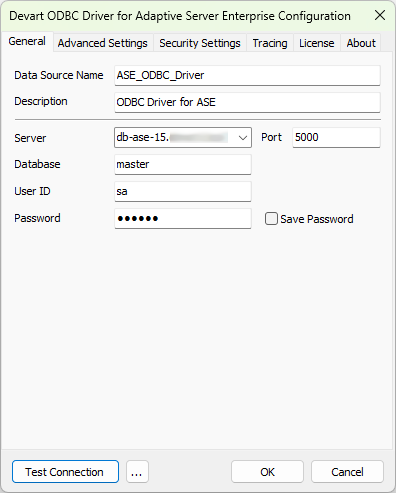
The driver's Windows configuration dialog: data source name, server, port 5000, database master, user and password. Its title bar calls it Devart ODBC Driver for Adaptive Server Enterprise.
Old Sybase and current SAP servers from one driver
Devart ODBC Driver for ASE works with Sybase Adaptive Server Enterprise from 12.5.4 and SAP Adaptive Server Enterprise from 16.0. A shop that still has a legacy Sybase box next to an SAP-era one can use the same driver for both, and an All Catalogs option lists every database on the server.
SSL, a built-in SSH client and HTTP tunnels
Devart ODBC Driver for ASE encrypts traffic with SSL/TLS, using custom certificates and password-protected keys. Its SSH support is built in, so no separate SSH client is needed, and HTTP/HTTPS tunneling covers networks where only web traffic gets out. SSL and SSH can run together.

The Security Settings tab with SSH switched on: host, port 22, user name, password, client private key, server public key and storage path.
Windows, Mac and Linux, in 32-bit and 64-bit
Devart ODBC Driver for ASE comes in 32-bit and 64-bit builds for Windows and Linux, and for macOS on Intel and Apple Silicon. Pick the bitness that matches your application rather than your operating system: 32-bit Office on 64-bit Windows needs the 32-bit driver.
Compatibility switches for ODBC tools that expect something else
Devart ODBC Driver for ASE has settings for the awkward cases: Use Quoted Identifier so double-quoted names aren't read as strings, Allow Fixed Types to report CHAR and BINARY instead of the variable types, ANSI or Unicode string types, forced ODBC 2.x or 3.x behavior, and Use Multiple Connections for concurrent commands. Connection pooling, batch updates and prepared statements help with speed.
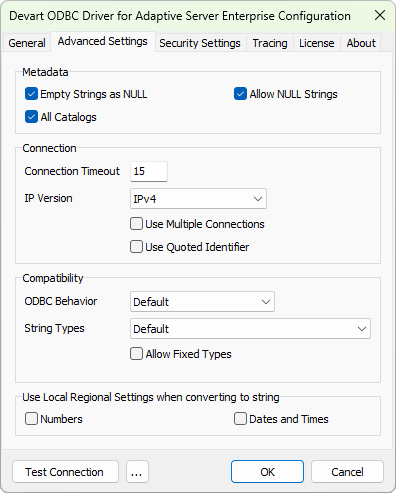
The Advanced Settings tab: metadata options including All Catalogs, connection timeout, IP version, Use Multiple Connections, Use Quoted Identifier, ODBC behavior and string types.
Benefits
- No client rollout. One installer replaces an SDK install on each analyst's machine.
- Legacy data in current tools. An aging ASE system can feed Power BI without being replaced first.
- Mac users are included. macOS gets a real driver and a graphical configurator.
- Safer access to old servers. An SSH tunnel means an old database doesn't have to be opened to the wider network.
- Simple distribution. Software vendors don't have to ship an SAP client with their application.
Real-World Uses
- A reporting analyst builds a refreshable Excel pivot table on live ASE tables, instead of waiting for a manual export.
- A SQL Server DBA sets up a Linked Server to ASE in SQL Server Management Studio and queries it with T-SQL during a migration project.
- A BI team connects Power BI, Tableau or Crystal Reports to ASE so old operational data can sit in the same dashboards as newer sources.
- An ETL job on Linux reads ASE through unixODBC on an Ubuntu or CentOS server, over SSH.
- A developer uses DBeaver or RazorSQL to run SQL against ASE with nothing but the driver installed.
Who It's For, and Who Should Skip It
It's for DBAs, analysts and developers who look after SAP or Sybase ASE and need it in ODBC tools without an SDK install, especially teams migrating off ASE, where a temporary connection shouldn't mean a client rollout.
Skip it if the SDK for SAP ASE is already on your machines and SAP's driver works with your tool. Skip it if your application can use a native ASE library. If you need several databases, look at Devart's ODBC Universal Bundle (from $499.95 a year for all its ODBC drivers) before buying drivers one at a time.
Usage Guide
- Get the installer. Sign in to or create a Devart account on the download page, then download the EXE or MSI for Windows, the PKG for macOS, or the DEB or RPM package for your Linux distribution. Only one version of the driver can be installed at a time.
- Install and activate. Run the installer and enter your trial or purchased activation key, or activate later. The driver must be activated even for the trial.
- Create a DSN. On Windows, open ODBC Data Sources in the bitness of your application, choose User DSN or System DSN, click Add and pick the Devart driver for ASE.
- Enter the connection. Server, port 5000 (or your own), database, user and password, plus the Security Settings tab if you use SSL, SSH or HTTP. Click Test Connection.
- Connect your tool. In Excel use Data, Get Data, From Other Sources, From ODBC, or from code use
DRIVER={Devart ODBC Driver for ASE};Server=your_ase_server;Database=your_database_name;Port=5000;User ID=your_username;Password=...
Where It Falls Short
- The trial takes paperwork. The installer sits behind a Devart sign-in, and the driver won't work until you enter a trial key.
- Few independent reviews. Almost nothing has been written about this particular driver, so your own trial matters more than usual.
- Licensing is per seat and per platform. Desktop allows one user at a time on one computer, and a shared server needs Server Standard at $999.95 a year.
- Access has needed fixes. The change log includes corrections for BIGINT imports and for updating date and time fields in Microsoft Access, so test your exact workflow.
- Activation shows up in the change log. Past fixes include re-activating the driver under another Windows user and license validation for a Linked Server.
What Users Say
We found no in-depth independent review of Devart ODBC Driver for ASE. GetApp lists it with no user reviews yet. G2 has a handful, mostly positive about stable connections to analytics and ETL tools, with one reviewer finding setup difficult. Most reviews of Devart's drivers are filed under the whole product line, so these ratings from November 2026 describe the vendor rather than this driver:
- Capterra: 4.7 out of 5 from 26 reviews of Devart ODBC Drivers
- Software Advice: 4.7 out of 5 from 26 users, with 4.5 for ease of use and 4.4 for customer support
- TrustRadius: a much lower 5.2 out of 10 from 58 ratings
Across those reviews, people praise reliability and speed. One TrustRadius reviewer reported "far less connection failures" than with the tool they used before, and a Software Advice reviewer called it "very simple and easy to install, setup and use." The complaints are about cost: "for each user, it is necessary to purchase a license" and "prices are still high", both from TrustRadius reviewers.
Comparisons
Devart ODBC Driver vs. SAP's native ASE driver
Devart's own comparison sets out the differences. SAP's driver needs the SDK for SAP ASE and Open Client; Devart's is a standalone driver with a direct TCP/IP connection. SAP covers Windows and Linux/Unix; Devart adds macOS. SAP encrypts with SSL through Open Client; Devart adds a built-in SSH client and HTTP/HTTPS tunneling.
Desktop vs. Server editions
Desktop covers one computer used by one person at a time, directly or remotely. Server Standard covers one server with up to 6 cores used by many people in one company. Server Enterprise removes the core limit. Site and OEM licenses are quoted on request.
Editions and Pricing
| Edition | Subscription | Perpetual | Who can use it |
|---|
| Desktop (Windows, macOS or Linux) | $179.95 per year | $349.95 | One user at a time on one computer |
| Server Standard | $999.95 per year | $1,999.95 | Many users on one server with up to 6 cores |
| Server Enterprise, Site, OEM | On request | On request | Any core count, whole company, or redistribution |
Each license is for one platform and includes a year of support and upgrades. Priority support is an optional extra, and Devart takes 5, 10 or 15 percent off for 5, 10 or 20 copies.
FAQs
Do I need SAP Open Client to use Devart ODBC Driver for ASE?
No. Devart ODBC Driver for ASE connects directly over TCP/IP and needs no ASE client, Open Client or SDK.
Which ASE versions does the Devart driver support?
Devart ODBC Driver for ASE works with SAP Adaptive Server Enterprise 16.0 and later, and Sybase Adaptive Server Enterprise 12.5.4 and later.
Is there a Sybase ODBC driver for Mac?
Yes. Devart ODBC Driver for ASE has a macOS package for Intel and Apple Silicon, with DSNs set up through iODBC or Devart's own ODBC Administrator.
Can Devart ODBC Driver for ASE work with a 32-bit application on 64-bit Windows?
Yes. The driver has a 32-bit build for that case. Create the DSN in the 32-bit ODBC Data Sources tool so the application can see it.
What happens when the subscription ends?
Devart ODBC Driver for ASE on a subscription works only for the term you've paid for, and it checks the license online. A perpetual license keeps the version you bought working.
Can I use the driver as a SQL Server Linked Server?
Yes. Devart lists Linked Server in SQL Server among the verified uses of Devart ODBC Driver for ASE. If several people share that server, you need a Server edition rather than Desktop.
System Requirements
- Windows: x86 or x64, including Windows Terminal Server
- macOS: Intel or Apple Silicon
- Linux: x86 or x64, DEB or RPM package
- Database: SAP ASE 16.0 and later, Sybase ASE 12.5.4 and later. No client software required
- Installed versions: one version of the driver at a time
Conclusion
Devart ODBC Driver for ASE is worth $179.95 a year if you need ASE data in ODBC tools and don't want the SDK on every machine, and it's the obvious choice if you need a Mac connection or an SSH tunnel to an old server. It's well maintained, with releases in April and October 2026. The main reason not to buy is that SAP's driver is already there if the SDK is on your machines. There's also little independent feedback on this driver, so test it with your own server and tool during the 30-day trial before you commit.
Download Free TrialBuy Now