You have a stack of burned discs, and every one of them is labeled with a scribbled marker line you can't read a month later. Disketch CD/DVD Label Maker for Mac lets you design proper disc labels and matching jewel case covers on your Mac, then print them.
Quick facts
- Maker: NCH Software
- Platforms: Mac (macOS 10.5 or above) and Windows 7 to 11
- Disc types: CD, DVD and Blu-Ray labels
- Free version: available for non-commercial use only
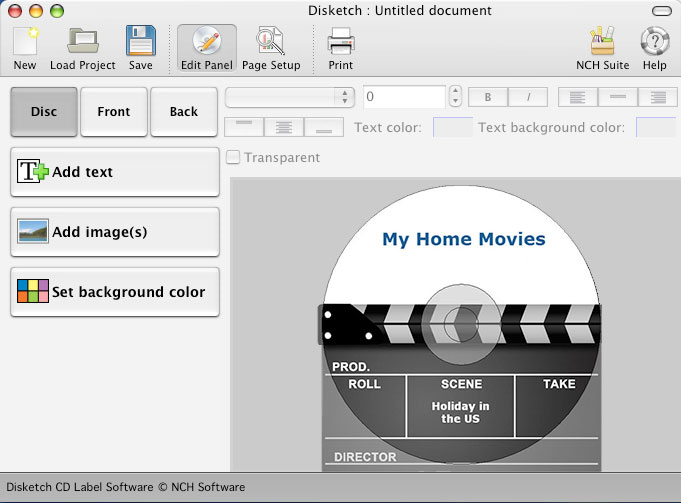
Key features
Design labels and covers for CD, DVD or Blu-Ray
Pick your label type, then add images and text. You can also make cover images for jewel cases, so the case and the disc look like a set.
Use your own photos and artwork
Import your pictures for disc backgrounds and covers, or just choose a plain background color.
Fill in track lists without retyping
Disketch can import track names directly from a CD in your drive. You can organize artist information alongside the track list, and you can choose from a variety of text styles. You can move, layer, resize and align text and images.
Print on sticky labels or straight onto discs
You can print on sticky labels or directly onto printable discs. You can also export files to send to a print shop, and manually adjust the printing position on the page.
Who it's for
It suits you if you burn music, video or data discs and want them to look consistent on the shelf. It also fits you if you need a quick way to produce covers and labels in one tool.
Pros and cons
- Pro: Labels and jewel case covers come from one program.
- Pro: Track names can be imported from a disc.
- Pro: A free version exists for non-commercial use.
- Con: Printing directly onto discs requires a disc printer.
- Con: The free version cannot be used commercially.
FAQs
Can I print directly onto a disc?
Yes, but you need a disc printer. Otherwise, print on sticky labels.
Does it support Blu-Ray?
Yes. You can create CD, DVD or Blu-Ray labels.
Is there a free version?
Yes, for non-commercial use only.
Can I use my own images?
Yes. You can import photos and artwork for backgrounds and covers.
System requirements
- Mac: macOS 10.5 or above
- Windows version: Windows 7 to 11