Express Burn Free: Burn Audio CDs and Data Discs Without Paying
You have a folder of songs you want to play in the car, or a pile of family photos you want on a disc that won't vanish with a failed hard drive. You don't want to learn a complicated suite to do it. Express Burn from NCH Software is built for that job: drag files in, pick a disc type, and burn.
Quick facts
- Platforms: Windows 7 to 11, and macOS 10.5 or above
- Free version: for non-commercial use only, does not expire, burns CDs only
- Paid version: the Plus edition adds DVD and Blu-ray burning
- Sign-up: not required to download the free version
- Hardware: a disc drive that can burn
Key features
Make audio CDs or MP3 CDs for any player
Audio is recorded by direct digital recording, so quality is kept. It accepts wav, mp3, wma, ogg, flac and more. You can normalize volume and set the pause length between tracks.
Back up files to data discs and ISO images
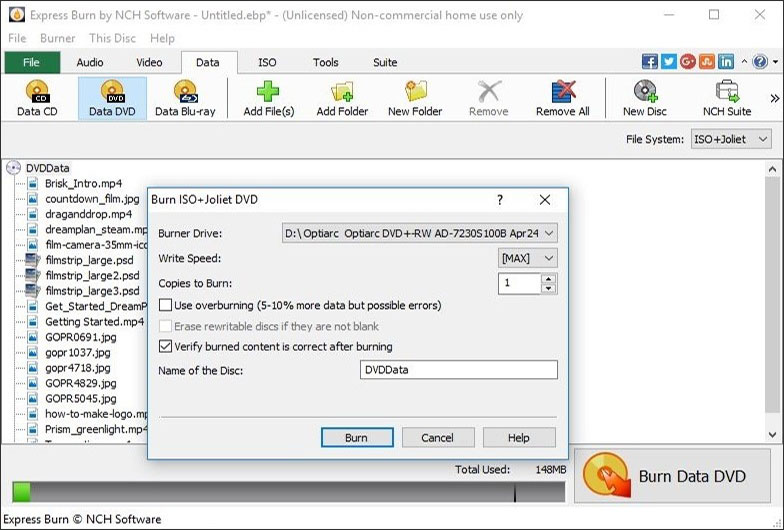
Burn data discs as ISO/Joliet, UDF or Hybrid. You can record an existing ISO image to disc, or create an ISO file instead of burning. Bootable data discs are supported too.
Author video DVDs with menus and chapters
The paid edition includes menu and button templates (over 20), and lets you add your own images. You can create and manage chapters. Video files are re-encoded for standard movie discs, in widescreen or standard, PAL or NTSC. It reads AVI, MPG, VOB, WMV, MP4, OGM and other formats with a DirectShow codec.
Automate burning from the command line
Command line operation lets you drive Express Burn from scripts or other programs. It also supports CD-R and CD-RW, and dual layer DVD and Blu-ray burning.
Who it's for
It suits home users who want mix CDs, photo or home-video archives, or simple backup discs. The command line option also helps if you want to automate repetitive burns. If you need to burn DVDs or Blu-rays, you'll need the paid edition.
Pros and cons
- Pro: The free version never expires and needs no sign-up.
- Pro: Drag and drop workflow keeps the steps short.
- Pro: Covers audio, data, ISO and video discs in one program.
- Con: The free version only burns CDs.
- Con: Free use is limited to non-commercial purposes.
- Con: It can't break copy-protected or region-protected videos, so it works only with your own content.
What users say
The vendor's page quotes a Softpedia review: "Express Burn comes with a simple and intuitive interface that provides quick and easy access to all the tools and features you might need to create your disc."
FAQs
Is Express Burn really free?
Yes, for non-commercial home use. The free version does not expire, but it only burns CDs.
Can I burn DVDs with the free version?
No. The free version burns CDs only. DVD and Blu-ray burning comes with the paid Plus edition.
Can I make a CD that plays in my car?
Yes. You can create standard audio CDs or MP3 CDs, depending on what your player supports.
Does it work on a Mac?
Yes. A Mac version exists for macOS 10.5 or above.
Can I copy a protected movie DVD?
No. It is meant for your own content and can't be used to break copy protection or region protection.
System requirements
- Windows 7 to 11, or macOS 10.5 or above
- A disc drive that supports burning