You have a folder of documents that is too big to email, or a RAR file someone sent that your Mac won't open. Express Zip from NCH Software handles both: it creates zip files and opens many other archive types.
Quick facts
- Platforms: Mac (macOS 10.5 or above) and Windows (7 to 11)
- Free version: available for non-commercial use only, and it does not expire
- Paid version: a Plus edition is sold by the vendor
- Formats opened: ZIP, RAR, CAB, TAR, 7Z, ISO, GZIP, ZIPX, LZH, ARJ and more
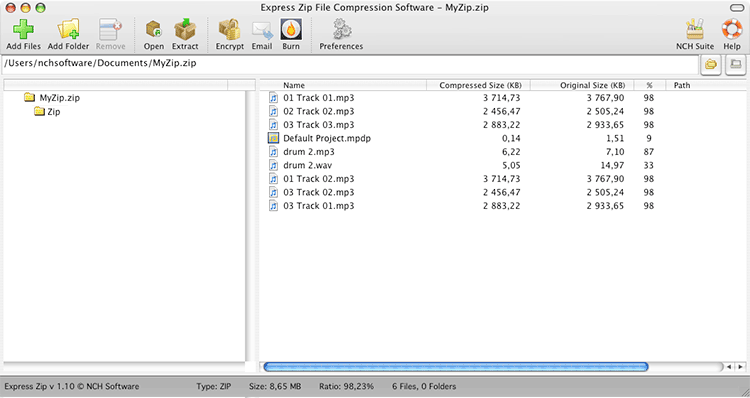
Key features
Shrink files so they fit in an email
Create new zip files quickly and choose from 5 levels of compression. This also helps when you back up data and want it to use less disk space.
Open archives other than ZIP
Extract RAR, 7Z, TAR, CAB, ISO and other archive formats. You can also convert archives to ZIP from other formats.
Password protect sensitive documents
You can encrypt ZIP files or open encrypted archives.
Send or burn without leaving the app
Email zip files in two clicks, or burn archived files to CD/DVD for long-term backup. Drag and drop works for adding files.
Split large archives and repair damaged ones
Split a big ZIP into smaller parts, or create a PAR2 recovery file to repair incomplete or corrupt archives.
Who it's for
It suits you if you zip and unzip files now and then and want a simple drag-and-drop tool. It also suits you if you receive archives in formats macOS doesn't open by itself. Home users can use the free version. Commercial use needs the paid edition.
Pros and cons
- Pro: opens many archive formats, not only ZIP.
- Pro: encryption, splitting and CD/DVD burning are included.
- Pro: the free version does not expire.
- Con: the free version is for non-commercial use only.
- Con: the vendor's page shows the Windows download most prominently, so the Mac download takes a little finding.
FAQs
Is Express Zip free on Mac?
A free version is available for non-commercial use only. It does not expire and includes most of the features of the professional version.
Can it open RAR files?
Yes. It opens RAR, 7Z, TAR, CAB, ISO and many other formats.
Can I password protect a zip?
Yes. You can encrypt ZIP files and open encrypted archives.
Which Mac versions work?
macOS 10.5 or above.
System requirements
- Mac: macOS 10.5 or above
- Windows: 7 to 11