Bandizip Professional: A Fast Windows Archiver Without the Ads
Bandizip is a Windows archiver from Bandisoft that opens more than 40 archive formats (ZIP, RAR, RAR5, 7Z, ISO, ZPAQ and more) and creates ZIP, 7Z and self-extracting archives. The Standard edition is free with ads; Bandizip Professional is a $30 one-time license for one person on up to 5 PCs that removes the ads and adds a password manager, ZIP repair, password recovery and image previews inside archives.
If you unpack downloads, mail split archives to clients or dig through old backup ZIPs, the archiver is something you touch every day. The question with Bandizip isn't whether it can open your files (it almost certainly can) but whether the Professional tools and an ad-free window are worth $30 to you.
Quick facts
- Version: 7.47, released October 13, 2026
- Developer: Bandisoft International Inc., which also makes Honeycam and BandiView
- Platform: Windows 7, 8, 8.1, 10 and 11, 32-bit, x64 and ARM64; the Mac app is sold separately
- Creates: ZIP, 7Z, ZIPX, EXE (self-extracting), TAR, TGZ, LZH, ISO, GZ, XZ
- Opens: 40+ formats, including RAR, RAR5, 7Z, CAB, ISO, UDF, WIM, ZPAQ, ZSTD, LZ4, NSIS and DEB
- Price: Professional $30 (one user, up to 5 PCs); Enterprise $20 per PC, at least 2 PCs; both permanent licenses
- Free version: the Standard edition, free for home and business use, with ads
- Refunds: within 7 days, only if the product key hasn't been used to register
- What we checked: the web installer, BANDIZIP-SETUP-STD-X64.EXE (7.4 MB), and the order page prices on November 20, 2026: Bandizip Professional $30, Bandizip Enterprise $20 per PC and the Bandizip + Honeycam Package $55.20, all one-time with no renewal. We didn't time compression against other archivers.
Download Free VersionBuy Professional ($30)Buy Enterprise (2 PCs)
Overview
Bandizip looks like a file manager: a folder tree on the left, the archive's contents on the right, and a toolbar with Open, Extract, New, Add, Delete, Test and Scan. You can also skip the window entirely and work from the Explorer right-click menu, which has entries for "Extract Here (Smart)", compress to ZIP or 7Z, and preview the contents. All three editions share the same engine and formats. The editions differ in the extra tools, the ads, the number of compression threads, and how licenses and updates work.
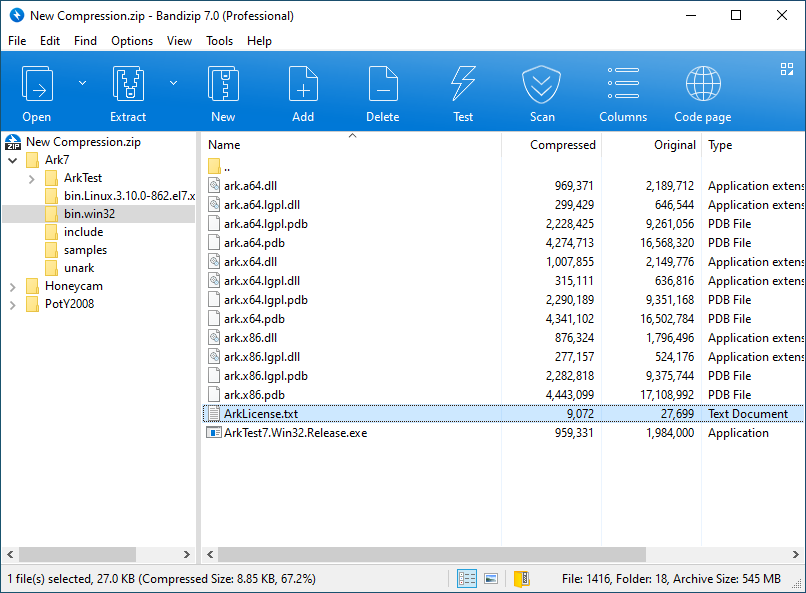
The Bandizip window (Professional, version 7.0 shown) browsing a 545 MB ZIP: folder tree, compressed and original sizes, and the toolbar.
Features
Compression on every core
Bandizip compresses with several processor cores at once, which Bandisoft says makes it up to 6 times faster. The thread limit depends on the edition: 16 in Standard, 32 in Enterprise and 64 in Professional, so the gap only shows on big workstation CPUs. It also creates multi-volume archives for email attachments, archives larger than 4 GB, AES-256 encrypted archives with encrypted file names, and self-extracting EXE files.
Edit an archive without unpacking it
Bandizip lets you add, delete and rename files inside an archive, and open a document from a ZIP, edit it and save it straight back into the archive. It tests archive integrity, detects code pages automatically so file names from archives made on other-language systems aren't garbled, and extracts in parallel. Extract Here (Smart) puts loose files into a folder only when the archive needs one, so your Downloads folder doesn't fill with stray files.
Image thumbnails inside archives (Professional)
Bandizip Professional shows thumbnails of the pictures in an archive without extracting them, which makes it quick to find the right photo in a camera dump or a zipped image set.

Thumbnail view of 15 WebP pictures inside pixabay.zip, without extracting them.
Password manager and password recovery (Professional)
Bandizip Professional stores the passwords you use often and tries them automatically when you open an encrypted archive, so the client password you were sent last month isn't lost in an email thread. When a password is truly forgotten, its Password Recovery runs a brute-force search over the character sets and lengths you choose.

Password Recovery on sample.zip, testing six-character passwords at about 305 million per second on the vendor's machine.
Repair damaged ZIP files (Professional)
Bandizip's Repair Archive analyzes a corrupted ZIP and copies every file it can still read into a new, repaired archive. It won't conjure up data that's gone, but it rescues the intact files from a broken download or a damaged USB stick.

Repair Archive writes the salvaged files from test.zip into test.repair.zip.
Antimalware scan of an archive
Bandizip passes an archive's contents to the antivirus Windows already runs (through AMSI, such as Microsoft Defender) and reports which file is infected before you extract anything. The free Standard edition has a limited version of this scan; Professional and Enterprise have the full one.
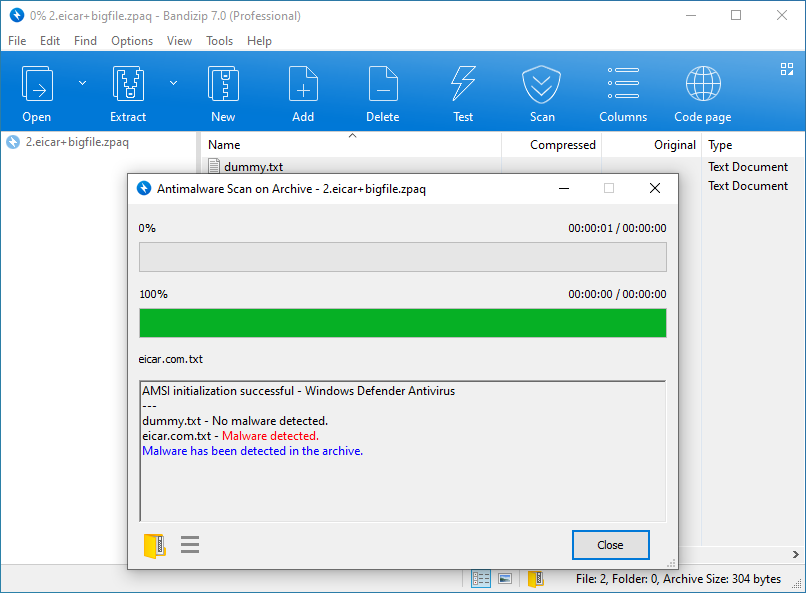
Antimalware Scan on Archive with Windows Defender: the EICAR test file is flagged, dummy.txt is clean.
Benefits
- One tool for every archive you're sent. RAR5, ZPAQ, ZSTD, ISO and old ALZ/EGG files open in the same window, without hunting for a format-specific extractor.
- A paid edition you buy once. The Professional license doesn't expire, and the free edition stays free for business use.
- Active maintenance. Bandisoft shipped six updates between April and October 2026 (7.42 to 7.47), mostly fixing security issues in archive parsing, which matters for a tool that opens files from strangers.
- Five PCs per Professional license. A desktop, a laptop and a work PC are covered by one $30 key.
Real-World Uses
- A designer's client handoff: split a 6 GB project into 500 MB AES-256 encrypted ZIP volumes, and let the password manager remember each client's password.
- Sorting a photo archive: browse years of zipped camera folders as thumbnails and pull out only the shots you need.
- A broken download: run Repair Archive on the ZIP that stops at 80% and keep the files that were already complete.
- An attachment from an unknown sender: scan the archive with Defender before extracting the "invoice.exe" hiding inside.
- An office rollout: buy Enterprise for each PC, register offline, and get notified only of stable releases.
Who It's For, and Who Should Skip It
Bandizip Professional suits people who handle archives all day on Windows and want the extra tools: password-protected client files, image-heavy archives, the occasional damaged ZIP. It also suits anyone who likes the free Bandizip but is tired of its ads.
Skip it if you only unpack a ZIP now and then: Windows 11 opens ZIP, 7Z and RAR on its own, and free open-source archivers such as 7-Zip and PeaZip have no ads at all. Mac users need Bandisoft's separate Mac app, which this license doesn't cover. Companies that must license every seat should look at Enterprise, not Professional, which is a single-user license.
Usage Guide
- Download the installer with the button on this page and run it; it installs the free Standard edition.
- To make an archive, right-click files in Explorer and choose a Bandizip compress option, or open Bandizip and click New. Pick the format, compression level, split size and password.
- To unpack, right-click an archive and choose Extract Here (Smart), or double-click it to browse the contents first.
- After buying Professional, enter the product key sent to your email in Bandizip's registration window (an Internet connection is needed to register).
- The Professional tools then appear under the Tools menu: Password Manager, Repair Archive, Password Recovery, and the thumbnail view and Scan button in the toolbar.
Before you buy
- Use the free Standard edition first: the formats, speed and interface are the same, so you'll know if you like Bandizip before paying. Bandisoft refunds only within 7 days and only if the key was never used to register.
- Registering a Professional key on a sixth PC deactivates the oldest registration automatically.
- Enterprise is $20 per PC with a 2-PC minimum, and it has no Password Recovery tool.
- The Professional key is for the Windows app only.
Where it falls short
- The free edition's ads are the main complaint. Since version 7.0 (2020) the free Standard edition is ad-supported, and many long-time users said so in reviews; several moved to 7-Zip or PeaZip.
- It extracts RAR but doesn't create it. For RAR archives you still need WinRAR.
- Frequent security fixes. Most 2026 updates patched vulnerabilities in format handling (TAR links, MoTW marks, NSIS, RAR5). They're fixed, but they mean you should keep Bandizip updated; Standard updates itself, Professional lets you choose.
- Password recovery is brute force. It works for short passwords; a long random password is out of reach of any brute-force tool.
What Users Say
AlternativeTo (3.6 out of 5 from 27 ratings, 173 likes)
"Surprisingly fast, and with a clean and nice UI. Highly recommended, since the free version already offers enough for most users." UberHoax
"Fast and upfront. Avoids the cuteness and complications of a lot of similar programs." TBayAreaPat
"Modern Design. The free version includes ads, but I've never seen it except when I first installed it and updated it." somecash
"Used to be nice, but they're just increasing ads more and more. It's just pile of ads now." MKAh
"Now, since version 7.37, Bandizip has intrusive ads." Weltall
"Need to immediately pay £19.49 on macOS without any option to try the app first. No way that's going to happen." lau22 (about the Mac app)
SnapFiles (editor 4.5 stars, users 4 stars from 8 reviews)
"I abandoned 7-Zip a long time ago in favor of Bandizip, which is fast and reliable." LowStrung, 4 stars, May 2015, who also noted that the portable version lacked the image previewer.
"Simple and user friendly interface and fast speed." alphard684, 5 stars, March 2013
"BandiZip is probably the smoothest, fastest compression utility I've used." gimpguy, 5 stars, July 2012, after a test on a 42 GB folder
"This program works and does what it's supposed to do, but no that it's full blown adware I will only use 7-Zip instead." JohnCorliss, 1 star, March 2020
"There are too many capable free competitors to make this a good choice for users." Harlan, 3 stars, March 2020, on the switch to a freemium model in version 7
The recurring themes
People who use Bandizip praise the same things for more than a decade: speed, a clean interface and wide format support, often in direct comparison with 7-Zip. The criticism is almost entirely about the ads in the free edition since version 7, which is exactly what the Professional license removes. If the ads are the reason you'd leave, $30 solves it; if you object to paying for an archiver on principle, the free open-source alternatives are the better fit.
Comparisons
Bandizip vs 7-Zip
7-Zip is free, open source and ad-free, and its 7Z format is what Bandizip also writes. Bandizip wins on convenience: a friendlier window, in-archive editing, smart extraction, image previews and code-page detection. Choose 7-Zip for zero cost and no ads; choose Bandizip Professional for the tools and polish.
Bandizip vs WinRAR
WinRAR is the only one of the two that creates RAR archives and adds recovery records. Bandizip opens RAR and RAR5 and costs less ($30 for 5 PCs, one-time), with a password manager, password recovery and image previews that WinRAR doesn't offer.
Editions and Pricing
| Edition | Price | License | What it adds | Buy |
|---|
| Standard | Free | Home and business use | All formats, ads, 16 threads, limited malware scan, automatic updates | Free download |
| Professional | $30 one-time | One user, up to 5 PCs, permanent | No ads, 64 threads, password manager, repair, password recovery, image preview, full malware scan | Buy Professional |
| Enterprise | $20 per PC, 2 PCs minimum | One PC per license, permanent | No ads, 32 threads, offline registration, stable-only updates; no password recovery | Buy Enterprise |
| Bandizip + Honeycam Package | $55.20 one-time | Bandizip Professional plus a 1-PC Honeycam Professional license | Adds Bandisoft's GIF and WebP maker at 20% off the $69 combined price | Buy Package |
The Enterprise button opens the order page with a quantity of 2, the minimum; change the quantity there for more PCs.
FAQs
Is Bandizip free for commercial use?
Yes. Bandizip Standard is free for home and business use, including commercial work. You pay only for the Professional or Enterprise features and to remove the ads.
Does the Bandizip Professional license expire?
No. A Bandizip Professional license is permanent, so you keep using the product without a renewal.
Can I use one Bandizip Professional key on my laptop and desktop?
Yes. Bandizip Professional is a single-user license that one person can register on up to 5 PCs at a time. A sixth registration deactivates the oldest one.
Does Bandizip run on Windows on ARM?
Yes. Bandizip has native ARM64 builds alongside the 32-bit and x64 versions for Windows 7 to 11.
Does the Windows license work with Bandizip for Mac?
No. Bandizip for macOS is a separate app with its own purchase (or the Bandizip 365 subscription), so the Windows Professional key doesn't activate it.
Can I get a refund on Bandizip Professional?
Only within 7 days of purchase and only if the product key hasn't been used to register. Once you register it, Bandisoft gives no refund, which is why trying the free edition first makes sense.
Can Bandizip Professional register without an Internet connection?
No. Bandizip Professional needs an Internet connection to register. Offline registration is an Enterprise edition feature.
Is there a portable Bandizip?
Yes. Bandisoft offers a portable build of Bandizip for Windows on its download page, alongside the installer and a Microsoft Store version.
System Requirements
- Windows 7, 8, 8.1, 10 or 11
- 32-bit, x64 or ARM64 processor
- About 7 MB for the x64 web installer
- An Internet connection to register Professional
Conclusion
Bandizip Professional is worth $30 if you live in archives on Windows and already like the free Bandizip. The one-time price covers five PCs, removes the ads that most reviewers complain about, and adds tools you'd otherwise need separate programs for: a password manager, ZIP repair, password recovery and image previews. The main reason not to buy: if you only need to open the odd ZIP or RAR, free 7-Zip or Windows itself does the job without ads or cost. Try the free edition first, since a registered key can't be refunded.
Download Free VersionBuy Professional ($30)Buy Enterprise (2 PCs)