Short answer
Short answer: first copy the photo off the card, try opening it in a different app, and run a free online repair on a few files. If that fails, use Stellar Repair for Photo ($39.99 a year, Windows and Mac): it fixes JPEGs with broken headers and structure, rebuilds badly damaged ones from a sample photo, and pulls out the hidden thumbnail when nothing else works. Wondershare Repairit ($69.99 a year or $99.99 once) and EaseUS Fixo ($69.95 a year) cost more but also repair videos and Office files.
Every tool here repairs and previews your photos free, so you see what you'll get before paying. If the preview shows only a grey photo or a tiny thumbnail, a licence won't change that.
At a glance: three ways to repair a JPEG
| Stellar Repair for Photo | Wondershare Repairit | EaseUS Fixo |
|---|
| Price | $39.99 a year (Standard) | $69.99 a year, $99.99 perpetual (Windows); Mac $89.99 a year | $69.95 a year, $119.95 lifetime |
| Windows / Mac | ✓ / ✓ (separate editions) | ✓ / ✓ (separate editions) | ✓ / ✓ (separate versions) |
| Photo formats | JPEG, HEIC/HEIF; RAW files only give an embedded JPEG | JPEG, PNG, HEIC, WebP, TIFF and camera RAW | JPEG, PNG, TIFF, GIF and camera RAW (CR3, CR2, NEF, ARW, DNG and more) |
| Repair with a sample photo | ✓ Advance Repair (JPEG) | ✓ Advance Photo Repair (JPEG) | ✗ not listed for photos |
| Thumbnail extraction | ✓ when the photo can't be saved | ✗ not listed | ✗ not listed |
| Batch repair | ✓ | ✓ | ✓ |
| Free version | Repairs and previews, no saving | Repairs and previews, no saving | Repairs and previews, no saving |
| Also repairs | Photos only (Premium adds video) | Video, documents, archives, PSD, audio | Video, Word, Excel, PowerPoint, PDF |
| Refunds | 30 days, only if you tried the trial | 7 days, technical problems only | 30 days, technical problems only |
What we checked
- We compared the photo repair programs on this site that are still sold and updated: what each repairs, how it handles badly damaged JPEGs, what the free version does, platforms, prices and refund rules, from the vendors' product pages, manuals and store pages.
- We read independent tests and Trustpilot reviews for each, including the failures.
- We confirmed Stellar Repair for Photo's current version on Stellar's data sheet (8.9.0.0 for Windows, 8.9.0.1 for Mac).
- What we checked: on November 29, 2026, Stellar's product data sheet and the order-system price of Stellar Repair for Photo ($39.99 a year, Windows and Mac), with Wondershare Repairit's prices from its order pages on November 28, 2026 ($69.99 a year and $99.99 perpetual for Windows, $89.99 and $119.99 for Mac) and EaseUS Fixo's from its checkout on November 20, 2026 ($69.95 a year, $119.95 lifetime), all in USD.
We compared features, prices and free versions. We didn't repair the same damaged photos with all three, so how well a tool does on your file depends on how badly it's damaged.
Why JPEGs break, and what can be saved
A JPEG has two parts: a header and structure that tell a viewer how to read the file, and the compressed picture data itself. Most "corrupt" photos come from a memory card pulled out too early, a camera that lost power while saving, a transfer that stopped halfway, or a recovery program that put files back together from fragments.
- Header or structure damage (the photo won't open, or Windows says it can't display it): this is the case repair tools fix best, because the picture data is usually intact.
- Damaged picture data (the photo opens with a grey band, a colour shift or a missing lower half): repair tools can make it open, but the damaged area usually stays damaged. Stellar's manual says so plainly.
- The file is mostly gone (0 KB, or only a few KB for a photo that should be several MB): no repair tool can rebuild data that isn't there. At best you get the small thumbnail stored inside the file.
Step 1: the free fixes first
- Copy the photos off the card or phone. Work on copies on your computer's drive, and stop using the card. Every tool here writes repaired copies and leaves the originals alone, but a failing card can get worse.
- Try another app. A photo that won't open in one viewer sometimes opens in a web browser or a different editor. If it does, save it as a new JPEG from there and you're done.
- Check the file size. A 0 KB file is empty, and repair won't help. If the photos were deleted or the card was formatted, you need photo recovery first, then repair for any recovered files that won't open.
- Try a free online repair for a few files. Stellar runs a separate web tool that repairs three JPEGs free, and Wondershare has an online photo repair too. Your photos are uploaded, so skip this for private pictures.
- Find a healthy sample photo. For badly damaged JPEGs, Stellar and Repairit rebuild the file using a working photo taken on the same camera or phone with the same settings. Keep one ready before you start.
Step 2: run a repair tool's free version
All three programs work the same way: add the photos, click Repair, preview the results, and pay only if you want to save them. The steps below use Stellar Repair for Photo for Windows, the cheapest of the three for photos.
- Install the free version and click Add Photos. You can add a whole folder of mixed JPEG and HEIC files at once.
- Click Repair. Each file then appears with a label: Repaired (the full photo), Extracted (an image pulled from inside the file) or Thumbnail (the small preview stored in the photo), with its resolution.
- Click each result to preview it. The resolution column tells you at a glance whether you got the full photo back or only a small copy.
- If a JPEG shows an Advance Repair link, click it and choose a healthy sample photo from the same device.
- If the previews are what you need, activate a licence and click Save Repaired Files. Save to a different drive from the one the photos came from.

Stellar Repair for Photo after a repair: two CR3 files gave only an extracted 1080x1620 JPEG and a thumbnail, one JPEG came back at full 4592x8160, and another needs Advance Repair with a sample photo.
Prices compared
One year of use (USD)
Stellar Repair for Photo Standard (Windows or Mac)$39.99
Wondershare Repairit (Windows)$69.99
Wondershare Repairit for Mac$89.99
Prices from the vendors' order pages, November 2026, regular prices. The yearly plans renew automatically unless you turn renewal off.
Buy once (USD)
Wondershare Repairit perpetual (Windows)$99.99
EaseUS Fixo Pro lifetime upgrades$119.95
Wondershare Repairit perpetual (Mac)$119.99
Stellar sells Repair for Photo only as a yearly licence. Repairit's perpetual licence covers the current major version.
Stellar Repair for Photo: the best value for JPEGs
- Price: $39.99 a year on one computer (Professional $59.99 adds photo recovery; Premium $69.99 adds video repair)
- Runs on: 64-bit Windows 11, 10, 8.1, 8; macOS 10.13 and later (Stellar lists an Intel processor in the Mac spec)
- Version: 8.9.0.0 for Windows and 8.9.0.1 for Mac (May and June 2026)
- Best for: JPEGs that won't open, from cameras, phones and recovery tools
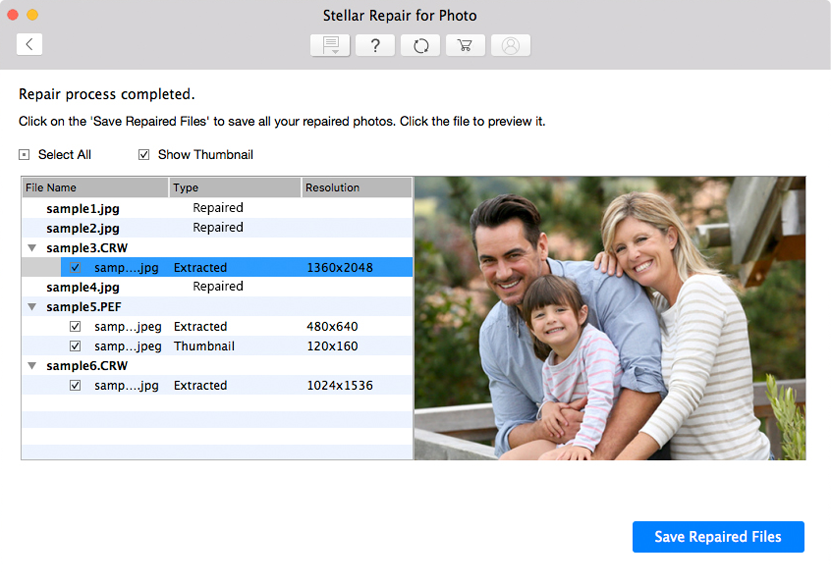
Stellar Repair for Photo for Mac: repaired JPEGs listed with their resolution, and a preview of the selected photo before saving.
Stellar Repair for Photo for Windows (once sold as Stellar Phoenix JPEG Repair) fixes JPEGs with a corrupt header, an invalid file structure, an unknown or invalid marker or a missing SOS marker, and repairs HEIC and HEIF photos too. Its Advance Repair borrows the structure of a healthy sample photo, and when a photo can't be saved, it extracts the thumbnail stored inside it, which is better than nothing when it's the only copy.
Stellar Repair for Photo is the cheapest of the three and the most focused on JPEGs. Its weak spot is RAW: Stellar's manual says repaired images are saved as JPG, and its own screenshots show CR3 files giving only a 1080x1620 extracted JPEG. If you need the RAW data for editing, this isn't the tool.
What we like
- Cheapest at $39.99 a year
- Clear Repaired / Extracted / Thumbnail labels with resolution
- Advance Repair with a sample photo
- Thumbnail extraction as a last resort
Watch out for
- RAW files come back only as embedded JPEGs
- Yearly licence only
- Damaged image areas stay damaged
- Stellar refunds only buyers who tried the free version first
"Stellar Repair for Photo turns out to be an easy-to-use Windows application for fixing photographs that were damaged while attempting to recover data."
Windows Report, quoted on Stellar's product page
"Support for RAW photos is a bit disappointing since all Stellar Repair for Photo does is extract embedded JPEG data."
DiskTuna, hands-on test of the 2019 release (the reviewer sells a competing tool and says so)
Stellar scores 4.8 out of 5 on Trustpilot from about 5,600 reviews across all its products, and its product page shows 4.7 from 266 reviews.
Download Stellar Repair for Photo (Windows) Free TrialBuy Stellar Repair for Photo (Windows)
Download Stellar Repair for Photo for Mac Free TrialBuy Stellar Repair for Photo for Mac
Wondershare Repairit: best when RAW photos or other files are damaged too
- Price (Windows): $69.99 a year, $39.99 a month, $99.99 perpetual
- Price (Mac): $89.99 a year, $59.99 a month, $119.99 perpetual
- Runs on: Windows 11, 10, 8, 7; macOS 10.13 to macOS 26
- Best for: RAW and HEIC photos, and anyone who also has damaged videos or documents
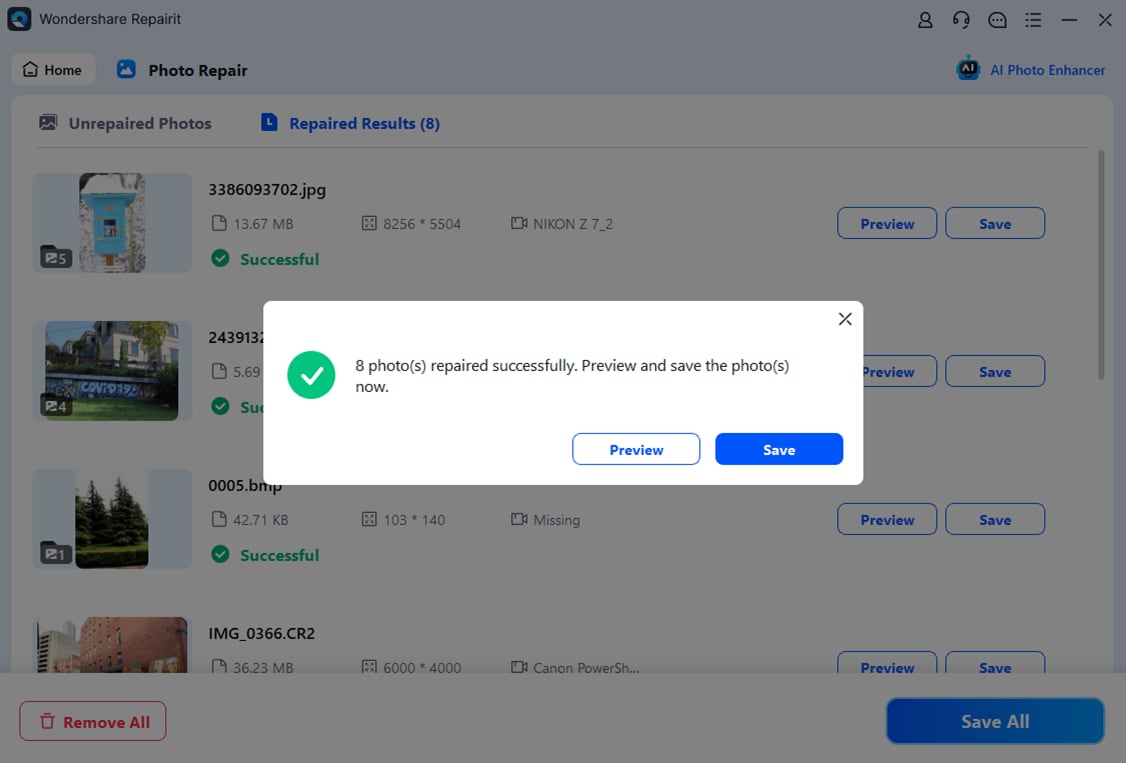
Wondershare Repairit's Photo Repair results: each repaired photo with its size, resolution and camera, and a Preview and Save button.
Wondershare Repairit is a toolkit: one program repairs videos, photos, PDF and Office documents, archives, Photoshop and design files, and audio. Its photo module takes JPEG, PNG, HEIC, WebP and camera RAW formats such as CR3, CR2, NEF, ARW, DNG and RAF, and Wondershare says its Advance Photo Repair is for severely corrupt JPEGs that Quick Photo Repair can't fix. The results list shows each photo's resolution and camera model.
Wondershare Repairit costs more than Stellar for photos alone, but it's the only one here with a one-time Windows licence under $100, and unlike Stellar it lists RAW formats as repairable rather than extract-only. Refunds are the strictest: 7 days, for technical problems or duplicate purchases only, so the free preview is your real test.
What we like
- Photos, video, documents, archives and design files in one program
- RAW support (CR3, NEF, ARW, DNG, RAF and more)
- Perpetual licence option
- Strong Trustpilot rating
Watch out for
- Costs more if you only need photo repair
- Mac edition costs more than Windows
- 7-day refund window, technical problems only
- Store adds offers for other Wondershare apps; AI features use credits
"A decent tool to recover your failed files but don't expect them to be as good as your camera can produce."
YUKO WEDDINGS, 4 stars on Trustpilot, November 23, 2026
"Did not have success using this product for video or photo repair."
Cory, 1 star on Trustpilot, November 24, 2026
Repairit's Trustpilot page showed 4.6 out of 5 from 970 reviews on November 28, 2026, mostly from people whose videos came back.
Download Repairit (Windows) Free TrialBuy Repairit (Windows)
Download Repairit for Mac Free TrialBuy Repairit for Mac
EaseUS Fixo: photos plus Office files
- Price: $69.95 a year, $49.95 a month, $119.95 lifetime upgrades
- Runs on: Windows 11, 10, 8, 7 and XP; a separate Mac version for macOS 11 to 15
- Version: 4.3.0
- Best for: a batch of photos and some damaged Word, Excel or PDF files from the same incident
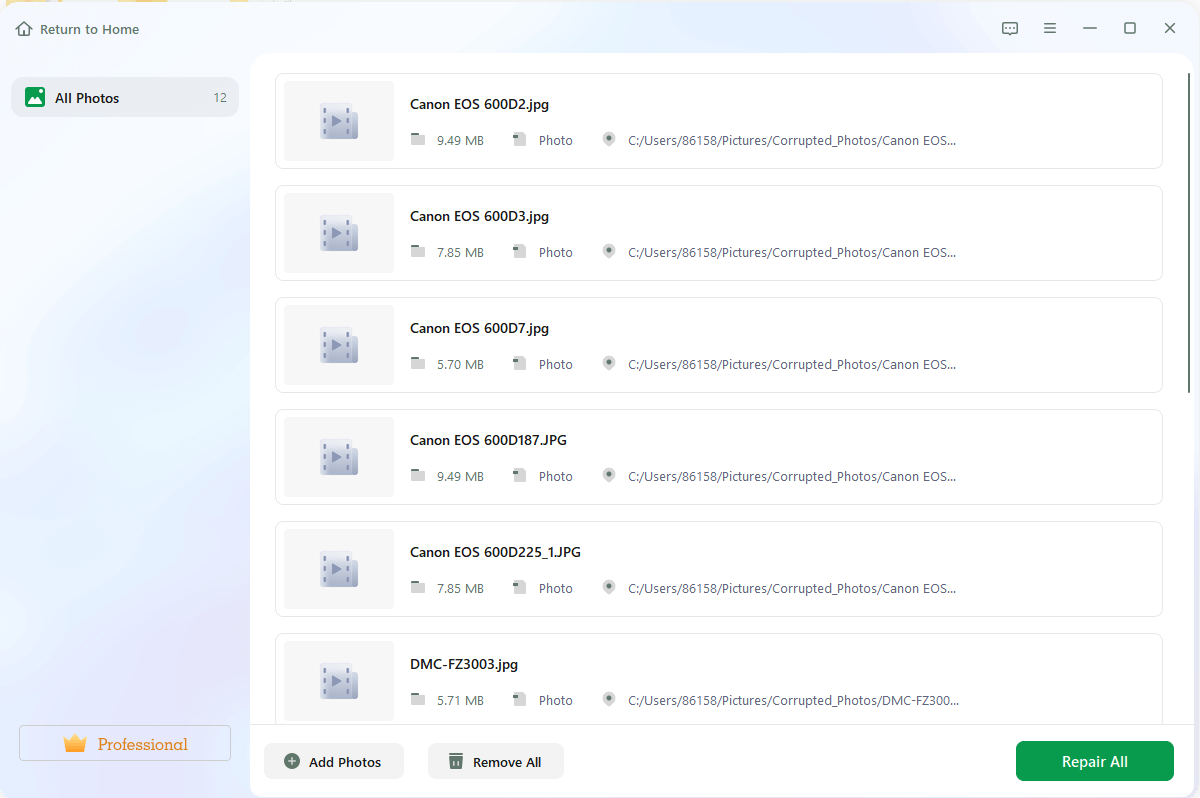
EaseUS Fixo's Photo Repair, from EaseUS's guide: corrupted JPEGs from two cameras added in one batch, ready for Repair All.
EaseUS Fixo has three modules: Video Repair, Photo Repair and File Repair. Its photo module repairs JPEG, PNG, TIFF and GIF files and camera RAW formats including CR3, CR2, NEF, ARW, DNG and RAF, from a computer, USB drive, memory card, camera or phone, and EaseUS lists blurry, pixelated, over- or underexposed and wrong-colour pictures among the faults it handles. Paid plans include AI credits for photo enhancement, upscaling and colourising, which are extras rather than repair.
EaseUS Fixo's value is the document repair: if a failing drive damaged your photos and your Word or Excel files, one licence covers both. For photos alone, reviews are more mixed than for video: one Trustpilot reviewer got about 85% of a set of damaged photos back, many at poor definition.
What we like
- Repairs photos (RAW included), videos and Word, Excel, PowerPoint and PDF files
- Batch repair with preview
- 30-day guarantee for unresolved technical problems
Watch out for
- No sample-photo or thumbnail option listed for photos
- Some photo repairs come back at low definition
- AI extras use credits; some lifetime buyers unhappy about that
"it's not miraculous or sensational."
Monsieur Jean-Jacques BELIN, 3 stars on Trustpilot, "Using Fixo to repair a set of damaged photos", January 2026
"A huge advantage over other software is the preview"
ALL DV STUDIO, 5 stars on Trustpilot, November 2024
EaseUS scores 4.9 out of 5 on Trustpilot from about 39,700 reviews overall; reviews that name Fixo are more mixed.
Download EaseUS Fixo Free TrialBuy EaseUS Fixo
Which should you choose?
| Your situation | Pick | Why |
|---|
| JPEGs from a camera or phone won't open | Stellar Repair for Photo for Windows | Cheapest, built for JPEG structure damage, with sample-photo repair and thumbnail extraction |
| Damaged photos on a Mac | Stellar Repair for Photo for Mac | Same tool on macOS at $39.99; test on Apple silicon with the free version first |
| RAW files you want to keep editing | Wondershare Repairit | Lists RAW formats as repairable (so does EaseUS Fixo); Stellar returns RAW only as an embedded JPEG |
| Photos and Word or Excel files damaged together | EaseUS Fixo | One licence repairs photos and Office documents |
| Photos and videos damaged together, and you want to pay once | Wondershare Repairit | $99.99 perpetual on Windows covers both |
| Only two or three JPEGs | A free online repair first | Stellar's web tool repairs three JPEGs free; upload only non-private photos |
Who should skip each one
What commonly goes wrong
- Repairing on the failing card. Copy everything off first. Reading a dying card again and again can make it worse.
- Confusing deleted with damaged. Repair tools fix files you still have. A formatted card needs photo recovery first.
- Expecting the full photo every time. When the picture data itself is damaged, you get a photo that opens with grey or discoloured areas, or only the thumbnail. Check the resolution in the preview before paying.
- No sample photo. Advanced repair needs a healthy photo from the same device and settings. If the camera still works, take one now.
- Expecting RAW back as RAW. Stellar saves repaired images as JPG. Check what format your tool writes before relying on it for editing.
- Paying before previewing. Refund rules are strict: Stellar refunds only buyers who tried the free version, Repairit only within 7 days for technical faults, and EaseUS only for faults support can't fix. A poor preview means a poor result.
FAQs
How do I fix a corrupted JPEG for free?
Try opening it in another app or a web browser and re-saving it, and run a free online repair on a few non-private files. If those fail, the free versions of Stellar Repair for Photo for Windows, Wondershare Repairit and EaseUS Fixo all repair and preview your photos, so you can see whether the paid version would save them.
What is the best JPEG repair software?
Stellar Repair for Photo for Windows is the best value for JPEGs at $39.99 a year: it fixes header and structure damage, rebuilds badly damaged JPEGs from a sample photo, and extracts the thumbnail as a last resort. Wondershare Repairit is the better pick for RAW files or when videos and documents are damaged too.
Why does my JPEG show a grey half or wrong colours?
A grey or discoloured area means part of the picture data itself is damaged, usually from an interrupted save or a failing card. Repair tools can make the file open and keep the undamaged part, but they can't rebuild picture data that was never written.
Can a corrupted RAW photo (CR2, NEF, ARW) be repaired?
Sometimes. Stellar Repair for Photo only extracts the embedded JPEG preview from a damaged RAW file, which is smaller than the original. Wondershare Repairit and EaseUS Fixo both list CR3, CR2, NEF, ARW, DNG and RAF among their supported photo formats; test your own file with their free versions before buying.
Is online JPEG repair safe?
Online repair means uploading your photos to the vendor's server. It's fine for a few ordinary pictures, but use a desktop program for private photos, ID scans or client work.
Can I repair photos from an SD card directly?
You can, but copy them to your computer first. All three tools read from memory cards, and working on copies protects the originals if the card is failing.
Does Stellar Repair for Photo work on Mac?
Yes. Stellar Repair for Photo for Mac is a separate Mac edition at the same $39.99 a year. Stellar's spec lists an Intel processor, so test the free version on an Apple silicon Mac before buying.
What if the repair tool only gives me a thumbnail?
Then the full-size picture data isn't recoverable from that file. Try Advance Repair with a sample photo first, and if the card still has unrecovered photos, run photo recovery software on it, because another copy of the file may still be there.
Damaged videos too? See Best Video Repair Software: Fix Corrupt MP4 and MOV Files. Photos deleted rather than damaged? See Best Data Recovery Software for Mac.