Wondershare Repairit: Fix Corrupted Videos, Photos, Documents and Audio
Wondershare Repairit is a Windows and Mac tool that repairs files that won't open or play: corrupted videos from cameras, drones and phones, damaged photos (including RAW), broken PDF and Office documents, ZIP/RAR archives, Photoshop and design files, and audio. The Windows 1-year license costs $69.99 (monthly $39.99, perpetual $99.99), and the free download lets you repair and preview before you buy.
The typical moment you need it: the camera battery died mid-recording, an SD card was pulled too early, or a file transfer crashed, and now the MP4 shows "can't play" or the PSD won't open. Repairit rebuilds the file's structure, and for badly damaged video it uses a healthy sample clip from the same device as a template.
Quick facts
- Version: 6.8 (Windows)
- Developer: Wondershare
- Platforms: Windows 11/10/8/7 and Windows Server 2003-2022; a separate Mac version supports macOS 10.13 to macOS 26
- Repairs: video, photo, document, archive, audio, Adobe and engineering files (100+ formats)
- Price (Windows): $39.99 per month, $69.99 per year, $99.99 perpetual
- Free version: repairs and previews; saving the repaired files needs a license
- Refunds: 7-day window, for technical problems or duplicate purchases, not change of mind
- What we checked: the US prices of all three Windows licenses on the order page, the 1.9 MB web installer from the Repairit site, the tech specs and the refund policy, on November 28, 2026. We didn't repair a damaged file with it.
Download Free TrialBuy Now
Overview
Repairit opens to a home screen with Video Repair, AI Media Enhancer and More Repair Types (Photo, Document, Archive, Engineering File and Audio Repair). Each works the same way: add the broken files, click Repair, preview the results, and save the ones that came back. Batch repair handles many files at once.
For video there are three levels. Quick Repair fixes common corruption. Advanced Repair asks for a sample video, a working clip shot on the same device with the same settings, and uses its structure to rebuild the broken one. Professional Mode is for RAW and log footage (BRAW, R3D, Canon RAW, ProRes RAW), HDR, 4K and higher, files with gyroscope data, and camera files left behind by a power failure (RSV, DAT, MDT), keeping the original encoding so the result still works in Premiere Pro, DaVinci Resolve or Final Cut Pro.
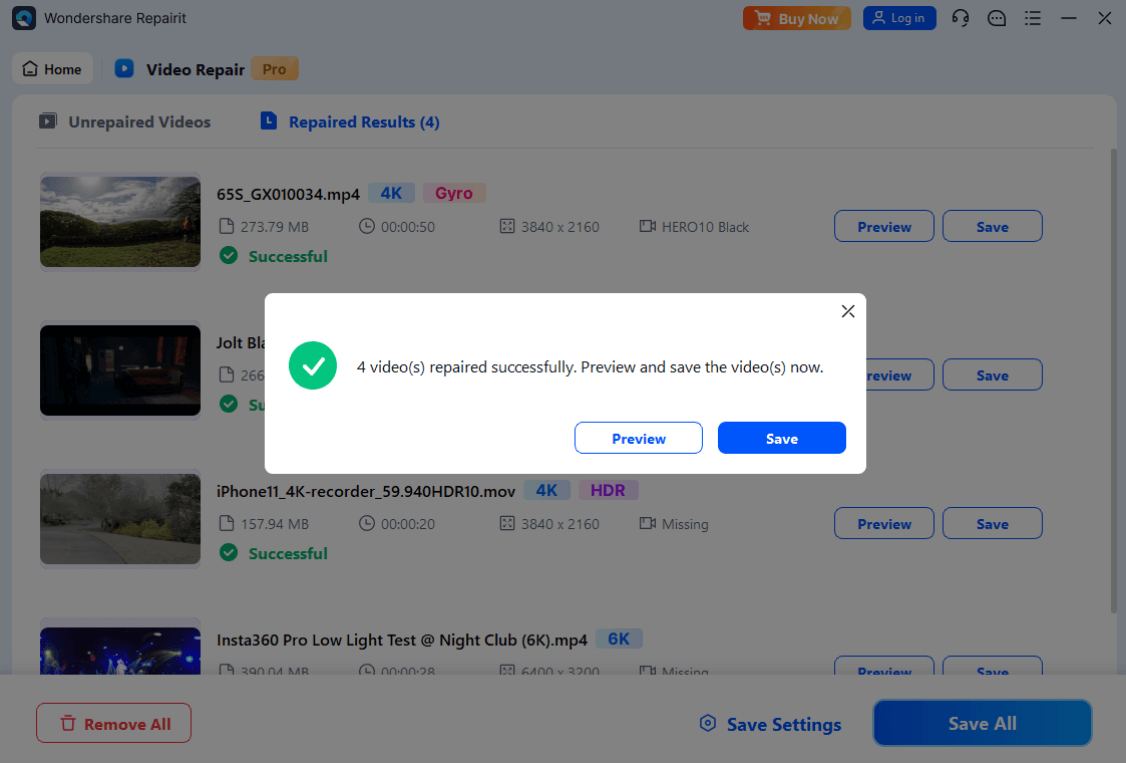
Video Repair with Pro mode: four repaired clips (GoPro 4K with gyro data, iPhone HDR and Insta360 6K) ready to preview and save, from Repairit's user guide.
Features
Video repair with sample-file Advanced Repair
Wondershare Repairit repairs MP4, MOV, AVI, MKV, MTS/M2TS, 3GP, MXF, FLV, WMV, INSV (Insta360), M4V, MPEG, TS, LRV and professional formats such as BRAW, R3D and CRM, from Canon, Nikon, Sony, GoPro, DJI and phone cameras. When Quick Repair isn't enough, Advanced Repair compares the broken clip with a sample video's format, encoding, device, bitrate, frame rate and resolution.
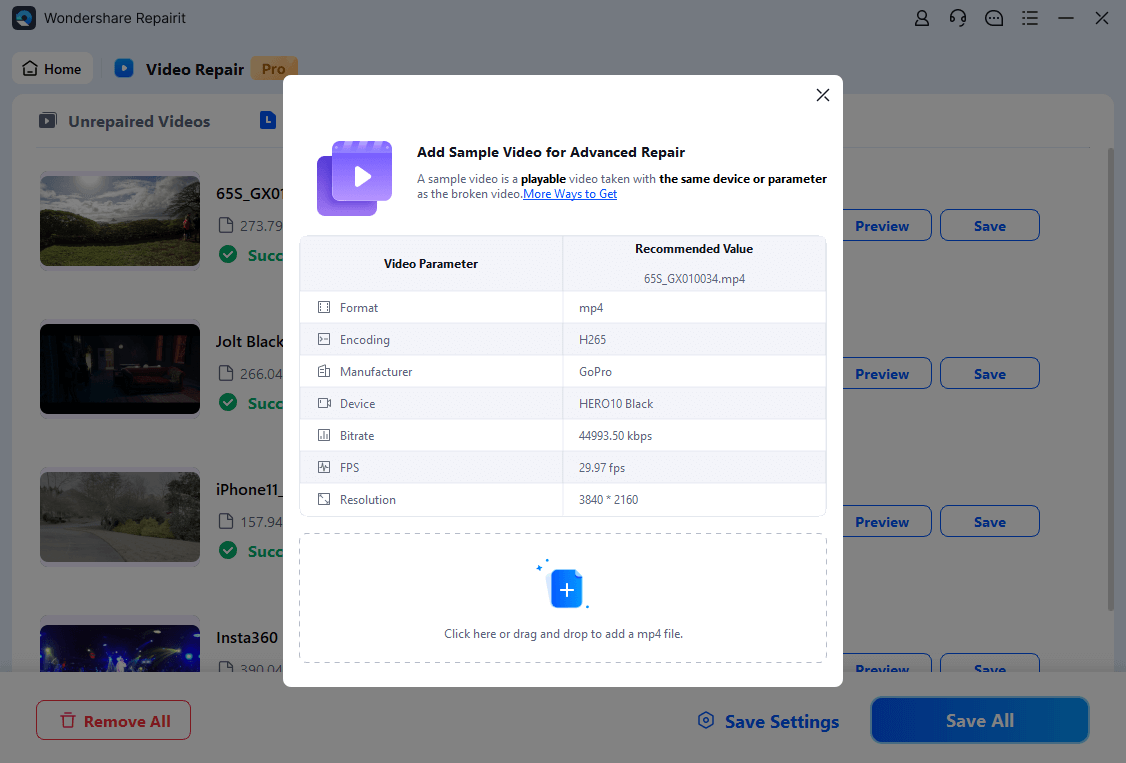
The Advanced Repair sample-video dialog: Repairit lists the parameters the sample should match (here a GoPro HERO10 Black H.265 4K clip).
Photo, document, archive and design-file repair
Wondershare Repairit's other repair modules cover JPEG, PNG, HEIC, WebP and camera RAW photos (CR3, CR2, NEF, ARW, DNG, RAF and more); PDF, Word, Excel, PowerPoint and Apple iWork documents; ZIP, RAR, 7Z and ISO archives; and Adobe and engineering files such as PSD, PSB, AI, INDD, Premiere projects, SketchUp, DXF and Vectorworks files.
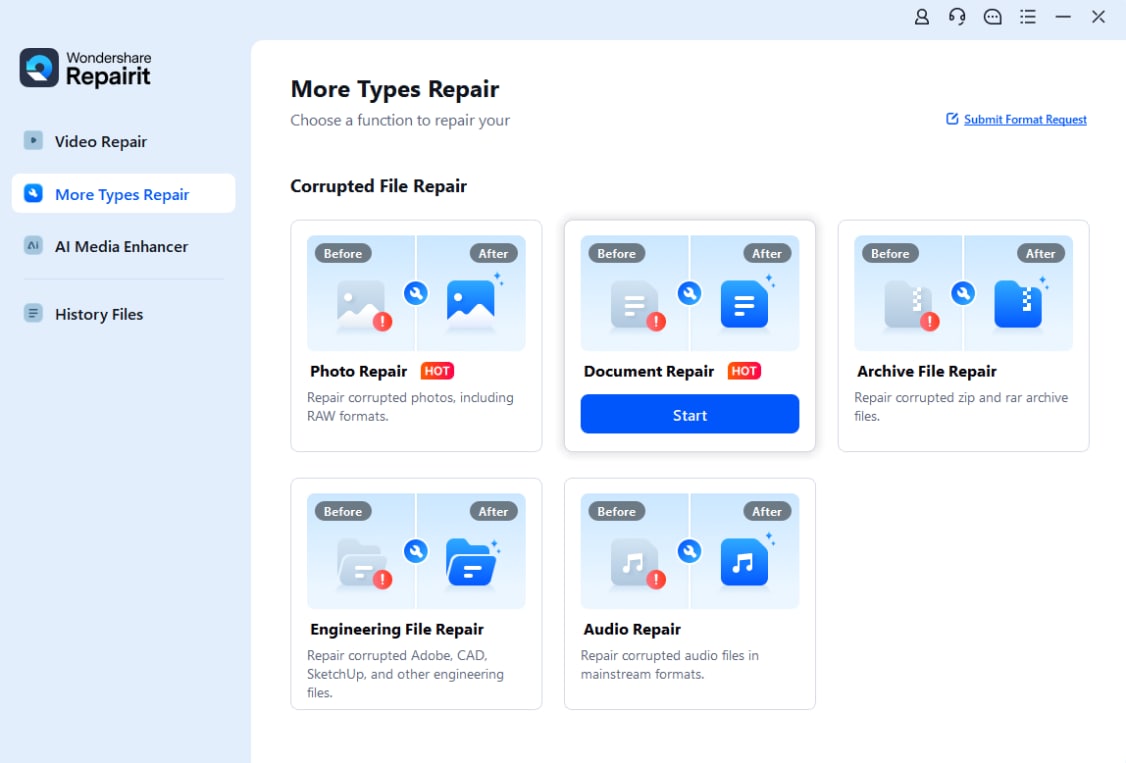
The More Repair Types screen with the photo, document, archive, engineering-file and audio repair modules.
Audio repair
Wondershare Repairit repairs MP3, WAV, AAC, FLAC, M4A, WMA and AIFF files, with an optional sample audio file for better results, and lets you play the repaired audio before saving.
AI media enhancer
Repairit's newer AI tools go beyond repair: an AI Video Enhancer that improves resolution, clarity and color and reduces blur and noise, an AI photo enhancer and upscaler, old photo restoration, a photo colorizer, and object, background and watermark removal. Paid plans include AI credits (1,500 a month on subscriptions, 2,250 once with the perpetual license).
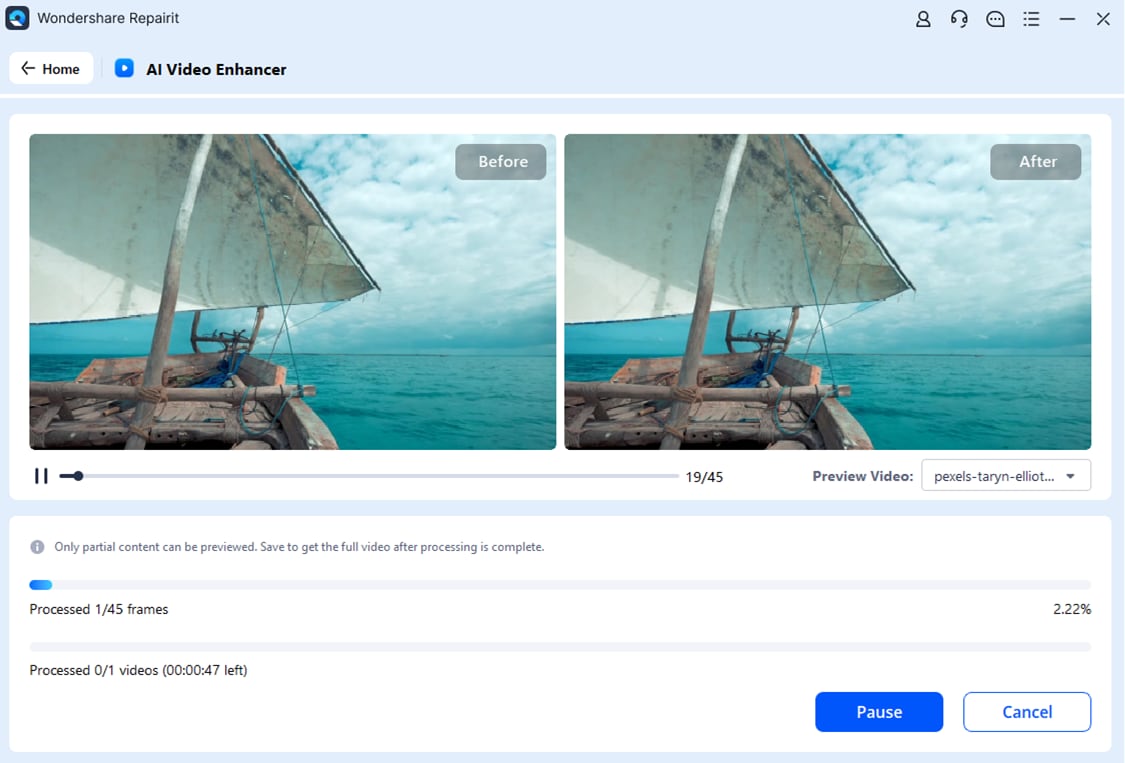
The AI Video Enhancer with a before/after preview while it processes the frames.
Benefits
- One tool for many file types: instead of a separate video, photo and Office repair program.
- See before you pay: the free version shows whether your file can be fixed.
- Handles pro footage: Professional Mode keeps RAW, HDR and log footage usable in editing software.
Real-World Uses
- A wedding videographer recovers a ceremony clip that cut off when the camera battery died, using a sample clip from the same camera.
- A drone or action-cam user fixes an MP4 or INSV file that was still being written when the card was removed.
- An office worker repairs an Excel workbook or PowerPoint deck that Office says is corrupt.
- A designer rescues a layered PSD that won't open after a crash.
Who It's For, and Who Should Skip It
Good fit: anyone with an important corrupted file, from families with a broken holiday video to videographers and photographers who shoot on several devices.
Skip it if: your files are missing rather than damaged (that's a job for data recovery software, such as Wondershare Recoverit), you only need to fix one small file once (try the free preview, then consider the monthly plan), or the file was overwritten or encrypted by ransomware: no repair tool can rebuild data that isn't there.
Usage Guide
- Copy the damaged files to your computer first, then download and run the Repairit installer (a small web installer that downloads the program).
- Choose Video Repair or open More Repair Types for photos, documents, archives, design files or audio.
- Add the broken files and click Repair; for professional footage, turn on Pro mode first.
- Preview the results. If a video still won't play, use Advanced Repair and add a working sample clip from the same device.
- Buy a license and save the repaired files to a different drive from the one they came from.
Before you buy
- Preview first. Run the free version on your actual file before paying; Wondershare only refunds within 7 days for unresolved technical problems or duplicate purchases, never for change of mind or disappointing results.
- Subscriptions renew automatically; you can cancel the renewal at any time.
- Perpetual means this major version: it includes minor updates but not the next major version.
- Windows and Mac are sold separately, with their own store pages.
- Prices on this page are the regular US prices; the store showed a Black Friday banner on November 28, 2026.
Where it falls short
- Not every file can be saved. Some users report no success at all; badly damaged footage may come back with lower quality than the original.
- Advanced Repair needs a sample from the same device and settings, which you may not have.
- Upselling: the store adds offers for other Wondershare apps, and many AI features use credits.
What Users Say
Trustpilot (repairit.wondershare.com: 4.6 out of 5 from 970 reviews)
Most reviews are from people whose files came back:
- Wacko (5 stars, November 23, 2026), "It worked": "It worked. Saved a very important family video."
- Ross Konikoff (5 stars, November 19, 2026): "This app is astonishing!!! It saved a valuable file with sound and video perfectly recovered and preserved!!!"
- Nick Pensa (5 stars, November 8, 2026): "The program worked well and repaired all of my files. The layout was easy to use and streamline."
- Walt (5 stars, October 23, 2026), "My first use of Repairit": "Very impressive. Rescued an irreplaceable event file."
- Tommy Webb (5 stars, October 18, 2026): "it 1s a great app, but the perpetual license need to be free just charge a little more for the software."
Mixed and negative
- YUKO WEDDINGS (4 stars, November 23, 2026): "A decent tool to recover your failed files but don't expect them to be as good as your camera can produce."
- Cory (1 star, November 24, 2026), "Unsuccessful": "Did not have success using this product for video or photo repair."
- PlayBergamo (1 star, November 13, 2026), "It's the worst": "It's the worst! 120€ and didn't worked out, i found out after drill dsk and for half the price worked perfectly."
The pattern
When Repairit works, users are relieved and grateful: the reviews are full of rescued family and event videos. When it doesn't, they feel they paid for nothing, which is why the free preview matters so much. The repair site itself shows a 4.6 rating from 952 reviews. We found few in-depth independent reviews; several "reviews" online come from competitors selling their own repair tools.
Comparisons
Repairit vs Recoverit
Both are Wondershare products and they solve different problems. Recoverit finds files that were deleted or lost from a drive; Repairit fixes files you still have but can't open. A lost and then damaged video may need both.
Repairit vs single-purpose repair tools
Dedicated tools such as Stellar Repair for Video focus on one file type. Repairit's strength is covering video, photos, documents, archives, design files and audio in one program, plus the AI enhancer.
Editions and Pricing
| License (Windows) |
Price |
Updates |
AI credits |
| 1 Month | $39.99, renews monthly | All updates while active | 1,500 per month |
| 1 Year | $69.99, renews yearly | All updates while active | 1,500 per month |
| Perpetual | $99.99 once | Minor updates of this version | 2,250 once |
All three include the full toolkit (video, photo, document, archive, engineering and audio repair, Professional Mode and batch repair). Each button orders that license.
Buy 1-Year License ($69.99)Buy 1-Month ($39.99)Buy Perpetual ($99.99)
FAQs
Is Wondershare Repairit free?
Wondershare Repairit is free to download and to run a repair and preview the result. Saving the repaired files requires a paid license; there's also a separate Repairit Online web service.
Can Repairit fix a video that stopped recording when the battery died?
Often, yes. Wondershare Repairit's Advanced Repair and Professional Mode are built for clips cut off by power loss, including camera RSV, DAT and MDT files, especially when you can supply a working sample clip from the same camera.
Can I get a refund if Repairit doesn't fix my file?
Only in limited cases. Wondershare lists Repairit under a 7-day refund window for unresolved critical technical issues or duplicate purchases; dissatisfaction with results or change of mind isn't covered. That's why previewing with the free version first matters.
Does the Windows license work on a Mac?
No. Wondershare Repairit for Windows and Repairit for Mac are sold separately, each from its own store page.
Does Repairit recover deleted files?
No. Wondershare Repairit repairs damaged files you still have. To find deleted or lost files, you need data recovery software such as Wondershare Recoverit.
Will repaired 4K or RAW footage still work in my editing software?
Wondershare Repairit's Professional Mode is meant for that: it keeps the original encoding and metadata of RAW, HDR/log and 4K+ footage so the result stays compatible with Premiere Pro, DaVinci Resolve and Final Cut Pro.
System Requirements
- Windows: Windows 11, 10, 8, Vista or 7; Windows Server 2003, 2008, 2012, 2016, 2019 or 2022
- Mac version: macOS 10.13 to macOS 26
- At least 700 MB of free disk space
- Works with files from computer disks, USB drives, memory cards, cameras and phones
Conclusion
Wondershare Repairit is worth buying when the free preview shows your file coming back. It covers more file types than most repair tools, handles professional camera footage, and its sample-file Advanced Repair rescues videos simpler tools give up on. For a one-off rescue the yearly license at $69.99 is the best value; the perpetual $99.99 license suits people who deal with damaged files regularly.
The reason for caution is that no repair tool fixes everything, and Wondershare won't refund disappointing results. Always run the free version on your own file first.
Download Free TrialBuy Now