Short answer
Short answer: Stellar Repair for Video is the best all-round pick: 17 formats, an Advanced Repair that uses a sample clip for badly damaged files, and editions for Windows and Mac, at $49.99 a year. If you want to own the tool outright, Kernel Video Repair is $49 lifetime and its trial saves the first 30 seconds of each repaired video. EaseUS Fixo ($69.95 a year) also repairs photos and Office files, and AnyMP4 Video Repair ($39.96 lifetime) is the cheapest for MP4, MOV and 3GP if you have a healthy sample clip from the same camera.
Before paying, copy the file off the card, try it in VLC, and run a free trial: if the preview shows your video, the paid version will save it; if it doesn't, no licence will.
At a glance: four video repair tools
| Stellar Repair for Video | Kernel Video Repair | EaseUS Fixo | AnyMP4 Video Repair |
|---|
| Price | $49.99 for 1 year (Standard) | $49 lifetime, or $29 for 1 year | $69.95 a year, $49.95 a month, $119.95 lifetime | $39.96 lifetime (1 PC) |
| Formats | 17, incl. MP4, MOV, MKV, AVI, MTS, WMV, WEBM, 3GP | 25+, incl. MP4, MOV, MKV, AVI, MTS, ProRes, MXF, RSV | MP4, MOV, MKV, M2TS, MTS, 3GP and more | MP4, MOV, 3GP only |
| Repair with a sample clip | ✓ Advance Repair | ✓ reference video (MP4, MOV) | ✓ Advanced Repair Mode | ✓ always needs one |
| Batch repair | ✓ | ✓ | ✓ | ✗ one file at a time |
| Free trial | Repairs, previews up to 20% of each video | Repairs, saves the first 30 seconds | Repairs and previews; no saving | Free download to test |
| Also repairs | Photos in Professional ($59.99) | Video only | Photos, Word, Excel, PowerPoint, PDF | Video only |
| Windows | 64-bit 11, 10, 8.1, 8 | 11, 10, 8.1 and older | 11, 10, 8, 7, XP | 11, 10 |
| Mac | ✓ separate edition | ✗ not on this site | ✓ separate version | ✓ separate edition (Intel build) |
What we checked
- We compared the four video repair programs on this site on formats, repair methods, batch handling, trial limits, platforms and licence terms, from each vendor's product pages, manuals and installers.
- We gathered independent reviews and Trustpilot comments for each, and the vendors' refund rules.
- What we checked: prices on each vendor's buy page on November 28, 2026: Stellar Repair for Video Standard $49.99 for 1 year (Professional $59.99, Premium $69.99), Kernel Video Repair $29 for 1 year and $49 lifetime, EaseUS Fixo $49.95 a month, $69.95 a year and $119.95 lifetime, and AnyMP4 Video Repair $39.96 lifetime, in USD.
We compared features, prices and trials. We didn't repair the same damaged clip with all four, so results on your file come down to how badly it is damaged.
The free steps first
Many "corrupt" videos aren't broken beyond a quick fix, and a few free steps rule out the easy cases.
- Copy the file to your computer first. Don't repair straight from a camera card or phone; every tool here works on a copy, and Stellar can't read a connected iPhone or Android directly.
- Try VLC. VLC can sometimes play a damaged AVI by rebuilding its index. It doesn't fix MP4 or MOV structure damage, which is what the repair tools are for.
- Try a free online repair for one small file. Stellar's online repair tool offers one free repair, and EaseUS runs a free online repair for MP4 and MOV files. Your video is uploaded, so skip this for private footage.
- Keep a healthy clip from the same camera. For badly damaged MP4 and MOV files, the tools rebuild the missing details from a working clip shot on the same device with the same settings. If you don't have one, record a few seconds now.
- Deleted, not damaged? Repair tools fix files you still have. If the card was formatted or the clip deleted, run data recovery first, then repair what comes back.
Prices compared
One year of use (USD)
Kernel Video Repair (1-year licence)$29.00
Stellar Repair for Video Standard$49.99
EaseUS Fixo Pro (1 year)$69.95
Buy page prices on November 28, 2026. The yearly plans renew automatically unless you turn renewal off.
Buy once, keep it (USD)
AnyMP4 Video Repair (lifetime, 1 PC)$39.96
Kernel Video Repair (lifetime)$49.00
EaseUS Fixo Pro (lifetime upgrades)$119.95
Buy page prices on November 28, 2026. Stellar's "LifeTime License" option is a 3-year subscription, so it isn't in this chart.
1. Stellar Repair for Video: best all-round
- Price: Standard $49.99 for 12 months on one computer (renews; turn auto-renewal off at checkout); Professional $59.99 adds photo repair
- Version: 7.1.0.0; Windows 11, 10, 8.1, 8 and Server 2022/2019/2016 (64-bit). Stellar Repair for Video for Mac is a separate $49.99 licence for macOS 11 and later
- Best for: camera, drone, dashcam and phone footage in any common format
Stellar Repair for Video fixes damage in the header, frames, sound section and slider of AVI, ASF, WMV, MKV, FLV, DIVX, WEBM, MJPEG, MPEG, AVCHD, MTS, MOV, MP4, M4V, 3G2, 3GP and F4V files, in codecs including H.264 and H.265/HEVC. Each file in the batch ends as Completed with a Preview link, or Awaiting Action with an Advance Repair link; Advance Repair takes a sample clip from the same device and format and uses it to rebuild the damaged one. Repaired clips are saved to any drive you choose, so you don't write back to a failing card.
Where it falls short: the free version runs the whole repair, then stops at the save, and its preview ends at 20% of the file's size. Several unhappy Trustpilot reviews come from people who expected a free fix. Stellar's "LifeTime License" toggle sells a 3-year subscription, not a one-time licence, and its refund policy refuses buyers who skipped the trial.

Stellar Repair for Video for Windows: files that normal repair couldn't fix wait with an Advance Repair link.
What we like
- 17 formats, the broadest everyday list here
- Advance Repair with a sample clip
- Windows and Mac editions
- Stellar scores 4.8 out of 5 from 5,601 Trustpilot reviews (all products)
Watch out for
- Yearly subscription; no true lifetime licence
- Trial preview stops at 20%
- Strict refund rules
- No drag and drop for adding files (Nerd Techy)
"Stellar Repair for Video is a robust video repair software that can fix most types of damage"
Nerd Techy, hands-on review
"I downloaded the "Trial" version of Stellar Repair for Video. ... No legitimate developer will ever try a stunt like this."
TDF Public, Trustpilot, 1 star, June 28, 2026, after the trial stopped at saving
Download Stellar Repair for Video (Windows)Buy Stellar Repair for Video (Windows)
Download Stellar Repair for Video for MacBuy Stellar Repair for Video for Mac
2. Kernel Video Repair: best one-time price, most formats
- Price: $49 lifetime (home use), or $29 for one year that renews
- Version: 20.12 (December 2022); Windows 11, 10, 8.1 and older, Windows Server 2022, 2019 and older
- Best for: anyone who wants to own the tool, and pro formats such as ProRes, MXF and RSV
Kernel Video Repair rebuilds the header, frame index and metadata of MP4, MOV, MKV, AVI, AVCHD, MTS, M4V, MPEG, WMV, FLV, WEBM, 3GP, TS, F4V, ProRes, RSV, MXF and more, so the file plays again in its original encoding and frame rate. It fixes black screens, stutter, flicker, truncated files, missing sound and out-of-sync audio. For badly damaged MP4 and MOV files it takes a reference video from the same device; the screen shows "No reference file needed" when the file's own structure is still readable. Batches run multi-threaded with no file-size limit (Kernel cites 60 GB 4K recordings), and the trial saves the first 30 seconds of each repaired video, a real file you can play.
Where it falls short: the program is deliberately simple, with no manual repair options if the automatic repair and the reference video don't work. The Windows build dates from December 2022, and most published "reviews" come from companies selling competing tools.
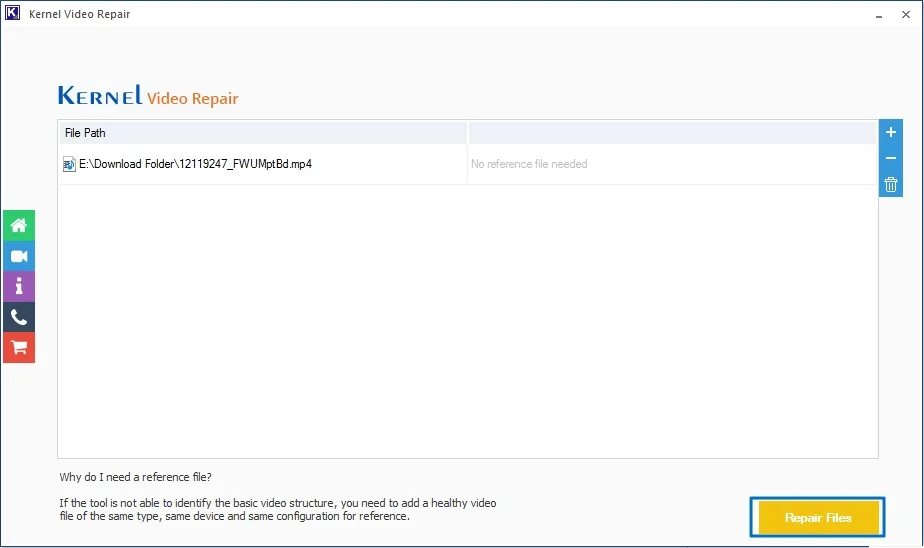
Kernel Video Repair: a corrupt MP4 added to the list, with the reference-file column ("No reference file needed") and the Repair Files button.
What we like
- $49 lifetime, or $29 for a year
- Trial saves a playable 30-second clip
- 25+ formats including ProRes and MXF
- No file-size limit, multi-threaded batches
Watch out for
- Few controls if automatic repair fails
- Windows build from 2022
- Thin independent testing
- Mac edition isn't listed on this site
"I have used this video repair software to repair client videos. As a professional photographer and video creator, I recommend this product."
Quoted from SoftwareSuggest on Kernel's product page (4.9 out of 5 from 485 reviews there)
"great customer service, thanks again Vikram!"
mckr, Trustpilot (KernelApps, all products), April 2026
Download Kernel Video RepairBuy Kernel Video Repair
3. EaseUS Fixo: video, photo and document repair in one
- Price: Fixo Pro $49.95 a month, $69.95 a year or $119.95 lifetime upgrades; each includes AI credits (1,500, 3,600 or 7,200)
- Version: 4.3.0; Windows 11, 10, 8, 7 and XP; a Mac version runs on macOS 11 to 15
- Best for: one incident that damaged videos, photos and Office files together
EaseUS Fixo has three modules in one window: Video Repair (MP4, MOV, MKV, M2TS, MTS, 3GP and more, from DSLRs, GoPros, drones, phones and CCTV), Photo Repair and File Repair for Word, Excel, PowerPoint and PDF. The workflow is the same in each: add files, repair them in a batch, preview, save. Users single out the preview: "A huge advantage over other software is the preview". Repair is unlimited on paid plans; the AI credits are for photo enhancement and colorizing.
Where it falls short: the trial saves nothing, monthly and yearly plans renew automatically, and EaseUS refunds within 30 days only for technical faults support can't fix. Reviews that name Fixo are more mixed than EaseUS's average, with failed document repairs and a video recovered without audio among the complaints.

EaseUS Fixo's Video Repair module: supported formats, devices and repair scenarios, with the Video, Photo and File Repair modules on the left.
What we like
- Repairs videos, photos and Office files
- Preview before paying
- Lifetime option ($119.95)
- EaseUS scores 4.9 out of 5 from 39,746 Trustpilot reviews (all products)
Watch out for
- Most expensive of the four
- Trial saves nothing
- Auto-renewing plans
- Refunds only for technical faults
"it worked perfectly, allowing me to repair each of the broken or corrupted .RSV files"
Billy Cleary, Trustpilot, 5 stars, February 26, 2026
"The video is damaged so we can't recover the audio"
Sundaravel Rajasekaran, Trustpilot, 1 star, June 9, 2025
Download EaseUS FixoBuy EaseUS Fixo
4. AnyMP4 Video Repair: cheapest, for MP4 and MOV with a sample
- Price: $39.96 lifetime for 1 PC (list $49.95), $59.96 for 3 PCs, or $29 a month
- Version: 1.0.22, Windows 11 and 10; AnyMP4 Video Repair for Mac is a separate licence
- Best for: an interrupted phone, drone or dashcam recording when you still have the device
AnyMP4 Video Repair does one job: you put the broken MP4, MOV or 3GP clip on the left and a healthy sample from the same device on the right, and it rebuilds the duration, resolution, bitrate, encoder and frame rate the broken file lost, marking each restored value "(Recovered)". It handles H.264 and H.265 up to 4K and beyond, and previews the result before saving. For the most common failure, a recording cut off when the battery died, that sample-based rebuild is the right fix.
Where it falls short: three formats only (no AVI, MKV or WMV), one file at a time, and no repair at all without a sample clip. AnyMP4's refund policy excludes refunds when data isn't fully recovered and can deduct a 20% fee. The Mac edition has program files built for Intel (x86_64) Macs only.
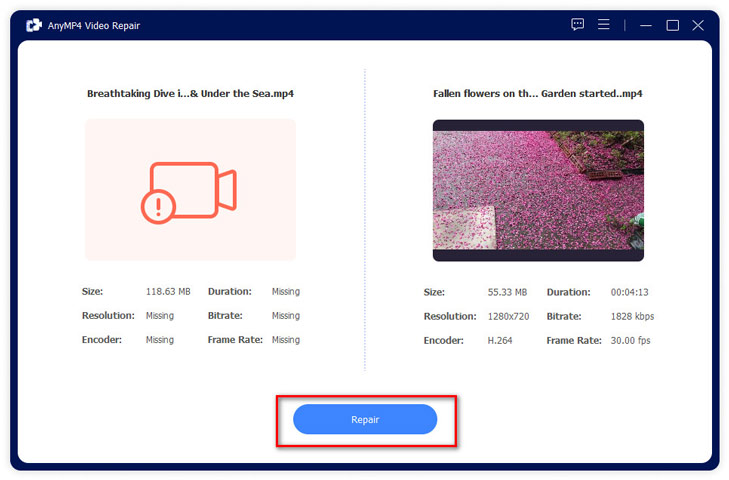
AnyMP4 Video Repair with both files loaded: the broken clip's duration, resolution, bitrate, encoder and frame rate read "Missing", while the sample shows 1280x720, H.264, 1828 kbps and 30 fps.
What we like
- Cheapest lifetime licence at $39.96
- Shows exactly which details it rebuilt
- Two files in, one click
- Free lifetime upgrades
Watch out for
- MP4, MOV and 3GP only
- Needs a sample clip every time
- One file at a time
- Few independent reviews
"Upload the MP4 video, add a video sample, then it will start repairing. And the repairing process is quick. Twenty minutes' video can be repaired in 5 minutes. But it could support more formats like WMV, MKV, AVI, etc."
Vijay, comment on AnyMP4's product page
"AnyMP4 is a great app with superb support."
Karmenu Vella, Trustpilot (AnyMP4, all products, 4.2 out of 5 from 239 reviews), November 2026
Download AnyMP4 Video RepairBuy AnyMP4 Video Repair
How to repair a corrupt video file, step by step
The steps are the same with any of the four tools:
- Copy the damaged video (and a healthy clip from the same camera, if you have one) to your computer's internal drive.
- Install the free trial and add the damaged file. Add several at once in Stellar, Kernel or Fixo.
- Click Repair. If a file fails, give it the sample clip: Advance Repair in Stellar, a reference file in Kernel, Advanced Repair Mode in Fixo, the sample box in AnyMP4.
- Preview the result (or play Kernel's 30-second trial file) and check both picture and sound.
- If it plays, buy the licence and save the repaired video to a different drive from the one it came from.
- For a one-off rescue on a yearly plan, turn auto-renewal off after saving.
Which video repair software should you choose?
| Your situation | Pick | Why |
|---|
| Mixed formats from a camera or drone, Windows or Mac | Stellar Repair for Video | 17 formats, Advance Repair with a sample, Mac edition |
| You want to own it, not rent it | Kernel Video Repair | $49 lifetime, trial saves a playable 30 seconds |
| ProRes, MXF or RSV footage | Kernel Video Repair | The only one of the four that lists these formats |
| Videos, photos and documents damaged together | EaseUS Fixo | One tool repairs all three |
| One MP4 from a phone you still have, small budget | AnyMP4 Video Repair | $39.96 lifetime; the phone gives you a sample clip |
| One small file, not private | A free online repair first | Stellar and EaseUS each offer one |
Who should skip each tool
- Skip Stellar Repair for Video if you want a one-time licence; its "LifeTime" option is a 3-year subscription.
- Skip Kernel Video Repair on a Mac (the Mac edition isn't on this site), or if you want manual repair controls.
- Skip EaseUS Fixo if you only need video repair; it costs the most and the trial saves nothing.
- Skip AnyMP4 Video Repair for AVI, MKV or WMV files, or if you no longer have the camera that shot the clip.
What commonly goes wrong
- Expecting the free trial to save the video. Only Kernel's trial saves a playable part (30 seconds). Stellar and Fixo preview only; read the trial limit before you start.
- A sample clip that doesn't match. Sample-based repair needs the same device, resolution, frame rate and codec. Many phones switch between H.264 and HEVC in their camera settings; match it.
- Repairing on the failing card. Copy off first and save the repaired file to another drive.
- Data that was never written. If the camera lost power before writing the video data, or it was overwritten, no tool can rebuild frames that aren't there. Expect partial results on badly damaged files.
- Forgetting the renewal. Stellar, Kernel's 1-year licence and Fixo's monthly and yearly plans renew automatically.
- Thinking a refund covers a failed repair. Stellar, EaseUS and AnyMP4 all limit refunds when the file simply couldn't be repaired. The trial is your test.
FAQs
What is the best software to repair corrupt MP4 files?
Stellar Repair for Video is the best all-round choice for corrupt MP4 files, with an Advance Repair mode that uses a sample clip for badly damaged files, for $49.99 a year. Kernel Video Repair ($49 lifetime) and AnyMP4 Video Repair ($39.96 lifetime) are the one-time alternatives.
Can a corrupted video be repaired for free?
Sometimes. VLC can play some damaged AVI files by rebuilding the index, and Stellar and EaseUS each offer a free online repair for a single small file. The desktop trials of Stellar Repair for Video and EaseUS Fixo repair and preview for free but need a licence to save; Kernel Video Repair's trial saves the first 30 seconds.
Why does my repaired video need a sample file?
A video cut off mid-recording often loses the index that tells players how its frames were encoded. Stellar Repair for Video, Kernel Video Repair, EaseUS Fixo and AnyMP4 Video Repair can copy that information from a healthy clip shot on the same device with the same settings.
Is there a video repair tool with a one-time price?
Yes. Kernel Video Repair costs $49 lifetime, AnyMP4 Video Repair $39.96 lifetime and EaseUS Fixo $119.95 for lifetime upgrades. Stellar Repair for Video is sold as a yearly or 3-year subscription.
Can I repair a video on a Mac?
Yes. Stellar Repair for Video for Mac runs on macOS 11 and later, EaseUS Fixo has a Mac version for macOS 11 to 15, and AnyMP4 Video Repair for Mac is a separate licence built for Intel Macs.
Can video repair software fix a video with no sound?
Often, yes. Stellar Repair for Video, Kernel Video Repair and EaseUS Fixo all list missing or out-of-sync audio among the faults they repair, but if the audio data itself is damaged it may not come back; check the sound in the trial preview.
Can these tools recover a deleted video?
No. Stellar Repair for Video, Kernel Video Repair, EaseUS Fixo and AnyMP4 Video Repair repair files you still have. For a deleted video or a formatted card, use data recovery software first, then repair the recovered file if it won't play.
Does repairing a video change the original file?
No. All four tools write a repaired copy and leave the damaged original alone, so you can try another tool or a different sample clip on the same file.
Lost the video rather than damaged it? See How to Recover Data From an External Hard Drive, or browse all video tools.