Split Multiple vCards: one big VCF file, one file per contact
You exported your address book and got a single .vcf file with hundreds of contacts inside. Outlook has no native way to read that file the way you need. Split Multiple vCards, also called SoftLay vCard Splitter, breaks that file into one VCF file per contact.
Quick facts
- Platforms: Windows 98, 2000, XP, 2003, Vista and Windows 7 (32 and 64 bit)
- Full version price: $19
- Trial: a demo version is available. It is limited, and it shows what the full version does.
- Supported vCard versions: 3.0 and 2.1
- Refund: 30-day money-back policy
Key features
Turn one address-book VCF into a separate file per contact
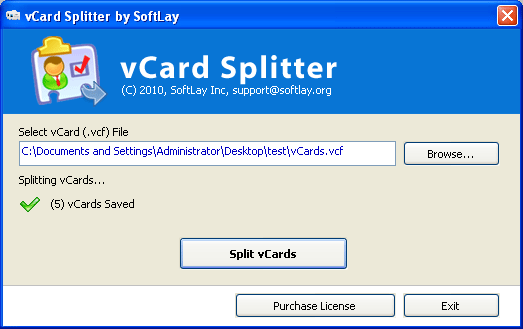
The tool is a small, simple Windows form application. It takes a single vCard file holding many contacts and writes an individual VCF file for each one.
Keep contact details intact
It preserves properties such as first name, last name, email address, phone number, mobile number, images and website.
Work with vCard 3.0 and 2.1, including Mac exports
It handles both vCard 3.0 and vCard 2.1 files. That includes files exported from Apple Address Book.
Split without Outlook installed
You can split the file even without Outlook installed. Afterwards you can import the single files into Outlook, Outlook Express/Windows Mail, Gmail, Apple Address Book, Windows Address Book, iPhone, iPad, iPod, Lotus Notes, Thunderbird, BlackBerry or Palm.
Who it's for
It suits anyone moving contacts between address books who is stuck with one combined VCF file. A typical case is a Mac user bringing an Apple Address Book export into Outlook on Windows.
Pros and cons
- Pro: It does one job, and the interface is small and simple.
- Pro: It keeps the main contact fields, including images.
- Pro: It has a low price and a 30-day refund policy.
- Con: The demo is limited, so you can't test a full conversion before buying.
- Con: It is a Windows application, and its listed support stops at Windows 7.
FAQs
Does it change my original VCF file?
The vendor says it keeps the contact properties intact. It writes separate files for each contact.
Which vCard versions can it split?
Both 3.0 and 2.1.
Do I need Outlook installed?
No. It splits the contacts even without Outlook installed.
Can I try it first?
Yes. A demo version is available, and it is limited compared with the full version.
Is there a refund option?
Yes, the vendor has a 30-day refund policy.
System requirements
Windows 98, 2000, XP, 2003, Vista or Windows 7 (32 and 64 bit). The tool is small, and a Pentium II 400 MHz, 64 MB RAM and 10 MB of disk space are listed as the minimum.