You have an MKV file that won't play on your phone, portable player or older media device, and you just want it as an MP4 or AVI without fiddling with codecs. That is the job 4Videosoft MKV Video Converter is built for.
Quick facts
- Version: 5.0.10
- Platform: Windows XP (SP2 or later), Windows Vista, Windows 7
- Download size: about 22 MB
- Input formats: MKV, MPG, WMV, MP4, AVI
- Output formats: MP4, AVI, 3GP, FLV, MOV, VOB and HD video
- Audio extraction: AAC, AC3, AIFF, AMR, AU, FLAC, MP3, M4A, MP2, OGG, WAV, WMA
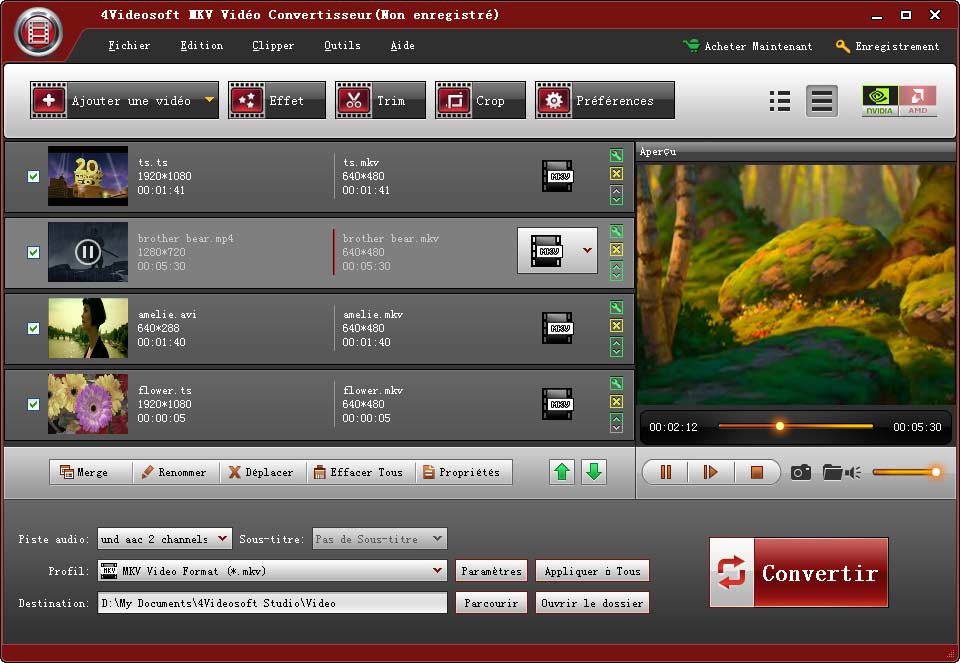
Key features
Turn MKV into formats your player accepts
Load MKV, MPG, WMV, MP4 or AVI files and convert them to MP4, AVI, 3GP, FLV, MOV, VOB or HD video for portable devices.
Pull the audio out of a video
You can extract the soundtrack and save it as MP3, AAC, FLAC, WAV, OGG, WMA and several other audio formats.
Trim, crop and join before you convert
The splitter cuts clips by exact time or by dragging a slider. The cropper removes black bars and adjusts the output aspect ratio. The joiner merges several files into one after conversion.
Add watermarks, pick subtitles and audio tracks
Overlay an image or text watermark and set its position and transparency. You can also choose the audio track and subtitle for the output video.
Fine-tune the output settings
Adjust codec, resolution, frame rate and video bitrate, plus audio codec, sample rate, channels and bitrate. Save the result as a custom profile. Deinterlacing converts interlaced footage to progressive, and a preview shows the original and output side by side, with contrast, brightness and saturation controls.
Convert many files at once
Load as many files as you like and send them to different output formats in a single run. The vendor says it supports dual-core CPUs for faster conversion.
Who it's for
It suits you if you have a collection of MKV files and a device that won't open them, and you want light editing (cut, crop, join, watermark) in the same tool. It is a Windows program, so Mac users need a different product.
Pros and cons
Pros
- Converts video and extracts audio in one tool
- Built-in split, crop, join and watermark
- Batch conversion to multiple formats
- Small download of about 22 MB
- Low hardware needs: an 800MHz CPU and 512 MB RAM
Cons
- Officially lists only Windows XP, Vista and 7
- Windows only
FAQs
Can it convert MKV to MP4?
Yes. MP4 is one of the listed output formats, along with AVI, 3GP, FLV, MOV and VOB.
Can I get just the audio from a video?
Yes. It extracts audio to formats such as MP3, AAC, FLAC, WAV and OGG.
Can I combine several videos into one?
Yes. The joiner merges selected files into a single file after conversion.
Do I get free upgrades?
The vendor says that once you buy it, you get free lifetime upgrades.
Does it need a powerful PC?
No. The vendor lists an 800MHz Intel or AMD CPU and 512 MB RAM or more.
System requirements
- OS: Windows XP (SP2 or later), Windows Vista, Windows 7
- CPU: 800MHz Intel or AMD or higher
- RAM: 512 MB or more