Getting your mail out of an Exchange database that won't open
Your Exchange database file has gone inaccessible, and the mailboxes inside it are the only copy you have. You need the mail back in a format Outlook can open. Exchange to Outlook Migration, sold by the vendor as Recover Data for EDB to PST, is built for this job. It reads EDB files and saves their contents into PST files.
Quick facts
- Vendor: Recover Data (Netware Data Recover)
- Version listed: 2.1
- Platforms: Windows (2000, XP, Vista, 7, Server 2008 on the listing)
- Price: $249 for the Academic License; the Corporate License is $299 and the Technical License is $499
- Trial: a demo version is offered before you buy
- Refund: 30-day money-back guarantee
Key features
Convert inaccessible EDB files into PST
The tool scans an EDB file you can't open and saves the data to a PST file. The vendor lists emails, journals, tasks, notes, calendar items and attachments.
Pick the files and folders you want in a five-step process
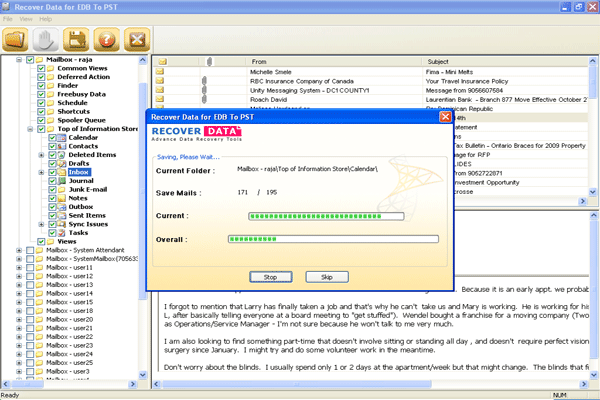
You browse to the priv, pub, mailbox and stm EDB files and click Next. The software analyses them and shows the contents in an explorer-style view. You select one or several folders to preview and save, then click Save to write the PST.
Process several EDB files in one run
The vendor says you can migrate from multiple EDB files at the same time, and that you can follow the conversion step by step as it runs.
Handle oversized databases
The vendor says its Guided File Excavation Technology (GFETch) lets you migrate even when the EDB file has passed the 16GB limit.
Who it's for
It suits you if you are an administrator or a single user with a damaged or dismounted Exchange database and a need to get mailbox data into Outlook. The three license tiers cover academic, corporate and technical use.
Pros and cons
Pros
- Simple, short workflow with a preview before saving
- Works on multiple EDB files and large files
- Demo available and a 30-day refund policy
Cons
- The listing's system requirements and operating systems are from the Windows 2000 to Windows 7 era
- Entry price is $249, and the cheapest tier is labelled Academic
- Output is PST only
What users say
"The software performs exactly as it claims for." (Recover Data client testimonials)
"Great Recovery Tools, I get all my files and emails back" (Recover Data client testimonials)
FAQs
What file does it read?
It reads Exchange EDB files, including priv, pub, mailbox and stm files, and saves to PST.
Can I try it first?
Yes. A demo version is available, and you can judge it before buying the full version.
What if I'm not satisfied?
The vendor offers a 30-day money-back guarantee.
Which license do I need?
Prices are $249 (Academic), $299 (Corporate) and $499 (Technical).
How do I get the activation key?
After purchase, the vendor emails you an activation key and a download link.
System requirements
- Processor: Pentium II 400 MHz
- Memory: 64 MB RAM
- Disk space: 10 MB minimum
- Operating systems: Windows 2000, 98, XP, Vista, 7 (32-bit), Server 2008