You need to send a document to someone as a PDF, but the program you wrote it in has no "Save as PDF" option. PDF Printer for Windows 7 handles that. It installs as a printer, so any program that can print can also produce a PDF.
Quick facts
- Platforms: Windows 7 (32-bit and 64-bit), Vista, XP, 2000, Server 2003, Windows 2000 Server and Server 2008
- Type: virtual PDF printer driver
- Licenses: Personal (home, non-commercial), Business (one computer per license) and Site
- Suggested hardware: workstation with 128MB RAM and a Pentium III 500 CPU; server with 256MB RAM and a Pentium 4 1.2G CPU
How it works
To an application, the software looks like an ordinary printer. When you print to it, it writes a PDF document instead of sending the pages to a laser or inkjet printer.
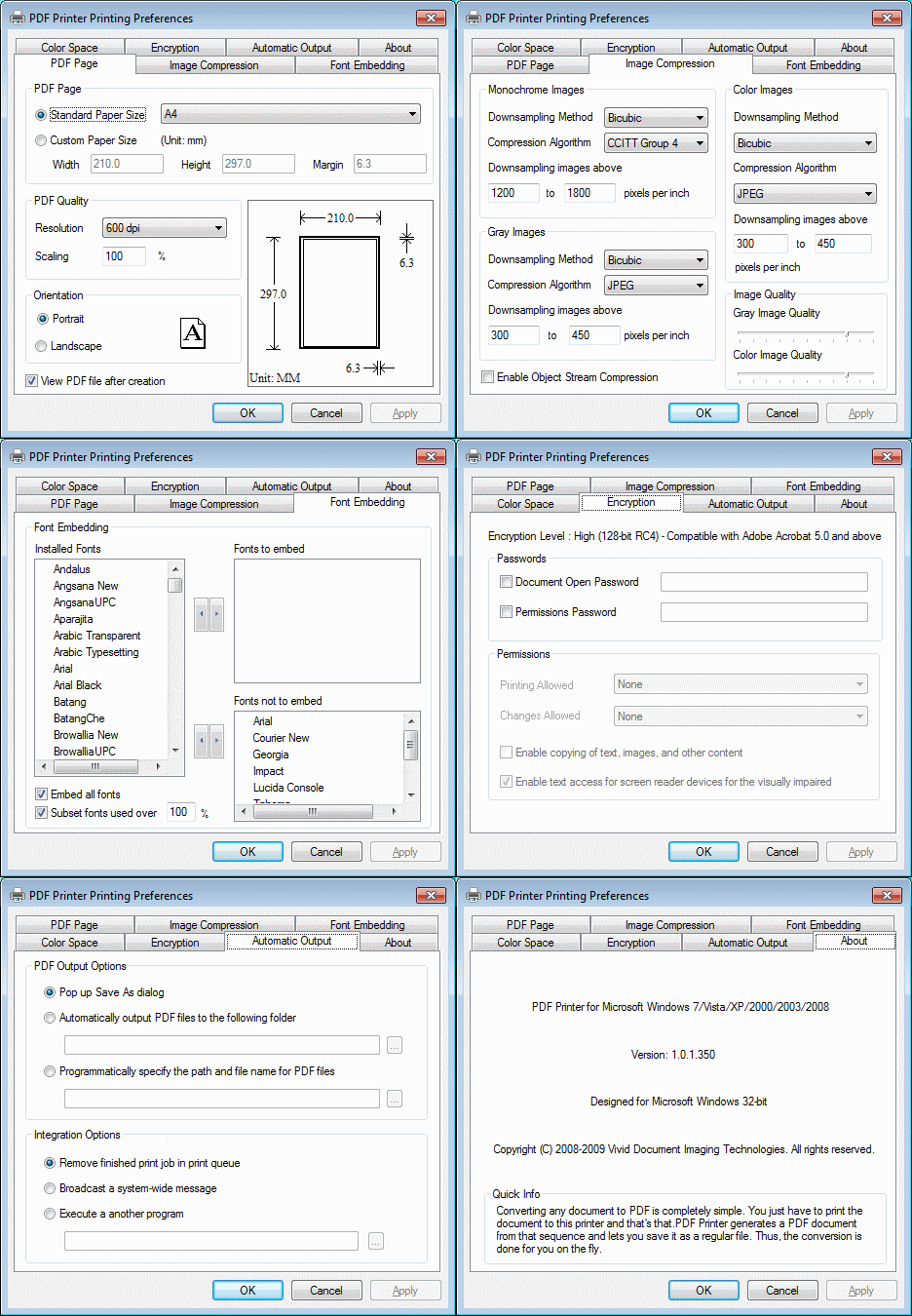
Key features
Make PDFs from any program that prints
The vendor lists Word, Excel, PowerPoint, Access, Outlook, Project, Visio, Publisher, Internet Explorer, AutoCAD, Lotus Notes and Quark Xpress. Any other application that prints works too.
Turn emails and web pages into PDFs
Print an email from Outlook, Outlook Express or Lotus Notes to save it as a PDF. You can also print a web page to archive it or share it.
Tune the output quality
You can choose quality settings for text and graphics to suit the purpose, including CMYK-compliant and ICC-profiled output. Printing a document again regenerates its PDF.
Control font embedding
Font embedding and subsetting can be automatic or manual. Embedding all fonts takes one click.
Lock down who can print, copy or edit
Apply a password and set permissions to restrict who can print, save, copy or modify the PDF.
Strip sensitive and hidden data
Remove metadata, hidden layers and other concealed information before you share a file.
Who it's for
It suits anyone on Windows 7 or an older Windows version who needs PDFs from programs with no built-in export. That includes office users, people archiving email or web pages, and anyone who needs password-protected PDFs. Server installs are covered too, and each user who accesses the printer on a server needs a Business license.
Pros and cons
- Pro: works from any application that can print
- Pro: password, permission and font controls
- Pro: covers both 32-bit and 64-bit Windows 7, plus older versions back to 2000
- Con: it is built for Windows 7 and earlier, and the vendor lists nothing newer
- Con: a license is needed per computer, and the Personal license bars business use
FAQs
Does it work on 64-bit Windows 7?
Yes. The vendor states support for both the 32-bit (x86) and 64-bit (x64) editions.
Can I use it at work with a Personal license?
No. The Personal license covers private, non-commercial use at home, on one computer. Business, academic or government use needs a Business license.
Can I convert email to PDF?
Yes. Print the message from Outlook, Outlook Express or Lotus Notes to the PDF printer.
Can I protect a PDF with a password?
Yes. You can set a password and restrict printing, saving, copying and modifying.
System requirements
- Windows 7, Vista, XP, 2000, Server 2003, 2000 Server or Server 2008
- Workstation: at least 128MB RAM and a Pentium III 500 CPU
- Server: at least 256MB RAM and a Pentium 4 1.2G CPU