Easy Mail Merge for Outlook: Personalized Mass Emails From Your Own Outlook Account
Easy Mail Merge is a $39.95 add-in for classic desktop Outlook on Windows that sends a separate, personalized email to every person on a list, with their name, custom text and even their own attachment, through your own Outlook account and at a pace your mail server accepts. It's for small businesses, schools, clubs and freelancers who send announcements, invoices or newsletters to a few hundred people and don't want a monthly email-marketing subscription.
Outlook's own mail merge goes through Word and can't attach a different file to each email or slow down to stay under your provider's sending limit. Send 600 messages at once from a normal mailbox and many providers will block the account for the day. Easy Mail Merge was built around those two problems.
Quick facts
- Version: 5.0.595, last updated July 10, 2024
- Developer: DS Development SRL, Bucharest, Romania
- Works with: classic desktop Outlook 2007, 2010, 2013, 2016, 2019, 2021 and Microsoft 365, 32-bit or 64-bit, on Windows Vista through Windows 11. No Mac version, and it doesn't run in Outlook on the web or the new Outlook for Windows.
- Imports from: Outlook contacts and contact groups, Exchange address lists, CSV and Excel files, Email Address Collector sessions and previous sessions
- Price: $39.95 on the order page, one-time. Lifetime license with one year of upgrades, for up to two computers. No limit on list size or emails sent.
- Free trial: sends at most 10 emails per mail merge session
- Guarantee: 30-day money-back guarantee
- What we checked: the 11.8 MB installer (signed by Digital Software Development SRL) downloaded from the vendor and the $39.95 price on the order page, both on November 3, 2026. We didn't send a test campaign.
Before you buy: know your mail provider's limits
Easy Mail Merge sends through your normal Outlook account, so your provider's rules still apply. Microsoft 365 and Outlook.com mailboxes, Gmail and most web hosts cap how many messages and recipients you can send per day, and they suspend accounts that send unwanted mail. Set the quota in Send Options below that cap, and only mail people who agreed to hear from you. The add-in's option to rotate between several accounts to get past a single account's limit can break a provider's terms, so check them first.
If you need thousands of marketing emails a month with list-signup forms and deliverability tools, a hosted service is the better fit.
Download Free TrialBuy Now
Overview
Easy Mail Merge adds a toolbar to Outlook's main window. You start a session, choose where the recipients come from, and Outlook opens its normal compose window with an extra menu for merge fields. You write the message the way you always do, insert fields such as the first name or company, preview it, and then the add-in generates one email per recipient and feeds them to Outlook's Outbox in small batches, following the send options you set. Sent messages land in your Sent Items folder like any other mail.
Each session is saved, so you can pause and resume it, look at its log, reload an old campaign, change the text and send it again.

Easy Mail Merge 5's Select Data Source step: Outlook Contact Groups, Outlook Contacts, Address Lists (including Exchange), External File (CSV or Excel), Email Address Collector or a Previous Session.
Features
One personal email per recipient, with merge fields
Easy Mail Merge creates a separate message for each address, so nobody sees the rest of the list and each greeting uses the right name. Any column you import (name, company, city, customer number) becomes a field you insert from the add-in's menu. Fields are marked with the ^ character in the message, and version 5 can also put addresses from your data into CC or BCC.
Content rules with IF, AND and OR
Easy Mail Merge goes beyond filling in names. Its scenarios apply logical rules to the imported fields and insert different text for different people: a price in dollars for US recipients and euros for European ones, or a different discount by customer category. One session can produce many genuinely different emails.
A different attachment for each person
Easy Mail Merge can attach a personal file to each email, such as an invoice, certificate or report named in your CSV or Excel data, and version 5 validates those attachments before sending so a missing file doesn't go unnoticed. This is the feature Outlook's built-in Word merge doesn't have.
Send options that respect your server's limits
Easy Mail Merge lets you start a session now or schedule it, set a quota per account (messages per hour or per day), a sending window (for example only between 9 and 17), a rate such as one message every 10 seconds, and skip weekends. It keeps only a small queue in the Outbox at a time. You can also send from several Outlook accounts in one session, and choose to close Outlook or shut the PC down when the session finishes.
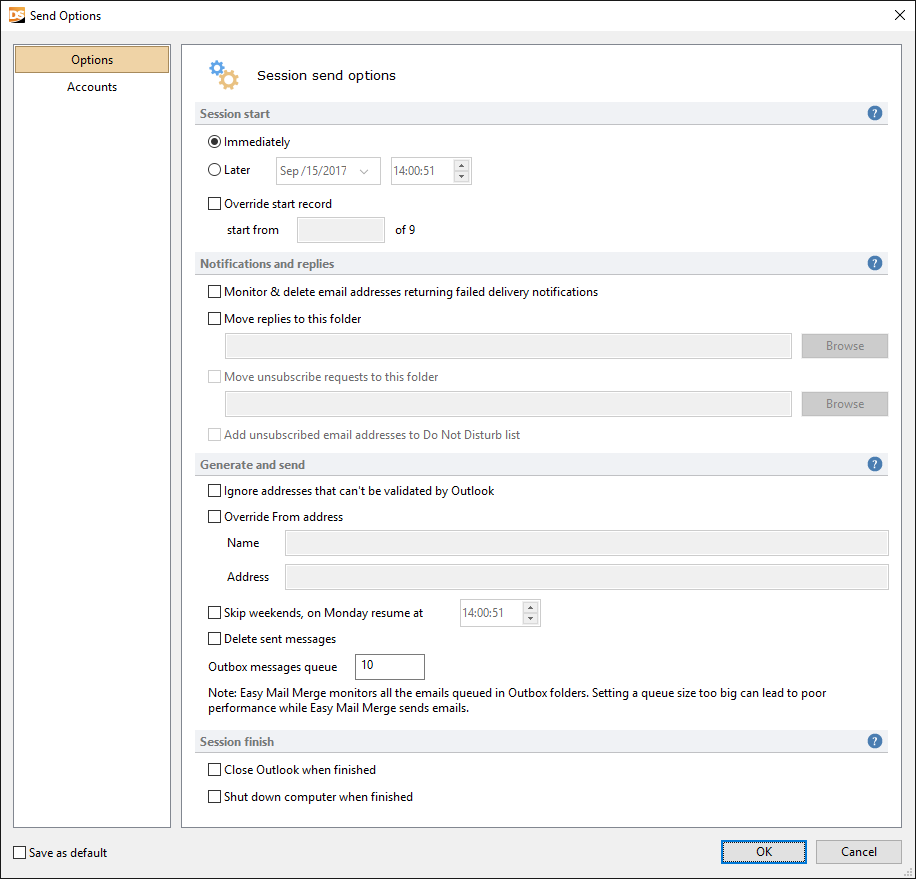
The Send Options window in version 5: immediate or scheduled start, an override for the start record, failed-delivery and reply/unsubscribe handling with a Do Not Disturb list, From-address override, weekend skipping and the Outbox queue size.
Bounce, reply and unsubscribe handling
Easy Mail Merge can watch for failed-delivery notices and delete those addresses from the list, move replies to a folder of your choice, and move unsubscribe requests to another folder while adding those addresses to a Do Not Disturb list that later sessions skip. Version 5 also logs and exports who replied to a session.
Session manager and open tracking
Easy Mail Merge's sessions window lists every campaign with its date, subject, status, account, progress and data source, with Pause, Resume, Stop, Report and Export buttons. For open and click statistics it inserts a Google Analytics tracking code, so you need a Google Analytics account, and only recipients who load images are counted.

The Easy Mail Merge Sessions window from an earlier version: one session running with a progress bar, others finished or saved as drafts, and buttons to pause, resume, stop, report and export.
Benefits
- No monthly fee and no per-contact pricing. $39.95 once, for any list size, compared with hosted services that charge every month as your list grows.
- Mail comes from your real address. Replies go to your normal inbox, and the messages look like personal emails rather than a newsletter platform's template.
- Your list never leaves your PC. The add-in doesn't upload contacts to the vendor or a web service.
- Nothing new to learn. You write in Outlook's own editor and find the sent mail in Sent Items.
Real-World Uses
- An accountant sends each client their own PDF statement, named in an Excel sheet, with a personal note, at one message every few seconds overnight.
- A school office emails 400 parents about a schedule change, with the child's name and class filled in from the student list.
- A small software shop mails existing customers an upgrade offer, inserting a price in dollars or euros depending on the country column.
- A club imports an Email Address Collector list of members' replies and sends the annual-dues reminder, with unsubscribes going to the Do Not Disturb list.
Who It's For, and Who Should Skip It
It's for Windows users of classic Outlook who send personalized messages to dozens or a few thousand people at a time and want them to look like normal, individual emails.
Skip it if:
- You're on a Mac, Outlook on the web or the new Outlook for Windows. It's a classic COM add-in for Windows only. Mac users can look at Outlook's own Word-based merge or a hosted mailing service.
- You run real email marketing at volume. Signup forms, consent records, designed templates and dedicated sending servers come with services like Mailchimp, which are built to stay off blacklists.
- You only need a one-line greeting. Outlook and Word's built-in mail merge already does that for free.
Usage Guide
- Install. Close Outlook, run the downloaded setup file and finish the wizard. Restart Outlook and the Easy Mail Merge toolbar appears in the main window.
- Start a session. Click Start Session and pick a data source: an Outlook contact group or contacts folder, an address list, a CSV or Excel file (choose the sheet), an Email Address Collector session or a previous session.
- Write the email. Outlook opens a compose window. Write the message or load an HTML template, and insert fields and scenarios from the add-in's menu. Attach a personal file per recipient if your data names one.
- Preview. Check a few generated emails to make sure every field fills in.
- Set the send options. Choose immediate or scheduled start, the accounts, a quota, time window and rate, and bounce, reply and unsubscribe handling.
- Send and monitor. Watch progress in the Sessions window, and pause or resume if you need to close Outlook.
Tips
- Don't use the
^ character in your own text or links. Easy Mail Merge reads it as the start of a merge field and stops with an "invalid property" error.
- If a CSV doesn't import all its columns, it's usually not separated by standard commas. Fix the delimiter in Excel first.
- A very fast rate, such as one email every two seconds, can make Outlook time out. A slower rate is more reliable and kinder to your provider.
- If every message bounces straight back, you've hit your provider's sending cap. Lower the quota.
Where it falls short
- Tied to classic Outlook. Microsoft is moving users to the new Outlook for Windows, which doesn't load COM add-ins like this one.
- Open tracking depends on Google Analytics. The vendor's tracking guide was last updated in 2020, before Google retired Universal Analytics in 2023, so test tracking with your current Google Analytics property before you count on it.
- Stability and support complaints. One detailed user review reports lock-ups after updates, lost scheduled merges and slow or missing replies from support.
- Older help pages. Parts of the FAQ still describe Outlook 2003 and version 2.0.
What Users Say
Easy Mail Merge has been sold for well over a decade, yet there are only a handful of written reviews: one comparison quoted by the vendor and a single detailed user review on SnapFiles. Here's what they say.
Office-Addins review (quoted by the vendor)
"Summing up, I can say that besides some common features and options, the availability of scenarios in the Easy Mail Merge add-in makes it the most flexible and comfortable to use. As to the abilities of working with distribution lists and databases, Easy Mail Merge also leaves all other add-ins far behind."
SnapFiles: 4 out of 5 (1 user review)
"Great value, easy to use, but buggy", carlye.owens520, August 4, 2017, for version 4.0.374:
"I downloaded Easy Mail Merge a few months ago and, especially for the price, it is a great tool. The capabilities are great, formatting emails and associating them with contact lists is incredibly easy and straightforward. The only thing lacking about this product is perhaps their support. There is only one way to contact support and that is through an email support button in the app. Sometimes they respond immediately, other times there is a weeks long delay, and sometimes they don't respond at all. This is especially frustrating because of the fact that the app is buggy. With each update I have downloaded so far, there have been features that no longer work or issues like frequent lock-ups."
The reviewer still recommends it to a friend. SnapFiles' own write-up notes that you "can create your mailing in the same way that you send a regular mail" and that it can "create complex scenarios that can insert specific text based on IF conditions."
The common thread is praise for the scenarios, the list sources and the value for money, against concerns about stability after updates and support response times. The review predates version 5 (2017), whose notes list improved stability at startup and while sending, but there's no newer user feedback to confirm it.
Comparisons
Easy Mail Merge vs Word and Outlook's built-in mail merge
The built-in merge is free and fine for a simple greeting. Easy Mail Merge adds per-recipient attachments, IF/AND/OR content rules, CSV and Excel sources without Word, scheduling, throttling, several sending accounts, bounce and unsubscribe handling, and saved sessions you can pause.
Easy Mail Merge vs a hosted service like Mailchimp
Hosted services send from their own servers with deliverability tools, signup forms and detailed reports, for a monthly fee that grows with your list. Easy Mail Merge costs $39.95 once and sends from your own mailbox, which feels personal but is bound by your provider's daily limits.
Editions and Pricing
| License |
Price |
Free upgrades |
Limits |
| Free trial |
$0 |
None |
10 emails per session |
| Standard license (lifetime) |
$39.95 |
1 year |
2 computers, unlimited emails |
| Standard + 2 years of upgrades (vendor's store) |
$49.95 |
2 years |
2 computers, unlimited emails |
Volume discounts apply automatically: 10% off for 5-15 licenses, 15% for 16-25 and 25% for 26-50. Past major upgrades cost $10 for owners whose free-upgrade year had ended.
FAQs
How many emails can I send with Easy Mail Merge?
Easy Mail Merge itself has no limit once licensed. The real limit is your mail provider's: set the per-hour or per-day quota in Send Options below it, or messages start bouncing back.
Does Easy Mail Merge work with the new Outlook for Windows?
No. Easy Mail Merge is a COM add-in for classic desktop Outlook (2007 through 2021 and Microsoft 365). The new Outlook for Windows and Outlook on the web don't load COM add-ins, so you'd need to switch back to classic Outlook.
Can Easy Mail Merge send from an address that isn't in Outlook?
Easy Mail Merge sends only from email accounts set up in your Outlook profile. Add the account to Outlook first, then select it in the session's send options.
Can I close Outlook while an Easy Mail Merge campaign is running?
Easy Mail Merge sends only while Outlook is open. Pause the session in the Sessions window before you close Outlook and resume it later, and it carries on from where it stopped.
Is Easy Mail Merge a subscription?
No. Easy Mail Merge is a one-time purchase with lifetime use and one year of free major upgrades. Each license activates on up to two computers, online or offline.
Does Easy Mail Merge need Microsoft Word?
No. Easy Mail Merge uses its own merge engine inside Outlook and imports CSV or Excel data directly. If Outlook is set to use Word as its email editor in very old versions, the add-in's toolbar may not show in the compose window.
Can I get my money back if Easy Mail Merge doesn't suit me?
DS Development offers a 30-day money-back guarantee on every order. After a refund, the license can no longer be activated.
System Requirements
- Operating system: Windows Vista, Server 2008, 7, 8, 10 or 11, 32-bit or 64-bit (not Windows RT)
- Outlook: classic desktop Outlook 2007, 2010, 2013, 2016, 2019, 2021 or Microsoft 365, 32-bit or 64-bit
- Download: 11.8 MB installer
- Optional: a Google Analytics account for open and click tracking
Conclusion
Easy Mail Merge is a good buy at $39.95 if you live in classic Outlook and regularly send the same message, made personal, to a few hundred people: invoices with their own attachments, parent letters, customer offers. The one reason to buy it is that it does what Outlook's own merge can't, sending each person their own file and pacing the sending so your account doesn't get blocked, without a monthly bill. The main reason not to is its future: it depends on classic Outlook, and the only detailed user review complains about bugs and slow support. Run the 10-email trial on your real list and your real account before you pay.
Download Free TrialBuy Now