Email Address Collector: Pull Every Address Out of Your Own Mail, Contacts and Files
Email Address Collector is a $29.95 Windows program from DS Development that scans your own Outlook, Thunderbird and Windows Live Mail folders, address books, Office documents, PDFs and text files for email addresses, filters them, removes the duplicates and saves a clean list as a CSV file or straight into your contacts. It's for small businesses and organizers who already have years of customer, member or contact emails and want a usable list out of them.
The problem it solves is a familiar one. Your web shop's order confirmations, your club's sign-up forms, the replies to last year's event invitation: the addresses are all there in your inbox, but Outlook gives you no way to gather them. Copying them by hand from a few hundred messages takes an afternoon and still leaves typos and duplicates.
Quick facts
- Version: 6.0.225, last updated January 20, 2020
- Developer: DS Development SRL, Bucharest, Romania (making Outlook tools since 1998)
- Runs on: Windows XP through Windows 11, 32-bit and 64-bit. A standalone program, not an Outlook add-in. No Mac version.
- Reads from: Outlook 2000 or newer (including Outlook 2019 and Microsoft 365 desktop), Outlook Express, Windows Mail and Windows Live Mail, Thunderbird, Office files (DOC, DOCX, XLS, XLSX), PDF and plain text files (TXT, CSV, HTML)
- Saves to: CSV, the clipboard, Outlook contacts or a distribution list, the Windows Address Book and Thunderbird address books
- Price: $29.95 on the order page, a one-time payment. The license is lifetime, includes one year of upgrades and activates on up to two computers.
- Free demo: everything works except saving: you can extract and review addresses but can't save them to a CSV file until you activate a license
- Guarantee: 30-day money-back guarantee
- What we checked: the 14.9 MB installer (eac-setup.exe, dated January 20, 2020 and signed by Digital Software Development SRL) downloaded from the vendor and the $29.95 price on the order page, both on November 3, 2026. We didn't run an extraction on a real mailbox.
Before you buy: collecting addresses isn't permission to mail them
Email Address Collector only reads data that's already on your PC. It doesn't crawl websites or search engines. But an address in your inbox isn't consent to receive marketing. Anti-spam laws such as CAN-SPAM in the US and the GDPR in the EU require a lawful basis (usually opt-in) for marketing email, and mail services block senders who get spam complaints. Use the list for people who actually asked to hear from you, or for non-marketing jobs like moving contacts to a new system.
Also note that the program hasn't had a new version since January 2020. It still installs on Windows 11, but the newest versions its source list names are Outlook 2019 and Thunderbird 68, so try the free demo on your own setup first.
Download Free TrialBuy Now
Overview
Email Address Collector (EAC for short) opens as a three-panel window. On the left is the source tree: your Outlook mailboxes and folders, Thunderbird, Windows Live Mail, your contacts, or the files and folders on your disk, each with a checkbox. In the middle is the session, the list of addresses found so far with their alias names. On the right are your contacts, where you can drop the results into Outlook, the Windows Address Book or Thunderbird.
You tick the folders or files you want, right-click and choose to extract from the checked items. Before it starts, EAC offers its filter window, which is where the program earns its price: you can limit the scan to certain fields, dates, accounts, senders, domains or keywords. When it finishes, an extraction summary shows how many addresses came from each source, how many were filtered out and how many were duplicates.
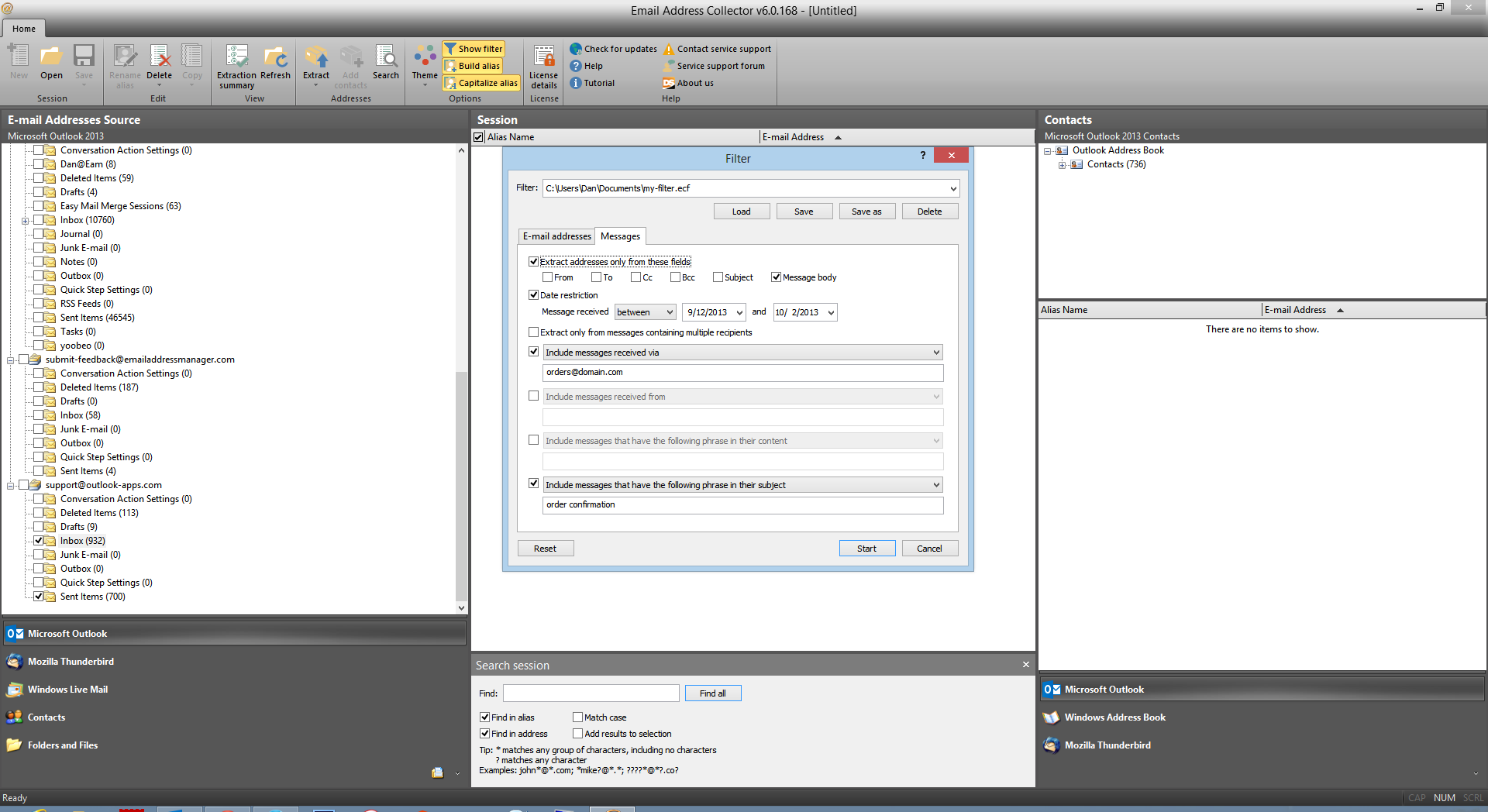
Email Address Collector 6.0 with Outlook folders on the left, the Filter window's Messages tab (message body only, a date range, one receiving account and a subject phrase) in the middle, and the Outlook contacts panel on the right.
Features
Extracts from your mail folders, headers and message bodies
Email Address Collector reads the From, To, CC and BCC fields of messages in Outlook, Outlook Express, Windows Live Mail and Thunderbird folders, and it can also scan the message body. That second part matters for order confirmations and contact-form emails, where the customer's address sits in the text of a message sent by your own website rather than in the header.
Reads documents, spreadsheets, PDFs and text files
Email Address Collector switches to a file browser under "Folders and Files", where you tick individual documents or whole folders. It reads Word and Excel files (old and new formats), PDF documents and plain text such as TXT, CSV and saved HTML pages, so an old member list in a spreadsheet or a stack of PDF registration forms can go into the same list as your email contacts.
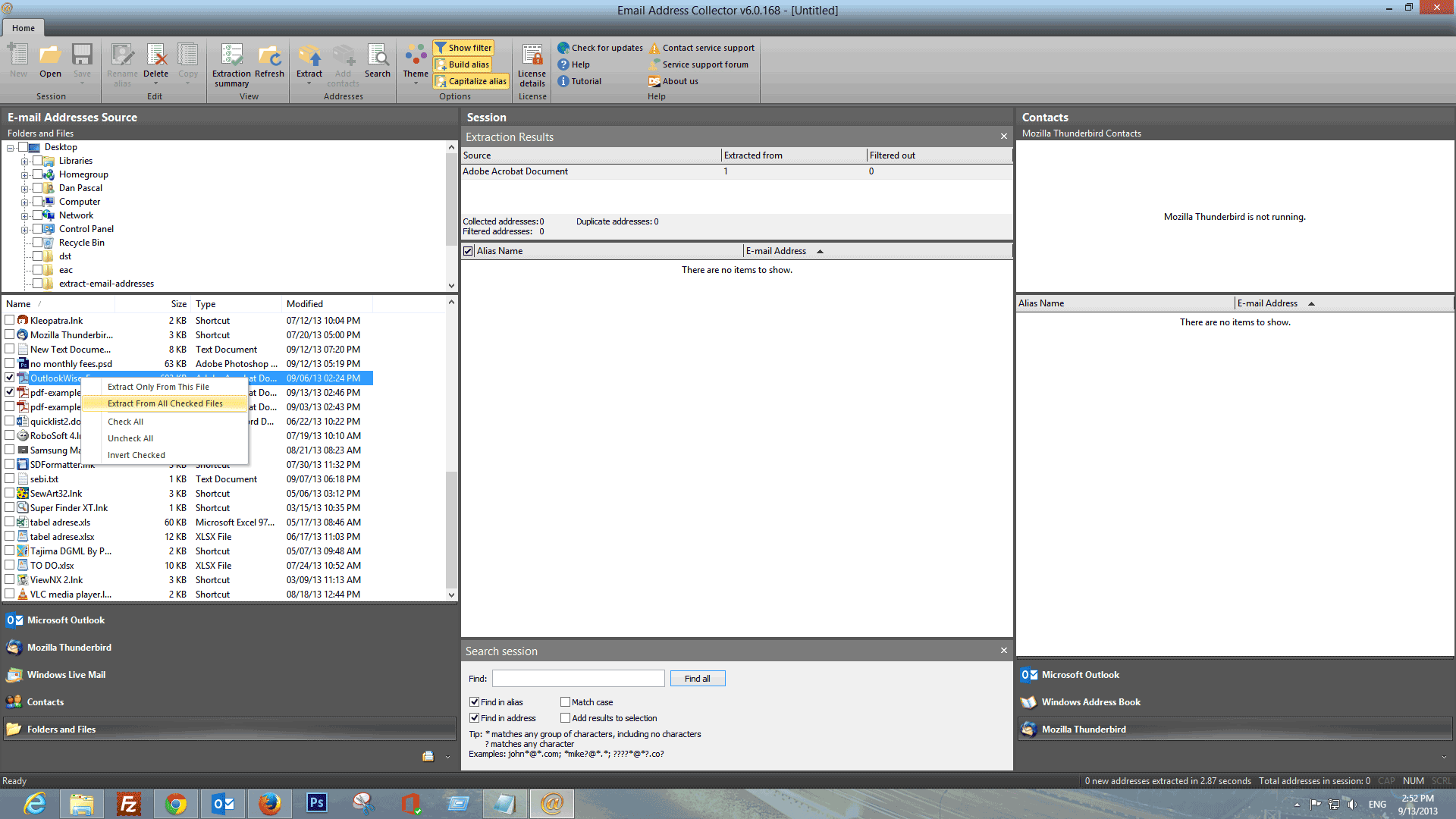
The "Folders and Files" source: PDF files ticked in the file list, with the right-click menu offering "Extract From All Checked Files" and the Extraction Results panel in the middle.
Filters that include or exclude, saved for next time
Email Address Collector's filter has two tabs. On the Messages tab you can restrict the scan to certain fields, a date range (such as "between" two dates or "after" one), messages with several recipients, messages received through a given account or from a given sender, and messages with a phrase in the body or subject. On the E-mail addresses tab you can keep or drop domains and keywords, and skip robot-like addresses from autoresponders and newsletters.
Every rule can be switched between include and exclude, and a filter can be saved to a file and loaded again, so a monthly "new customers" extraction takes a couple of clicks.
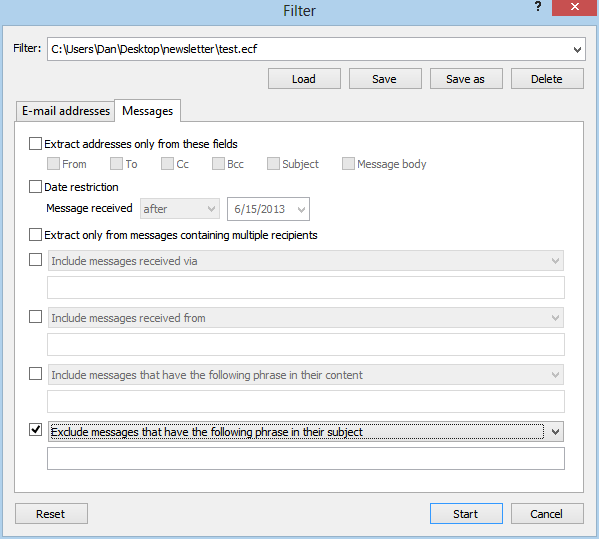
The Filter window with a saved filter file loaded and the rule switched to "Exclude messages that have the following phrase in their subject".
Duplicate removal, alias names and a session search
Email Address Collector drops duplicates automatically and keeps the display name next to each address. The toolbar can build alias names for addresses that have none and capitalize them, and a search box with wildcards (for example *@*.com) finds entries in a long session. You can rename or delete entries before saving.
Saves to CSV or straight into your contacts
Email Address Collector saves the finished list as a standard CSV file that Excel, Mailchimp or a mail merge tool can import, copies it to the clipboard, or adds the entries to Outlook contacts, an Outlook distribution list (contact group), the Windows Address Book or a Thunderbird address book.
Benefits
- An afternoon of copying becomes a few minutes. One pass over a folder of several thousand messages gives you a de-duplicated list with names.
- The list is targeted, not just big. Because you can filter by subject, sender, account and date, you get "everyone who placed an order in 2025", not every address that ever appeared in your inbox.
- Your data stays on your PC. The program works offline on local mail and files and doesn't upload anything to a web service.
- You pay once. $29.95 with no subscription, which is less than a month of many online list tools.
Real-World Uses
- A small web shop scans the body of every "New order" email from its shop software to build a customer list for an opt-in newsletter or a recall notice.
- A club secretary pulls the addresses from ten years of members' replies and an old Excel roster into one CSV for the new membership system.
- A consultant changing jobs extracts the contacts from the Sent Items folder (people they actually wrote to) into a Thunderbird or Outlook address book before the old mailbox is closed.
- An event organizer collects the addresses from a folder of PDF registration forms, excluding the organizer's own domain with a domain filter.
Who It's For, and Who Should Skip It
It's for Windows users of classic desktop Outlook, Thunderbird or Windows Live Mail who keep their mail locally (or in a PST/OST) and need a clean address list out of it, plus anyone with addresses scattered across Office files and PDFs.
Skip it if:
- You use a Mac, Gmail in the browser or Outlook on the web. The program only reads Windows mail clients and local files. Gmail users can export contacts from Google Contacts instead.
- You only use the new Outlook for Windows. The vendor's supported list names classic desktop Outlook (up to 2019 and Microsoft 365), not the new web-based Outlook app.
- You want to find addresses of strangers on the web. It doesn't crawl websites, and buying such lists would put you on the wrong side of anti-spam rules anyway.
- You need a maintained, regularly updated tool. The last release is from January 2020.
Usage Guide
- Install and launch. Run the downloaded setup file, then start Email Address Collector from Start > DS Development > Email Address Collector. If your Outlook profile has a password, it asks for it. With a very large mailbox the first load can take a while, so let the loading window finish.
- Pick a source. In the bottom-left panel, choose Microsoft Outlook, Mozilla Thunderbird, Windows Live Mail, Contacts, or Folders and Files.
- Tick what to scan. Check the folders or files. Right-clicking gives Check All and Invert Checked for big trees.
- Extract with a filter. Right-click and choose "Extract from checked folders" (or files), then click Filter and set the rules you need, or load a saved filter.
- Clean up the session. Check the extraction summary, search the list, build or capitalize aliases and delete entries you don't want.
- Save. Use File > Save to write a CSV file, right-click > Copy to Clipboard, or add the entries to your contacts in the panel on the right.
Tips
- Start Outlook before you start Email Address Collector. The vendor's fix for a program stuck on its loading screen is exactly that, followed by a repair of the Outlook data file if it still hangs.
- Scan the Sent Items folder when you want people you've actually corresponded with, and the body of form-notification emails when you want web leads.
- Turn on the robot-address filter to drop no-reply, newsletter and autoresponder addresses before they reach your list.
Where it falls short
- Dated look and source list. The interface dates from version 6.0 of 2013, and the newest versions the vendor names are Outlook 2019, Office 2019 and Thunderbird 68, so test the demo with newer Thunderbird or Office releases before you rely on it.
- Slow start on big mailboxes. It scans your Windows profile for mail folders when it opens, which the vendor says can take a while with very large folders.
- A broken Outlook data file stops it. If the PST is damaged, the program can hang on loading until the file is repaired.
- Help pages are partly out of date. The FAQ still names version 5.0.123 as the latest, two releases behind.
What Users Say
Email Address Collector has been sold since the early 2000s, but it has collected very few written reviews. Most of what exists is magazine coverage that the vendor quotes and short download-site write-ups.
PC Magazine (quoted by the vendor)
"You'd expect Outlook to know how extract all the addresses from an e-mail message into your contacts list, but it can't do anything of the kind. Enter Email Address Collector, which scours all the messages in an Outlook folder (or almost anything else) for addresses that it can add to your Outlook address book."
SnapFiles
SnapFiles lists version 6.0 with a user rating of 4 out of 5 and no written user reviews yet. Its editor's description sums it up as a tool that "enables you to extract targeted email addresses from your Outlook, Outlook Express and Thunderbird mailboxes, Contacts and the Windows Address Book", adding that "to limit the extraction, you can set filters based on the email subject, content, time and other message details."
SnapFiles also notes the trial limit plainly: "can not save contacts list unless you activate a license".
The recurring themes are the depth of the filters and the range of sources. On the other side, there's little independent user feedback from recent years, and nothing that confirms how it behaves with the newest Outlook builds, which is one more reason to use the free demo before buying.
Comparisons
Email Address Collector vs Outlook's own export
Outlook can export your existing contacts to CSV, but it can't pull addresses out of messages, and it can't read the body of an email or a PDF. Email Address Collector does both and filters the result, so it's the tool for addresses that never made it into your contacts.
Email Address Collector vs Easy Mail Merge
They're two halves of one job from the same vendor. Email Address Collector builds the list, and Easy Mail Merge for Outlook ($39.95) sends a personalized message to each address on it through your own Outlook account. If you only need the list for another system, EAC alone is enough.
Editions and Pricing
| License |
Price |
Free upgrades |
Computers |
| Free demo |
$0 |
Can't save results |
Any |
| Standard license (lifetime) |
$29.95 |
1 year |
2 |
| Standard + 2 years of upgrades (vendor's store) |
$39.95 |
2 years |
2 |
Volume discounts apply automatically: 10% off for 5-15 licenses, 15% for 16-25 and 25% for 26-50. Payment is by card or PayPal, and the activation code arrives by email within minutes.
FAQs
Does Email Address Collector work with Microsoft 365 Outlook?
Email Address Collector reads classic desktop Outlook 2000 or newer, and the vendor's guide names Outlook 2019 and 365. Outlook on the web and the new Outlook for Windows app aren't on its list, so if that's all you use, test the free demo first.
Can Email Address Collector extract addresses from websites?
No. Email Address Collector only reads mail clients, address books and files on your own computer. You can scan a web page you've saved as HTML, but it doesn't browse or crawl the internet.
Is the Email Address Collector license a subscription?
No. The Email Address Collector license is a one-time payment for lifetime use of the version you buy, with one year of free upgrades to new major versions. After that year you keep using it, you just don't get new major versions for free.
Can I use one Email Address Collector license on my home and office PCs?
Yes. Each Email Address Collector license activates on up to two computers at a time, and you can reactivate it after reinstalling Windows. Activation works online or offline, for networks whose proxy blocks the licensing server.
Can I get a refund if Email Address Collector doesn't work with my mail?
DS Development backs every order with a 30-day money-back guarantee. Once the refund is processed, the license can no longer be activated.
Why did Email Address Collector find no addresses?
Email Address Collector only scans items whose checkbox is ticked. Tick each folder (right-click can check all subfolders), then right-click and choose "Extract from checked folders". A filter that's too strict, such as a narrow date range, can also leave the list empty.
Does Email Address Collector run on Windows on ARM or Windows RT?
DS Development's programs don't run on Windows RT. The vendor doesn't list Windows on ARM either, so check the demo first on an ARM laptop.
System Requirements
- Operating system: Windows XP, Server 2003, Vista, Server 2008, 7, 8, 10 or 11, 32-bit or 64-bit
- Mail clients: Outlook 2000 or newer (2019 and Microsoft 365 desktop are the newest the vendor names), Outlook Express 5 or later, Windows Mail and Windows Live Mail, Thunderbird 2.0 or newer (68 is the newest the vendor names)
- Files: Office 2000 or newer documents, PDF, TXT, CSV and HTML
- Download: 14.9 MB installer
Conclusion
Email Address Collector is worth $29.95 if you run classic Outlook or Thunderbird on Windows and have a pile of order, form or reply emails you need to turn into a clean list. The one reason to buy it is the filter: few tools let you say "only the body of messages to this account, with this subject, in this date range" and get a de-duplicated CSV a minute later. The main reason not to is age. It hasn't been updated since 2020 and it can't read web-based mail or the new Outlook. The demo does everything except save, so run it on your real mailbox and see what it finds before you pay. And use the list only for people who agreed to hear from you.
Download Free TrialBuy Now