Auto Follow Up for Outlook: Automatic Follow-Up Emails When Nobody Replies
Auto Follow Up is an add-in for desktop Microsoft Outlook on Windows that watches for replies to the emails you choose and, if none arrives in time, sends a follow-up you wrote in advance (or asks you first). It also sends recurring emails on a schedule. It costs $29.95 once and works with Outlook 2007 through 2021 and Microsoft 365's desktop Outlook.
Salespeople, freelancers and anyone chasing invoices know the routine: you send a quote, hear nothing, and three days later you have to remember to nudge. Auto Follow Up takes over the remembering. Tick a box when you send, and the nudge goes out only if the other side stays silent.
Quick facts
- Developer: DS Development (outlook-apps.com), maker of Easy Mail Merge and Auto Reply Manager
- Version: 4.0.487, updated January 12, 2024
- Outlook: classic desktop Outlook 2007, 2010, 2013, 2016, 2019, 2021 and Microsoft 365 desktop, 32-bit and 64-bit
- Windows: Vista, 7, 8, 10 and 11, plus Server 2008
- Price: $29.95 one-time; each license activates on up to 2 computers
- Updates: 1 year of free upgrades to new major versions (a 2-year option costs $39.95 on the vendor's store)
- Trial: 30 days free; 30-day money-back guarantee
- What we checked: the installer from the vendor (12.3 MB, follow-up-emails.exe) and the order page on November 4, 2026, which listed "Auto Follow Up for Outlook" at $29.95 with no renewal. We didn't run it in Outlook.
Before you buy
- Classic Outlook only. Auto Follow Up is a COM add-in, so it runs inside classic desktop Outlook. It won't appear in the new Outlook for Windows, Outlook on the web or Outlook for Mac.
- Outlook has to be running for replies to be checked and follow-ups to go out.
- Test before you trust it with clients. Two older user reports (2016 and 2017, on version 1) describe the add-in sending repeated, unwanted follow-ups. Start with "Prompt for confirmation" turned on and a few internal test emails.
Download Free TrialBuy Now
Overview
After installation, Auto Follow Up adds a button to Outlook's message window. While composing, you click it, set the conditions and write the follow-up text, then send as usual. The add-in then watches your incoming mail for a reply in that conversation. If one arrives, the follow-up is cancelled; if not, the follow-up is sent when the wait ends, or a window asks you to send, postpone or cancel it. A toolbar lets you review, edit or remove every active follow-up, and you can add one to a message that's already in Sent Items.

The Auto Follow Up Options window: presets, wait for a response from any recipient, ignore replies from listed addresses or with "out of office" keywords, the list of follow-up emails, allowed weekdays, confirmation and read-receipt options.
Features
Follow up only when there's no reply
Auto Follow Up waits for a response from any recipient, all of them or the ones you pick. You can tell it to ignore replies from certain addresses (wildcards allowed) or replies whose subject contains words such as "out of office" or "auto reply", so an autoresponder doesn't count as an answer. Read receipts can count as a response, too.
A real message, sent as often as you allow
Auto Follow Up's message editor lets you write the follow-up in HTML or plain text, with a subject like "Reminder: ^Subject^" built from the original. It can wait a number of days, hours and minutes or until a set date, keep sending until a reply arrives (up to a maximum, for example 5), space the reminders out, attach the original message or put it inline, and add other attachments. Templates and the recipient's name personalize it.

Follow Up Message Settings: the reminder subject and HTML body on the left; on the right, wait 1 day, keep sending until a response is received (at most 5, one day apart) and include the original message as an attachment.
Recurring emails on a schedule
Auto Follow Up also sends independent recurring emails: daily, weekly, monthly, quarterly, yearly or every N days, limited to chosen weekdays. If a due date falls on a disabled day, the email goes on the next allowed day. It's handy for monthly invoice reminders or a weekly status mail.
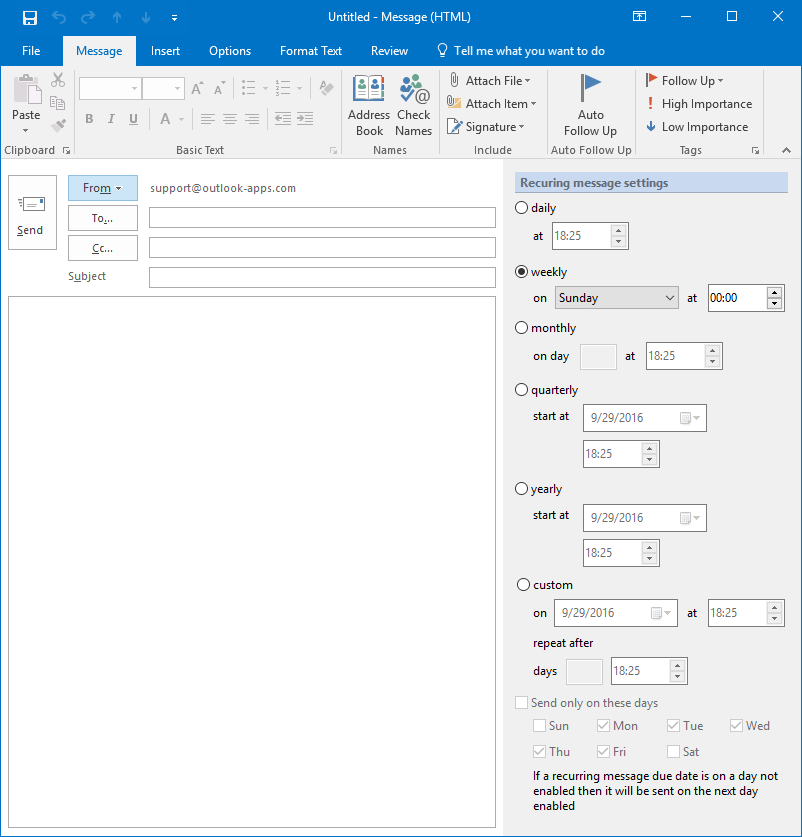
An Outlook message window with the Auto Follow Up button on the ribbon and the Recurring message settings pane: weekly on Sunday at 00:00, with daily, monthly, quarterly, yearly and custom options.
Work-hours sending, presets and account choice
Auto Follow Up can restrict follow-ups to weekdays you tick (Monday to Friday by default in the screenshot), send them from a chosen Outlook account, and save a set of options as a preset or as the default, so repeated cases take one click.
Real-World Uses
- Quotes and proposals: send a price offer and follow up after three working days if the client hasn't answered, then once more a week later.
- Unpaid invoices: attach the invoice and keep a polite reminder going every five days until the customer replies.
- Job applications or press pitches: one follow-up after a week, with the original attached for context.
- Personal reminders only: leave confirmation on and use the prompt as a "they didn't answer" alert without emailing anyone.
Who It's For, and Who Should Skip It
Auto Follow Up suits people who live in classic desktop Outlook on Windows and send one-to-one emails that need answers: sales, recruiting, freelancing, accounts receivable.
Skip it if you've moved to the new Outlook, Outlook on the web or a Mac, if your PC isn't on most of the day, or if you send bulk campaigns with sequences; a CRM or email-sequence service built for that fits better.
Usage Guide
- Close Outlook, run follow-up-emails.exe and finish the setup wizard, then restart Outlook. The Auto Follow Up toolbar appears.
- Write a new email and click Auto Follow Up on the message ribbon.
- Choose whose reply to wait for, add ignore rules for out-of-office replies, and click Add to write the follow-up text and the wait period.
- Leave Prompt for confirmation on for your first few follow-ups, then send the email.
- To add a follow-up to a message you already sent, select it in Sent Items and use the Auto Follow Up icon there.
- Use the management window to edit or remove active follow-ups.
Where it falls short
- Reply detection depends on Outlook. A reply that lands in another mailbox, a phone call or a reply with a changed subject (if you match on subject) may not count, and the follow-up goes out anyway.
- Old documentation. Many help pages on the vendor's older site still show version 1 on Outlook 2007.
- Limited outside reviews. We found only a few user reports, and they're negative (below).
What Users Say
SnapFiles user review (1 of 5 stars, March 31, 2017, version 1.0)
"Unfortunately, I've had to setup my reminders five times in eight months since every time my reminders come due, I get a notice telling me that this reminder no longer exists and asks me if I'd like to delete it. ... after doing the latest update to the software, the last auto email reminder went to my client 40 times." raymond820, "Poor execution, poor support"
Slipstick Outlook forums (March 7, 2016)
"Running Outlook 2013 on Windows. Been using Auto Follow Up Emails in Outlook for the last couple of years but I just uninstalled it. It sends tons of emails to people that I don't instruct it to, and customer support is nonexistent." mr_malkovich
Both reports predate version 4 (last updated January 2024), and we found no reviews of the current version either way. They're still worth taking seriously: the main risk with any auto follow-up tool is an email you didn't mean to send, so test with confirmation on.
FAQs
Does Auto Follow Up work with the new Outlook for Windows?
No. Auto Follow Up is a COM add-in for classic desktop Outlook (2007 to 2021 and Microsoft 365 desktop). The new Outlook and Outlook on the web don't load COM add-ins.
Do my contacts need anything installed for Auto Follow Up to work?
No. Auto Follow Up runs only in your Outlook and sends ordinary emails, so it works whatever mail program the recipient uses, unlike Outlook's own flags.
Can I use one Auto Follow Up license at home and at work?
Yes. Each Auto Follow Up license can be activated on up to two computers at a time, online or offline.
Is Auto Follow Up a subscription?
No. Auto Follow Up is a lifetime license for $29.95 with one year of free upgrades to new major versions; after that the version you have keeps working.
Does Auto Follow Up send follow-ups if Outlook is closed?
No. Auto Follow Up runs inside Outlook, so Outlook must be open for it to detect replies and send follow-ups.
System Requirements
- Windows Vista, 7, 8, 10 or 11 (32-bit or 64-bit), or Windows Server 2008
- Classic desktop Outlook 2007, 2010, 2013, 2016, 2019, 2021 or Microsoft 365 desktop, 32-bit or 64-bit
- About 12 MB for the installer
Conclusion
Auto Follow Up does a useful job at a low one-time price: it remembers to chase unanswered emails for you, with sensible controls for who must reply, when to send and how often, plus recurring emails. It's a reasonable buy for classic Outlook users who send quotes and invoices. The reasons for caution are real: it doesn't work in the new Outlook, and older user reports describe unwanted repeat emails. Use the 30-day trial with confirmation switched on before you let it email clients on its own.
Download Free TrialBuy Now