Bells & Whistles for Outlook: 40 Small Fixes for the Things Outlook Makes You Do by Hand
Bells & Whistles for Outlook is a $29.95 add-in for classic desktop Outlook on Windows that automates the repetitive parts of email: it types a personal greeting into every reply, inserts saved text templates, warns you before you send without the attachment you mentioned, adds tracking IDs and notes to conversations, and reports on your own email habits. It's for people who live in Outlook all day and answer the same kinds of messages over and over.
Typing "Hi John," for the 60th time today, retyping the same three paragraphs about shipping times, or sending "please see attached" with nothing attached: none of these takes long on its own, but together they eat a real part of the day. Bells & Whistles collects small fixes for all of them in one ribbon tab.
Quick facts
- Version: 7.0.840, last updated January 12, 2024 (version 7 first released October 4, 2021)
- Developer: DS Development SRL, Bucharest, Romania
- Works with: classic desktop Outlook 2007, 2010, 2013, 2016, 2019, 2021 and Microsoft 365, 32-bit or 64-bit, on Windows Vista through Windows 11. No Mac version, and it doesn't run in Outlook on the web or the new Outlook for Windows.
- Features: more than 40, including greetings, templates, signatures, missing-attachment and blank-subject alerts, tracking IDs, notes, Send Again, email-to-task and My Metrics statistics
- Price: $29.95 on the order page, one-time. Lifetime license with one year of upgrades, for up to two computers.
- Free trial: 30 days
- Guarantee: 30-day money-back guarantee
- What we checked: the 18.3 MB installer (signed by Digital Software Development SRL) downloaded from the vendor and the $29.95 price on the order page, both on November 3, 2026. We didn't install it in Outlook.
Before you buy: check which Outlook you have
Bells & Whistles is a classic COM add-in. It works in the desktop Outlook that comes with Office 2007 through 2021 and Microsoft 365, but not in the new Outlook for Windows (the one with the "New Outlook" toggle), Outlook on the web or Outlook for Mac. If your company is moving everyone to the new Outlook, this add-in won't come along. Use the 30-day trial to make sure your setup loads it.
Download Free TrialBuy Now
Overview
After installation, Bells & Whistles adds its own tab to Outlook's ribbon with buttons for Options, My Metrics, Notes, Search Notes, Email Templates, the Add-ins Utility and Print Selection. Most of its work happens automatically when you write, reply or forward, based on rules you set in the Options window.
The key idea is the mail profile. The default "Everyone" profile applies to all messages, and you can add profiles for particular recipients or senders: no greeting for your boss, an automatic BCC to the CRM address for customers, plain text for one mailing list. Version 7 applies profiles dynamically when you change the recipients and adds a search to the profile manager.
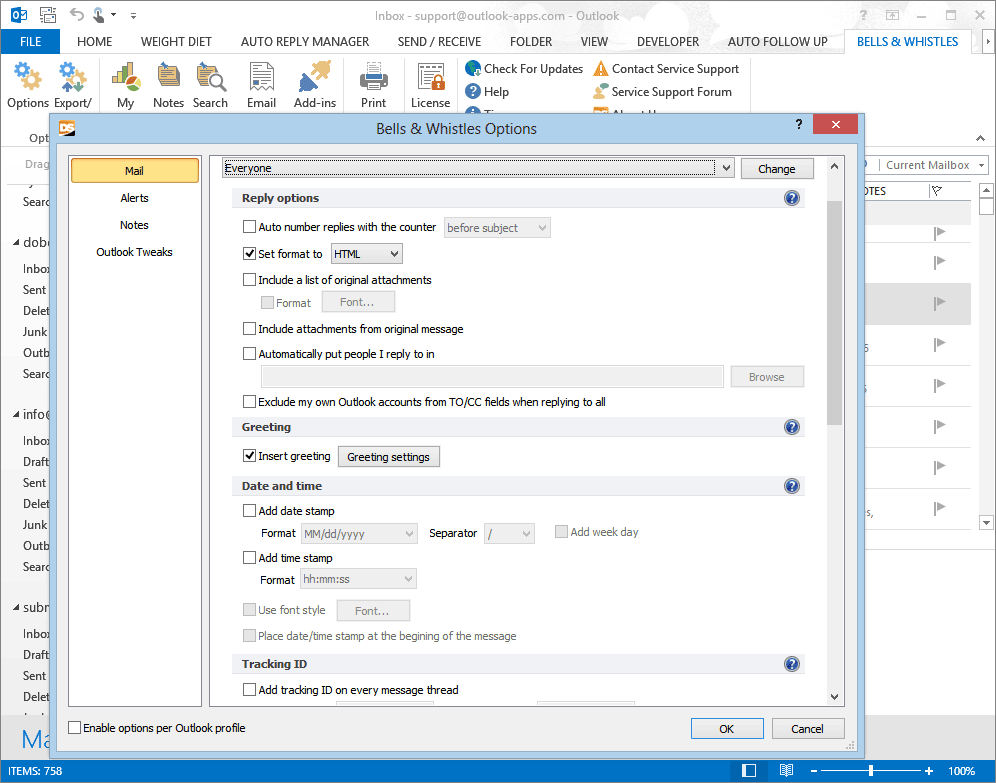
The Bells & Whistles ribbon tab in Outlook 2013 and its Options window on the Mail tab for the "Everyone" profile: reply numbering and format, attachment handling, automatic greeting, date and time stamps and tracking IDs.
Features
Automatic greetings that use the right name
Bells & Whistles inserts a greeting such as "Hi John," at the top of replies and new messages, taking the first name from the recipient. Version 7 can use the contact's title, use different greeting text when the person is in your contacts, and let you choose which contact folders to search. You can also insert only the name without a salutation.
Text templates, signatures and disclaimers
Bells & Whistles stores reusable blocks of text, organized in categories and each with an optional keyboard shortcut, so a standard answer goes in with one keystroke. Templates can include attachments and images, can be imported from HTML files or created from text you select in an email, and can be shared between mail profiles. It can also add or rotate signatures and disclaimers, and import your existing Outlook signatures.
Alerts before embarrassing mistakes
Bells & Whistles checks the message when you click Send and warns you about a missing attachment (based on keywords you define, such as "attached"), a blank subject line or excessive capital letters. Alerts can be switched on or off separately for new messages, replies and forwards.
Reply automation: format, recipients and tracking IDs
Bells & Whistles can force replies to HTML or plain text, number replies with a counter, add a unique tracking ID such as [#DSD-13301] to the subject of a conversation, add date and time stamps, put people you reply to into a contacts folder, add fixed addresses to To, CC or BCC, pick the sending account, reply to all automatically, and mark a flagged email completed after you answer it.
Notes on emails and a notes search
Bells & Whistles lets you attach private text notes to any message, for example "promised a call back Friday", and search them later from the ribbon. You can choose to include the notes when you reply or forward. Computer Power User singled this feature out as worth the price alone.
Outlook tweaks: Send Again, email-to-task, attachments and add-ins
Bells & Whistles adds Send Again and Edit & Send Again to messages in Sent Items, turns an email into a task, marks old unread messages as read on a schedule, dismisses reminders containing given keywords, compresses outgoing attachments above a size you choose, and lets you unblock file extensions Outlook refuses to open. Its Add-ins Utility lists every installed Outlook add-in so you can enable or disable them, and Print Selection prints part of a message with its header.
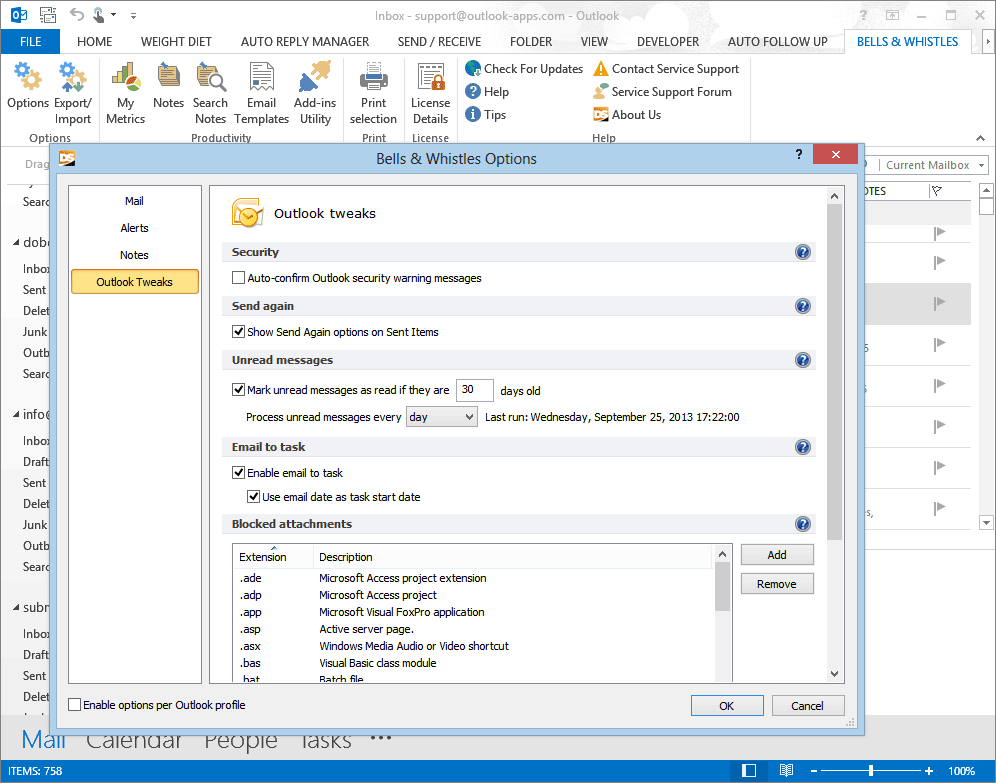
The Outlook Tweaks tab: auto-confirm security warnings, Send Again on Sent Items, marking unread messages older than 30 days as read, email to task, and the list of blocked attachment extensions.
My Metrics: statistics about your own email
Bells & Whistles' My Metrics builds reports from your mail folders for a date range, accounts and folders you choose: traffic by day and hour, busiest weekday, top email addresses and categories, conversation length, how fast you reply (counting only work hours if you set them), word counts and the age of emails waiting in your folders. Charts are interactive, clicking a point lists the emails behind it, and reports can be saved, emailed or exported to Excel.
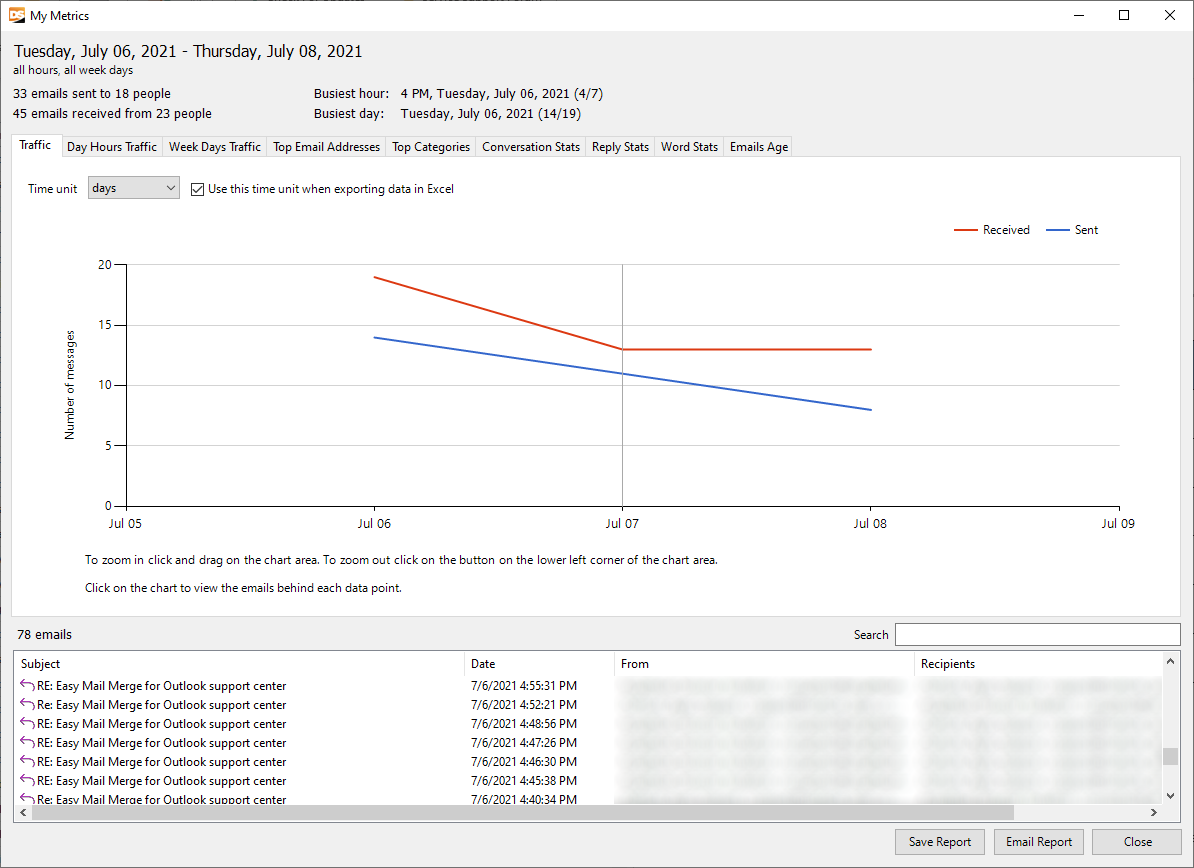
A My Metrics report for three days: emails sent and received, busiest hour and day, tabs for traffic, top addresses, categories, conversations, reply stats, word stats and email age, and the emails behind the selected data point.
Benefits
- Fewer keystrokes on every reply. Greetings, standard answers and signatures go in without typing, which adds up when you answer dozens of messages a day.
- Fewer "sorry, forgot the attachment" follow-ups. The send-time check catches the mistake before your recipient does.
- Different rules for different people. Profiles mean the automation fits each audience instead of applying blindly to everything.
- An honest look at your inbox habits. Reply-time and email-age reports show where your day goes.
- One purchase replaces several tools. At $29.95 for more than 40 features, it costs less than a dollar per feature.
Real-World Uses
- A support desk agent answers ticket emails with a tracking ID in the subject, a greeting with the customer's name and a template for the common fixes, each on a keyboard shortcut.
- A sales rep has a profile that automatically BCCs the CRM's dropbox address on every message to customers, and none on internal mail.
- A manager runs My Metrics monthly to see average reply time and how many emails sit unanswered for over a week.
- A freelancer notes the agreed price on a client's email and finds it months later with Search Notes.
Who It's For, and Who Should Skip It
It's for heavy users of classic desktop Outlook on Windows: support staff, sales, assistants and small business owners who write many similar replies every day.
Skip it if:
- You use the new Outlook for Windows, Outlook on the web or a Mac. It only loads in classic Windows Outlook. Outlook's own My Templates covers basic snippets in the new Outlook and on the web.
- You need shared team templates. Templates live on each PC. Copying the options file shares all settings, not just templates, so a team template tool fits better.
- Your IT department locks down add-ins. Many companies block unapproved COM add-ins, so ask first.
Usage Guide
- Install. Close Outlook, run the downloaded setup file and finish the wizard, then restart Outlook. The Bells & Whistles tab appears on the ribbon.
- Set up the Everyone profile. Click Options. On the Mail tab, choose reply format, greeting, stamps and tracking IDs. On the Alerts tab, turn on "Alert on missing attachments" and the blank-subject alert.
- Add exceptions. Create extra profiles for recipients who need different treatment, such as no greeting or an automatic BCC.
- Build your templates. Open Email Templates, create categories and templates, and give your most-used ones keyboard shortcuts.
- Try the tweaks. On the Outlook Tweaks tab, enable Send Again and email-to-task, and review the blocked attachment list.
- Run a report. Click My Metrics, pick a period, folders and accounts, and generate the statistics.
Tips
- If an automatic action such as an added CC doesn't happen, check whether the recipient is filtered out by your profile setup. That's the usual cause.
- To move your setup to another PC, copy
options.dat from C:\Users\USER_NAME\AppData\Roaming\DS Development\BW. It holds all options, including templates.
- Send Again only shows in the Sent Items folder, by right-clicking a message or on the ribbon there.
Where it falls short
- Tied to classic Outlook. Microsoft is moving users to the new Outlook for Windows, which doesn't load COM add-ins, so its long-term future depends on how long you keep classic Outlook.
- Not every tool earns its place. Even a positive magazine review noted that its tools "aren't as equally beneficial". Expect to use a handful and ignore the rest.
- Lots of options to set up. Profiles, alerts and tweaks are spread over several tabs, so expect to spend some time on configuration.
- Some options weaken Outlook's defaults. Auto-confirming Outlook security warnings and unblocking risky attachment types are convenient but remove protections. Leave them off unless you know why you need them.
- Error messages. The vendor's FAQ mentions errors such as "0x80004003" and advises installing the latest version and contacting support.
What Users Say
Bells & Whistles has more press coverage than DS Development's other add-ins, mostly from computer magazines in its earlier versions, which the vendor quotes on its product page. Independent user reviews are few.
Magazines and tech sites (quoted by the vendor)
PC World Magazine: "Bells & Whistles for Outlook saves you dozens of keystrokes by handling such pesky tasks as automatically adding a greeting to a reply, or warning if your outgoing message is missing an attachment or a subject line."
Computer Power User Magazine: "The aptly named Bells & Whistles for Outlook users is a keeper. Although all of its tools aren't as equally beneficial, combined they flesh out Outlook very well. In particular, BW's simplistic, yet handy, Notes utility may be worth forking over nearly 30 bones for alone."
PC Pro UK: "Everyone has a copying mechanism to deal with the masses of email they get sent every day, but now you can save time and hassle by automating common messages and tasks with Bells & Whistles for Outlook."
EveryJoe.com: "My favorite bit is the ability to customize your reply messages. I've got Bells & Whistles set up so that all my replies are sent in plain-text format, and the first name of the person I'm replying to is auto-populated at the top of my reply. I can even customize the characters that follow the name."
About.com: "Bells and Whistles for Outlook includes many small but nifty tricks that better life with Outlook."
SnapFiles: 4 out of 5 (1 user review)
"Must have", OzBrad, October 7, 2009, for version 3.0.178: "Easy to use, works well, adds useful features to outlook. Interface is well designed, and easy to understand. In my opinion a must have for each Outlook Installation."
SnapFiles' editor calls it "A very useful add-on for Outlook users, that offers great everyday functionality at a good price."
The recurring praise is for the greetings, the missing-attachment warning and the notes, and for the price. The criticism is mild and consistent: some tools matter more than others. Nearly all of this feedback dates from before version 7, and we found no recent user reviews.
Comparisons
Bells & Whistles vs Outlook's built-in Quick Parts and rules
Outlook already has Quick Parts, My Templates, signatures and rules, all free. Bells & Whistles adds what they don't: greetings with the recipient's name, per-recipient profiles applied while you compose, a missing-attachment check based on your own keywords, notes on emails, Send Again and personal email statistics.
Bells & Whistles vs Auto Reply Manager
Both come from DS Development. Bells & Whistles helps you write your own replies faster. Auto Reply Manager ($39.95) sends replies for you, automatically, to incoming messages that match its rules, such as out-of-office notices or order acknowledgements.
Editions and Pricing
| License |
Price |
Free upgrades |
Computers |
| Free trial |
$0 |
None (30-day trial) |
Any |
| Standard license (lifetime) |
$29.95 |
1 year |
2 |
| Standard + 2 years of upgrades (vendor's store) |
$39.95 |
2 years |
2 |
Volume discounts apply automatically: 10% off for 5-15 licenses, 15% for 16-25 and 25% for 26-50. Owners outside their free-upgrade year could move to version 7 for $14.95.
FAQs
Does Bells & Whistles work with Microsoft 365?
Bells & Whistles works with the classic desktop Outlook included in Microsoft 365, 32-bit or 64-bit. It doesn't work in the new Outlook for Windows or Outlook on the web.
Can I use Bells & Whistles on my work and home computers?
Yes. Each Bells & Whistles license activates on up to two computers at a time, online or offline, and you can reactivate it after reinstalling Windows.
Can I share my Bells & Whistles templates with colleagues?
Only by copying settings. Bells & Whistles keeps templates on the local PC in its options.dat file, and copying that file to another computer transfers all options, not just the templates.
Does Bells & Whistles work in the reading pane's inline reply?
Yes. For Outlook 2013 and later, Bells & Whistles supports Outlook's in-line compose method, so greetings and templates work when you reply in the reading pane.
What happens after the free-upgrade year of Bells & Whistles?
Your Bells & Whistles license keeps working for life. You just don't get new major versions for free; the last major upgrade cost $14.95 for licenses outside the upgrade period.
Will Bells & Whistles conflict with my other Outlook add-ins?
DS Development knows of no conflicts with other Outlook add-ins, except with antivirus software set to a severe protection level. Comodo Internet Security can stop it loading (error -1) until you mark it as a trusted application.
Can I get a refund for Bells & Whistles?
Yes. DS Development offers a 30-day money-back guarantee on every order. After the refund, the license can no longer be activated.
System Requirements
- Operating system: Windows Vista, Server 2008, 7, 8, 10 or 11, 32-bit or 64-bit (not Windows RT)
- Outlook: classic desktop Outlook 2007, 2010, 2013, 2016, 2019, 2021 or Microsoft 365, 32-bit or 64-bit
- Download: 18.3 MB installer
Conclusion
Bells & Whistles is worth $29.95 for anyone who spends their working day answering email in classic desktop Outlook. The one reason to buy it is how much routine typing and checking it removes: the greeting, the standard paragraph, the forgotten attachment, the "what did I promise this client" note. The main reason not to is that it's tied to classic Outlook, so if you've moved to the new Outlook or a Mac, it won't load. Install the 30-day trial, set up the Everyone profile and two or three templates, and you'll know within a week whether it earns its place.
Download Free TrialBuy Now