Wing FTP Server Corporate Edition: A Self-Hosted FTP, SFTP and Web File Server for Windows
Wing FTP Server Corporate Edition for Windows is a $1,299 self-hosted file transfer server that lets a company's staff, partners and customers exchange files over FTP, FTPS, SFTP and a browser-based web client, all managed from a web console. The Corporate edition is the one for organizations that need unlimited users, LDAP or Active Directory sign-in, two-factor authentication and automation.
It's the kind of server that sits quietly in a back office receiving scanner uploads, supplier price lists and customer artwork, and that IT only notices when something goes wrong. That's also why keeping it patched matters, as the security section below explains.
Quick facts
- Version: 8.2.7, released October 28, 2026
- Developer: Wing FTP Software
- Runs on: 64-bit Windows 11, 10, 8 and 7, and Windows Server 2012 to 2025. Linux, macOS and Solaris builds are licensed separately.
- Protocols: FTP, FTPS (explicit and implicit SSL), SFTP over SSH2, HTTP and HTTPS web client, plus iOS and Android apps
- Corporate-only features: unlimited users and connections, LDAP and Windows authentication, two-factor authentication (TOTP), ODBC or MySQL user storage, events manager and task scheduler
- Price: $1,299 for one server. The license never expires, includes 2 years of free updates and lifetime email and remote support.
- Free trial: 30 days with every feature. After that it becomes a Free edition for non-commercial use (1 domain, 10 users, no encryption).
What we checked: the price on the order page ($1,299.00 for Wing FTP Server Corporate Edition for Windows, with Secure at $569 and Standard at $199), the 77.5 MB Windows installer dated October 28, 2026, and Wing FTP's edition comparison, all on October 29, 2026. We didn't install the server or connect clients to it.
Before you buy: plan for patching
In 2025 Wing FTP Server had a critical, maximum-severity vulnerability (CVE-2025-47812, CVSS 10) that let attackers run code on the server through the web client's login, even with an anonymous account. Wing FTP fixed it in version 7.4.4 on May 14, 2025, but attackers began exploiting unpatched servers on July 1, 2025, a day after the technical details were published. Any internet-facing file server is a target, so budget for updates: the license's 2 years of free updates can be extended with upgrade protection, and you should install new versions promptly.
Download Free TrialBuy Now
Overview
Wing FTP Server runs as a service on your own Windows machine and is administered entirely from a web browser. You create one or more domains (separate virtual servers, each with its own IP, ports and users), add users and groups, point each at a folder, and decide which protocols they can use. Users connect with any FTP or SFTP client, with Wing FTP's mobile apps, or simply through the web client in a browser, which needs no software at all.
All four editions share the same program. Standard adds unlimited domains and weblinks to the Free edition, Secure adds encryption (FTPS, HTTPS, SFTP), and Corporate adds the enterprise features: directory sign-in, two-factor authentication, database-backed users and automation.
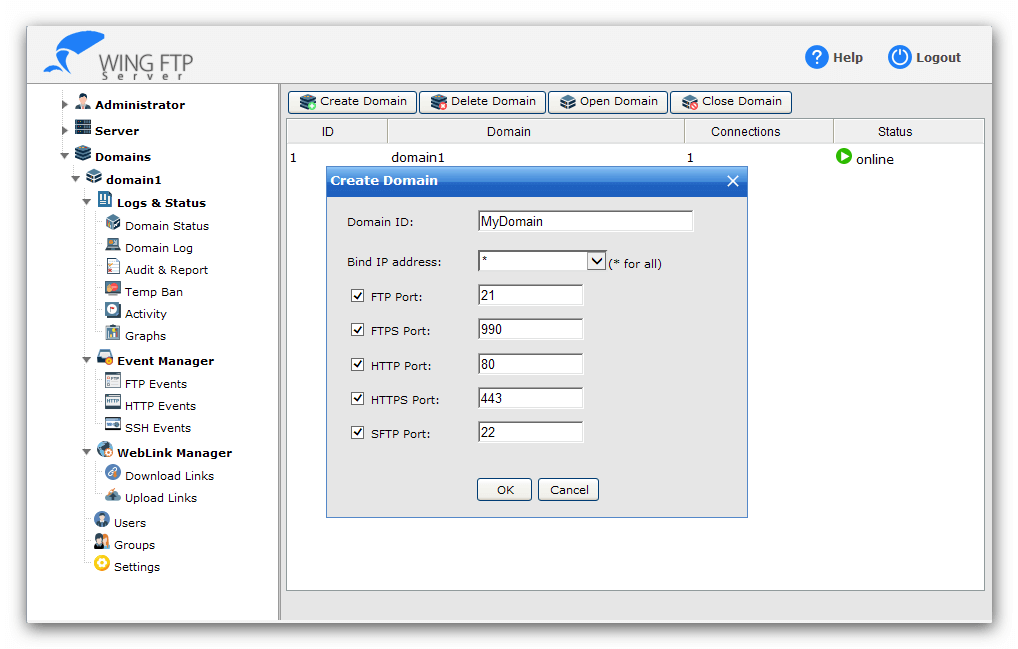
The web administration console's Domain Management page with the Create Domain dialog: bind IP address and switches for the FTP (21), FTPS (990), HTTP (80), HTTPS (443) and SFTP (22) ports. The menu on the left lists Logs & Status, Event Manager, WebLink Manager, Users, Groups and Settings.
Features
Every common transfer protocol in one server
Wing FTP Server Corporate serves files over plain FTP, FTPS (explicit and implicit SSL), SFTP over SSH2, and HTTP/HTTPS through its web client, and you switch each protocol on or off per domain and per user. Recent versions generate a unique self-signed SSL certificate on first run.
Detailed per-user control
Wing FTP Server gives each user or group its own directories and subfolder permissions, limits, ratios and quotas, IP and access-time restrictions, file-type rules and an expiry date. Users can be allowed to change their password, and to create download links and upload (file request) links to share with people who have no account.
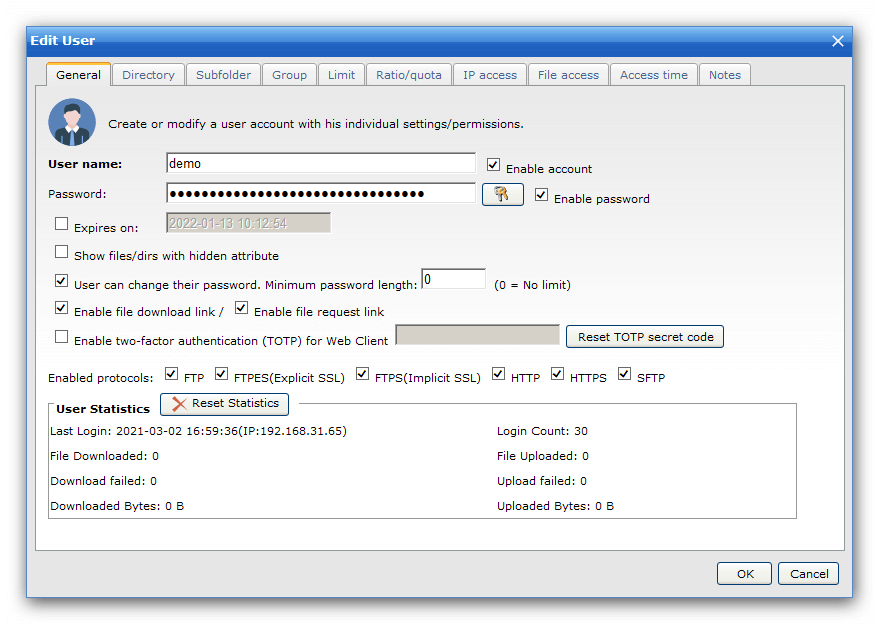
The Edit User dialog: tabs for Directory, Subfolder, Group, Limit, Ratio/quota, IP access, File access and Access time, switches for file download and request links, the two-factor authentication (TOTP) option, and the protocols this user may use.
Directory sign-in and two-factor authentication (Corporate)
Wing FTP Server Corporate lets staff sign in with their Windows or LDAP (Active Directory) accounts instead of separate FTP passwords, adds TOTP two-factor authentication for the web client, and can keep user accounts in an ODBC or MySQL database so another system can manage them.
Events manager and task scheduler (Corporate)
Wing FTP Server Corporate's events manager triggers actions when things happen on the server, such as a file upload or a login, and its task scheduler runs jobs on a timetable. Together they automate the routine parts of a file exchange.
A web client for people who don't use FTP
Wing FTP Server's web client lets users browse, upload and download in a browser, with a thumbnail view for images. Recent versions improved its file-listing speed. iOS and Android apps are available for all editions.
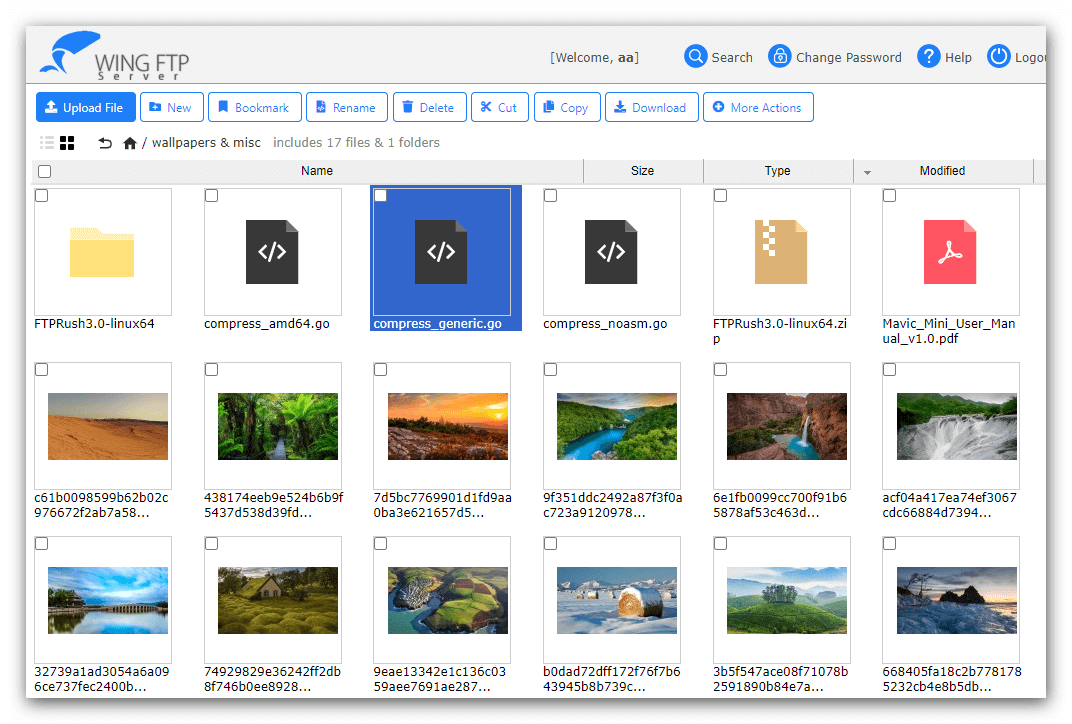
The browser-based web client in thumbnail view: a folder of 18 landscape photos with upload, new folder, favorites, search and download buttons along the top.
Audit and reporting
Wing FTP Server logs sessions and transfers and has an Audit & Report section with filters, which helps when you need to show who downloaded what.
Real-World Uses
- Print shop or agency: customers upload artwork through an upload link, with no account and no FTP client.
- Supplier exchange: partners drop files over SFTP each night, and an event notifies staff when they arrive.
- Branch offices: staff sign in with their Active Directory accounts and 2FA to fetch shared files from the web client.
- Scanners and devices: copiers and cameras that only speak plain FTP upload to a separate, restricted domain.
Who It's For, and Who Should Skip It
The Corporate edition fits organizations that need their own file transfer server on their own hardware, with more than 200 users or connections, directory sign-in, 2FA or automation.
Skip Corporate if you don't need those: the Secure edition ($569) already has FTPS, HTTPS and SFTP for up to 200 users, and Standard ($199) suits small internal use. Skip self-hosting altogether if you have nobody to patch and watch an internet-facing server: a cloud file-sharing service is safer in that case. And if you only need SFTP, Windows' built-in OpenSSH server is free.
Usage Guide
- Install: run WingFtpServer.exe on a 64-bit Windows machine. It installs as a Windows service.
- Open the admin console: sign in to the web administration in your browser.
- Create a domain: in Domain Management, set the IP and switch on only the protocols you need (prefer SFTP, FTPS and HTTPS over plain FTP).
- Add users: create users or groups, set their home folders, permissions and limits, or connect LDAP or Windows authentication.
- Secure it: install a proper SSL certificate, turn on TOTP for web users, and disable anonymous access unless you need it.
- Register and update: enter your license key, and install new versions as they're released (back up the Data folder first).
Where it falls short
- A security record to watch. Beyond the 2025 critical flaw, Wing FTP's own release notes list further security fixes, including a possible remote code execution in the web client for logged-in users and an XSS issue in the old admin UI. Updates are frequent, which is good, but only if you install them.
- Updates are time-limited. The software never expires, but free updates last two years. After that, security fixes need paid upgrade protection.
- Expensive at the top. Corporate costs more than six times the Standard edition, and a Site License is $15,000.
- Each license covers one computer, and each platform (Windows, Linux, Mac, Solaris) is a separate product.
What Users Say
SoftwareReviews: 7.0 out of 10 composite score from 12 reviews
Ihasan J., Operations, Consulting (March 2023), "Easy File Transfer With Wing FTP Server": "Deploying Wing FTP Server was straightforward".
Charles C., Information Technology, Manufacturing (July 2022), "Smooth and Affordable File Transfer App": "Wing FTP has enhanced the sharing of files, with stable transmission and secure business operations."
Irfan H., Information Technology (September 2021): "Easy to use, deploy and manage!"
Security press, July 2025
The critical bug made headlines. The Register's headline read "CVSS 10 RCE in Wing FTP exploited within 24 hours, security researchers warn", and Help Net Security and BleepingComputer reported attacks on unpatched servers that downloaded and ran malware and created new users to keep access. The fix had been available since version 7.4.4, released six weeks earlier.
The pattern: the few user reviews are short and positive about easy deployment and stable transfers. The bigger signal is the 2025 vulnerability, which shows both that attackers target this product and that the fix was already out for administrators who kept up with updates.
Editions and Pricing
| Edition |
Price (1 server) |
Users / connections per domain |
What it adds |
| Free | $0 (non-commercial) | 10 / 10, 1 domain | FTP, web client, web admin, mobile apps |
| Standard | $199 | 100 / 100, unlimited domains | Weblinks and upload links, lifetime support |
| Secure | $569 | 200 / 200 | FTPS, HTTPS and SFTP |
| Corporate | $1,299 | Unlimited | LDAP and Windows sign-in, TOTP, ODBC/MySQL users, events manager, task scheduler |
Wing FTP gives volume prices (5 Corporate licenses cost $5,195) and Site Licenses ($3,000 Standard, $7,000 Secure, $15,000 Corporate) for unlimited computers at one site. Every license includes 2 years of free updates, with 4-year, 6-year and lifetime upgrade protection offered at checkout on Wing FTP's own store.
FAQs
Does the Wing FTP Server license expire?
No. Wing FTP Server licenses never expire. Updates are free for two years, and lifetime email and remote support is included for paid users.
Is my Wing FTP Server affected by CVE-2025-47812?
Only versions 7.4.3 and earlier are affected. Wing FTP Server 7.4.4 and later, including the current 8.2.7, contain the fix. If you run an older version, update it right away.
Can I install one Wing FTP Server license on two servers?
No. A single Wing FTP Server license covers one copy on one computer. Several servers need several licenses, or a Site License for unlimited computers at one site.
Does the Windows license work on Linux?
No. Wing FTP Server's Windows, Linux, macOS and Solaris versions are sold as separate products.
How do I upgrade Wing FTP Server to a new version?
Download the latest installer, back up the Data folder in Wing FTP Server's installation folder, stop the Wing FTP Server service, and install the new version into the same folder.
How fast do I get the license key?
Wing FTP Software sends the registration code within 12 hours of payment approval.
System Requirements
- Operating system: 64-bit Windows 11, 10, 8 or 7, or Windows Server 2025, 2022, 2019, 2016 or 2012
- Download: 77.5 MB installer
- Administration: any modern web browser
- Network: open ports for the protocols you enable (by default 21 FTP, 990 FTPS, 22 SFTP, 80 HTTP, 443 HTTPS)
Conclusion
Wing FTP Server Corporate Edition is worth $1,299 for an organization that wants its own file server with every protocol, unlimited users, directory sign-in and 2FA, paid once and run on its own hardware. The main reasons not to buy it: most small businesses only need the $569 Secure edition, and the 2025 critical vulnerability is a reminder that an internet-facing server needs someone to patch it, with paid upgrade protection after the first two years. Try all features free for 30 days, and buy Corporate only if you need what it adds.
Download Free TrialBuy Now