Wing FTP Server Standard for Mac: A Web-Managed File Server on macOS
Wing FTP Server Standard Edition for Mac is a $199 one-time-purchase file server for macOS, built for Intel Macs, that gives up to 100 users per domain access to files over plain FTP and a web browser. It's best for a small office with a Mac acting as a server on an internal network, because this edition has no encryption.
That last point decides the purchase. If files or passwords will cross the internet, Standard is the wrong edition, however good the price looks.
Quick facts
- Version: 8.2.7, released October 28, 2026
- Developer: Wing FTP Software
- Runs on: macOS, as a 64-bit Intel program. There's no native Apple Silicon build. Windows and Linux versions are sold as separate products.
- Protocols: plain FTP and HTTP only
- Limits: 100 user accounts and 100 concurrent connections per domain, unlimited domains
- Price: $199 per server, paid once. Includes 2 years of updates and lifetime technical support.
- Free trial: 30 days with every feature, then a Free edition for non-commercial use
What we checked: $199.00 for Wing FTP Server - Standard Edition for Mac on the order page, its limits in Wing FTP's edition comparison, its volume prices on the Mac purchase page, and the 17.6 MB archive dated October 28, 2026. Inside the archive, the version file says 8.2.7, the main program is a 64-bit Intel Mac binary with no Apple Silicon code, and the setup script requires root and installs a startup service. All checked on November 6, 2026. We didn't install the server, test client connections or try it on an Apple Silicon Mac.
Before you buy: no encryption, and a real security history
Standard sends user names, passwords and file contents across the network unencrypted. Anyone who can watch the traffic can read them. Don't open this edition to the internet for anything you care about. FTPS, SFTP and HTTPS start at the Secure edition ($569).
Wing FTP Server is also a known target. A CVSS 10 remote code execution flaw (CVE-2025-47812), fixed in version 7.4.4, was attacked in the wild in July 2025, and the US agency CISA added it to its list of known exploited vulnerabilities. Keep the server updated, and remember that free updates end after two years unless you extend the upgrade protection.
Download Free TrialBuy Now
Overview
Wing FTP Server for Mac turns a Mac into your own file server. It runs as a background service, and you manage it from a web console on port 5466 in any browser. You create users, give each a home folder and permissions, and they connect with an FTP client or through the built-in web client.
macOS dropped its own built-in FTP server years ago, so this fills a real gap for an office that keeps a Mac as its file machine. The web console, web client and features are the same as on Windows, so the vendor's screenshots on this page apply to every platform. One archive covers every edition, and your license key decides what's switched on. Standard is the first paid step up from the Free edition: it allows commercial use, lifts the limit from 10 users to 100 per domain, and allows unlimited domains.
Features
A web client for people without an FTP program
Wing FTP Server Standard includes a browser-based client where users can browse folders, upload and download. There are also iOS and Android apps. In this edition the web client runs over plain HTTP, so keep it on your own network.
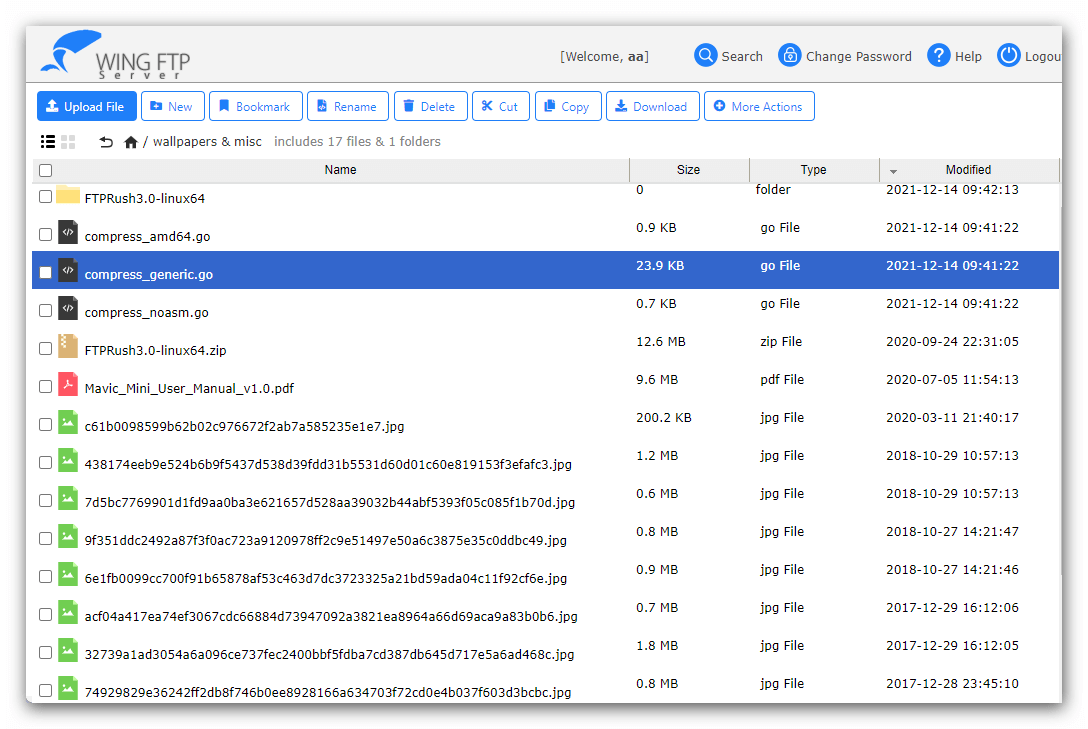
The web client in list mode: a folder of JPG files with sizes, types and dates, and toolbar buttons for upload, search and download.
Share links without creating an account
Wing FTP Server's weblinks and upload links let a user send a file, or request one, from someone who has no account. A link can expire on a set date, require a password and stop after a download limit.
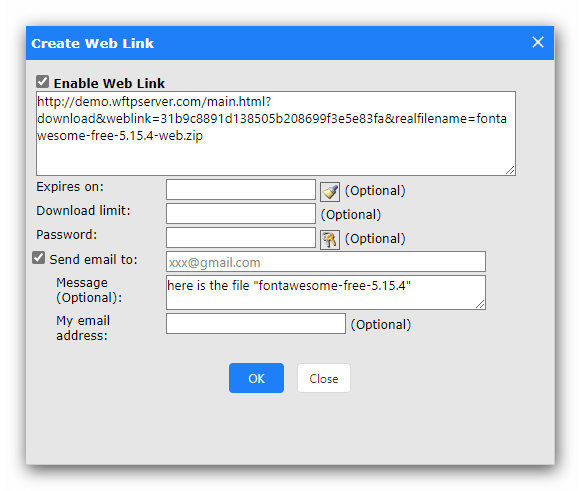
The Create Web Link dialog, with fields for an expiry date, a password, a download limit and a recipient's email.
Per-user folders, quotas and limits
Wing FTP Server gives each user a home folder, permissions and quotas, and virtual directories can map other folders into it. You can create several domains, or virtual servers, each with its own users and its own 100-user limit.
Audit reports
Wing FTP Server records logins, uploads, deletions and folder changes with the user, time, file, size and IP address. You can run weekly, monthly or custom reports and export them to CSV, which is useful when someone asks who deleted a file.

Audit & Report: a table of file activity, with buttons for weekly, monthly and custom reports and Export to CSV.
Basic protection against abuse
Wing FTP Server includes anti-hammering to block repeated login attempts, IP allow and deny rules, and password length and complexity rules. They help, but they don't replace encryption.
Benefits
- A one-time cost. $199 buys a license that never expires, with no per-user fees.
- Your files stay on your hardware. Nothing goes through an outside storage provider, and a Mac you already own can be the server.
- An upgrade path. The same installation becomes Secure or Corporate with a new license key.
Real-World Uses
- A design studio with a Mac as its file machine gives clients on the local network a browser-based place to pick up artwork.
- A video team drops large files onto a shared Mac, with an audit trail of who sent what.
- Network printers, cameras or scanners that only speak plain FTP drop their files onto the Mac, now that macOS has no FTP server of its own.
- An older app that only knows FTP keeps working against a Mac on the local network.
Who It's For, and Who Should Skip It
Standard for Mac fits a small office with an Intel Mac as its server, sharing files on a trusted internal network or over a VPN, with up to 100 accounts per domain.
Skip it if customers, partners or remote staff will connect over the open internet. Secure ($569) is the minimum for that. If you only need secure transfers, macOS already includes an SFTP server: switch on Remote Login in System Settings. If you only want to share folders with other Macs, built-in File Sharing does that for free. If you have an Apple Silicon Mac, test the trial before paying, because this is an Intel program. And if nobody will keep the server patched, a hosted file-sharing service is the safer choice.
Usage Guide
- Download the archive and extract it in Terminal:
tar xzvf wftpserver-mac-i386.tar.gz, then cd wftpserver.
- Run
sudo ./setup.sh and answer the prompts.
- Open
http://YourServerIP:5466 in a browser for the web administration.
- Register your Standard license key under Server, then License. The trial already has every feature.
- Create a domain and users, giving each a home folder, permissions and quotas.
- Switch on anti-hammering, set a password policy, add IP rules and disable anonymous logins.
- To update, download the new archive into the parent folder, extract it over the old one and run
sudo /Library/StartupItems/WingFTPServer/WingFTPServer restart. Back up the Data folder first.
Where it falls short
- Trial features may disappear. The trial includes FTPS, SFTP and HTTPS. If you set those up, they stop working on a Standard key.
- A steady stream of security fixes. Wing FTP's release notes for 2026 list a possible SQL injection and a Lua code injection (8.2.3), a remote code execution needing a logged-in user (8.2.5), and an XSS issue and a folder-escape bug for domain admins (8.2.6). They're fixed quickly, but you need to keep up.
- No automation. The events manager and task scheduler are Corporate-only.
- Intel only. Wing FTP Server for Mac has no native Apple Silicon build, so on an M-series Mac it depends on Apple's Rosetta 2 translation layer.
- Command-line setup. There's no Mac installer or app to drag in. You install from Terminal with a shell script.
- One computer per license, and the Mac license doesn't cover a Windows or Linux server.
What Users Say
Wing FTP Server has few public user reviews. They discuss the product as a whole, and none of those below is specific to the Mac or to one edition.
SoftwareReviews: 7.0/10 composite score, 7.3/10 CX score, 12 reviews
The site rates Wing FTP Server highest for large file support and secure managed file transfer. Reviewers there received a small gift card for writing a review.
- Irfan H., Information Technology, Technology (September 2021), 8/10: "It is easy to use and deploy and supports almost all the ftp protocols including sftp"
- Ihasan J., Operations, Consulting (March 2023), 9/10: "I recommend Wing FTP Server cz it has worked without failure."
- Charles C., Information Technology, Manufacturing (July 2022), 10/10: "Wing FTP is a productive file transfer tool, which champions for solid communications and stable operations."
G2: 3.3 out of 5 from 2 reviews
G2 has too few reviews to rate it properly. One reviewer valued it for sharing large files and found it simple to use. The other called it simple but adequate and wanted a better, updated interface and a better experience on mobile.
The Record (Recorded Future News), July 14, 2025
Under the headline "Exploited Wing file transfer bug risks 'total server compromise,' CISA warns", The Record reported that Censys "observed 8,103 exposed devices running Wing FTP Server". That's why it matters to keep this software off the open internet unless it's fully patched.
The handful of user reviews praise easy deployment and stability, and the only complaint is a dated interface. The loudest independent coverage is about security.
Standard vs Secure
Wing FTP Server Secure costs $370 more than Standard and buys two things: encryption (FTPS, SFTP and HTTPS) and twice the users and connections per domain. Weblinks, audit reports and lifetime support are the same in both.
Wing FTP Server vs the macOS built-in tools
Wing FTP Server Standard costs $199, while Remote Login (SFTP) and File Sharing are free in macOS. What the money buys is separate user accounts that aren't Mac accounts, plain FTP for older devices, a browser-based client, share links and audit reports. If you'd use none of those, the built-in tools are the better choice.
Editions and Pricing
| Edition |
Price (1 server) |
Users / connections per domain |
Encrypted protocols |
| Free | $0 (non-commercial, 1 domain) | 10 / 10 | None |
| Standard | $199 | 100 / 100 | None |
| Secure | $569 | 200 / 200 | FTPS, SFTP, HTTPS |
| Corporate | $1,299 | Unlimited | FTPS, SFTP, HTTPS, plus 2FA and LDAP |
Standard gets cheaper in quantity on Wing FTP's Mac purchase page: 2 licenses cost $378, 3 cost $537, 4 cost $676, 5 cost $796, and a Site License is $3,000. The 2 years of included updates can be extended to 4 years for $99.50, or to 6 years or a lifetime for $199 at checkout.
FAQs
Does Wing FTP Server Standard support SFTP?
No. Wing FTP Server Standard offers only plain FTP and HTTP. SFTP, FTPS and HTTPS start at the Secure edition.
Can I upgrade Wing FTP Server Standard to Secure later?
Yes. Wing FTP Server uses one installer for every edition, and a new license key switches on the extra features, so you don't need to reinstall.
Is the 100-user limit for the whole server?
No. Wing FTP Server Standard allows 100 user accounts and 100 concurrent connections per domain, and you can create unlimited domains on one server.
Is the current Wing FTP Server safe from CVE-2025-47812?
Yes. Wing FTP Server 7.4.4 and every later version, including 8.2.7 for Mac, contain the fix. Versions 7.4.3 and earlier are vulnerable and should be updated at once.
Does a Wing FTP Server Standard license expire?
No. A Wing FTP Server license never expires. Only free updates are time-limited, to 2 years.
Does Wing FTP Server run on Apple Silicon Macs?
Wing FTP Server for Mac has no native Apple Silicon build. The download contains only 64-bit Intel code, so an M-series Mac would have to run it through Rosetta 2. Try the free trial on your own Mac before you buy.
Does Wing FTP Server for Mac start automatically after a reboot?
Yes. Wing FTP Server's setup script installs a macOS LaunchDaemon, so the service is set up to start with the system.
How soon will I get my Wing FTP Server license key?
Within 12 hours. Wing FTP Software emails the registration code once the payment is approved.
System Requirements
- macOS on an Intel Mac. Apple Silicon Macs need Rosetta 2.
- Administrator access to run the setup script with sudo
- 17.6 MB download
- A modern web browser for administration, on port 5466 by default
- Open ports for the listeners you enable (by default 21 for FTP, 80 for HTTP)
Conclusion
Wing FTP Server Standard for Mac is worth $199 for a small office that keeps an Intel Mac as its server and needs plain FTP, a browser client and audit reports on a trusted internal network. The main reasons not to buy it are that it has no encryption and no native Apple Silicon build. If you only need secure transfers, use the SFTP built into macOS. Use the 30-day trial, and test with only the plain FTP and HTTP listeners so you see what Standard really gives you.
Download Free TrialBuy Now