Wing FTP Server Secure Edition: Encrypted FTPS, SFTP and HTTPS File Transfer on Your Own Windows Server
Wing FTP Server - Secure Edition for Windows is a $569 one-time-purchase file server that adds encrypted transfers (FTPS, SFTP and HTTPS) to Wing FTP's self-hosted server, for up to 200 user accounts and 200 connections per domain. It's the edition for a small or mid-sized business that has to stop sending passwords and files in clear text, but doesn't need directory sign-in or two-factor authentication.
Picture the usual trigger: an auditor, a bank or a large customer tells you plain FTP is no longer acceptable. Secure is the cheapest Wing FTP license that answers that request.
Quick facts
- Version: 8.2.7, released October 28, 2026
- Developer: Wing FTP Software
- Runs on: 64-bit Windows 11, 10, 8 and 7, and Windows Server 2012 to 2025. The Linux, macOS and Solaris builds are sold as separate products.
- Secure-edition protocols: FTPS (explicit and implicit SSL/TLS), SFTP over SSH2 and HTTPS, on top of plain FTP and HTTP
- Limits: 200 user accounts and 200 concurrent connections per domain, unlimited domains
- Not included: LDAP and Windows sign-in, two-factor authentication, database user storage, events manager and task scheduler (all Corporate-only)
- Price: $569 per server, paid once. Includes 2 years of updates and lifetime email and remote support.
- Free trial: 30 days with every feature, then a Free edition for non-commercial use without encryption
What we checked: $569.00 for Wing FTP Server - Secure Edition for Windows on the order page, the Secure edition's limits and protocols in Wing FTP's edition comparison, Secure's volume and upgrade-protection prices on Wing FTP's Windows purchase page, and the 77.5 MB installer dated October 28, 2026, all on October 29, 2026. We didn't install the server or test client connections.
Before you buy: encryption isn't the same as being patched
Wing FTP Server is a known target. A CVSS 10 remote code execution flaw (CVE-2025-47812), fixed in version 7.4.4, was attacked in the wild in July 2025, and on July 14, 2025 the US agency CISA added it to its list of known exploited vulnerabilities and told federal agencies to patch by August 4. Encrypting the transfers doesn't protect a server that runs an old version. If you buy Secure, plan who installs updates, and remember that free updates end after two years unless you extend the upgrade protection.
Download Free TrialBuy Now
Overview
Every Wing FTP Server edition is the same Windows program: one installer, a service that runs in the background, and a web console you manage from any browser. Your license key decides which features it turns on. The Free and Standard editions only speak plain FTP and HTTP, where user names, passwords and file contents cross the network unencrypted. The Secure edition switches on the encrypted listeners: FTPS for traditional FTP clients, SFTP for SSH-based clients and scripts, and HTTPS for the browser-based web client.
It also doubles Standard's user and connection limits, from 100 to 200 per domain. Since you can create as many domains (virtual servers) as you like, each with its own users, the 200 limit applies to each one separately.

The Listeners dialog for one domain: FTP with explicit SSL on port 21, FTPS with implicit SSL/TLS on 990, HTTP on 80, HTTPS on 443 and SFTP using SSH on 22, all listening, with buttons to add, edit or delete a listener.
Features
FTPS for the FTP clients people already use
Wing FTP Server Secure encrypts classic FTP with SSL/TLS in both styles: explicit FTPS, where the client upgrades a normal port-21 connection with AUTH TLS, and implicit FTPS on its own port (990 by default). Clients such as FileZilla connect as before, just with encryption turned on. TLS 1.3 has been on by default since version 8.2.0, and version 8.2.7 fixed a bug where some FTPS clients reported a disconnection after uploading.
SFTP for scripts, servers and partners
Wing FTP Server Secure includes a built-in SFTP server over SSH2, the protocol most banks, ERP systems and Linux scripts expect. It's a single port to open in the firewall, unlike FTP's passive-mode port range. Version 8.2.0 updated it to libssh 0.12.0 and added more key-exchange and host-key algorithms, and version 8.2.4 sped up SFTP listings of folders with very many files.
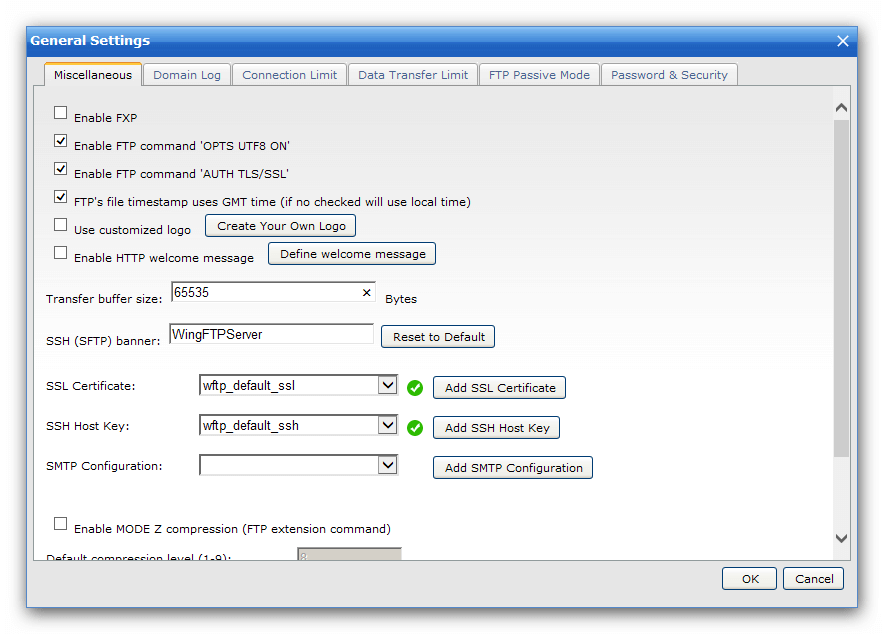
A domain's General Settings: the switch for the FTP command AUTH TLS/SSL, the SSH (SFTP) banner, and drop-downs to pick the SSL certificate and SSH host key, with buttons to add your own. Other tabs cover the domain log, connection and transfer limits, FTP passive mode and password security.
HTTPS web client for people without an FTP program
Wing FTP Server Secure serves its browser-based web client over HTTPS and can redirect anyone who types the plain HTTP address to the secure one. Users browse, upload and download folders in the browser, and the modern interface added in version 8.0 can open Office documents in an online editor. Since version 8.2.7, a fresh install generates its own unique self-signed certificate, but for outside users you'll want a proper certificate from a certificate authority so browsers don't show warnings.
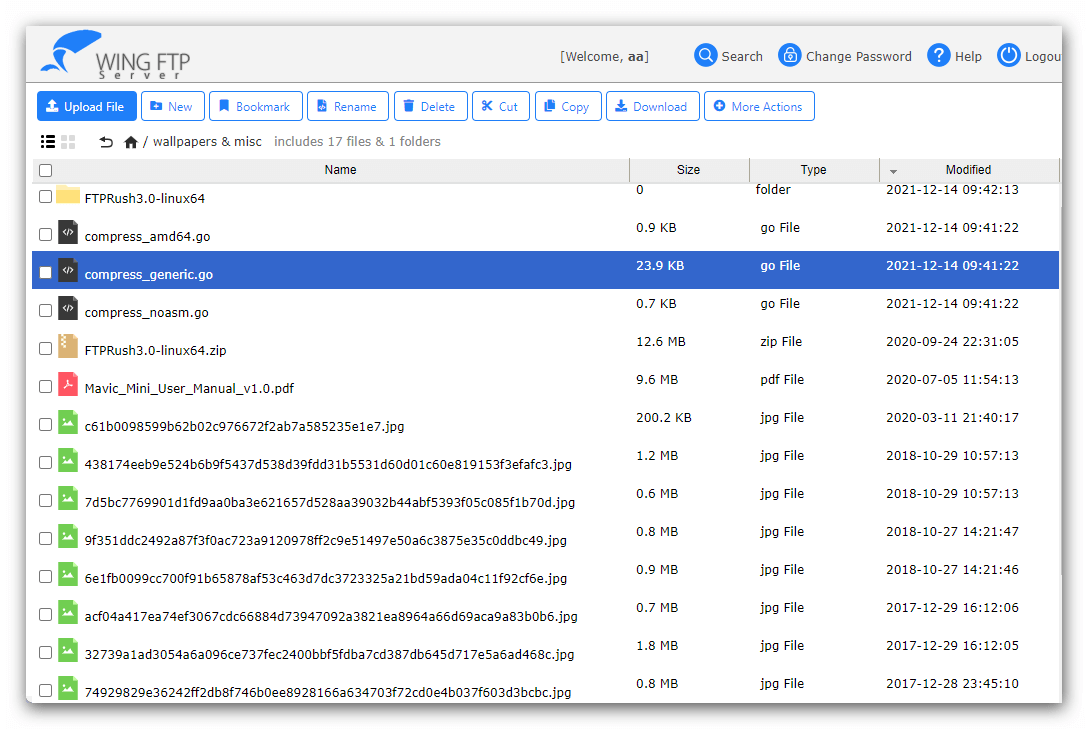
The web client in list mode: a folder of JPG files with their sizes, types and modified dates, a breadcrumb path, and toolbar buttons for views, upload, new folder, favorites, search and download.
Hardening settings that come with every edition
Wing FTP Server pairs the encrypted protocols with controls you'll want on any internet-facing server: anti-hammering to block brute-force logins, IP allow and deny rules, password length and complexity rules with a forced change at first login, and access schedules that limit when an account can log in. An optional FIPS 140-3 mode (OpenSSL certificate #4985, added in version 8.2.1) is there for organizations that must use validated cryptography.
Share links with an expiry date and a password
Wing FTP Server's weblinks and upload links let a user send a file, or request one, from someone who has no account. Each link can expire on a set date, require a password and stop after a download limit, and the server can email the link for you. Sent over HTTPS, this replaces the "just email me the attachment" habit for files that are too big or too sensitive.
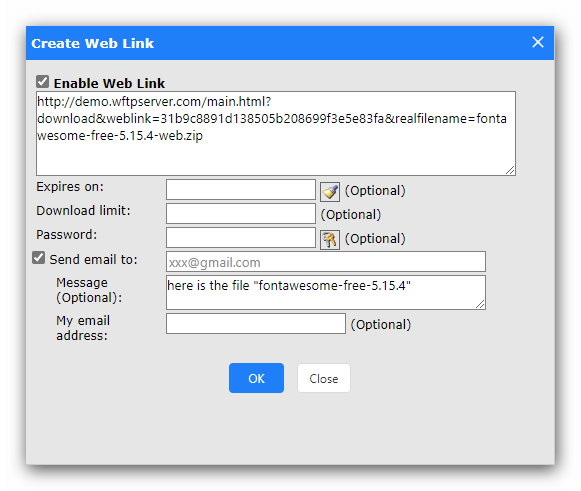
The Create Web Link dialog for one JPG file: the generated link, an expiry date picker set to August 7, 2025, and fields for a password, a download limit, a recipient's email and a message.
A transfer log you can hand to an auditor
Wing FTP Server records every transaction in its Audit & Report section: protocol, action, user, time, file, size and IP address. You can run weekly, monthly or custom reports and export them to CSV, which is often the second half of a compliance request after "encrypt it".

Audit & Report: a table of logins, uploads, deletions and folder changes with their user, time, file name, size and IP, under buttons for weekly, monthly and custom reports and Export to CSV.
Benefits
- One server, three secure options. You don't have to make every partner switch to the same client: FTP users move to FTPS, scripts use SFTP, and everyone else uses a browser.
- A one-time cost. $569 buys a license that never expires, compared with per-user monthly fees for hosted file-sharing services.
- Your files stay on your hardware, which matters when contracts or regulations say where data may be stored.
Real-World Uses
- Accounting firm: clients upload tax documents through a password-protected HTTPS upload link instead of email attachments.
- Distributor: a retail customer's system collects order files every hour over SFTP with key-based authentication.
- Legacy migration: an old line-of-business app that only knows FTP is switched to explicit FTPS on the same port 21, and plain FTP is then turned off.
- Several brands on one machine: two subsidiaries each get their own domain, users and certificate, each with room for 200 accounts.
Who It's For, and Who Should Skip It
The Secure edition fits a business or IT team that needs encrypted file transfer for staff, customers or partners, has fewer than 200 accounts per domain, and is happy managing users inside Wing FTP itself.
Skip Secure if you need staff to log in with their Active Directory accounts, or want two-factor authentication on the web client: both are only in the Corporate edition ($1,299), and for a server open to the internet, 2FA is worth having. If all your users are on the internal network and plain FTP is acceptable, Standard ($199) is enough. And if nobody on your team will keep the server patched, a hosted file-sharing service is the safer choice.
Usage Guide
- Install and register: run WingFtpServer.exe on 64-bit Windows, open the web administration, and register your Secure license key (the trial already has every feature).
- Add your certificate: in the domain's General Settings, add an SSL certificate from a certificate authority and, if you like, your own SSH host key.
- Set the listeners: in the listener manager, keep FTPS, SFTP and HTTPS, and remove plain FTP and HTTP (or redirect HTTP to HTTPS) once your users have moved.
- Create users: give each user a home folder, permissions and quotas, and allow only the protocols they need.
- Lock it down: switch on anti-hammering, set a password policy, add IP access rules, and disable anonymous logins.
- Update: back up the Data folder, stop the service and install the new version into the same folder whenever a release appears.
Where it falls short
- No two-factor authentication. Secure encrypts the connection but protects accounts with passwords only. TOTP for the web client is a Corporate feature.
- A steady stream of security fixes. Beyond the 2025 flaw, Wing FTP's own release notes for 2026 list a possible SQL injection and a Lua code injection (8.2.3), a remote code execution needing a logged-in user (8.2.5), and an XSS issue and a folder-escape bug for domain admins (8.2.6). They're fixed quickly, but you need to keep up.
- No automation. The events manager and task scheduler, which can run a script or send an email when a file arrives, are Corporate-only.
- One computer per license, and the Windows license doesn't cover a Linux or Mac server.
What Users Say
Wing FTP Server has few public user reviews, and they discuss the product as a whole rather than one edition. The encryption the Secure edition adds is the part reviewers mention most.
SoftwareReviews: 7.0/10 composite score, 7.3/10 CX score, 12 reviews
The site rates Wing FTP Server highest for large file support and secure managed file transfer (90 each) and lowest for high performance (77), with a likeliness-to-recommend score of 78. Reviewers there received a small gift card for writing a review.
Irfan H., Information Technology, Technology (September 2021), recommends it 8/10: "It is easy to use and deploy and supports almost all the ftp protocols including sftp"
Ihasan J., Operations, Consulting (March 2023), 9/10: "I like the many security features of Wing FTP Server It makes file transfer fast and easy" and "I recommend Wing FTP Server cz it has worked without failure."
Charles C., Information Technology, Manufacturing (July 2022), 10/10, "Smooth and Affordable File Transfer App": "Wing FTP is a productive file transfer tool, which champions for solid communications and stable operations."
G2: 3.3 out of 5 from 2 reviews
G2 has too few reviews to rate Wing FTP Server properly. One reviewer, from the media industry, valued it for sharing large files and found it simple to use. The other called it simple but adequate and wanted a better, updated interface and a better experience on mobile.
The Record (Recorded Future News), July 14, 2025
Under the headline "Exploited Wing file transfer bug risks 'total server compromise,' CISA warns", The Record reported that Shadowserver "saw about 2,000 Wing FTP Server instances exposed to the internet" and that Censys "observed 8,103 exposed devices running Wing FTP Server". Those numbers show how many organizations run it facing the internet, and why attackers looked at it.
The pattern: the handful of user reviews praise easy deployment, protocol coverage and stability. The only complaint is a dated interface, and the sample is small. The loudest independent coverage is about security, so judge Wing FTP on how well you'll maintain it as much as on its features.
Comparisons
Secure vs Standard
Wing FTP Server Secure costs $370 more than Standard and buys two things: encryption (FTPS, SFTP, HTTPS) and twice the users and connections per domain (200 instead of 100). Everything else, including weblinks, upload links, audit reports and lifetime support, is the same.
Secure vs Corporate
Wing FTP Server Corporate costs $730 more than Secure. It removes the 200 limit and adds LDAP and Windows sign-in, TOTP two-factor authentication, ODBC or MySQL user storage, the events manager and the task scheduler. If you need only encryption for a few hundred accounts, Secure covers it. If you need directory sign-in, 2FA or automation, go straight to Corporate.
Editions and Pricing
| Edition |
Price (1 server) |
Users / connections per domain |
Encrypted protocols |
| Free | $0 (non-commercial, 1 domain) | 10 / 10 | None |
| Standard | $199 | 100 / 100 | None |
| Secure | $569 | 200 / 200 | FTPS, SFTP, HTTPS |
| Corporate | $1,299 | Unlimited | FTPS, SFTP, HTTPS, plus 2FA and LDAP |
Secure licenses get cheaper in quantity on Wing FTP's Windows purchase page:
| Secure licenses |
Total price |
Per server |
| 1 | $569 | $569 |
| 2 | $1,080 | $540 |
| 3 | $1,536 | $512 |
| 5 | $2,275 | $455 |
| Site License | $7,000 | Unlimited computers at one site |
Each price includes 2 years of updates. When buying on Wing FTP's own order page, a single Secure license can be extended to 4 years of updates for $284.50 more, or to 6 years or a lifetime of updates for $569 more.
FAQs
Does Wing FTP Server Secure Edition include two-factor authentication?
No. Wing FTP Server's TOTP two-factor authentication for the web client is only in the Corporate edition. The Secure edition relies on passwords plus anti-hammering, IP rules and password policies, and SFTP users can use SSH keys.
Do I need a separate download for the Secure edition?
No. Wing FTP Server uses one Windows installer for every edition. The trial runs with all features for 30 days, and registering a Secure license key keeps the encrypted protocols switched on.
Is the 200-user limit for the whole server?
No. Wing FTP Server Secure allows 200 user accounts and 200 concurrent connections per domain, and you can create unlimited domains on the same server, each with its own IP address or ports.
Can Wing FTP Server Secure run in FIPS mode?
Yes. Wing FTP Server has supported a FIPS 140-3 mode (OpenSSL certificate #4985) since version 8.2.1. You enable it under Administration, Server, Settings, General Settings, Security.
Is the current Wing FTP Server safe from CVE-2025-47812?
Yes. Wing FTP Server 7.4.4 and every later version, including 8.2.7, contain the fix. Versions 7.4.3 and earlier are vulnerable and should be updated at once.
Does the Wing FTP Server Secure license expire?
No. A Wing FTP Server license never expires. Only free updates are time-limited (2 years), and paid users keep lifetime email and remote support.
Can I use the Windows Secure license on a Linux server?
No. Wing FTP Server Secure for Windows, Linux, macOS and Solaris are separate products, each licensed for one computer.
How soon will I get my license key?
Within 12 hours. Wing FTP Software emails the registration code once the payment is approved, and registering it turns the trial into your Secure license.
System Requirements
- Operating system: 64-bit Windows 11, 10, 8 or 7, or Windows Server 2025, 2022, 2019, 2016 or 2012
- Download: 77.5 MB installer
- Administration: a modern web browser
- Network: open ports for the listeners you enable (by default 21 for FTP and explicit FTPS, 990 implicit FTPS, 22 SFTP, 443 HTTPS)
- Certificate: an SSL certificate from a certificate authority is recommended for HTTPS and FTPS users outside your network
Conclusion
Wing FTP Server Secure Edition is good value at $569 for a business that needs its own encrypted file server for up to 200 accounts per domain: FTPS, SFTP and an HTTPS web client in one program, paid once, with no per-user fees. The one reason to buy it is that it's the cheapest Wing FTP license that ends plain-text transfers. The main reason not to is that it has no two-factor authentication or directory sign-in, and that this product's security record means someone must install updates promptly. If you can commit to that, try it free for 30 days and buy Secure. If you need 2FA or LDAP, pay for Corporate instead.
Download Free TrialBuy Now