Wing Gateway: A Reverse Proxy and Load Balancer Made for Wing FTP Server
Wing Gateway is a $799 one-time-purchase add-on for Wing FTP Server that runs on Windows or Linux in your DMZ, forwards FTP, FTPS, SFTP, HTTP and HTTPS connections to the Wing FTP Server machines behind it, and can spread those connections across several servers. It's only useful if you already run Wing FTP Server.
It solves two specific problems: keeping your file server and its data off the DMZ, and handling more secure connections than one machine can take.
Quick facts
- Version: 1.1.2, released March 20, 2023
- Developer: Wing FTP Software
- Runs on: Windows 7 to 11, Windows Server 2008 to 2022, and 32-bit or 64-bit Linux
- Needs: Wing FTP Server version 6.4.3 or later on the same LAN, licensed separately
- Protocols forwarded: FTP, FTPS, SFTP, HTTP, HTTPS
- Price: $799 per machine, paid once, with lifetime updates and email and remote support
- Free trial: 15 days, with no free edition afterwards
What we checked: $799.00 for Wing Gateway on the order page and its volume prices on Wing FTP's purchase page, the 3.1 MB Windows installer, Wing FTP's edition comparison, and the version history inside the Linux archive, all on November 6, 2026. We didn't install it or measure its throughput, so the performance figures here are the vendor's.
Before you buy: check three things
- A real cluster usually needs Corporate. Every node must see the same users, and Wing FTP's manual says to use database or LDAP authentication for that. In Wing FTP's edition comparison, ODBC, MySQL and LDAP user storage are Corporate-only ($1,299 per server). Two nodes plus a gateway could cost $3,397 before any volume discount.
- It isn't a security patch. Wing Gateway hides your servers' addresses, but it forwards real client traffic to them. Attacks on Wing FTP Server's own web interface, like the CVSS 10 flaw CVE-2025-47812 that was exploited in July 2025, still need the server to be kept updated.
- Development is quiet. The last release was version 1.1.2 in March 2023, while Wing FTP Server itself still gets frequent updates.
Download Free TrialBuy Now
Overview
Wing Gateway normally sits on its own machine in the DMZ. Clients connect to it, and it passes their connections through to Wing FTP Server on the internal network. Your files and user data never sit in the DMZ. Wing FTP Server connects to the gateway on port 7466 by default, and you do all the configuration in Wing FTP Server's web administration, not on the gateway.

The vendor's deployment diagram: clients on the internet, Wing Gateway between two firewalls in the DMZ, and three Wing FTP Server nodes on the local network, with an optional NAS and database or LDAP server.
Features
A reverse proxy for every Wing FTP protocol
Wing Gateway proxies FTP, FTPS, SFTP, HTTP and HTTPS, so clients connect as if they'd reached Wing FTP Server directly. It maps FTP passive ports automatically and forwards active-mode data traffic, which is usually the awkward part of putting FTP behind a proxy. Wing FTP Server still sees each client's real IP address.
Load balancing by client IP
Wing Gateway distributes connections across Wing FTP Server nodes based on the client's IP address, so one client always lands on the same server. You can add or remove a node without stopping the service. The vendor says it handles thousands of connections on a normal 4-core CPU.
Each node needs its own passive port range, and Wing FTP's guide gives 5024-5124 and 6024-6124 as an example for two servers.
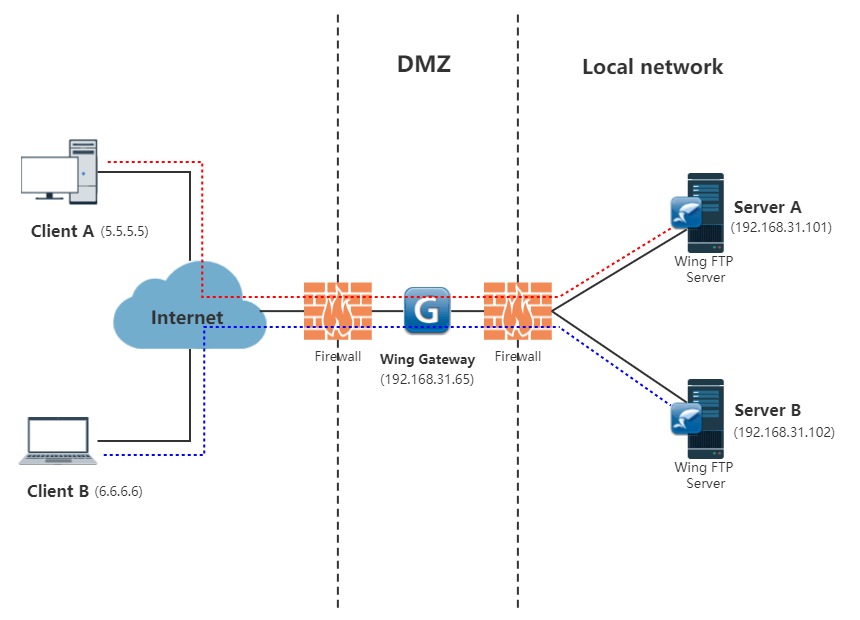
From Wing FTP's load balancing guide: each client's connections always go to the same internal server.
Failover to a standby node
Wing Gateway can treat one Wing FTP Server machine as a failover server. It stays on standby until the running node fails, then carries on. You turn this on with a single switch in the gateway's settings.
Managed from Wing FTP Server's console
Wing Gateway has no console of its own to learn. You add it under Server, Settings, Gateway Manager with its IP address, port and password, then choose it on each listener. The link between Wing FTP Server and the gateway is encrypted.

Gateway Manager in Wing FTP Server's web administration, listing three gateways with their enabled and running status.

The Edit Gateway Configuration dialog: host IP, port 7466, password, description, and switches for failover and listening on a single IP.
FastUDP for long-distance transfers
Wing Gateway supports FastUDP, a UDP-based protocol meant to speed up transfers over high-latency links. Version 1.1.2 extended it to the HTTPS listener.
Real-World Uses
- A company whose security policy bans inbound connections to the internal network puts the gateway in the DMZ, so partners' SFTP sessions end there instead of on the file server.
- A business with hundreds of SFTP clients spreads the CPU load over two or three Wing FTP Server machines.
- An organization that can't afford file-transfer downtime keeps a standby Wing FTP Server ready to take over.
Who It's For, and Who Should Skip It
Wing Gateway fits an organization that already runs Wing FTP Server, ideally the Corporate edition, and needs a DMZ layer, more capacity or a failover node.
Skip it if you don't use Wing FTP Server, because it doesn't work with anything else. Skip it, too, if one server handles your traffic and your only goal is to reduce exposure: a VPN in front of the server is often cheaper. If you run a general-purpose load balancer such as HAProxy or NGINX already, compare what it takes to configure FTP passive ports on that before paying $799.
Usage Guide
- Install Wing Gateway on a machine in the DMZ. On Windows, run WingGateway_Setup.exe. On Linux, extract the archive and run
sudo ./setup.sh.
- In Wing FTP Server's web administration, go to Server, Settings, Gateway Manager and click Add Gateway.
- Enter the gateway's host IP, port and password, and run Connection Test.
- Under Domain, Settings, Listeners, edit a listener, select the gateway and enter the port it should listen on.
- For FTP, turn on automatic mapping of passive ports under FTP Passive Mode.
- For a cluster, repeat the settings on each node, keep users in a database or LDAP, and keep files on a NAS or shared folder.
- Register the license from Gateway Manager by selecting the gateway.

A domain's Listeners window, listing its FTP, FTPS, SFTP, HTTP and HTTPS listeners. You assign a listener to the gateway here.
Where it falls short
- Tied to one product. It only fronts Wing FTP Server.
- It doesn't sync anything. Files and users match across nodes only if you add shared storage and a shared user store.
- No Mac version. It runs on Windows and Linux only, although it can front a Wing FTP Server on a Mac.
- Balancing is by client IP, not load. Many users behind one office address all land on the same node.
- One license per machine, so a redundant pair of gateways means two licenses.
What Users Say
Very little public feedback
We found no independent user reviews or benchmarks of Wing Gateway. Softpedia lists it, but only with a product description. Wing FTP Server itself has a small number of reviews, summarized on our Wing FTP Server Corporate Edition page. Treat the performance claims here as the vendor's until you've tested them with the 15-day trial.
Editions and Pricing
There's one edition of Wing Gateway. One license covers the Windows and Linux versions, used on one machine at a time.
| Licenses | Price |
|---|
| 1 | $799 |
| 2 | $1,518 |
| 3 | $2,157 |
| 4 | $2,716 |
| 5 | $3,195 |
| Site License (unlimited computers at one site) | $9,800 |
FAQs
Does Wing Gateway work without Wing FTP Server?
No. Wing Gateway is a module for Wing FTP Server, and all of its settings are made in Wing FTP Server's administration.
Can Wing Gateway run on the same machine as Wing FTP Server?
Yes. Wing Gateway has supported running on the same server (127.0.0.1) since version 1.1.2, although you lose the DMZ separation.
Which Wing FTP Server version does Wing Gateway need?
Wing Gateway 1.0.7 and later require Wing FTP Server 6.4.3 or later.
Does the Wing Gateway license cover both Windows and Linux?
Yes. One Wing Gateway license can be used with either the Windows or the Linux version, on one server machine at a time.
How long does a Wing Gateway license last?
A Wing Gateway license is a one-time purchase and includes free updates for life, unlike Wing FTP Server's 2 years of upgrade protection.
What happens when the Wing Gateway trial ends?
Wing Gateway's evaluation lasts 15 days. After that you need a license to keep using it, because there's no free edition.
System Requirements
- 2-core x86 CPU with 1 GB RAM
- Windows 7, 8, 10 or 11, Windows Server 2008, 2012, 2016, 2019 or 2022, or most Linux systems (such as CentOS 6.0+ and Ubuntu 10+)
- 3.1 MB download on Windows, 3.0 MB on 64-bit Linux, 2.7 MB on 32-bit Linux
- Wing FTP Server on the same LAN, reachable on the gateway port (7466 by default)
Conclusion
Wing Gateway is worth $799 if you already run Wing FTP Server, ideally Corporate, and a security policy or heavy SFTP load calls for a DMZ layer, clustering or failover. The one reason to buy it is that it understands FTP's awkward port handling and is set up from a console you already use. The main reason not to is cost: with Corporate nodes, a cluster adds up quickly, and a single small server gets more from a VPN. Use the 15-day trial to measure it on your own traffic, because there's little independent evidence to go on.
Download Free TrialBuy Now