Short answer: choose Wing FTP Server Corporate Edition for Windows if you want a full-featured file transfer server (FTP, FTPS, SFTP, HTTPS, unlimited users, LDAP sign-in, two-factor authentication and automation) for a one-time $1,299. Choose Serv-U's MFT Server edition if you work under compliance rules that ask for FIPS 140-2 validated encryption, need high availability or a DMZ gateway, or want phone support, and can pay its $335 per server per month, billed annually.
For most small and mid-sized companies, Wing FTP Server does the same job for a fraction of the cost. Serv-U MFT Server earns its price in regulated environments. Serv-U's cheaper FTP Server edition has no SFTP at all, so compare it with Wing FTP Server Secure Edition ($569), not with Corporate.
At a Glance
| |
Wing FTP Server Corporate |
Serv-U MFT Server |
Serv-U FTP Server |
| Price for one server |
$1,299 one-time |
$335 per month, billed annually (from $4,019) |
$55 per month, billed annually (from $666) |
| License type |
Perpetual, 2 years of updates included |
Annual subscription |
Annual subscription |
| Free trial |
30 days, direct download, then a free non-commercial edition |
14 days, after a registration form |
14 days, after a registration form |
| Users / concurrent sessions |
Unlimited / unlimited |
Unlimited / unlimited |
250 / 100 |
| FTP, FTPS and HTTP |
✓ |
✓ |
✓ |
| SFTP and HTTPS |
✓ |
✓ |
✗ |
| Active Directory / LDAP sign-in |
✓ Windows and LDAP |
✓ (Active Directory on Windows only) |
✗ |
| Events and automation |
✓ Events manager and task scheduler |
✓ Events, notifications, conditional execution |
Automated file management only |
| FIPS 140-2 validated cryptography |
✗ |
✓ |
✗ |
| Operating systems |
64-bit Windows 7 to 11, Windows Server 2012 to 2025 (Linux, macOS and Solaris versions sold separately) |
Windows Server 2012 R2 to 2022, or Linux |
Windows Server 2012 R2 to 2022, or Linux |
| Support |
Lifetime email and remote support |
Email and phone |
Email |
| Current version |
8.2.7 (October 28, 2026) |
15.5.4 (February 24, 2026), plus a hotfix |
15.5.4 (February 24, 2026), plus a hotfix |
How we compared them
- We read both vendors' edition comparison tables line by line and matched editions by what they include, not by name. Wing FTP Server Corporate lines up with Serv-U MFT Server, and Wing FTP's Secure edition with Serv-U FTP Server.
- We checked the prices where you would pay them: Wing FTP Server Corporate on its order page, Serv-U on SolarWinds' product and pricing pages.
- We checked current versions and release dates in Wing FTP's version history and SolarWinds' Serv-U release notes, and the supported operating systems in each vendor's system requirements.
- We went through each product's security record: the vendors' own release notes and the published advisories for the flaws attackers exploited.
- We collected user ratings from SoftwareReviews, which scores both products on the same scale.
What we checked: Wing FTP Server Corporate Edition for Windows at $1,299.00 on the order page and its 77.5 MB version 8.2.7 installer dated October 28, 2026; Serv-U at $55 (FTP Server) and $335 (MFT Server) per server per month, billed annually, with SolarWinds' pricing page listing them from $666 and $4,019; Serv-U 15.5.4 release notes dated February 24, 2026; all on October 29, 2026. We compared features, prices, trials and security history, and didn't install either server or measure transfer speeds.
Wing FTP Server Corporate Edition
Wing FTP Server Corporate Edition for Windows is a self-hosted file server from Wing FTP Software that serves files over FTP, FTPS, SFTP and a browser-based web client, all run from a web console.
- Price: $1,299 one-time for one server, with 2 years of updates and lifetime email and remote support
- Runs on: 64-bit Windows 11, 10, 8 and 7, and Windows Server 2012 to 2025
- Trial: 30 days with every feature, then a free edition for non-commercial use (1 domain, 10 users, no encryption)
- Best for: companies that want every protocol, unlimited users and directory sign-in without a yearly bill
Wing FTP Server runs as a Windows service, and you manage everything from a browser. You create domains (separate virtual servers, each with its own ports and users), switch each protocol on or off, and give users their own folders, quotas, IP and time restrictions. People who don't use FTP clients simply sign in to the web client, and there are iOS and Android apps too.
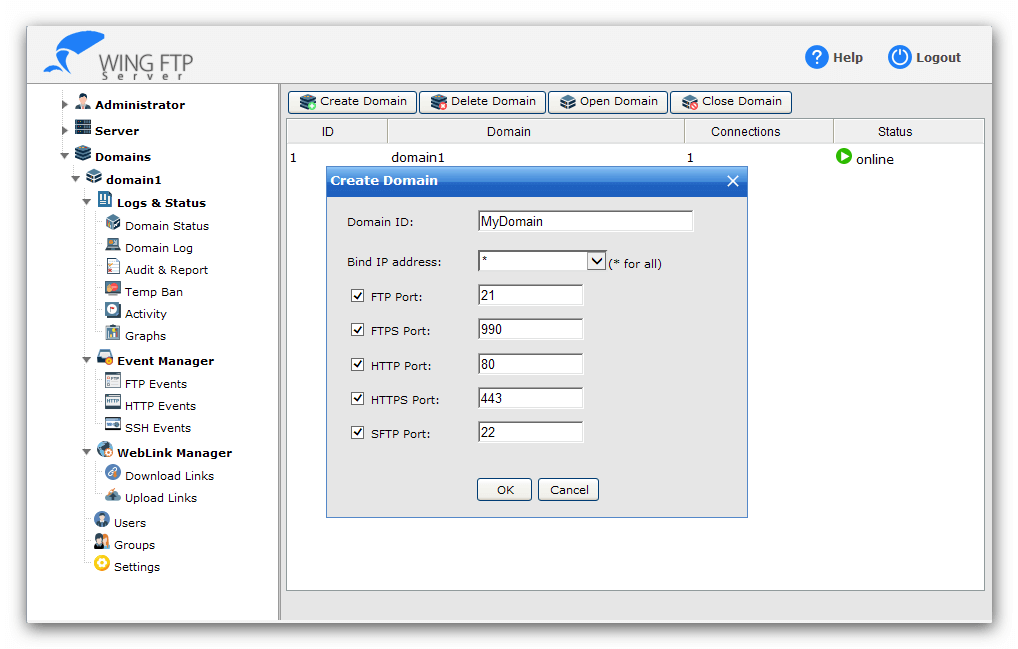
Wing FTP Server's web administration console: the Create Domain dialog with switches for the FTP (21), FTPS (990), HTTP (80), HTTPS (443) and SFTP (22) ports, and the Event Manager, WebLink Manager, Users and Groups menu on the left.
The Corporate edition is the one that competes with Serv-U MFT Server. It removes the user and connection limits of the cheaper editions and adds Windows and LDAP (Active Directory) sign-in, TOTP two-factor authentication, user accounts stored in an ODBC or MySQL database, an events manager that reacts to uploads and logins, and a task scheduler. Users can also create download links and upload links to share with people who have no account.
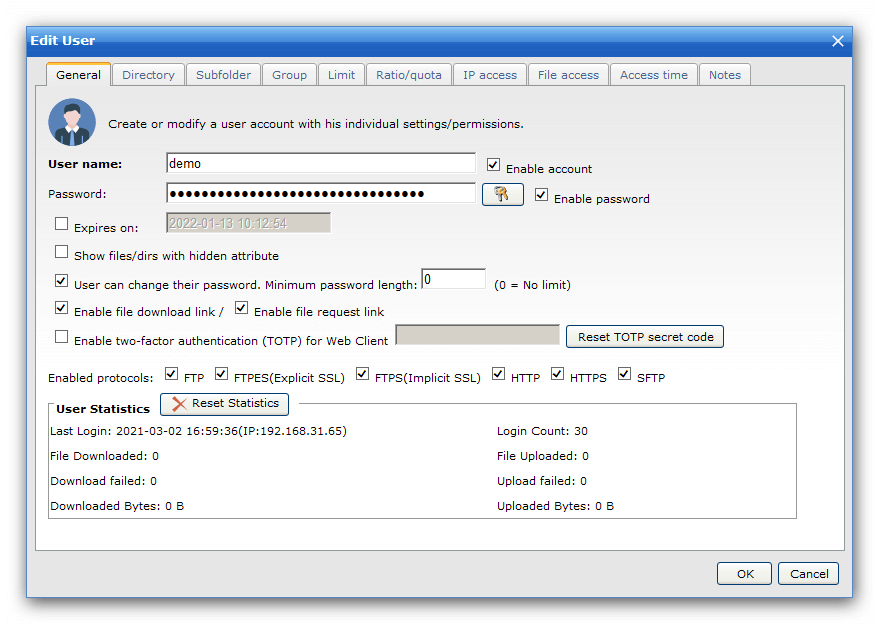
The Edit User dialog: tabs for directories, subfolders, limits, quotas, IP access, file access and access time, the two-factor authentication (TOTP) option, and the protocols this user may use.
Where Wing FTP Server falls short is mostly outside the product itself. Free updates end after two years, so later security fixes need paid upgrade protection. Each license covers one computer, and the Linux, macOS and Solaris versions are separate products. And in 2025 it had a maximum-severity security flaw that attackers exploited (see the security section below).
What we like
- Paid once: $1,299 is about a third of one year of Serv-U MFT Server
- Every protocol, unlimited users, LDAP and 2FA in one edition
- 30-day trial you can download straight away
- Runs on desktop Windows and Windows Server 2025
- Frequent releases (version 8.2.7 came out October 28, 2026)
Watch out for
- Updates are free for 2 years only, then need paid upgrade protection
- A critical, exploited flaw in 2025 (fixed in 7.4.4)
- No FIPS 140-2 mode, high-availability option or DMZ gateway
- No phone support
- Few user reviews to go on
What users say about Wing FTP Server
SoftwareReviews gives Wing FTP Server a composite score of 7.0 out of 10 from 12 reviews. The reviews are short and mostly about easy setup:
- Ihasan J., Operations, Consulting (March 2023): "Deploying Wing FTP Server was straightforward".
- Charles C., Information Technology, Manufacturing (July 2022): "Wing FTP has enhanced the sharing of files, with stable transmission and secure business operations."
- Irfan H., Information Technology (September 2021): "Easy to use, deploy and manage!"
Download Wing FTP Server Free TrialBuy Wing FTP Server Corporate
Serv-U (FTP Server and MFT Server)
Serv-U is SolarWinds' self-hosted file transfer server for Windows and Linux, sold as two editions: Serv-U FTP Server and Serv-U MFT (managed file transfer) Server.
- Price: FTP Server $55 and MFT Server $335 per server per month, billed annually, with volume discounts
- Runs on: Windows Server 2012 R2 to 2022, or Linux (Red Hat 8, Rocky 8, Ubuntu 20.04 to 24.04, Debian 12, openSUSE 15.5)
- Trial: 14 days, fully functional, after a registration form
- Best for: regulated organizations that need FIPS 140-2 encryption, high availability, a DMZ gateway or phone support
Serv-U has been around for decades and is now a SolarWinds product. You manage it from the Serv-U Management Console in a browser, with the same idea of domains, users, groups and virtual folders as Wing FTP Server. The two editions differ a lot. Serv-U FTP Server handles FTP, FTPS and HTTP with web and mobile clients, for up to 250 user accounts and 100 concurrent sessions. Serv-U MFT Server adds SFTP and HTTPS, unlimited users and sessions, Active Directory (Windows only) and LDAP sign-in, database authentication, events and notifications, ad-hoc file sharing with password-protected, expiring links, remote web and iPad administration, custom branding and phone support.

Serv-U Management Console, Limits & Settings > Encryption: the SSL certificate for FTPS and HTTPS, the SSH private key for SFTP, the Enable FIPS 140-2 mode option, switches to disable SSLv3 and TLS 1.0, and the SSH ciphers, MACs and key exchange algorithms.
The MFT edition is where Serv-U pulls ahead of Wing FTP Server for regulated work. It offers FIPS 140-2 validated cryptography, which some government and healthcare buyers must have, SolarWinds publishes a guide for running it under PCI DSS 3.2, and it supports high availability (with additional Serv-U licenses). The optional Serv-U Gateway add-on, for either edition, keeps data out of the DMZ so outside users never connect directly to your internal network.

The Serv-U Management Console Dashboard: session, login and transfer statistics at the top, and the Active Sessions tab listing three users connected over HTTP with their IP address, last command and browser.
Where Serv-U falls short is cost and licensing. It's a subscription, so you pay every year to keep using it. The FTP Server edition can't do SFTP or HTTPS, which most companies now want. Its system requirements list only Windows Server editions up to 2022, not desktop Windows or Server 2025. And SolarWinds has announced that the older Java-based web client modules (FTP Voyager JV and Web Client Pro) will be dropped, so long-time users have a migration to plan.
What we like
- FIPS 140-2 validated cryptography and PCI DSS guidance (MFT)
- High availability and a DMZ gateway option
- Phone support (MFT), plus SolarWinds' large THWACK user community
- Windows or Linux under the same product
- Updates included as long as you subscribe
Watch out for
- MFT Server costs $335 per server per month, every year
- No SFTP or HTTPS in the FTP Server edition
- Only a 14-day trial, behind a registration form
- Exploited security flaws in 2021 and 2024
- Active Directory sign-in on Windows only
What users say about Serv-U MFT Server
SoftwareReviews gives SolarWinds Serv-U MFT Server a composite score of 7.1 out of 10 from 41 reviews (customer experience score 7.3). Two reviews show the usual praise and complaints:
- Shawn I., Information Technology, Healthcare (July 2023), "Great Product, Tasks could be easier to configure": "Initial implementation was very straight forward and we're able to scipt a lot of events to make transfers and scheduled transfers easy for our end users." What he dislikes: "Creating "events" could be easier. I find that I end up needing to create a scheduled task with a script that the "event" runs rather than being able to do it within Serv-U."
- Gazal P., Public Sector, Healthcare (January 2024), "Nice and fast File sharing platform": the favorite aspects were "Safety, time managment, data transfer, large file transfer, fast response", and the dislike was "Multiple files transfer speed is slow".
Download Serv-U Free Trial
Price and Licensing
Wing FTP Server Corporate costs less in year one and far less over time. At $1,299, it costs about a third of one year of Serv-U MFT Server, and you keep using it after that without paying again. The catch is updates: Wing FTP includes two years, and after that new versions and security fixes need upgrade protection, which Wing FTP sells in 4-year, 6-year and lifetime options. Serv-U's subscription includes updates for as long as you pay.
First-year price for one server (USD)
Full-featured editions (SFTP, LDAP, unlimited users)
Wing FTP Server Corporate (one-time)$1,299
Serv-U MFT Server (per year)$4,019
Entry editions with encryption
Wing FTP Server Secure: FTPS, HTTPS, SFTP, 200 users (one-time)$569
Serv-U FTP Server: FTPS only, 250 users (per year)$666
Wing FTP prices on its order page, Serv-U prices on SolarWinds' pricing page ("starts at"), checked on October 29, 2026. Serv-U offers volume discounts.
Both are licensed per server. Wing FTP also sells Site Licenses for unlimited computers at one site ($15,000 for Corporate), and its Windows, Linux, macOS and Solaris versions are separate products. Serv-U's editions run on Windows or Linux, and high availability needs extra Serv-U licenses.
Features
Wing FTP Server Corporate and Serv-U MFT Server cover the same everyday needs: every common protocol, unlimited users, directory sign-in, multi-factor authentication, database-backed accounts, event-driven automation, sharing links, a web client and mobile apps. For a typical business file exchange, either will do the job.
The differences are at the edges. Serv-U MFT Server adds the compliance and resilience features: FIPS 140-2 validated cryptography, high availability, the DMZ gateway, custom authentication through a DLL, and remote administration from an iPad. Wing FTP Server Corporate adds a built-in task scheduler next to its events manager, which matters given that a Serv-U reviewer above ends up scripting scheduled tasks outside Serv-U. And Wing FTP gives Secure-edition buyers SFTP for $569, where Serv-U only offers SFTP in its MFT edition.
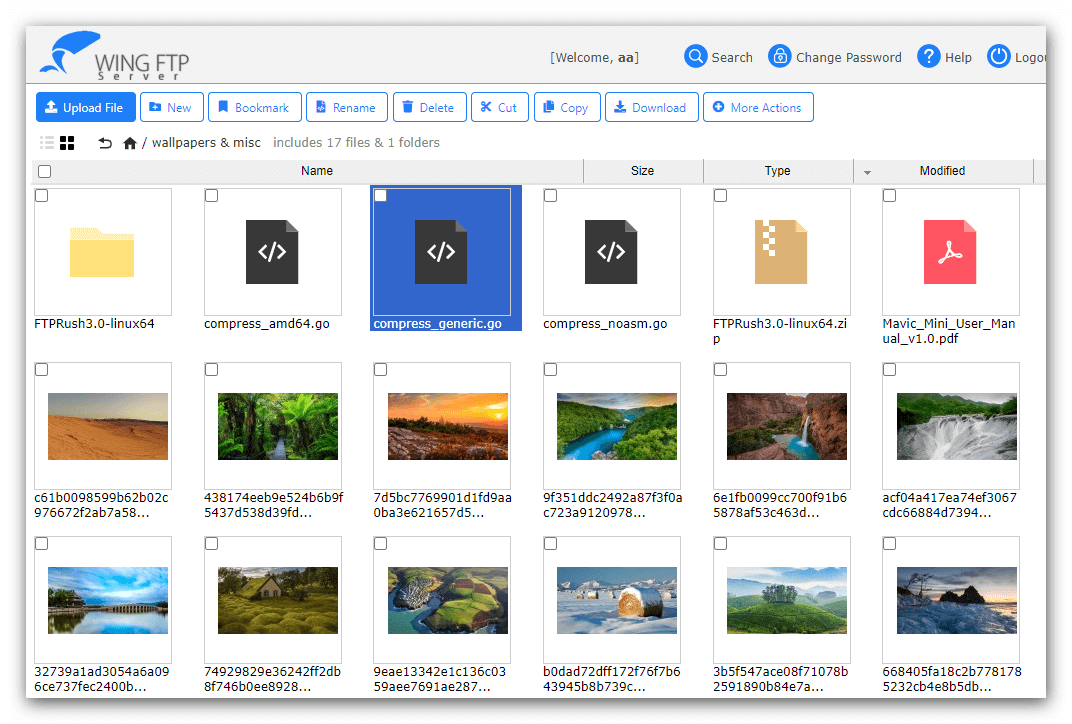
Wing FTP Server's browser-based web client in thumbnail view, with upload, new folder, favorites, search and download buttons along the top. Serv-U's web client works the same way: users need only a browser.
Security Record
Both products have had serious flaws that attackers exploited, so whichever you pick, you need to install updates promptly. An internet-facing file server is a favorite target, and neither vendor is immune.
- Wing FTP Server: CVE-2025-47812 (CVSS 10) let attackers run code on the server through the web client's login, even with an anonymous account. Wing FTP fixed it in version 7.4.4 on May 14, 2025, and attacks on unpatched servers began on July 1, 2025.
- Serv-U: CVE-2024-28995, a directory traversal flaw that let attackers read files on the server without logging in, was fixed on June 5, 2024. SolarWinds knew of attacks by June 18, and the US cybersecurity agency CISA added it to its list of exploited vulnerabilities on July 17, 2024. An earlier Serv-U flaw was exploited in 2021. SolarWinds also fixed several critical (9.1) flaws in versions 15.5.3 and 15.5.4 that need an attacker to already have admin rights.
The practical difference is how updates are paid for. Serv-U's subscription always includes them. Wing FTP Server's free updates last two years, so budget for upgrade protection if you'll run it longer. Running an unpatched copy of either is the real risk.
SoftwareReviews composite score (out of 10)
Serv-U MFT Server (41 reviews)7.1
Wing FTP Server (12 reviews)7.0
Scores as shown on SoftwareReviews on October 29, 2026. Users rate the two almost the same.
Which Should You Choose?
| Your situation |
Pick |
Why |
| Over 200 users, need Active Directory sign-in and 2FA, no compliance mandate |
Wing FTP Server Corporate |
Same core features as Serv-U MFT for $1,299 once |
| Up to 200 users who need SFTP or HTTPS |
Wing FTP Server Secure |
$569 once, and Serv-U's FTP edition has no SFTP |
| Government, healthcare or payment data that needs FIPS 140-2 |
Serv-U MFT Server |
FIPS 140-2 validated cryptography and PCI DSS guidance |
| File transfer can't go down, or no data may sit in the DMZ |
Serv-U MFT Server |
High availability and the Serv-U Gateway |
| Server runs Windows Server 2025 or desktop Windows |
Wing FTP Server |
Serv-U's requirements stop at Windows Server 2022 |
| You want vendor phone support |
Serv-U MFT Server |
Wing FTP offers email and remote support only |
Who should skip Wing FTP Server: organizations whose auditors require FIPS 140-2 validated encryption, high availability or a DMZ gateway, and anyone who would let the two years of free updates run out on an internet-facing server.
Who should skip Serv-U: small businesses that would pay more for one year of MFT Server than for Wing FTP Server Corporate outright, and anyone tempted by the cheaper FTP Server edition who actually needs SFTP.
What commonly goes wrong
- Buying Serv-U FTP Server for SFTP. SFTP and HTTPS are only in Serv-U MFT Server, and the FTP edition also stops at 250 users and 100 sessions.
- Letting updates lapse. Both products had exploited flaws, and attackers went after servers that hadn't been patched, even though fixes were already out. On Wing FTP Server, check when your two years of free updates end.
- Exposing plain FTP to the internet. Both servers can run unencrypted FTP. Keep it for scanners and devices on your internal network, and give outside users SFTP, FTPS or HTTPS.
- Expecting Active Directory on Linux with Serv-U. Serv-U's Active Directory sign-in is Windows-only. On Linux, use LDAP.
- Counting licenses wrong. Both are licensed per server. A second Serv-U server for high availability needs its own license, and Wing FTP's Windows license doesn't cover a Linux machine.
FAQs
Is Wing FTP Server cheaper than Serv-U?
Yes. Wing FTP Server Corporate costs $1,299 once for one server, while Serv-U MFT Server, its closest match, costs $335 per server per month, billed annually, which SolarWinds lists from $4,019. Wing FTP's only recurring cost is optional upgrade protection after the first two years of updates.
Does Serv-U FTP Server support SFTP?
No. Serv-U FTP Server supports FTP, FTPS and HTTP. SFTP (over SSH2) and HTTPS are only in Serv-U MFT Server. Wing FTP Server includes SFTP from its $569 Secure edition up.
Is Serv-U a subscription or a one-time purchase?
Serv-U is sold as a subscription: both editions are priced per server per month and billed annually, with volume discounts. Wing FTP Server is a one-time purchase that never expires.
Can I try Wing FTP Server and Serv-U for free?
Yes. Wing FTP Server has a 30-day trial with every Corporate feature that you can download directly, and after it ends the program becomes a free edition for non-commercial use. Serv-U offers a fully functional 14-day trial of either edition after you fill in a registration form.
Does Wing FTP Server work with Active Directory?
Yes, in the Corporate edition. Wing FTP Server Corporate signs users in with their Windows or LDAP (Active Directory) accounts, and adds TOTP two-factor authentication for the web client. The Standard and Secure editions use their own user accounts.
Which runs on Linux, Wing FTP Server or Serv-U?
Both. Serv-U runs on Windows or Linux (Red Hat, Rocky, Ubuntu, Debian and openSUSE). Wing FTP Server also has Linux, macOS and Solaris versions, but they are separate products from the Windows edition compared here, so buy the one for your server's platform.
Is Wing FTP Server safe to use after the 2025 vulnerability?
Yes, if you keep it updated. Wing FTP Server's critical flaw (CVE-2025-47812) affects version 7.4.3 and earlier, and version 7.4.4 and later, including the current 8.2.7, contain the fix. Serv-U had its own exploited flaw in 2024, so the same rule applies to both: install updates as they come out.
Does Serv-U run on Windows Server 2025?
Not officially yet. Serv-U 15.5.4's system requirements list Windows Server 2022, 2019, 2016, 2012 and 2012 R2. Wing FTP Server supports Windows Server 2025 as well as desktop Windows 7 to 11.
Conclusion
For most businesses, Wing FTP Server Corporate Edition is the better buy. It matches Serv-U MFT Server on the features most companies use (SFTP, HTTPS, unlimited users, Active Directory sign-in, 2FA and automation) for $1,299 once instead of $335 per server per month. If you need fewer than 200 users, Wing FTP Server Secure Edition at $569 is cheaper than even one year of Serv-U's entry edition, and it includes SFTP.
Serv-U MFT Server is worth its price when compliance or uptime decides: FIPS 140-2 validated encryption, high availability, a DMZ gateway and phone support are things Wing FTP Server doesn't offer. Whichever you pick, keep it patched, because both have been targeted. Try Wing FTP Server free for 30 days first and see whether it covers what you need.
Download Wing FTP Server Free TrialBuy Wing FTP Server Corporate