Wise Registry Cleaner Pro: Careful Registry Cleanup, but Don't Expect a Faster PC
Wise Registry Cleaner Pro is a Windows utility that removes obsolete registry entries, backs them up first, and cleans every user account on a shared PC, for $19.95 for one year on up to three PCs at checkout. It's for people who like to keep Windows tidy and for anyone looking after a family or classroom computer.
Let's be straight about registry cleaners: the free Wise Registry Cleaner does the core job for one user, and Microsoft doesn't support registry cleaning tools at all. A cleaner can clear leftovers and may fix an odd error, but don't buy one expecting a slow PC to fly.
Quick facts
- Developer: WiseCleaner
- Version: 11.3.3, June 2026
- Platform: Windows 11, 10, 8 and 7
- Download size: 10.7 MB
- Scan modes: Fast, Deep and custom areas
- Safety: backs up removed entries, and can make full registry backups and restore points
- Price: $19.95 for one year and three PCs at checkout, with the $10 discount code OLKTYH already applied by the Buy Now button (regular price $29.95)
- Renewal: the renewal box is ticked by default, and the order page shows $14.99 for the next year
- Free version: yes, for the current user, with no time limit
- Guarantee: 60 days, with exclusions such as a simple change of mind
- What we checked: the 10.7 MB installer's file version is 11.3.3, and the Pro plan was $19.95 on the order page with code OLKTYH ($29.95 without it), with a $14.99 renewal, on November 6, 2026. We didn't run it on a PC, so we can't give you our own before-and-after figures.
Before you buy
Use the free version first. You'll get scanning, cleaning, backups and scheduling for your own account. Pay only if you need to clean several accounts on one PC, or you want the other Pro extras.
Microsoft's position. Microsoft's support policy says it doesn't support registry cleaners, warns that a bad registry change can force a Windows reinstall, and advises making a backup and restore point first. Wise makes those backups for you, but keep the warning in mind.
Watch the renewal box. It's ticked by default on the order page, so untick it if you only want one year.
Download Free TrialBuy Now
Overview
The window has three tabs: Registry Cleaner, System Tuneup and Registry Defrag. On the first tab, a list of registry areas is preselected with what WiseCleaner calls its 18 recommended, safe items. One click on Scan checks them, and the results list shows each entry, with anything not safe to delete called out in the summary at the top. A panel on the right handles AutoClean and the schedule.
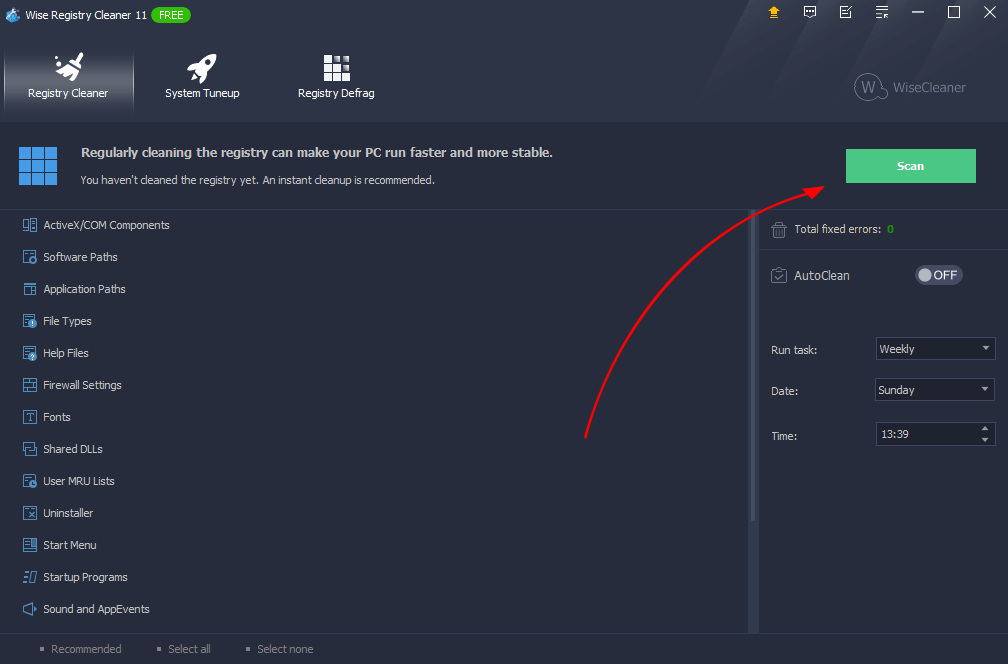
The main window of version 11, shown here in the free edition.
Features
Wise Registry Cleaner Pro cleans every account on a shared PC
Wise Registry Cleaner Pro's Multi-User Registry Cleanup is the one feature WiseCleaner marks as requiring a Pro license on its product page. If you have administrator rights, you can scan and clean all user accounts at once, without logging in to each one. It's handy on a family PC, or on school or library machines.
Wise Registry Cleaner Pro shows you what it found before it cleans
Wise Registry Cleaner Pro lists invalid ActiveX and COM components, startup entries, software paths, file types, fonts and old uninstall records. You can expand each section, untick an entry, or right-click and choose Ignore Selected Entry. Fast Scan covers the basics, Deep Scan goes further, and Custom Area lets you pick categories. An exclusion list protects anything you never want touched.
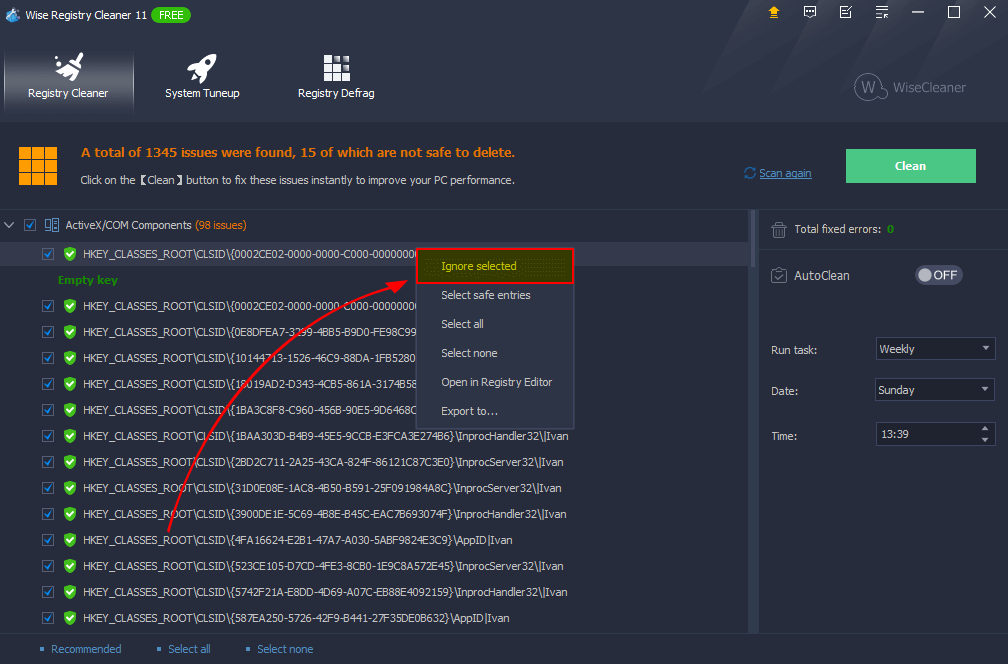
Scan results, with the right-click menu for ignoring an entry.
Wise Registry Cleaner Pro backs up before it changes anything
Wise Registry Cleaner Pro saves the entries it's about to delete, and makes a Windows restore point before it defragments the registry. You can also create a full registry backup yourself from the menu, which is worth doing before a big cleanup. Every recovery is done from Menu, then Restore.
Wise Registry Cleaner Pro runs on a schedule
Wise Registry Cleaner Pro can clean daily, weekly, monthly, when idle or at logon, and it can put a one-click cleaning icon on your desktop. With backups on, a monthly run is a sensible limit. There's no need for a daily one.
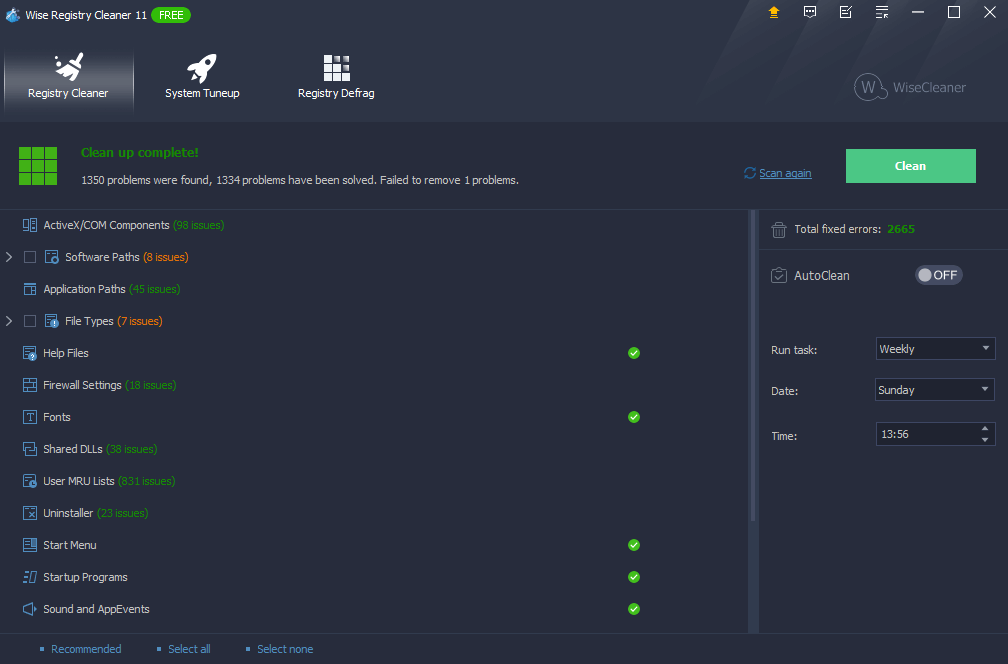
The summary after a clean, with each area marked as finished.
Wise Registry Cleaner Pro also adjusts Windows settings
Wise Registry Cleaner Pro's System Tuneup tab changes registry settings for system speed, stability and networking, and WiseCleaner says that some of them help SSD lifespan. Each change can be set back to the Windows default. Treat these as small tweaks rather than upgrades.
Benefits
- Less risk than manual editing. The automatic backups make cleanups reversible.
- One cleanup for a whole household. That's the real reason to pay for Pro on a shared PC.
- Fewer stale entries. It can clear what old uninstallers left behind, and the broken links they can cause.
Real-World Uses
- A family PC with four accounts: clean them all from one administrator login.
- After removing a stubborn program: run a Deep Scan to catch its leftover entries.
- A school computer room: schedule a monthly clean on each PC, within the three-PC license.
- A Windows error about a missing file at startup: check the startup section for a stale entry and remove it.
- An older PC you're looking after: make a full backup, clean up, and restore if anything misbehaves.
Who it's for, and who should skip it
Buy Pro if you manage a shared PC and want one cleanup across all accounts. Most single users don't need to pay, because the free version covers the same scan. Skip it altogether if your goal is speed: more memory, an SSD, or removing startup programs does far more. If you're not comfortable with the idea of changing the registry, leave it alone, since Windows runs fine with leftover entries. Anyone who wants disk cleanup and optimization too may prefer an all-in-one suite such as Wise Care 365.
Usage Guide
- Install Wise Registry Cleaner and launch it. Enter your Pro key through the Register item in the menu.
- Open the menu at the upper right, choose Back up, and create a full registry backup.
- Leave the recommended items ticked and click Scan.
- Expand the results. Untick anything you're not sure of, or right-click and choose Ignore Selected Entry.
- Click Clean.
- Restart and use the PC as normal. If something breaks, open the menu, choose Restore, pick the backup and click Restore.
- Set a monthly schedule in the panel on the right if you want it to run by itself.
Where it falls short
- Little measurable speed gain. The High-Tech Society's November 2026 review reported that "our before-and-after testing showed no meaningful change in boot time or responsiveness." PCWorld said much the same in 2012.
- Registry cleaning has real risk. FileHorse lists the "Risk of accidental deletion without careful review." The backups reduce that risk, but only if Windows still boots enough to use them, which is why a system restore point matters.
- Pro is hard to compare. WiseCleaner's page names multi-user cleanup as Pro-only and says that defragmenting comes "at zero cost," while the review above lists defrag as Pro-only. Check the Registry Defrag tab in the free version before paying for it.
- Promotion in the free version. That same review notes "an in-app box promoting other WiseCleaner tools."
What Users Say
Wise Registry Cleaner has been around for many years and has a long trail of reviews, most of them about the free version. They agree that it's safe and easy, and they disagree on whether registry cleaning does much.
The High-Tech Society (hands-on review)
Katya Seryabkina gave it 3.5 out of 5 in November 2026: "Wise Registry Cleaner is a safe, lightweight, and genuinely free registry cleaner from an established developer." She found that the "Fast scan finished in well under a minute and flagged a few hundred invalid entries," and on restoring: "We tested this by restoring a backup, and the rollback completed without incident." Her bottom line was "Worth keeping in your toolkit as a free, careful registry cleaner," and she listed a con that "Measurable speed gains from registry cleaning are marginal at best."
FileHorse (editor's review)
Michael Reynolds lists these pros: "User-friendly interface," "Automatic backup and restore options," "Free version is highly functional" and "Customizable scan options." His cons: "Limited features compared to competitors' paid tools" and "Risk of accidental deletion without careful review." He calls it "an excellent tool for users seeking a lightweight, effective, and free registry cleaner."
PCWorld (older review, version 7)
Jon L. Jacobi wrote in May 2012: "Super-effective registry cleaning and defragging (plus mild system tweaking) is Wise Registry Cleaner 7's forte." On speed: "you may not notice a difference in boot times unless you've been running your Windows installation for quite a while."
Comments on WiseCleaner's site
These are chosen by the vendor. Swain: "Wise Registry Cleaner is something I run from time to time to clean up outdated registry entries and keep my Windows system tidy." Maxixe: "Safe registry cleaning with options to review detected issues before making changes." Saltire: "Works out of the box, no learning curve. Especially appreciated on my old PC." The product page shows 312 reviews on its counter.
Trustpilot (WiseCleaner as a company)
WiseCleaner scored 4.6 out of 5 from 97 reviews on November 6, 2026, with 86% five-star and 9% one-star. Mohit Sharma, five stars, September 2026: "It remove all the junk files from the Computer, Defragment's the registry and Optimize the hard drive." Talib Mahar, five stars, June 2026: "The program is straight forward, works efficiently, and offers useful features for optimizing PC performance." Naldo, two stars, May 2026: "the service and follow up is very poor."
The themes: people trust it because it's careful, with its backups and clear results. The doubts are about the whole category: tests show little or no speed gain, and nobody can honestly promise a faster PC from a tidier registry.
Comparisons
Wise Registry Cleaner Free vs Pro
Free scans, cleans, backs up and schedules for the current user. Pro adds multi-user cleanup on WiseCleaner's page, and The High-Tech Society also lists automatic program updates and premium support. If you're the only user, stay on Free.
Wise Registry Cleaner Pro vs Wise Care 365 Pro
Wise Care 365 Pro comes from the same company and bundles registry cleaning with disk cleanup, privacy tools and system tuning for $39.95 a year on three PCs. Choose it if you want one program for all of that. Choose this one if the registry is all you care about.
Editions and Pricing
| Edition | Price | Term | What you get |
|---|
| Free | $0 | No expiry | Scanning, cleaning, backups and scheduling for the current user |
| Pro (this listing) | $19.95 at checkout with code OLKTYH | 1 year, up to 3 PCs | Adds multi-user cleanup. Next year shows at $14.99 |
| Pro on WiseCleaner's own store | $19.95 with its coupon | 1 year, up to 3 PCs | The same plan, price seen November 6, 2026 |
FAQs
Does Wise Registry Cleaner Pro make Windows faster?
Wise Registry Cleaner Pro is unlikely to make a noticeable difference to speed on a modern PC. A November 2026 hands-on test found no meaningful change in boot time, although a very old Windows install may benefit a little.
Is Wise Registry Cleaner Pro safe?
Wise Registry Cleaner Pro is one of the more careful tools, because it backs up what it removes and limits its default scan to recommended items. Microsoft still doesn't support registry cleaners, so make a full backup first.
Does Wise Registry Cleaner work on Windows 11?
Yes, Wise Registry Cleaner runs on Windows 11, 10, 8 and 7.
How many PCs does a Wise Registry Cleaner Pro license cover?
The Wise Registry Cleaner Pro plan sold here covers up to three PCs for one year.
Can I undo a Wise Registry Cleaner Pro cleanup?
Yes, Wise Registry Cleaner Pro keeps an automatic backup of each cleanup, and you can reverse it from Menu, then Restore. System restore points are listed in the same place.
Is there a portable version of Wise Registry Cleaner?
Yes, Wise Registry Cleaner has a Create a portable version item in its menu, so you can carry it on a USB stick for repair jobs.
What if Wise Registry Cleaner Pro doesn't help my PC?
WiseCleaner's 60-day guarantee doesn't generally cover a change of mind, but it does cover technical problems it can't resolve. Since the free version gives you the same scan, test that before you buy.
System Requirements
- Windows 11, 10, 8 or 7
- About 11 MB for the download
- Administrator rights for multi-user cleanup
Conclusion
A careful registry cleaner, and worth $19.95 only if you'll use multi-user cleanup. Wise Registry Cleaner Pro earns its reputation with clear results and solid backups. The one reason to buy it is cleaning every account on a shared PC in one go. The main reason not to is that the free edition does the same job for one user, and no registry cleaner is going to speed up a slow PC. Start with the free version and see if you need more.
Download Free TrialBuy Now