InstallAware Developer: Script Your Windows Setups and Build MSIX Packages
InstallAware Developer is a $1,438.56 one-time Windows setup builder that adds MSIcode scripting, MSIX, APPX and App-V packaging, and command line builds to the wizard-driven Express edition. It suits developers whose installers need logic and who want them in an automated build.
Sooner or later a setup needs to ask something a wizard can't: is the old service running, which config do I keep, should this feature install on this machine? Developer is the point where InstallAware lets you write that down in a readable script instead of fighting MSI tables.
Save 10% on InstallAware Developer
Coupon code: IVERTECH
Type the code by hand into the Coupon code box on the order page and click Apply. It isn't added for you. The price drops from $1,438.56 to $1,294.70, a saving of $143.86.
Quick facts
- Version: X18 26H2 (35.13), released October 29, 2026
- Developer: InstallAware Software
- Price: $1,438.56 one time, $1,294.70 with the coupon. No auto-renewal
- Runs on: Windows
- Trial: 14 days, all editions in one download
- Not included: debugger, dialog editor, compiler directives
- Updates included: minor upgrades free, major upgrades free for 3 months
What we checked: version X18 26H2 (35.13), released October 29, 2026, on the download page. Checkout price $1,438.56 in USD, and coupon code IVERTECH taking $143.86 off on the order page, both on November 5, 2026. We didn't install the product or build a setup with it.
Before you buy
- The trial needs a work email. The installer is password protected, and the password goes to a corporate address. Gmail, Hotmail, Yahoo and similar addresses are refused
- You can't ship trial builds. InstallAware says setups built on the trial must not be distributed, so rebuild the project after you buy
- Maintenance is only sold with the license. Without it, major upgrades stop after 3 months, so decide at checkout
- Refund: InstallAware has advertised a 30-day money-back guarantee, but the edition pages don't state one. Confirm it with sales before a purchase this size
Download Free TrialBuy Now
Overview
Developer is the second of the four paid InstallAware X18 editions, and it's the edition most buyers should look at first. Everything in Express is here: the wizards, MSI and native code output, patching and web updates. What changes is control. Your setup becomes a script you can read and edit, while the visual views stay in sync with it.
Features
MSIcode scripting
InstallAware Developer describes a setup in MSIcode, a human readable script that flows conditionally at runtime and compiles into a logo certifiable MSI. You get the logic of a script without hand-editing Windows Installer tables, and one script covers install, maintenance and uninstall.
Two-way IDE
InstallAware Developer keeps its visual designers and code view in sync. Prototype in the designers, drop to code for the extra logic, and each view reflects the other's changes.
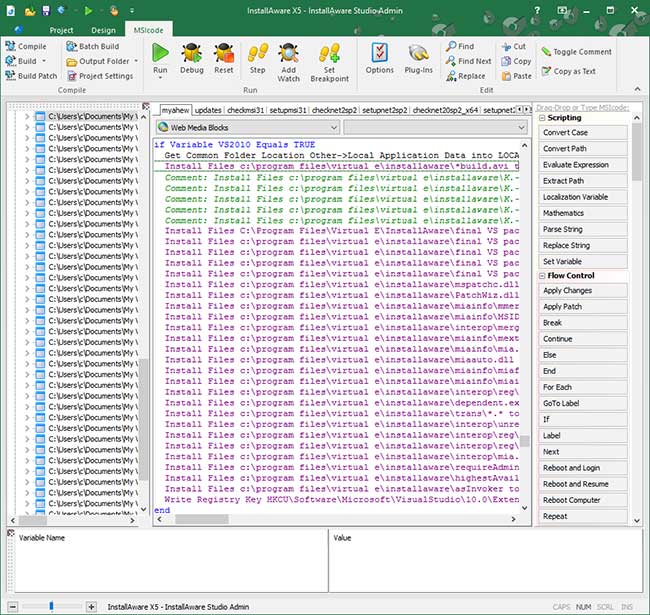
The MSIcode view of a setup project in the IDE, from an older version with a Studio Admin title bar.
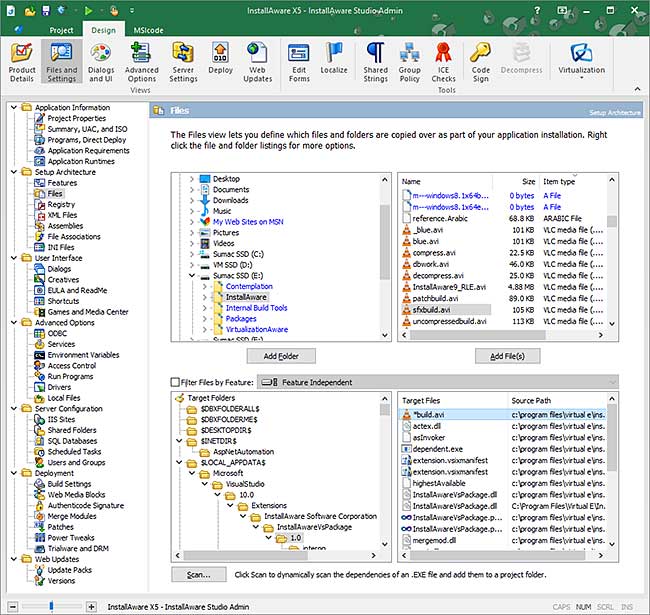
The visual Files view of the same IDE, which stays in sync with the script.
MSIX, APPX and App-V output
InstallAware Developer builds MSIX and APPX packages and App-V virtual packages, and includes an App-V Package Viewer. That covers Microsoft Store style delivery and enterprise virtualization from one tool.
Command line builds and plug-ins
InstallAware Developer adds command line build tools for automated builds, along with EXE plug-ins and calls to any DLL function. It shares the Visual Studio and Team Foundation integration of the other editions.
Hybrid installs and virtual machine testing
InstallAware Developer adds Hybrid Installation Technology, which switches between the Windows Installer and native code engines at runtime, and automated virtual machine testing of your builds. Web update client source code is included as well.
Benefits
- Installer logic lives in a text script, so it can go into source control and code review
- One tool covers classic MSI and newer MSIX packaging
- Setups can rebuild on every release instead of by hand on one person's PC
Real-World Uses
- Upgrading an installed base: detect an old version and migrate its settings during setup
- Store and direct sales: produce MSIX for the Store and an MSI for corporate customers
- Nightly builds: run a command line build from your pipeline
- Enterprise delivery: hand IT an App-V package
Who It's For, and Who Should Skip It
Buy it if you write software and your setup has real logic. Skip it if wizards cover your setup, because Express costs half as much. Skip it if you need to design custom dialogs or step through scripts in a debugger: those need Studio, and without a debugger a complex script means testing by rebuilding. IT packagers who capture other vendors' setups need Studio Admin.
Usage Guide
- Download the X18 trial with a work email, and use the password InstallAware sends you
- Choose Developer in the setup wizard
- Create a project and fill in the visual views
- Switch to the MSIcode view and add conditions or custom steps
- Build with the IDE, then try the command line tool
- Test on a clean machine, and rebuild with your license before shipping
Where it falls short
- No debugger. You can't step through MSIcode until Studio
- No dialog editor. You choose from 18 themes and 313 dialogs, but can't design new ones
- No compiler directives or build events. Those start at Studio too, which limits advanced release builds
- Heavy memory use with the biggest dictionaries. The 2 GB dictionary needs 21 GB of RAM while compressing
What Users Say
Few independent reviews of InstallAware exist. Most named comments come from InstallAware's own site, so read them as selected praise.
Customer comments published by InstallAware
"It will quickly handle small jobs but will grow to meet the more complex requirements of larger jobs."
Jim Gunkel, InstallAware client page
"However, as software developers we really like the ability to drop down to the InstallAware scripting level which is still quite easy to use yet flexible enough for our complex tasks."
Jim Gunkel, InstallAware client page
"You are not limited to standard MSI actions; you can even author your own plugins."
Andrew Neillans, InstallAware client page
Independent review sites
G2 shows a 5.0 average, but from only 2 reviews, and G2 itself says there are too few to draw conclusions. One reviewer, a small business founder, reports about eight years of use without problems. SourceForge lists InstallAware Developer with no user reviews at all. We found no InstallAware listing on Capterra.
That is a thin record for a product this expensive, so treat the trial as your real evidence.
Complaints on InstallAware's own forum
"I get "Insufficient Memory" error ONLY when creating - Single self-installing EXE."
TheVman, InstallAware forum, June 2015
"Your site is throttling the download speed preventing me from downloading your product to evaluate."
TheVman, InstallAware forum, June 2015
InstallAware's support replied that it doesn't throttle downloads and suggested the latest build for the memory error. These posts are old, but the large download is still the first hurdle a trial user meets.
The recurring themes: people like the mix of visual editing with script access, the compression and the custom dialogs. The complaints are about size and memory use, and the praise comes mostly from pages InstallAware publishes itself.
Comparisons
InstallAware Developer vs Express
Developer doubles the price and adds scripting, MSIX, APPX, App-V, command line builds and plug-ins. If you want any one of those, Express isn't an option.
InstallAware Developer vs Studio
Studio doubles the price again for the debugger, dialog editor and compiler directives. Developer is enough unless you'll maintain long scripts or need branded dialogs.
InstallAware Developer vs WiX
WiX is open source and XML based, and it fits teams who prefer writing MSI definitions by hand. Developer costs more but gives you a visual IDE alongside its script.
Editions and Pricing
| Edition | Price | With IVERTECH | What it adds |
|---|
| Express | $718.56 | $646.70 | Wizards and visual views, MSI and native code setups, patching, web updates |
| Developer | $1,438.56 | $1,294.70 | MSIcode scripting, two-way IDE, MSIX, APPX, App-V, command line builds, plug-ins |
| Studio | $2,878.56 | $2,590.70 | Debugger, dialog editor, compiler directives, build events |
| Studio Admin | $5,758.56 | $5,182.70 | Setup capture, MST creation, MSI import, automation interfaces |
| Developer option | Price |
|---|
| Competitive upgrade (from InstallShield, Wise, or InstallAware X12 through X5) | $949.45 |
| Upgrade (from InstallAware X13 or newer) | $719.28 |
| 1 year maintenance, unlimited upgrades | $575.42 added |
| 2 years maintenance | $1,006.99 added |
| Floating license, several machines, not at the same time | $719.28 added |
| Gold Support, priority help from InstallAware | $1,194.00 added |
Buy Developer ($1,438.56)With 1 Year Maintenance ($2,013.98)With 2 Years Maintenance ($2,445.55)With Floating License ($2,157.84)With Gold Support ($2,632.56)Competitive Upgrade ($949.45)Upgrade ($719.28)
FAQs
Do I need to learn MSI to use InstallAware Developer?
InstallAware Developer doesn't require MSI table knowledge. You write MSIcode or use the visual views, and the compiler produces the MSI.
Can InstallAware Developer convert an InstallShield project?
InstallAware Developer can't import an existing MSI or MSM database, which is a Studio Admin feature. It does convert Wise, Inno Setup and NSIS projects, the same as Express.
Does InstallAware Developer work with Azure DevOps?
InstallAware lists Team Foundation and VSTS integration for Developer, and its Express page mentions Azure DevOps integration. Command line builds also let you run it from any pipeline.
What is a floating InstallAware license?
A floating InstallAware license lets you install on several machines, including virtual ones, for use one at a time.
Does InstallAware Developer include macOS and Linux builds?
InstallAware's edition chart ticks macOS builds with Apple notarization and Linux builds for Developer. For an IDE that itself runs on those systems, see InstallAware MultiPlatform 2026.
What happens if I skip maintenance on InstallAware Developer?
Skipping maintenance leaves you free minor upgrades and 3 months of free major upgrades. Maintenance can't be added later.
System Requirements
- Build machine: Windows. The single-file download needs a 64-bit OS to unpack
- Download: web installer 94.7 MB to 5.98 GB depending on what you select, single file 3.93 GB
- Memory: the 2 GB, 3 GB and 4 GB compression dictionaries need 21 GB, 32 GB and more of RAM while compressing
- Target systems: Windows XP through Windows 11 and Windows Server 2025, x86, x64 and ARM64
- Visual Studio: integrates with versions 2003 through 2026, and is only required for the free edition
Conclusion
InstallAware Developer is the sensible starting edition for a software team: scripting, MSIX and command line builds are what most real projects end up needing. It's worth the price if your installers have logic and you ship regularly. The main reason not to buy is the missing debugger, which matters once a script grows. Try it on your hardest setup during the trial.
Enter coupon code IVERTECH on the order page to pay $1,294.70.
Download Free TrialBuy Now