Short answer
Buy InstallAware Developer ($1,438.56 one-time) if your setup needs any logic, an MSIX package or a build server: it's the cheapest edition with MSIcode scripting and command line builds. InstallAware Express ($718.56) is enough for a plain wizard-built MSI or EXE setup that you build by hand. Step up to InstallAware Studio ($2,878.56) only for the script debugger and dialog editor, and to InstallAware Studio Admin ($5,758.56) only if you repackage other vendors' installers or import existing MSIs. All four are in one download with a 14-day trial, and the code IVERTECH takes 10% off on the order page.
At a glance: the four InstallAware X18 editions
| Express | Developer | Studio | Studio Admin |
|---|
| Price at checkout (one-time) | $718.56 | $1,438.56 | $2,878.56 | $5,758.56 |
| With code IVERTECH (10% off) | $646.70 | $1,294.70 | $2,590.70 | $5,182.70 |
| Visual wizards, MSI and native code setups | ✓ | ✓ | ✓ | ✓ |
| Patching, web updates, runtime pre-installs | ✓ | ✓ | ✓ | ✓ |
| macOS and Linux builds (per InstallAware's chart) | ✓ | ✓ | ✓ | ✓ |
| MSIcode scripting, two-way visual/script editing | ✗ | ✓ | ✓ | ✓ |
| MSIX, APPX and App-V packages | ✗ | ✓ | ✓ | ✓ |
| Command line build tools, plug-ins | ✗ | ✓ | ✓ | ✓ |
| Script debugger, compiler directives, build events | ✗ | ✗ | ✓ | ✓ |
| Dialog editor, new setup themes | ✗ | ✗ | ✓ | ✓ |
| Setup capture (repackaging), MST transforms | ✗ | ✗ | ✗ | ✓ |
| Import MSI/MSM, automation interfaces | ✗ | ✗ | ✗ | ✓ |
| Maintenance, floating license, Gold Support add-ons | ✗ | ✓ | ✓ | ✓ |
Prices in USD on the order page, checked November 15, 2026. Features from InstallAware's edition chart for X18 26H2. Each license is a one-time purchase with no auto-renewal.
How we compared the editions
- We went through InstallAware's "right edition" chart line by line and noted every feature that appears at each step up.
- We opened the order page for each edition and read the price and the quantity pricing it shows.
- We checked the current version and the free edition on InstallAware's download and product pages.
- We gathered the add-on prices (maintenance, floating license, Gold Support, upgrades) shown with each edition's order options.
What we checked: on November 15, 2026, InstallAware's download page listed X18 26H2 (35.13), released October 29, 2026, with the free, Express, Developer, Studio and Studio Admin editions in one download, and the order pages showed $718.56, $1,438.56, $2,878.56 and $5,758.56 in USD. The coupon IVERTECH took 10% off on the order page when we tested it on November 5, 2026. We compared features and prices; we didn't install InstallAware or build a setup with it.
The free way first: InstallAware for Visual Studio
InstallAware's freeware edition is an extension for Microsoft Visual Studio (versions 2003 through 2026), and it's in the same download as the paid editions. InstallAware describes it as completely free. From the InstallAware menu inside Visual Studio it builds your solution, finds its dependencies, creates an InstallAware setup project, adds the runtimes it needs and builds the setup, and the toolbar has MSIX/APPX and App-V builders.
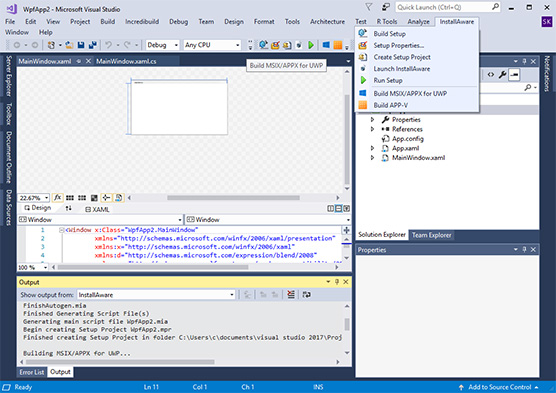
The InstallAware menu in Visual Studio: Build Setup, Setup Properties, Create Setup Project, Launch InstallAware, Run Setup, Build MSIX/APPX for UWP and Build APP-V, with the build log in the Output pane.
It needs Visual Studio installed, so it suits a team that already builds there. InstallAware's pages don't spell out what the free extension leaves out compared with the paid editions, so use the 14-day trial to see the difference on your own project before you pay.
InstallAware Express
- Price: $718.56 one-time at checkout, $646.70 with code IVERTECH
- Version: X18 26H2 (35.13), released October 29, 2026
- Trial: 14 days; the installer password goes to a work email address
- Best for: a small software shop shipping a desktop app that needs a professional MSI or EXE setup without scripting
InstallAware Express builds MSI and native code setups entirely through wizards and visual views: files, shortcuts, services, databases, Windows features and server roles, runtime pre-installs, patches and unlimited web updates. Its Windows Features dialog, for example, lets a setup switch on optional Windows components per Windows version.
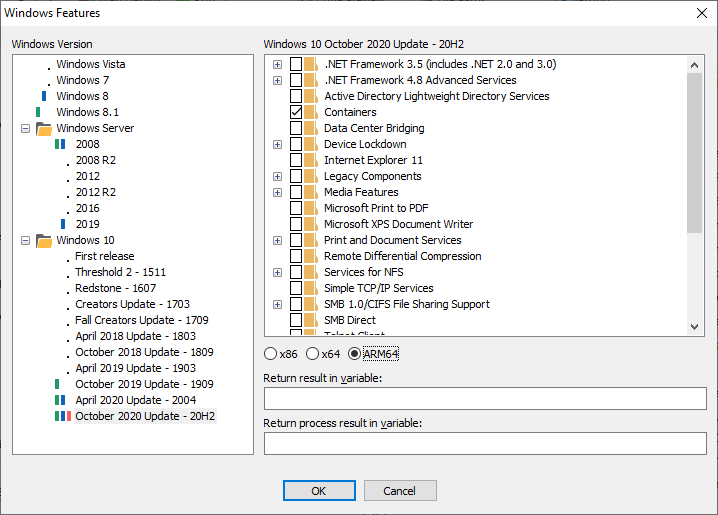
InstallAware's Windows Features dialog: Windows versions on the left (Windows 11 25H2 selected), the optional features to turn on, such as Hyper-V and its tools, and the variables that return the result.
What Express can't do is the line that matters most: no scripting, no MSIX, APPX or App-V, and no command line builds, so it can't run on a build server. It also has no add-ons: maintenance, floating licenses and Gold Support aren't offered with it.
What we like
- Half the price of Developer
- Patching, web updates and runtime installs without writing code
- Same setup engine and themes as the higher editions
Watch out for
- No command line builds, so no automated build pipeline
- No MSIX packages
- No maintenance option to extend free major upgrades
Download InstallAware Express Free Trial Buy InstallAware Express
InstallAware Developer
- Price: $1,438.56 one-time at checkout, $1,294.70 with code IVERTECH
- Add-ons at purchase: 1 year maintenance $575.42, 2 years $1,006.99, floating license $719.28, Gold Support $1,194.00
- Upgrades: $719.28 from InstallAware X13 or newer; $949.45 competitive upgrade from InstallShield, Wise or InstallAware X12 through X5
- Best for: developers whose setups need logic, MSIX output or an automated build
InstallAware Developer is where the setup becomes a script you can read. MSIcode sits behind the visual views and stays in sync with them, so you can click to add files and then write the condition that decides whether a feature installs. Developer adds MSIX, APPX and App-V packaging, command line build tools for a build server, plug-ins, calls to any DLL function and scriptable uninstalls.
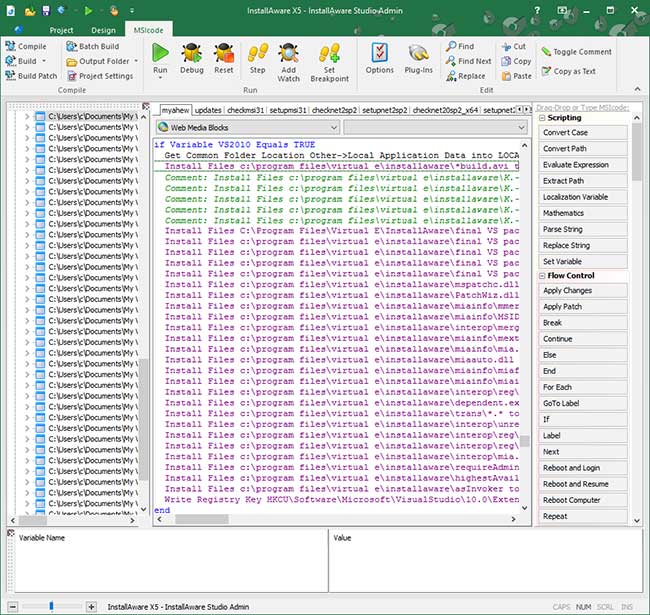
The MSIcode view of a setup project: Install Files commands under an if condition, and the drag-and-drop command list (Scripting, Flow Control) on the right. This is an older version of the IDE with a Studio Admin title bar; the script view is the same in Developer.
For most commercial software vendors, Developer is the edition to buy: the jump from Express is $720, and it removes all three hard limits (script, MSIX, build server). The next step, Studio, doubles the price again for tools that make long scripts easier to work on, not for new kinds of output.
What we like
- Scripting and visual editing of the same project
- MSIX, APPX and App-V output
- Command line builds for a CI pipeline
Watch out for
- No debugger: you rebuild and rerun to find a script bug
- No dialog editor beyond the 313 pre-built dialogs and 18 themes
- Can't import an existing MSI or InstallShield project
Download InstallAware Developer Free Trial Buy InstallAware Developer
InstallAware Studio
- Price: $2,878.56 one-time at checkout, $2,590.70 with code IVERTECH
- Add-ons at purchase: 1 year maintenance $1,151.42, 2 years $2,014.99, floating license $1,439.28, Gold Support $2,389.20
- Best for: teams maintaining long setup scripts or shipping fully branded installers
InstallAware Studio adds the tools for big scripts and custom looks. The debugger lets you set a breakpoint, step through the setup and watch its variables as it runs. Compiler directives build different variants (such as a patch) from one script, build events hook into the build, and inline updates are added. The dialog editor designs your own setup dialogs with 44 controls and lets you create new themes.
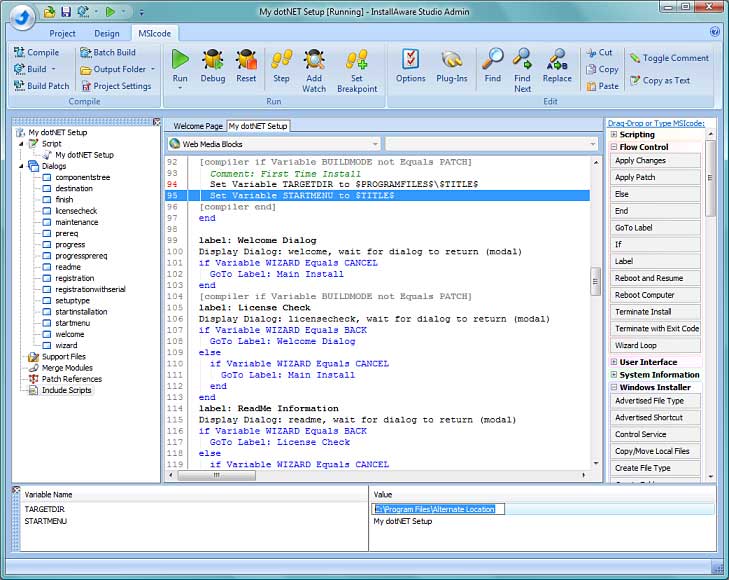
The MSIcode debugger running a setup: the current line highlighted, compiler directives in brackets, and the TARGETDIR and STARTMENU variables with their values at the bottom. This screenshot is from an older version of the IDE.
Studio is worth it when setup work is a real part of someone's job. If your script fits on a few screens and the built-in dialogs look fine, Developer does the same output for half the money.
What we like
- Step-through debugging of setup scripts
- Your own dialogs and setup themes
- Build variants from one script
Watch out for
- Double the price of Developer
- No setup capture or MSI import
- Maintenance costs $1,151.42 a year extra
Download InstallAware Studio Free Trial Buy InstallAware Studio
InstallAware Studio Admin
- Price: $5,758.56 one-time at checkout, $5,182.70 with code IVERTECH
- Add-ons at purchase: 1 year maintenance $2,303.42, 2 years $4,030.99, floating license $2,879.28, Gold Support $4,779.60
- Upgrades: $2,879.28 from InstallAware X13 or newer; $3,800.65 competitive upgrade from InstallShield, Wise or InstallAware X12 through X5
- Best for: enterprise packagers who repackage and customize other vendors' installers
InstallAware Studio Admin is the edition for setups you didn't write. Setup capture (PackageAware) records what another installer changes and turns it into an InstallAware project, including a driverless capture mode. InstallTailor creates MST transforms that change an MSI's defaults, the MSI/MSM import turns an existing database into a project, and two automation interfaces (one web based) let your own systems drive InstallAware.
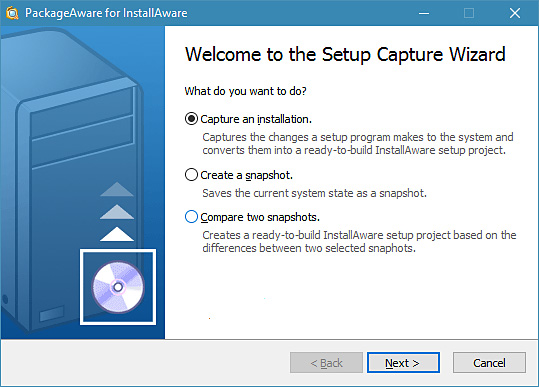
The PackageAware Setup Capture Wizard: capture an installation, create a snapshot, or compare two snapshots to build a ready-to-build InstallAware project.
If you package your own product, none of that is needed, and Studio Admin costs twice as much as Studio. It's the right buy for IT departments and packaging consultants, and for anyone moving an existing MSI-based project into InstallAware.
What we like
- Repackage any vendor's setup
- MST transforms for silent, customized deployments
- Import existing MSI and merge module projects
Watch out for
- $5,758.56, double Studio
- Most of the extras serve IT packaging, not product setups
- A thin independent review record for the price
Download InstallAware Studio Admin Free Trial Buy InstallAware Studio Admin
Where InstallAware MultiPlatform fits
InstallAware MultiPlatform 2026 is a separate product, not a fifth X18 edition. At $4,318.56 ($3,886.70 with IVERTECH), it's a setup IDE that itself runs on Windows, Intel and Apple Silicon Macs, and Linux, and builds native installers for all three from one script, working with DEB, RPM and PKG packages. InstallAware's X18 chart also ticks macOS and Linux builds in every edition, so ask InstallAware's sales team what MultiPlatform adds for your project before choosing it over an X18 edition. If you need to ship one portable EXE rather than an installer, InstallAware Virtualization is the related tool.
Download InstallAware MultiPlatform 2026 Buy InstallAware MultiPlatform 2026
Price per edition
One license at checkout, before the coupon (USD)
InstallAware Express$718.56
InstallAware Developer$1,438.56
InstallAware Studio$2,878.56
InstallAware MultiPlatform 2026$4,318.56
InstallAware Studio Admin$5,758.56
InstallAware order page prices, checked November 15, 2026. One-time licenses with no auto-renewal.
Each step up the X18 line doubles the price. The order page also lowers the price per copy as you add more copies: at the largest quantity tier it lists, Express drops to $431.14 a copy and Developer to $863.14, 40% off. Upgrades are separate licenses and cost about half of a new one ($359.28 for Express, $719.28 for Developer, from X13 or newer).
Maintenance: decide at checkout
Every InstallAware license includes free minor upgrades and free major upgrades for 3 months. After that, a new major version means buying an upgrade, unless you bought maintenance with the license: it can't be added later. For Developer, one year of maintenance adds $575.42 and two years $1,006.99; for Studio, $1,151.42 and $2,014.99. Express doesn't offer maintenance at all.
Developer: license plus options at checkout (USD)
With floating license$2,157.84
With 1 year maintenance$2,013.98
With 2 years maintenance$2,445.55
With Gold Support$2,632.56
InstallAware Developer order options, before the coupon, checked November 15, 2026.
Which should you choose?
| Your situation | Pick | Why |
|---|
| You build in Visual Studio and want a quick setup | InstallAware for Visual Studio (free) | Builds a setup from your solution at no cost |
| A straightforward desktop app, setups built by hand | Express | Wizards cover files, prerequisites, patches and updates |
| Setups with conditions, or a CI build server | Developer | MSIcode scripting and command line builds |
| You need MSIX packages, for example for the Microsoft Store | Developer | Cheapest edition with MSIX and APPX |
| Long scripts, several product variants, branded dialogs | Studio | Debugger, compiler directives, dialog editor |
| Repackaging other vendors' software for deployment | Studio Admin | Setup capture, MST transforms, MSI import |
| You develop on a Mac or Linux and ship to all three systems | MultiPlatform 2026 | The IDE itself runs on all three |
Who should skip each: skip Express if you'll ever automate builds, since it has no command line tools. Skip Studio if you don't write long scripts or design dialogs. Skip Studio Admin unless you repackage or import MSIs. And skip all of them if your installer is simple and you're comfortable writing installer scripts by hand, because free script-based tools exist for that job.
What commonly goes wrong
- The trial download needs a work email. The installer is password protected, and InstallAware sends the password only to a corporate address; Gmail, Hotmail and Yahoo addresses are refused.
- Shipping a trial build. Setups built with the trial must not be distributed. Rebuild the project after you buy.
- Skipping maintenance by accident. It's only sold with the license, and major upgrades stop being free after 3 months.
- Forgetting the coupon. IVERTECH has to be typed into the Coupon code box on the order page and applied; it isn't added for you.
- Buying Express for a build server. Express has no command line build tools.
- The download size. The single-file download is 3.93 GB because it carries the application runtimes; the web installer starts at 94.7 MB.
- Refund terms. InstallAware has advertised a 30-day money-back guarantee, but the edition pages don't state one, so confirm it with sales before a purchase this size.
What users say
Independent reviews of InstallAware are scarce. G2 shows a 5.0 average from only 2 reviews, and most named comments are on InstallAware's own site. One customer quoted there: "It will quickly handle small jobs but will grow to meet the more complex requirements of larger jobs." Another: "However, as software developers we really like the ability to drop down to the InstallAware scripting level which is still quite easy to use yet flexible enough for our complex tasks." (Jim Gunkel, InstallAware client page)
Complaints on InstallAware's own forum are about size and memory, such as "I get "Insufficient Memory" error ONLY when creating - Single self-installing EXE." (TheVman, June 2015). With so little independent feedback, the 14-day trial on your real project is the best evidence you'll get.
FAQs
What's the difference between InstallAware Express and Developer?
InstallAware Developer adds MSIcode scripting, MSIX, APPX and App-V packages, command line builds, plug-ins and DLL calls to everything in Express. Developer costs $1,438.56 at checkout against $718.56 for Express, both one-time.
Is there a free version of InstallAware?
Yes. InstallAware's freeware edition is an extension for Visual Studio, included in the same download as the paid editions. It needs Visual Studio installed and builds a setup from your Visual Studio solution.
Is InstallAware a subscription?
No. InstallAware Express, Developer, Studio and Studio Admin are one-time licenses with no auto-renewal. They include free minor upgrades and 3 months of free major upgrades; longer upgrade coverage is optional maintenance bought with the license.
Which InstallAware edition can build MSIX packages?
InstallAware Developer, Studio and Studio Admin build MSIX and APPX packages. InstallAware Express doesn't.
Can InstallAware import an InstallShield or existing MSI project?
Only InstallAware Studio Admin imports existing MSI and MSM databases. The other editions convert Wise, Inno Setup and NSIS projects, but not MSI databases.
Does the IVERTECH coupon work on every InstallAware edition?
The IVERTECH code took 10% off each of the four X18 editions and MultiPlatform 2026 on the order page when we tested it. Type it into the Coupon code box and click Apply before paying.
Can I change InstallAware edition after installing the trial?
Yes. All InstallAware editions are in one download: uninstall, run setup again from where you saved it, and pick another edition. You don't need to download again.
What is an InstallAware floating license?
An InstallAware floating license lets you install on several machines, including virtual ones, for use one at a time. It's an add-on at purchase for Developer, Studio and Studio Admin, priced at half the license.