InstallAware Studio: Debug Your Setup Scripts and Design Your Own Dialogs
InstallAware Studio is a $2,878.56 one-time Windows setup IDE that adds an MSIcode debugger, a dialog editor and compiler directives to the Developer edition. It suits teams who maintain long installer scripts or need fully branded setups.
Once a setup script reaches hundreds of lines, rebuilding and reinstalling to find one wrong variable gets old fast. Studio is the edition where you set a breakpoint, step through the setup and read its variables as it runs.
Save 10% on InstallAware Studio
Coupon code: IVERTECH
Type the code by hand into the Coupon code box on the order page and click Apply. It isn't added for you. The price drops from $2,878.56 to $2,590.70, a saving of $287.86.
Quick facts
- Version: X18 26H2 (35.13), released October 29, 2026
- Developer: InstallAware Software
- Price: $2,878.56 one time, $2,590.70 with the coupon. No auto-renewal
- Runs on: Windows
- Trial: 14 days, all editions in one download
- Not included: setup capture, MST creation, MSI import, automation interface
- Updates included: minor upgrades free, major upgrades free for 3 months
What we checked: version X18 26H2 (35.13), released October 29, 2026, on the download page. Checkout price $2,878.56 in USD, and coupon code IVERTECH taking $287.86 off on the order page, both on November 5, 2026. We didn't install the product or build a setup with it.
Before you buy
- The trial needs a work email. The installer is password protected, and the password goes to a corporate address. Gmail, Hotmail, Yahoo and similar addresses are refused
- You can't ship trial builds. InstallAware says setups built on the trial must not be distributed, so rebuild the project after you buy
- Maintenance is only sold with the license. Without it, major upgrades stop after 3 months, so decide at checkout
- Refund: InstallAware has advertised a 30-day money-back guarantee, but the edition pages don't state one. Confirm it with sales before a purchase this size
Download Free TrialBuy Now
Overview
Studio is the third InstallAware X18 edition. It keeps everything in Developer, including MSIcode, MSIX, App-V and command line builds, and adds the tools for people whose job includes the installer: debugging, custom interface design and conditional compilation for several product variants.
Features
Integrated setup debugger
InstallAware Studio debugs MSIcode inside the IDE. You step through scripts line by line, stop at breakpoints, and inspect variables at runtime, so a failing condition shows up without a rebuild-and-guess cycle.
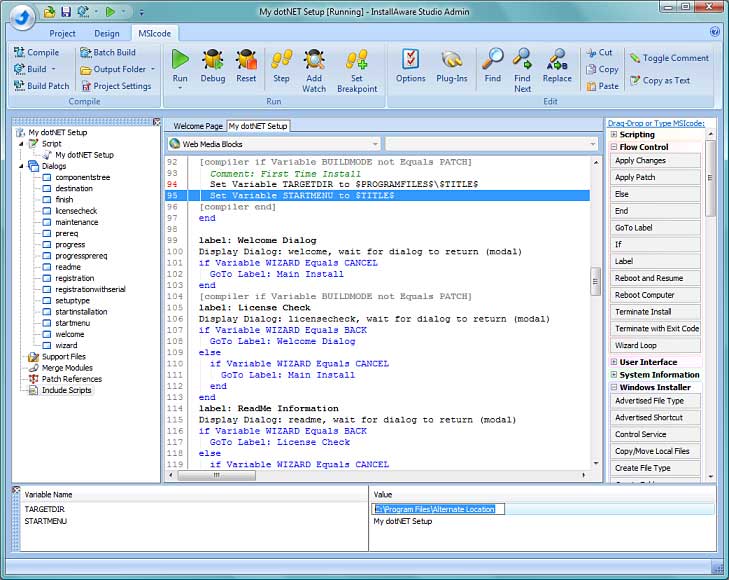
The MSIcode debugger with a script in progress and its variables listed below, from an older version of the IDE.
Dialog editor and custom themes
InstallAware Studio adds a dialog editor with 44 controls, and lets you create new setup themes. Script variables pass to and from dialogs automatically, with alpha blending and transparency available for branded windows.
Compiler directives
InstallAware Studio adds compiler directives, which include or leave out parts of a script at build time. One script can produce a trial and a retail build, or several product SKUs.
Build events and a redistributable build interface
InstallAware Studio runs your own actions at build events such as pre-compress and post-build. It also includes a redistributable build interface.
Inline updates
InstallAware Studio supports inline updates, on top of the unlimited web updates that every edition includes.
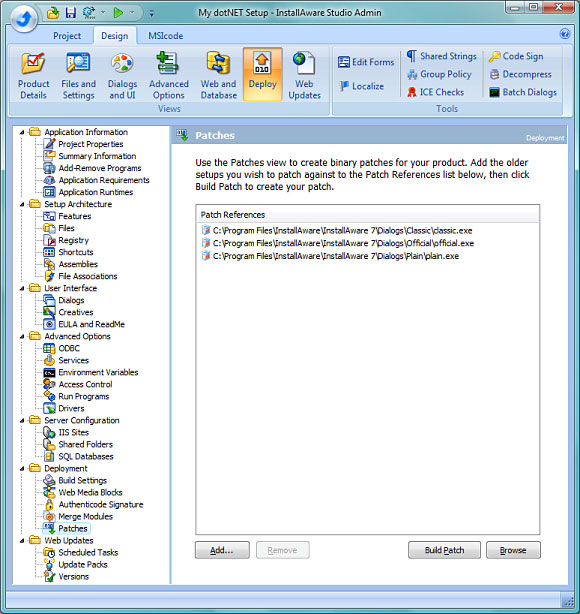
The Patches view for differential patches, from an older version with a Studio Admin title bar.
Benefits
- Installer bugs get found on your machine instead of a customer's
- Setups can match your product's branding exactly
- One project can serve many builds, which cuts duplicate work
Real-World Uses
- A product line: build Standard and Pro SKUs from one script with compiler directives
- A branded consumer app: design a custom first-run wizard with your own theme
- A tricky upgrade path: step through migration logic to see which branch ran
- A signed release pipeline: use build events to run your own tasks at each stage
Who It's For, and Who Should Skip It
Buy it if someone on your team owns the installer as a real piece of engineering. Skip it if your scripts are short, because Developer saves $1,440. Skip it if you package other vendors' software for an enterprise: you need setup capture and MST creation, which only Studio Admin has.
Usage Guide
- Download the X18 trial with a work email, and use the password InstallAware sends you
- Choose Studio in the setup wizard
- Open a sample project, and set a breakpoint in the MSIcode view
- Run the setup under the debugger and watch the variables
- Open a dialog in the dialog editor and change it
- Add a compiler directive and build each variant, then rebuild with your license before shipping
Where it falls short
- A big jump in price. Studio costs twice Developer for tools only heavy users need
- Can't open existing MSI databases. Import is reserved for Studio Admin
- A long feature list to learn. The dialog and script tools take time, and much of the vendor's screen material shows older versions
What Users Say
Few independent reviews of InstallAware exist. Most named comments come from InstallAware's own site, so read them as selected praise.
Customer comments published by InstallAware
"The web downloadable packages are an excellent feature, as is the ability to customise every single dialog in the install process! It means we can brand our products, and customise the installer interface to suit our needs - and it can all be done with a visual editor."
David Ridgway, InstallAware client page
"Combined with an extensive selection of pre-built themed installers, or even the option to totally construct your own, this makes InstallAware one of the most flexible packages out in the market today."
Andrew Neillans, InstallAware client page
Independent review sites
G2 shows a 5.0 average, but from only 2 reviews, and G2 itself says there are too few to draw conclusions. One reviewer, a small business founder, reports about eight years of use without problems. SourceForge lists InstallAware Developer with no user reviews at all. We found no InstallAware listing on Capterra.
That is a thin record for a product this expensive, so treat the trial as your real evidence.
Complaints on InstallAware's own forum
"I get "Insufficient Memory" error ONLY when creating - Single self-installing EXE."
TheVman, InstallAware forum, June 2015
"Your site is throttling the download speed preventing me from downloading your product to evaluate."
TheVman, InstallAware forum, June 2015
InstallAware's support replied that it doesn't throttle downloads and suggested the latest build for the memory error. These posts are old, but the large download is still the first hurdle a trial user meets.
The recurring themes: people like the mix of visual editing with script access, the compression and the custom dialogs. The complaints are about size and memory use, and the praise comes mostly from pages InstallAware publishes itself.
Comparisons
InstallAware Studio vs Developer
Studio adds the debugger, dialog editor, compiler directives, build events and inline updates. Scripting and MSIX are the same in both.
InstallAware Studio vs Studio Admin
Studio Admin doubles the price for setup capture, InstallTailor, MSI import and automation interfaces. Those serve packagers and build integrators, and a team writing its own product rarely needs them.
Editions and Pricing
| Edition | Price | With IVERTECH | What it adds |
|---|
| Express | $718.56 | $646.70 | Wizards and visual views, MSI and native code setups, patching, web updates |
| Developer | $1,438.56 | $1,294.70 | MSIcode scripting, two-way IDE, MSIX, APPX, App-V, command line builds, plug-ins |
| Studio | $2,878.56 | $2,590.70 | Debugger, dialog editor, compiler directives, build events |
| Studio Admin | $5,758.56 | $5,182.70 | Setup capture, MST creation, MSI import, automation interfaces |
| Studio option | Price |
|---|
| Competitive upgrade (from InstallShield, Wise, or InstallAware X12 through X5) | $1,899.85 |
| Upgrade (from InstallAware X13 or newer) | $1,439.28 |
| 1 year maintenance, unlimited upgrades | $1,151.42 added |
| 2 years maintenance | $2,014.99 added |
| Floating license, several machines, not at the same time | $1,439.28 added |
| Gold Support, priority help from InstallAware | $2,389.20 added |
Buy Studio ($2,878.56)With 1 Year Maintenance ($4,029.98)With 2 Years Maintenance ($4,893.55)With Floating License ($4,317.84)With Gold Support ($5,267.76)Competitive Upgrade ($1,899.85)Upgrade ($1,439.28)
FAQs
Can I try the InstallAware Studio debugger before buying?
Yes, the InstallAware Studio debugger is available in the 14-day trial. Choose Studio in the setup wizard.
Is InstallAware Studio per developer?
The InstallAware order page describes a standard license as single machine use, and a floating license as use on several machines, one at a time. Ask sales about team licensing.
Can InstallAware Studio create setups for several languages?
InstallAware Studio includes 35 languages, a translation environment you can redistribute, and language switching at compile time or runtime.
Does InstallAware Studio need Visual Studio?
InstallAware Studio has a stand-alone IDE and doesn't need Visual Studio. It also integrates with Visual Studio 2003 through 2026.
Do setups built with InstallAware Studio need a runtime on the customer's PC?
Setups built with InstallAware Studio need no proprietary runtime packages, according to InstallAware.
Can I add maintenance to InstallAware Studio later?
InstallAware Studio maintenance is only available at the time of purchase, so add it on the first order if you want it.
System Requirements
- Build machine: Windows. The single-file download needs a 64-bit OS to unpack
- Download: web installer 94.7 MB to 5.98 GB depending on what you select, single file 3.93 GB
- Memory: the 2 GB, 3 GB and 4 GB compression dictionaries need 21 GB, 32 GB and more of RAM while compressing
- Target systems: Windows XP through Windows 11 and Windows Server 2025, x86, x64 and ARM64
- Visual Studio: integrates with versions 2003 through 2026, and is only required for the free edition
Conclusion
InstallAware Studio is worth the money for teams with a long-lived, complicated installer, where the debugger alone can save days. It's overkill for most small vendors. The one reason to buy is finding setup bugs before customers do. The main reason not to is that Developer already covers scripting and modern packaging at half the price.
Enter coupon code IVERTECH on the order page to pay $2,590.70.
Download Free TrialBuy Now