ON1 Portrait AI 2023.5: Automatic Retouching for Every Face in the Photo
ON1 Portrait AI 2023.5 is a portrait retouching app and plugin for Windows and Mac that finds every face in a photo and smooths skin, removes blemishes, brightens eyes and whitens teeth automatically, for $29.99 one-time at Black Friday pricing until November 27, 2026 (regular $69.99). It is for portrait, wedding and school photographers who retouch many faces and want natural results in seconds, not an hour of frequency separation in Photoshop.
A wedding gallery of 600 frames, each with two or more faces, is where manual retouching stops being practical. Portrait AI detects each face, applies your preferred amount of retouching, and lets you batch a whole folder before the proofs go out.
Quick facts
- Version: Portrait AI 2023.5 (17.5.1), released June 22, 2023
- Developer: ON1 Inc. (Oregon, USA)
- Platforms: Windows 10 and 11 (64-bit), macOS 10.15.6 or later, Intel and Apple Silicon
- Works as: standalone app, or plugin for Photoshop, Lightroom Classic, Photoshop Elements, Apple Photos, Affinity Photo and Corel PaintShop Pro
- License: perpetual, 2 computers
- Price: $29.99 (regular $69.99); also built into ON1 Photo RAW
- Trial: 30 days, fully working with no watermarks; starts at first launch
- Guarantee: 30-day money-back
- What we checked: the price on the order page ($29.99, regular $69.99) and the trial terms on ON1's download page on November 20, 2026. We didn't install the trial, whose download link ON1 sends by email.
Before you buy
- This is a 2023 release. ON1 still sells Portrait AI 2023.5, but there hasn't been a newer standalone version since June 2023. ON1 Photo RAW 2027 includes portrait retouching along with the newer AI tools.
- Photo RAW owners don't need it, since the portrait tools are part of Photo RAW.
- The Black Friday price ends November 27, 2026 at 11:59 PM Pacific.
Download Free TrialBuy Portrait AI
Overview
Portrait AI uses machine learning to find each face, then locates the eyes, skin, lips and teeth and retouches each area by an amount you set. Everything is automatic to start with, and everything stays adjustable: you can move the detected eye and mouth points, paint the skin mask, and brush out stubborn blemishes. Edits are non-destructive, so you can come back and change them later. The 2023.5 update added Mask AI (one-click masks for people, sky, trees, water and more), a content-aware crop that fills new edges, and a faster, more accurate Perfect Eraser.
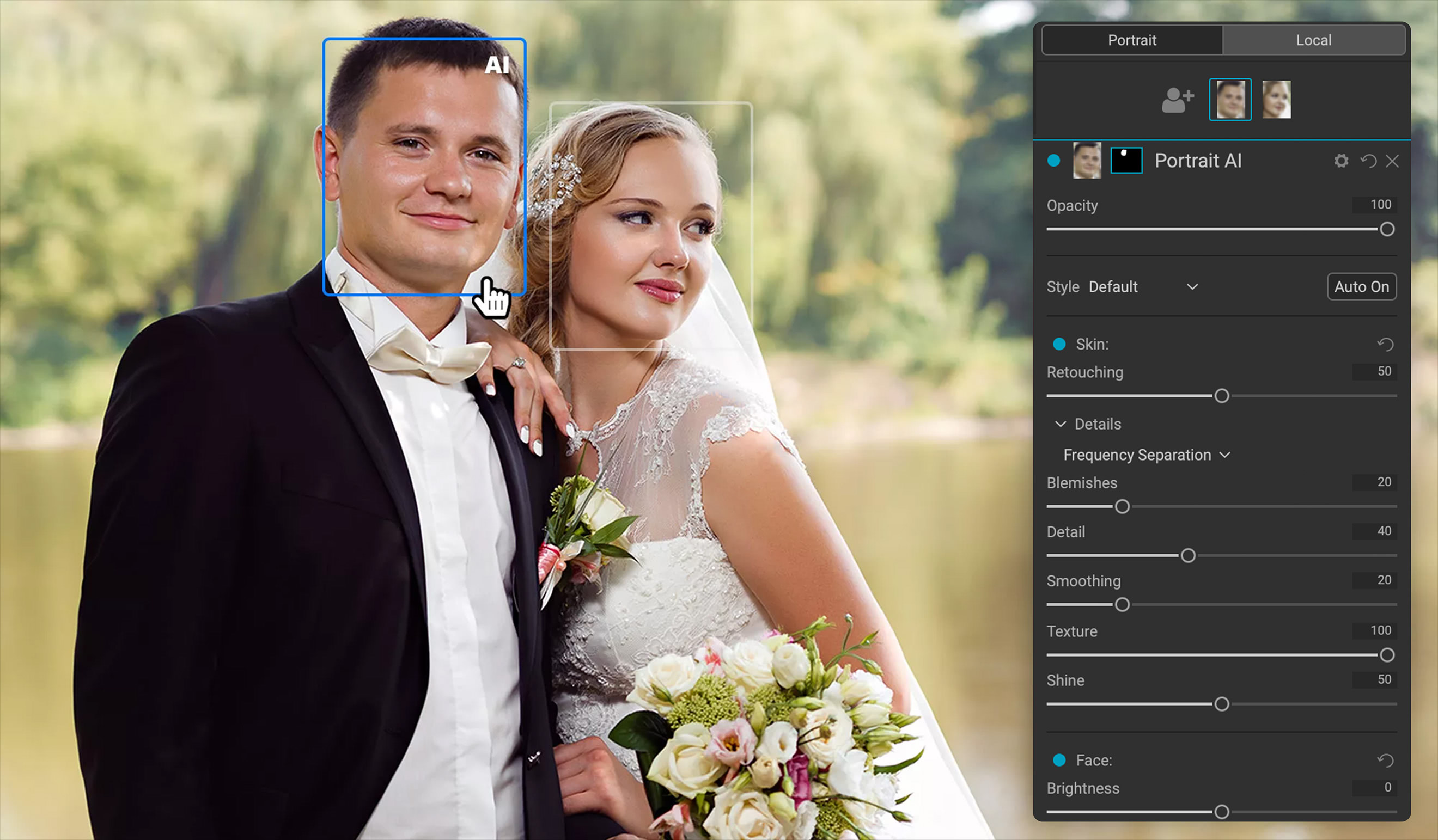
Portrait AI with both faces of a wedding couple detected; the groom is selected and the Skin panel (Frequency Separation, Blemishes, Detail, Smoothing, Texture, Shine) applies to him only.
Features
Natural skin with frequency separation
ON1 Portrait AI retouches skin with frequency separation, evening out color and tone while keeping pores and texture, so faces don't look plastic. Separate sliders handle blemishes, detail, smoothing, texture and shine.
Eyes, teeth, lips and face shape
ON1 Portrait AI detects eyes, teeth and lips automatically: it brightens the whites of the eyes, sharpens the iris, reduces dark circles, whitens teeth and adjusts lip color. Face controls add fill light, slim the face and balance left and right eye size to correct lens and lighting problems.

The Face (Brightness, Slim Face, Left and Right Eye Size) and Eyes (Brightness, Whitening, Detail, Dark Circles, Brow Enhance) controls, with the original portrait inset bottom left.
Per-face settings and batch processing
ON1 Portrait AI gives every face its own settings, so the bride and groom can get different amounts of retouching. Batch Process retouches every face in a whole folder automatically, which suits proofing a shoot before delivery.
Non-destructive edits and presets
ON1 Portrait AI records every change in History and keeps the original untouched, and you can save your retouching style as a preset to apply across sessions.

Before and after, with the History panel listing each Portrait AI step (Detail, Dark Circles, Lip Vibrance, Lip Hue, Whitening, Slim Face, Brightness).
Benefits and Real-World Uses
- Wedding and event galleries: batch-retouch hundreds of frames with several faces each, then fine-tune the hero shots.
- School and headshot sessions: one preset gives a consistent, light retouch across a whole class or team.
- Family portraits: different settings for children and adults in the same frame.
- Lightroom users: send a portrait to the plugin and get it back retouched, without learning Photoshop's frequency separation.
Who It's For, and Who Should Skip It
Portrait AI suits photographers who retouch faces in volume and want a cheap, one-time tool that plugs into Lightroom Classic or Photoshop.
Skip it if you own ON1 Photo RAW, if you want a tool that gets regular new versions (this one is from 2023), or if you rarely shoot people. Lightroom users with a current Adobe plan may find its own people masks cover light retouching.
Usage Guide
- Enter your email on ON1's Portrait AI trial page, open the installer it sends and install. The 30-day trial starts at first launch.
- Open a portrait in the standalone app, or send it from Lightroom Classic, Photoshop or another host.
- Portrait AI finds the faces; click a face to select it.
- Adjust Skin, Face, Eyes and Mouth, and correct the detected eye or mouth points if needed.
- Remove leftover blemishes with the eraser or clone stamp, and save your settings as a preset.
- For a whole shoot, use Batch Process and pick the folder.
Where it falls short
- No new version since June 2023, while ON1's other AI tools have moved on to 2026 and 2027 releases.
- Overlap with newer editors. Amateur Photographer's 2023 review found it effective, but noted Lightroom users may get similar results from Lightroom's own AI masking and local adjustments.
- Few independent reviews, all from its 2023 launch, so there is little outside testing of how it holds up today.
What Users Say
Reviews
Independent reviews of Portrait AI are few and date from its 2023 release. Amateur Photographer (June 2023) called Portrait AI 2023 effective, with the caveat that Lightroom's own AI masking may be enough for Lightroom users.
ON1 as a company scores 4.1 out of 5 on Trustpilot from 3,226 reviews. Recent reviewers mostly praise support and training ("Hank followed up on each email. And kept following up to help me set up On1," Doreen, 5 stars), while the negative ones mention bugs after upgrades and a cancellation request that went unanswered.
The pattern: it does the job quickly and naturally for the price, but it's an older product, and newer all-in-one editors (including ON1's own Photo RAW) now cover much of the same ground.
Comparisons
Portrait AI vs ON1 Photo RAW 2027
Photo RAW includes portrait retouching plus a full editor, NoNoise AI, Resize AI and Effects, and gets yearly versions. Portrait AI alone costs less and is enough if you only need face retouching inside Lightroom or Photoshop.
Editions and Pricing
Prices on the order page on November 20, 2026, in USD. Black Friday prices end November 27, 2026 at 11:59 PM Pacific.
| Option |
Price now |
Regular price |
License |
What you get |
| Portrait AI 2023.5 | $29.99 | $69.99 | Perpetual, 2 computers | Standalone app and plugins |
| Photo RAW MAX subscription | $79.99/year | $89.99/year | Subscription, 3 computers | Every ON1 app in Photo RAW MAX, plugins, future versions |
Buy Portrait AI 2023.5Subscribe to Photo RAW MAX
FAQs
Is ON1 Portrait AI still sold and supported?
Yes. ON1 Portrait AI 2023.5 is still on sale on ON1's site with a 30-day trial, though its last version came out in June 2023.
Does ON1 Portrait AI run on older computers?
ON1 Portrait AI has lighter requirements than ON1's newer apps: macOS 10.15.6 or Windows 10, 8 GB of RAM and a graphics card with 2 GB of video memory.
Can ON1 Portrait AI retouch group photos?
Yes. ON1 Portrait AI detects every face in the photo and gives each one its own retouching settings.
Does the Portrait AI trial add a watermark?
No. The ON1 Portrait AI trial is fully working for 30 days with no watermarks, counted from the first launch.
Can I get a refund on ON1 Portrait AI?
Yes. ON1 Portrait AI is covered by ON1's 30-day money-back guarantee.
System Requirements
- OS: Windows 10 or 11 (64-bit); macOS 10.15.6 or later (macOS 12 recommended)
- Processor: 64-bit Intel or AMD at 2 GHz with SSE 4.2, or Apple Silicon
- RAM: 8 GB; 16 GB or more recommended
- Disk: 2 GB for installation
- Graphics: Metal (Mac) or DirectX 12 and DirectML (Windows), Vulkan 1.1 and OpenGL 4.2, 2 GB video memory (8 GB recommended); 1920x1080 display
- Optional: Lightroom Classic 2020 or later as a plugin host
Conclusion
At $29.99 until November 27, 2026 ($69.99 after), ON1 Portrait AI is a sensible buy for Lightroom and Photoshop users who retouch a lot of faces and want automatic, natural-looking results with per-face control and batch processing. The reason to buy is speed on large portrait sets for a small one-time price. The reason not to: it hasn't had a new version since 2023, and if you're choosing an ON1 product today, Photo RAW 2027 includes these tools along with ON1's current AI features. Try it on a real shoot during the 30-day trial.
Download Free TrialBuy Portrait AI